Hi, I'm developing using the Heltec Esp32 LoRa , however after include a Servo library I'm gettin error on compiler.
I've tried many differents Servo library unsuccessfully,
Any suggestion of a Servo library that works??
each library return a different error.
Hi @edumaster182. I don't have a lot of experience with it, but I think this library is the popular choice for use with ESP32 boards:
It is available for installation from the Arduino IDE Library Manager. After installing it, you will find example sketches demonstrating its usage under Arduino IDE's File > Examples > ESP32Servo menu.
Tried older version of IDE but same problem. Note that no code was typed, only included the library ESP32Servo.h
If I add that lib, the error shows up. Already tried different versions, lib from different authors . same problem.
The LEDC API has been changed in order to support the Peripheral Manager and make it easier to use, as LEDC channels are now automatically assigned to pins. For more information about the new API, check /api/ledc.
Removed APIs
ledcSetup
ledcAttachPin
The breakage is being tracked by the library developer here:
I see that some work has been done already on a fix for the breakage, but unfortunately has not been completed:
Resolution
The easiest solution will be to use a version of the "esp32" boards platform that is compatible with the ESP32Servo library.
The breaking changes in the "esp32" boards platform were introduced in the 3.0.0 release, so you won't have these problems compiling the library if you install an older version of the "esp32" platform.
Select Tools > Board > Boards Manager... from the Arduino IDE menus.
The "Boards Manager" dialog will open.
Wait for the updates to finish, as shown by the messages printed at the bottom of the "Boards Manager" dialog.
Scroll down through the list of boards platforms until you find the "esp32" entry. Click on it.
A "Select version" dropdown will appear in the entry.
Click on the "Select version" dropdown.
It will expand.
Select "2.0.17" from the menu.
Click the "Install" button in the "esp32" entry.
Wait for the installation to finish.
Click the "Close" button on the "Boards Manager" dialog.
The "Boards Manager" dialog will close.
Now compile your sketch again. Hopefully this time the error will not occur and the library will work as expected.
Arduino IDE will occasionally notify you that a new version of the boards platform is available, you'll need to refrain from accepting the offer that will cause an update back to the problematic version of the platform. If you find these notifications annoying, you can disable them via the IDE preferences.
I'll provide instructions you can follow to do that:
Select File > Preferences... (or Arduino > Settings... for macOS users) from the Arduino IDE menus.
The "Preferences" dialog will open.
Uncheck the box next to "Check for updates on startup" in the "Preferences" dialog.
Click the "OK" button.
The "Preferences" dialog will close.
If you disable the automatic update check, make sure to periodically do a manual check for newer versions of the installed boards platforms and libraries that you want to keep updated. You can check for new versions of Arduino IDE by selecting Help > Check for Arduino IDE Updates from the Arduino IDE menus. You can check for new versions of boards platforms and libraries by selecting "Updatable" from the "Type" menu in the Boards Manager and Library Manager views.
I had this same issue when I recently got some ESP32 off Amazon (the ESP-WROOM-32).
This is what I did to get the ESP32 to work with servo. I have an example code at bottom that I got to work to control Servo from WiFi. Just put in the WiFi name and password into the code.
I installed the ESP32Servo library by Kevin Harrington, and manually type #include <ESP32Servo.h> . If you select it from the drop down it includes 3 other unnecessary libraries. I tried the ServoESP32 Library and that did not work.
Also, make sure you select the ESP32 Dev Module board. The first picture shows the board and library that worked for me.
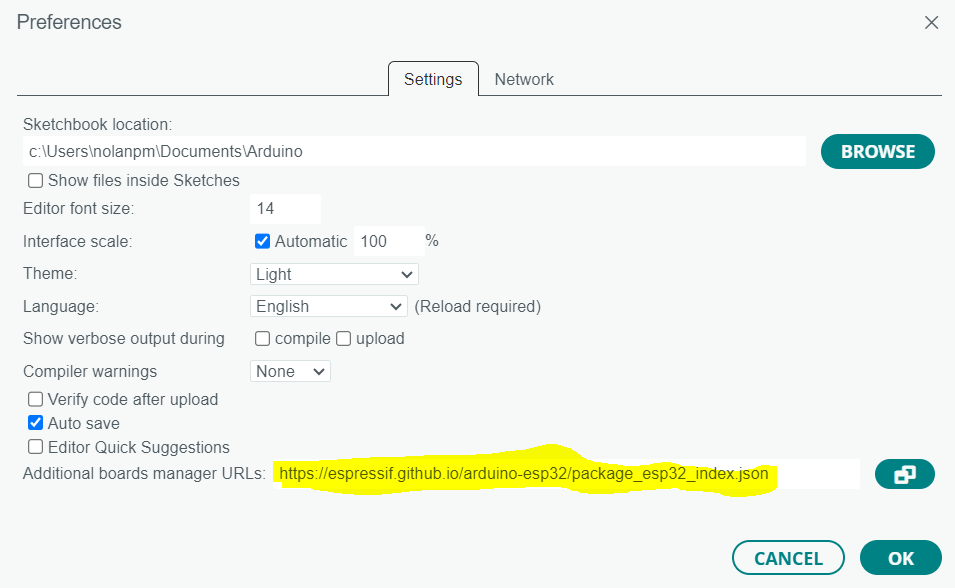
After that go to File, Preferences and make sure https://espressif.github.io/arduino-esp32/package_esp32_index.json is in the additional board manager URL field. If you add this URL make sure to restart the IDE.
#include <WiFi.h>
#include <ESP32Servo.h>

Servo myservo;  // create servo object to control a servo
// twelve servo objects can be created on most boards

// GPIO the servo is attached to
static const int servoPin = 13;

// Replace with your network credentials
const char* ssid     = "WiFi Name";
const char* password = "Password";

// Set web server port number to 80
WiFiServer server(80);

// Variable to store the HTTP request
String header;

// Decode HTTP GET value
String valueString = String(5);
int pos1 = 0;
int pos2 = 0;

// Current time
unsigned long currentTime = millis();
// Previous time
unsigned long previousTime = 0;
// Define timeout time in milliseconds (example: 2000ms = 2s)
const long timeoutTime = 2000;

void setup() {
  Serial.begin(115200);

  myservo.attach(servoPin,500,2500);  // attaches the servo on the servoPin to the servo object

  // Connect to Wi-Fi network with SSID and password
  Serial.print("Connecting to ");
  Serial.println(ssid);
  WiFi.begin(ssid, password);
  while (WiFi.status() != WL_CONNECTED) {
    delay(500);
    Serial.print(".");
  }
  // Print local IP address and start web server
  Serial.println("");
  Serial.println("WiFi connected.");
  Serial.println("IP address: ");
  Serial.println(WiFi.localIP());
  server.begin();
}

void loop(){
  WiFiClient client = server.available();   // Listen for incoming clients

  if (client) {                             // If a new client connects,
    currentTime = millis();
    previousTime = currentTime;
    Serial.println("New Client.");          // print a message out in the serial port
    String currentLine = "";                // make a String to hold incoming data from the client
    while (client.connected() && currentTime - previousTime <= timeoutTime) { // loop while the client's connected
      currentTime = millis();
      if (client.available()) {             // if there's bytes to read from the client,
        char c = client.read();             // read a byte, then
        Serial.write(c);                    // print it out the serial monitor
        header += c;
        if (c == '\n') {                    // if the byte is a newline character
          // if the current line is blank, you got two newline characters in a row.
          // that's the end of the client HTTP request, so send a response:
          if (currentLine.length() == 0) {
            // HTTP headers always start with a response code (e.g. HTTP/1.1 200 OK)
            // and a content-type so the client knows what's coming, then a blank line:
            client.println("HTTP/1.1 200 OK");
            client.println("Content-type:text/html");
            client.println("Connection: close");
            client.println();

            // Display the HTML web page
            client.println("<!DOCTYPE html><html>");
            client.println("<head><meta name=\"viewport\" content=\"width=device-width, initial-scale=1\">");
            client.println("<link rel=\"icon\" href=\"data:,\">");
            // CSS to style the on/off buttons
            // Feel free to change the background-color and font-size attributes to fit your preferences
            client.println("<style>body { text-align: center; font-family: \"Trebuchet MS\", Arial; margin-left:auto; margin-right:auto;}");
            client.println(".slider { width: 300px; }</style>");
            client.println("<script src=\"https://ajax.googleapis.com/ajax/libs/jquery/3.3.1/jquery.min.js\"></script>");

            // Web Page
            client.println("</head><body><h1>Daddy's Robot Control</h1>");
            client.println("<p>Position: <span id=\"servoPos\"></span></p>");
            client.println("<input type=\"range\" min=\"0\" max=\"270\" class=\"slider\" id=\"servoSlider\" onchange=\"servo(this.value)\" value=\""+valueString+"\"/>");

            client.println("<script>var slider = document.getElementById(\"servoSlider\");");
            client.println("var servoP = document.getElementById(\"servoPos\"); servoP.innerHTML = slider.value;");
            client.println("slider.oninput = function() { slider.value = this.value; servoP.innerHTML = this.value; }");
            client.println("$.ajaxSetup({timeout:1000}); function servo(pos) { ");
            client.println("$.get(\"/?value=\" + pos + \"&\"); {Connection: close};}</script>");

            client.println("</body></html>");

            //GET /?value=180& HTTP/1.1
            if(header.indexOf("GET /?value=")>=0) {
              pos1 = header.indexOf('=');
              pos2 = header.indexOf('&');
              valueString = header.substring(pos1+1, pos2);

              //Rotate the servo
              myservo.write(valueString.toInt());
              Serial.println(valueString);
            }
            // The HTTP response ends with another blank line
            client.println();
            // Break out of the while loop
            break;
          } else { // if you got a newline, then clear currentLine
            currentLine = "";
          }
        } else if (c != '\r') {  // if you got anything else but a carriage return character,
          currentLine += c;      // add it to the end of the currentLine
        }
      }
    }
    // Clear the header variable
    header = "";
    // Close the connection
    client.stop();
    Serial.println("Client disconnected.");
    Serial.println("");
  }
}
An update on this statement. The fix I mentioned in my previous reply has since been completed and released in version 3.0.0 of the "ESP32Servo" library.
So you can now update to the latest version of the "esp32" boards platform and latest version of the "ESP32Servo" library and they will be compatible with each other.