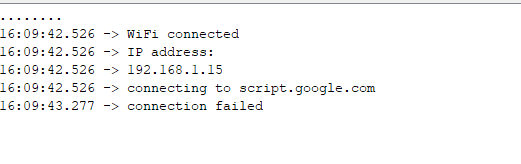
Are you using that Google script like: Public without authentication?
Because problem should be at client authentication that is running that script..
Also you are using fingerprint, but it is code, but you havent used it.. So it is insecured HTTPS, maybe server refused your connection. Because you are not using authentication (your ESP does not trust domain).
I needed to use the redirect class instead to handle google moving me across ports
heres the code for my use case of a get and post requests
// Example Arduino/ESP8266 code to upload data to Google Sheets
// Follow setup instructions found here:
// https://github.com/StorageB/Google-Sheets-Logging
//
// This example uses the HTTPSRedirect library by Sujay Phadke
// https://github.com/electronicsguy/ESP8266


#include <Arduino.h>
#include <ESP8266WiFi.h>
#include "HTTPSRedirect.h"

// Enter network credentials:
const char* ssid     = "";
const char* password = "";

//https://docs.google.com/spreadsheets/d/1dRtKvB14uJQwMYhidVbJBEd7SN7d8rPQFh9M7P8hw1I/edit#gid=0

// Enter Google Script ID:
const char *GScriptId = "";

// Enter command (insert_row or append_row) and your Google Sheets sheet name (default is Sheet1):
String payload_base =  "{\"command\": \"insert_row\", \"sheet_name\": \"Sheet1\", \"values\": ";
String payload = "";


const char* host = "script.google.com";
const int httpsPort = 443;
const char* fingerprint = "";
String url = String("/macros/s/") + GScriptId + "/exec";

HTTPSRedirect* client = nullptr;

// Declare variables that will be published to Google Sheets
int value0 = 0;
int value1 = 0;
int value2 = 0;

void setup() {

  Serial.begin(9600);
  delay(10);
  Serial.println('\n');

  // Connect to WiFi
  WiFi.begin(ssid, password);
  Serial.print("Connecting to ");
  Serial.print(ssid); Serial.println(" ...");

  while (WiFi.status() != WL_CONNECTED) {
    delay(1000);
    Serial.print(".");
  }

  Serial.println('\n');
  Serial.println("Connection established!");
  Serial.print("IP address:\t");
  Serial.println(WiFi.localIP());


  // Use HTTPSRedirect class to create a new TLS connection
  client = new HTTPSRedirect(httpsPort);
  client->setInsecure();
  client->setPrintResponseBody(true);
  client->setContentTypeHeader("application/json");

  Serial.print("Connecting to ");
  Serial.println(host);

  // Try to connect for a maximum of 5 times
  bool flag = false;
  for (int i=0; i<5; i++){
    int retval = client->connect(host, httpsPort);
    if (retval == 1) {
       flag = true;
       Serial.println("Connected");
       break;
    }
    else
      Serial.println("Connection failed. Retrying...");
  }

  if (!flag){
    Serial.print("Could not connect to server: ");
    Serial.println(host);
    return;
  }

  // delete HTTPSRedirect object
  delete client;
  client = nullptr;
}


void loop() {

// create some fake data to publish
value0 ++;
value1 = random(0,1000);
value2 = random(0,100000);


static bool flag = false;
if (!flag){
    client = new HTTPSRedirect(httpsPort);
    client->setInsecure();
    flag = true;
    client->setPrintResponseBody(true);
    client->setContentTypeHeader("application/json");
  }
  if (client != nullptr){
    if (!client->connected()){
      client->connect(host, httpsPort);
    }
  }
  else{
    Serial.println("Error creating client object!");
  }

  // Create json object string to send to Google Sheets
  payload = payload_base + "\"" + value0 + "," + value1 + "," + value2 + "\"}";

  // Publish data to Google Sheets
  Serial.println("Publishing data...");
  Serial.println(payload);
  if(client->POST(url, host, payload)){
    // do stuff here if publish was successful
  }
  else{
    // do stuff here if publish was not successful
    Serial.println("Error while connecting");
  }


// a delay of several seconds is required before publishing again
delay(5000);

  Serial.println("requesting data...");

  if(client->GET(url, host)){
    // do stuff here if publish was successful
  }
  else{
    // do stuff here if publish was not successful
    Serial.println("Error while connecting");
  }
  delay(30000);

}