Please find attached What is mean?
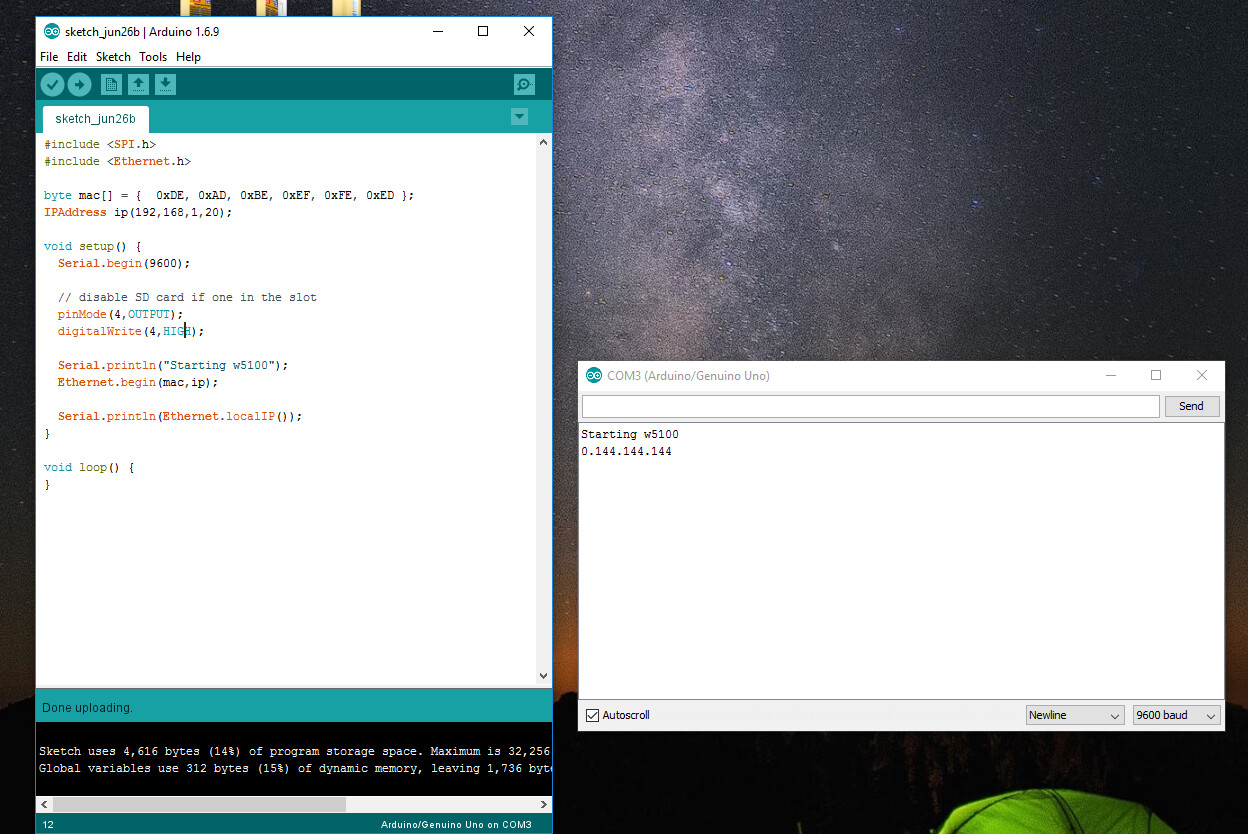
taylance1:
Please find attached What is mean?
Incorrect library for your ethernet controller IC? Which shield do you have? Does it have a w5100, w5200, w5500, or enc28j60?
@SurferTim,
I have the same problem. I have the wiznet 5100 ethernet shield mounted on Arduino Uno. The computer is linked to router by an ethernet cable and the ethernet shield is linked to the router by another cable.
The problem is most likely with the rj45 socket because i ran the code you posted earlier on this thread and it said 'Starting ethernet ', but said 'Failed' after a minute. The code before that ran perfectly and displayed the ip address.
I have also checked that the orange and green lights are functioning and there are no solder bridges. I have also checked on a different connection but its the same problem.
(Additional information: My ethernet shield did not have a sticker with the mac address and i made up my own with the following mac address: 0xDE, 0xAD ,0xBE, 0xEF, 0xFE, 0xEE ... Hope this information helps)
Sorry for the long message, but I have to submit a project in a week and am desperate. Please help me find a way, thanks in advance.
Try the code in reply #2 first. If that works, try the code in reply #4. If it waits a couple minutes before returning "failed", you have a DHCP problem. Check the CAT5 cable. Replace it with a known good cable.
SurferTim:
Try the code in reply #2 first. If that works, try the code in reply #4. If it waits a couple minutes before returning "failed", you have a DHCP problem. Check the CAT5 cable. Replace it with a known good cable.
I followed your suggestion, SurferTim, and checked my ethernet cable and i was surprised to see that it said : "Cable only to be used for wireless router 0584FT" ... i have that particular wireless router installed itself, but I think this cable is faulty. I will get a new ethernet CAT5 cable and try it with that.
(I am using a cable from the LAN port of the router to laptop and am on a broadband connection. Another cable is from router to the rj45 port on the ethernet shield. Hope this helps)
Thank you.
ankith727:
I followed your suggestion, SurferTim, and checked my ethernet cable and i was surprised to see that it said : "Cable only to be used for wireless router 0584FT" ... i have that particular wireless router installed itself, but I think this cable is faulty. I will get a new ethernet CAT5 cable and try it with that.(I am using a cable from the LAN port of the router to laptop and am on a broadband connection. Another cable is from router to the rj45 port on the ethernet shield. Hope this helps)
Thank you.
Thank you so much SurferTim!! It was indeed a problem with the ethernet cable. I changed it to a different CAT5 cable and everything works fine now! You're a hero 
Thanks again
SurferTim:
Try this test sketch. If the serial monitor shows 192.168.0.2, then the SPI side of the w5100 is working. If it shows anything else, like 0.0.0.0, then that part is failing.#include <SPI.h>
#include <Ethernet.h>
byte mac[] = { 0xDE, 0xAD, 0xBE, 0xEF, 0xFE, 0xED };
IPAddress ip(192,168,0,2);
void setup() {
Serial.begin(9600);
// disable SD card if one in the slot
pinMode(4,OUTPUT);
digitalWrite(4,HIGH);
Serial.println("Starting w5100");
Ethernet.begin(mac,ip);
Serial.println(Ethernet.localIP());
}
void loop() {
}
i tried your code and it displays 0.0.0.0 . how to fix it? i tried sdcard code and it work. maybe it isnt SPI problem?
Are you certain the shield has a w5100 IC?
yes, it has w5100 IC.
my shield was error before, i cant upload any program when the shield is plugged. then i solve the problem by removing some solder between SPI pin and sdcard slot. then i try your code to test my SPI pins.
Sounds like a hardware fail. It may have been damaged by the solder short.
but it works, when i tried sdcard example from arduino IDE
The SD card may work, but you may have damaged the w5100.
i have solved the problem. it because of the library. i replaced original ethernet library with w5200 library. after i install new arduino IDE it can work normally now.
but it error again now. when i attach a LCD shield it show 0.0.0.0 again.
patrixx:
i have solved the problem. it because of the library. i replaced original ethernet library with w5200 library. after i install new arduino IDE it can work normally now.
but it error again now. when i attach a LCD shield it show 0.0.0.0 again.
What LCD shield? How do you have them stacked?
i use this shield
i put it on top of ethernet shield, i use some female header to separate between ethernet and lcd shield. lcd shield use pin 4,5,6,7,8,9
sometime it show 192.0.0.0, 0.168.0.0 or 0.0.0.102
It could be a power problem or a pin problem. D10 is used as the LCD background control. It is also used as the slave select for the w5200.
Which w5200 shield do you have? There could be a problem with other pins. Some have the RST (D8) and PWDN (D9) pins on digital pins. DFRobot's shield is one of those.
sorry, i mean i used w5200 before, but now i use w5100.
thanks.. its really pin 10 that cause the problem. it work normally after i remove female header on pin 10
Dave-44:
I checked mine and was very surprised to see this many bridged joints. See attached jpg.Cheers
Dave.
Hi Dave! THANK YOU VERY MUCH!!!! I've spent all night pulling my hair out trying to get this W5100 board to work... After reading your post, I checked the board and to my surprise there were many solder bridges on the main chip! :o I'm a bit dumbfounded by this, but VERY HAPPY as I've found the obvious culprit! Thanks for your suggestion, it helped me! ~ Jon G.
Read reply #8 on page 1 of this thread. You are welcome! 