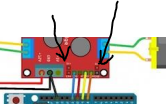
I'm trying to make an arduino car project controlled by eye movements. I have a code in python that detects where the eye is looking, and according to this code, I want to send data to the arduino and activate the car. I am using Arduino uno, HC 06 Bluetooth module, L298N motor driver and 2 dc motors for the car. When I make all the connections and run the Python code, the leds of the arduino are on but the motors don't work. The arduino code and the part of the python code that sends data to the arduino is as follows. What could be the problem?
L298N motor driver https://lastminuteengineers.com/l298n-dc-stepper-driver-arduino-tutorial/
#include<SoftwareSerial.h>
SoftwareSerial mySerial(10, 11);  // Communication RX,TX pins are determined.


// motor driver L298 pins named


const int in1=11;
const int in2=10;
const int in3=9;
const int in4=8;

void setup()
{
  pinMode(in1,OUTPUT);
  pinMode(in2,OUTPUT);
  pinMode(in3,OUTPUT);
  pinMode(in4,OUTPUT);


  Serial.begin(9600);

 }


  int sayac1=0, sayac2=0, i=0;  //variables that are not wanted to be reset in the loop
Defined as 0 outside the loop.

  int dizi[20];  // Created array to store the blinking data

  void loop()


 {


  int gd=0;  //The variable "gd" is defined for the eye state (right, left, straight).
  int gk=0;  //The "gk" variable is defined for the blink status.
    int sh;  //The "sh" variable is defined for the data coming via serial communication.

    if(Serial.available())
    {
      sh=Serial.read();

      if(sh<52)  // If the value of sh is less than 52, it is written to the gd variable.
    {
      gd=sh;
    }

      else if(sh==52)  // If the value of sh is 52, it is written to the gk variable.
    {
      gk=sh;
     sayac1=sayac1+1;   //Increased counter1 by 1 for blink status
    }

      if(sayac1==16)  // if the counter1 is 16, it is reset. (For about 2 seconds)
      sayac1=0;

      dizi[i]=sayac1;  //counter1 values transferred to array

      if(i>0)    //i>0 is checked because array[-1] problem will occur in case of i=0.
    {
      if(dizi[i]==dizi[i-1])   //counter1 and i are reset if the same value occurs during two loops
      {
      sayac1=0;
      i=0;
    }

   }


i++;  //dizi için i değişkeni 1 arttırıldı.

  if(sayac1==15)  // If counter1 is 15 (about 2sec), counter2 is increased by 1.

 sayac2=sayac2+1;

// All variables are written to the serial communication screen to control

    Serial.print("Goz Durumu:");
    Serial.println(gd);
    Serial.print("Goz Kırpma");
    Serial.println(gk);
    Serial.print("sayac1:");
    Serial.println(sayac1);
    Serial.println();
    Serial.print("sayac2:");
    Serial.println(sayac2);
    Serial.println();


   }

    else   // If there is no data waiting to be read in the memory, the system is disabled. (Camera off or rpi off status)

    dur();

      if(sayac2==2) //counter2 resets to 2 so that it only takes 0 and 1 value.

   sayac2=0;

      if(sayac2==0)  // If counter2 is 0, the system is disabled.

  { dur();
    }


  else if(sayac2==1)  // if counter2 is 1, the vehicle is activated
  {
    if(gd==49)  // If gd 49, the left function is called.
  {
    sol();
  }

  else if(gd==51)  // If gd 49, the right function is called.
  {
    sag();
  }

  else if(gd==50)  // if gd is 50 the forward function is called
  {
    duz();
  }

  }
  }

// Stop, straight, right and left functions have been created according to L298n pins

   void dur()
   {
    digitalWrite(in1,LOW);
    digitalWrite(in2,LOW);
    digitalWrite(in3,LOW);
    digitalWrite(in4,LOW);
   }
   void duz()
   {
    digitalWrite(in1,LOW);
    digitalWrite(in2,HIGH);
    digitalWrite(in3,HIGH);
    digitalWrite(in4,LOW);
   }
   void sag()
   { digitalWrite(in1,LOW);
    digitalWrite(in2,HIGH);
    digitalWrite(in3,LOW);
    digitalWrite(in4,HIGH);
   }
   void sol()
   {
     digitalWrite(in1,HIGH);
    digitalWrite(in2,LOW);
    digitalWrite(in3,HIGH);
    digitalWrite(in4,LOW);
   }
part of the python code
	if right_eye_ratio> 4.9 or left_eye_ratio> 4.9:
			cv2.putText(frame, "BLINKING", (50,150),font,4,(255,0,0 ))
			serial.write('4'.encode('utf-8'))

		else:
				if gaze_ratio <= 0.6:
					cv2.putText(frame, "LEFT", (0,100), font,2,(0,0,255),3)
					#Serial.write(49);
					serial.write('1'.encode('utf-8'))
				elif 0.6 < gaze_ratio < 1.5:
					cv2.putText(frame, "FORWARD", (100, 100), font, 2, (0, 0, 255), 3)
					#Serial.write (50);
					serial.write('2'.encode('utf-8'))
				elif gaze_ratio > 1.5:
					cv2.putText (frame, "RIGHT", (200, 100), font, 2, (0, 0, 255), 3)
					#Serial.write (51);
					serial.write('3'.encode('utf-8'))