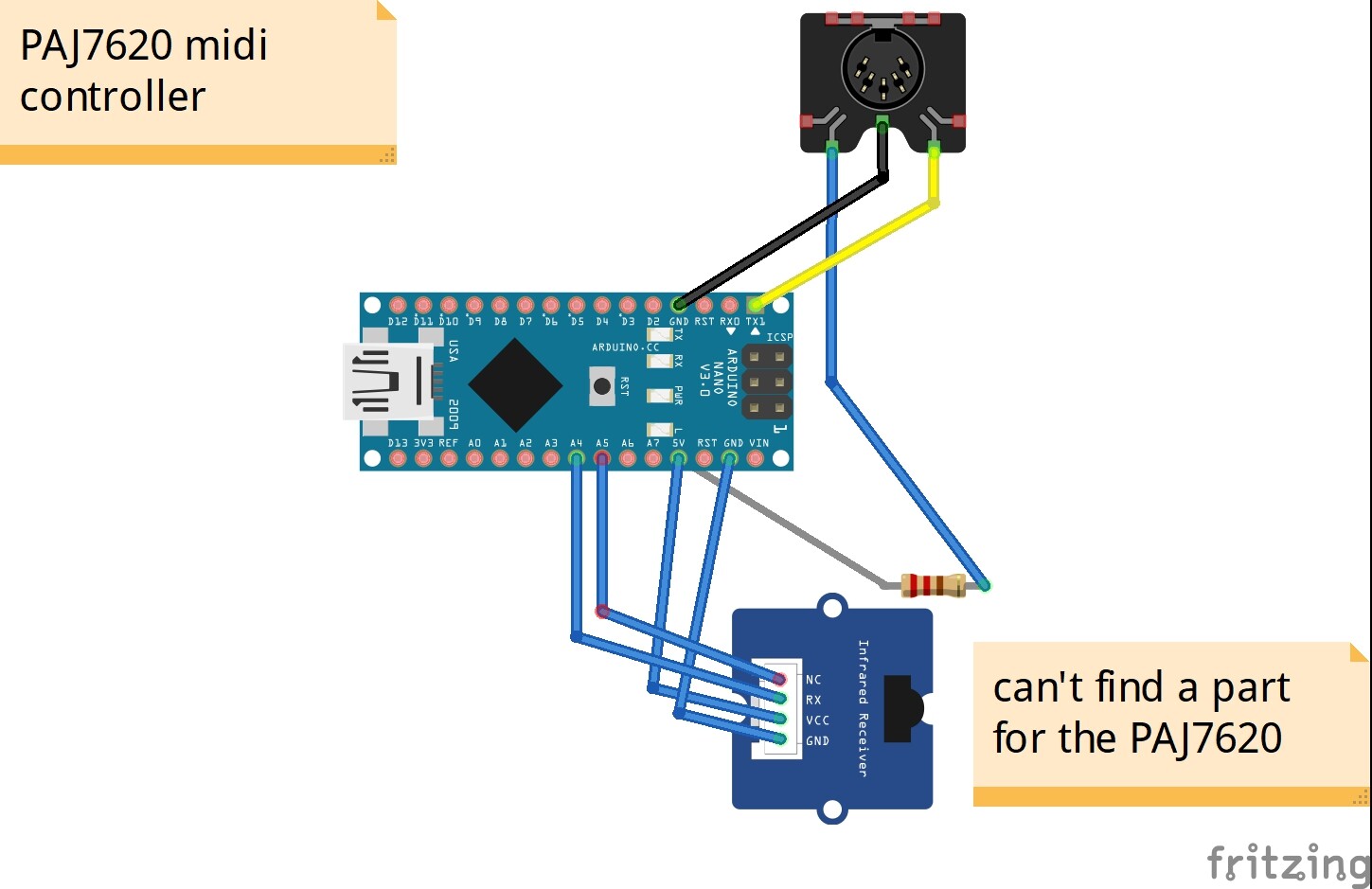
I have a Gesture_PAJ7620 connected to a nano. The idea is to send midi commands related to the gestures. However, it's transmitting sysex message all the time - presumably output from the sensor? The gesture works fine when sending text messages. The same board sends midi properly without the gesture. Any ideas?
#include <MIDI.h>
#include <midi_Defs.h>
#include <midi_Message.h>
#include <midi_Namespace.h>
#include <midi_Settings.h>

#include <Wire.h>
#include "paj7620.h"

MIDI_CREATE_DEFAULT_INSTANCE();

#define GES_REACTION_TIME   500       // You can adjust the reaction time according to the actual circumstance.
#define GES_ENTRY_TIME      800       // When you want to recognize the Forward/Backward gestures, your gestures' reaction time must less than GES_ENTRY_TIME(0.8s).
#define GES_QUIT_TIME     1000

void setup() {
MIDI.begin(1);
}

void loop() {
  uint8_t data = 0, data1 = 0, error;
  error = paj7620ReadReg(0x43, 1, &data);       // Read Bank_0_Reg_0x43/0x44 for gesture result.
  if (!error) {
    switch (data) {               // When different gestures be detected, the variable 'data' will be set to different values by paj7620ReadReg(0x43, 1, &data).
      case GES_RIGHT_FLAG:
        MIDI.sendProgramChange(1, 1);
        delay(GES_QUIT_TIME);
        break;
      case GES_LEFT_FLAG:
        MIDI.sendProgramChange(2, 1);
        delay(GES_QUIT_TIME);
        break;
      case GES_UP_FLAG:
        MIDI.sendProgramChange(3, 1);
        delay(GES_ENTRY_TIME);
        break;
      case GES_DOWN_FLAG:
        MIDI.sendProgramChange(4, 1);
        delay(GES_QUIT_TIME);
        break;
      case GES_FORWARD_FLAG:
        MIDI.sendProgramChange(5, 1);
        delay(GES_QUIT_TIME);
        break;
      case GES_BACKWARD_FLAG:
        MIDI.sendProgramChange(6, 1);
        delay(GES_QUIT_TIME);
        break;
      case GES_CLOCKWISE_FLAG:
        MIDI.sendProgramChange(3, 1);
        break;
      case GES_COUNT_CLOCKWISE_FLAG:
        MIDI.sendProgramChange(8, 1);
        break;
      default:
        paj7620ReadReg(0x44, 1, &data1);
        if (data1 == GES_WAVE_FLAG) {
          MIDI.sendProgramChange(9, 1);
        }
        break;
    } // end switch
  } // end if no error
  delay(100);
} // end loop
Try this. I didn't compile it, but it should or nearly. edit: one typo. It compiles, but I have no gesture device, so over to you.
I just
shut off anything that might have sent a MIDI package.
and
added some printing so we can see the flow
This should just tell you about the things you picking up from the sensor.
Divide and conquer.
# include <MIDI.h>
# include <midi_Defs.h>
# include <midi_Message.h>
# include <midi_Namespace.h>
# include <midi_Settings.h>

# include <Wire.h>
# include "paj7620.h"

MIDI_CREATE_DEFAULT_INSTANCE();

# define GES_REACTION_TIME   500       // You can adjust the reaction time according to the actual circumstance.
# define GES_ENTRY_TIME      800       // When you want to recognize the Forward/Backward gestures, your gestures' reaction time must less than GES_ENTRY_TIME(0.8s).
# define GES_QUIT_TIME     1000

void setup() {
  Serial.begin(115200);
  Serial.println("Hello Gesture MIDI World!\n");

  //  MIDI.begin(1);
}

void loop() {
  uint8_t data = 0, data1 = 0, error;
  error = paj7620ReadReg(0x43, 1, &data);       // Read Bank_0_Reg_0x43/0x44 for gesture result.
  if (!error) {
    switch (data) {               // When different gestures be detected, the variable 'data' will be set to different values by paj7620ReadReg(0x43, 1, &data).
      case GES_RIGHT_FLAG:
  //        MIDI.sendProgramChange(1, 1);
        Serial.print(" GES_RIGHT_FLAG "); Serial.println(data);
        delay(GES_QUIT_TIME);
        break;
      case GES_LEFT_FLAG:
  //        MIDI.sendProgramChange(2, 1);
        delay(GES_QUIT_TIME);
        Serial.print(" LEFT "); Serial.println(data);
        break;
      case GES_UP_FLAG:
   //        MIDI.sendProgramChange(3, 1);
        delay(GES_ENTRY_TIME);
        Serial.print(" GES_UP_FLAG "); Serial.println(data);
        break;
      case GES_DOWN_FLAG:
   //        MIDI.sendProgramChange(4, 1);
        delay(GES_QUIT_TIME);
        Serial.print(" GES_DOWN_FLAG "); Serial.println(data);
        break;
      case GES_FORWARD_FLAG:
   //        MIDI.sendProgramChange(5, 1);
        delay(GES_QUIT_TIME);
        Serial.print(" GES_FORWAWRD_FLAG "); Serial.println(data);
        break;
      case GES_BACKWARD_FLAG:
   //        MIDI.sendProgramChange(6, 1);
        delay(GES_QUIT_TIME);
        Serial.print(" GES_BACKWAWRD_FLAG "); Serial.println(data);
        break;
      case GES_CLOCKWISE_FLAG:
   //        MIDI.sendProgramChange(3, 1);
        Serial.print(" GES_CLOCKWISE_FLAG "); Serial.println(data);
        break;
      case GES_COUNT_CLOCKWISE_FLAG:
   //        MIDI.sendProgramChange(8, 1);
        Serial.print(" GES_ANTI_CLOCKWISE_FLAG "); Serial.println(data);
        break;
      default:
        Serial.print(" default "); Serial.print(data);
        paj7620ReadReg(0x44, 1, &data1);
        if (data1 == GES_WAVE_FLAG) {
     //        MIDI.sendProgramChange(9, 1);
          Serial.print(" default "); Serial.println(data);
        }
        break;
    } // end switch
  } // end if no error
  delay(1000);
} // end loop
I started with this code and it works fine. I assumed that simply replacing Serial.print with midi out code would work, but something else is going on. As I say, gesture code works, midi code works, combining the two doesn't ;(
That sounds a possible diagnosis. Will look into software serial. But the gesture is connected to A4 and A5 - does this create a second serial port that will transmit from the tx pin??
Is this audio interface expecting to receive MIDI messages?
If so it is expecting them at 31.25KHz, so your serial interface must be set to 31250 baud using the serial begin call.
You will not be able to see messages at this speed because the serial monitor can’t be set at this speed. So you loose the ability to use the serial print for debug messages,
Also not only has the speed got to be right but the signal needs to be the correct form and polarity. Your attempt at a diagram gives me no confidence that you are wiring the output correctly.
Can you please show how your TX is wired from the Arduino to the socket. Correct wiring would involve resistors.
Can you read #7 again, I don't think you've posted a tiny program that shows you can just directly send/receive at the focusrite the same MIDI command(s) you are trying to gate with gestures.
That is a tiny program that has only the MIDI. No mention or use of the gesture device.
And another that does just the gesture reception and Serial.print of what you are getting from it. No MIDI stuff.
If I read correctly, you have done both and if I am reading carefully I see neither. Sketch.
I know they are simple and work, but there may be a clue.
Also: I do not know but you should probably, or learn: can the MIDI serial comms work using software serial ports?
#include <MIDI.h>
#include <midi_Defs.h>
#include <midi_Message.h>
#include <midi_Namespace.h>
#include <midi_Settings.h>
MIDI_CREATE_DEFAULT_INSTANCE();

void setup()
{
MIDI.begin(1);
}

void loop()
{
MIDI.sendNoteOn(55,127,1);  // Send a Note for testing purposes
delay(500);		// Wait for a second
MIDI.sendNoteOff(55,0,1);   // Stop the note
}
and the (working) gesture only code
#include <Wire.h>
#include "paj7620.h"
#define GES_REACTION_TIME   500       // You can adjust the reaction time according to the actual circumstance.
#define GES_ENTRY_TIME      800       // When you want to recognize the Forward/Backward gestures, your gestures' reaction time must less than GES_ENTRY_TIME(0.8s).
#define GES_QUIT_TIME     1000

void setup() {
  uint8_t error = 0;

  Serial.begin(9600);
  Serial.println("\nPAJ7620U2 TEST DEMO: Recognize 9 gestures.");

  error = paj7620Init();      // initialize Paj7620 registers
  if (error) {
    Serial.print("INIT ERROR,CODE:");
    Serial.println(error);
  } else {
    Serial.println("INIT OK");
  }
  Serial.println("Please input your gestures:\n");
}

void loop() {
  uint8_t data = 0, data1 = 0, error;

  error = paj7620ReadReg(0x43, 1, &data);       // Read Bank_0_Reg_0x43/0x44 for gesture result.
  if (!error) {
    switch (data) {               // When different gestures be detected, the variable 'data' will be set to different values by paj7620ReadReg(0x43, 1, &data).
      case GES_RIGHT_FLAG:
        Serial.println("Right");
        delay(GES_QUIT_TIME);
        break;
      case GES_LEFT_FLAG:
        Serial.println("Left");
        delay(GES_QUIT_TIME);
        break;
      case GES_UP_FLAG:
        Serial.println("Up");
        delay(GES_ENTRY_TIME);
        break;
      case GES_DOWN_FLAG:
        Serial.println("Down");
        delay(GES_QUIT_TIME);
        break;
      case GES_FORWARD_FLAG:
        Serial.println("Forward");
        delay(GES_QUIT_TIME);
        break;
      case GES_BACKWARD_FLAG:
        Serial.println("Backward");
        delay(GES_QUIT_TIME);
        break;
      case GES_CLOCKWISE_FLAG:
        Serial.println("Clockwise");
        break;
      case GES_COUNT_CLOCKWISE_FLAG:
        Serial.println("anti-clockwise");
        break;
      default:
        paj7620ReadReg(0x44, 1, &data1);
        if (data1 == GES_WAVE_FLAG) {
          Serial.println("wave");
        }
        break;
    } // end switch
  } // end if no error
  delay(100);
} // end loop