Hi everyone.
I have followed this article and have used the device already.
Video tutorial Bài 6: Điều khiển thiết bị online dùng app blynk và Kit wifi node mcu esp8266 - Tự học lập trình IOT - YouTube
Code: BAI6_DIEU_KHIEN_THIET_BI_ONLINE_VA_OFFLINE_SU_DUNG_BLYNK_VA_WEB.ino - Google Drive
Because I'm not a major in electronics or programming, I have new ideas and cannot do it, so I wrote an article asking everyone for help.
The problem is that this device is used by many people, and when you borrow a phone from a stranger to use it, the risk that the stranger can use the device on their own may occur (because the WiFi connection is also saved or blynk). In addition, the online side has a timer function, the Offline party does not.
So I want to create one more task of entering pass and timer.
Offline mode: you need to rewrite the code:
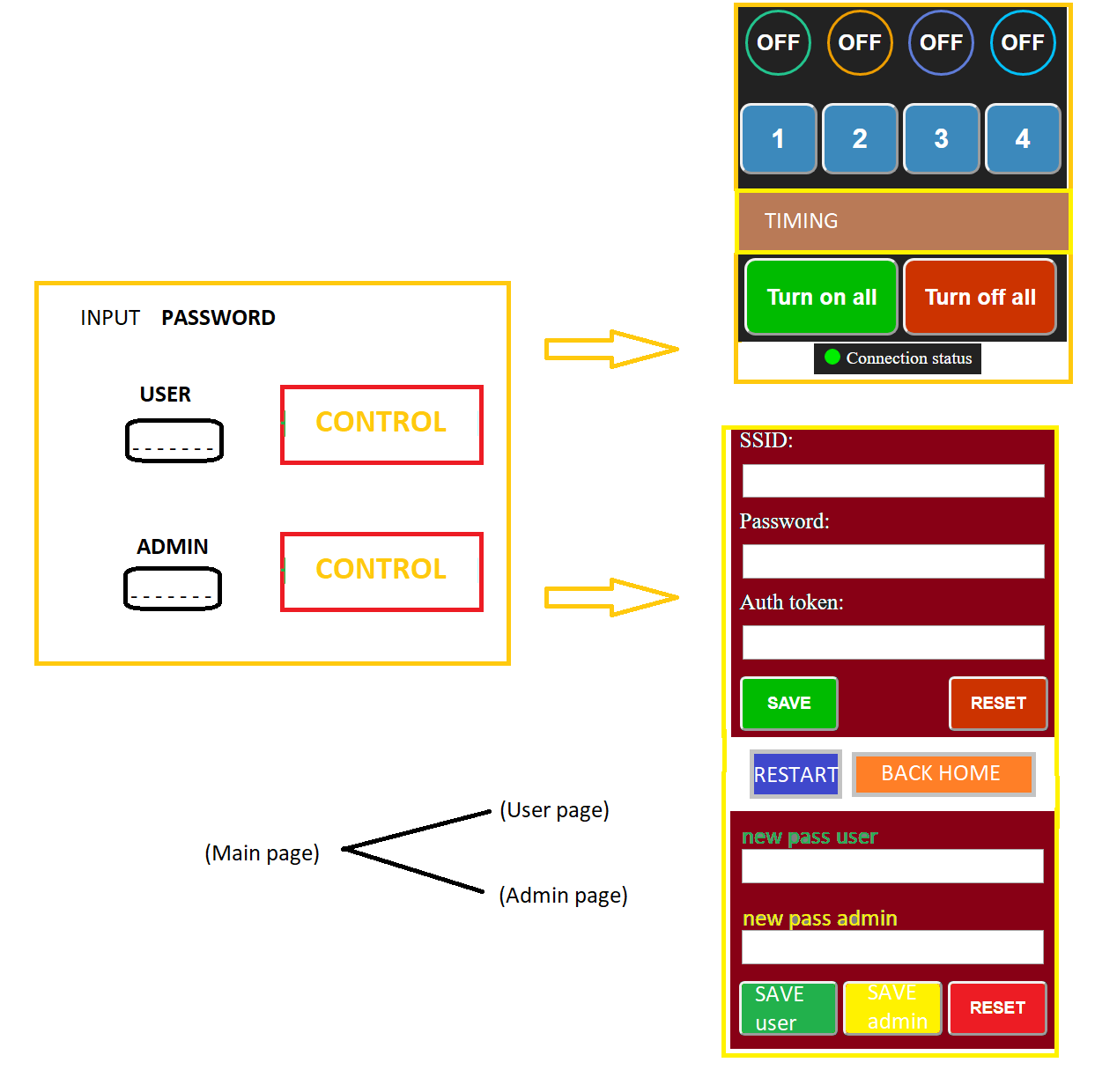
How to enter the IP to connect Nodemcu finished, must enter the access password before entering the device control screen. This pass is the one I entered in the code (so when I forgot the password, press Reset to reuse from the beginning)
Click Configure Wifi then edit to Configure wifi / pass or Configure only, because: to access here, you must enter the Pass again, this Pass is the admin's password, the purpose is that other users can not manually. Edit Blynk connection settings. Besides, in the Configure interface, there should be 2 more features: 1 is to change the user pass. 2 is to change the admin's Pass.
If you press the reset button, you must add the code to erase the currently used pass memory (or the forgotten password) to the default pass.
Add timer function for buttons (like Blynk)
Online mode (Blynk): this is a support application available, so it is not clear whether it supports me to create a password, so that the user must enter the password before using it. Or you must enter the correct password you are using in offline mode.
If the password cannot be set, then when using a stranger's phone to log in and use it temporarily, after logging in, it is safest to log out the account, right?
Thank you everyone for reading through the idea.
So everyone please help me to code the code to solve my problem.
Look forward to the help of everyone.