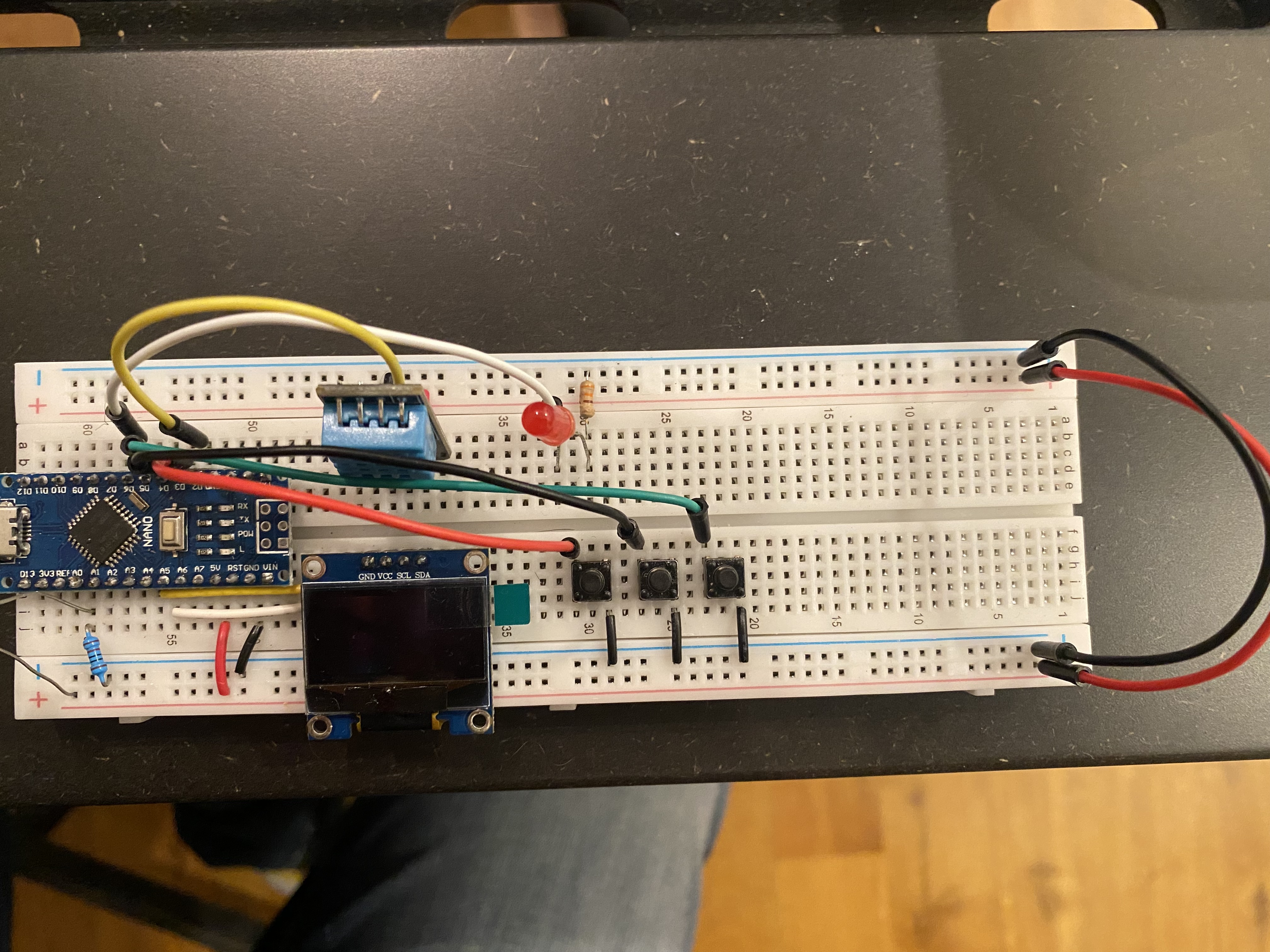
I'm writing some code where I want a menu system to display on an OLED screen. I have written the following code, but I'm having difficulty getting the three buttons to be recognised. On the Oled.cpp tab you can see some code I've written where I'm trying to get the up button state to be read and to move a cursor accordingly:
main.ino
#include "PushButton.h"
#include "Oled.h"


#define selectButton 3
#define upButton 4
#define downButton 5


PushButton select(selectButton, true, true);
PushButton up(upButton, true, true);
PushButton down(downButton, true, true);


OLEDDisplay Oled;


void setup() {
  Serial.begin(115200);

  Oled.init();

}

void loop() {
  Oled.homeScreen();

//  if (enterButton.isPressed()) {
//    Serial.println("Enter Button is pressed");
//  }
//  else {
//  if (upButton.isPressed()) {
//    //Serial.println(menuItem);
//    Serial.println("Up Button is pressed");
//  }
//  else {
//    if (downButton.isPressed()) {
//    Serial.println("Down Button is pressed");
//    }
//  }
//  }


}
PushButton.h
//INTERFACE

#ifndef PUSH_BUTTON_H
#define PUSH_BUTTON_H

#include <Arduino.h>


class PushButton
{
  private:
    byte pin;
    byte state;

    bool isPullUp;
    bool internalPullUpActivated;
    unsigned long lastTimeStateChanged;
    unsigned long debounceDelay;


    void readState();

  public:
//THE CONSTRUCTOR
//What do I need to be able to interact with the button?
  PushButton() {}       //do not use
  PushButton(byte pin, bool isPullUp, bool internalPullUpActivated);

  void init();


  bool isPressed();
};


#endif
PushButton.cpp
//THE IMPLEMENTATION

#include "PushButton.h"

PushButton::PushButton(byte pin,bool isPullUp,
                bool internalPullUpActivated)
{
  this->pin = pin;
  this->isPullUp = isPullUp;
  this->internalPullUpActivated = internalPullUpActivated;
//  this->selectButton = selectButton;
//  this->upButton = upButton;
//  this->downButton = downButton;

  lastTimeStateChanged = millis();
  debounceDelay = 50;
}

void PushButton::init()            //Data type, class, name of function
{
  if (isPullUp && internalPullUpActivated) {
    pinMode(pin, INPUT_PULLUP);
  }
  else {
    pinMode(pin, INPUT);
  }


  state = digitalRead(pin);
}

void PushButton::readState()
{
  unsigned long timeNow = millis();
  if (timeNow - lastTimeStateChanged > debounceDelay) {
    byte newState = digitalRead(pin);
    if (newState != state) {
      state = newState;
      lastTimeStateChanged = timeNow;
    }
  }
  state = digitalRead(pin);
  return state ;                   //to store the state inside the class
}

bool PushButton::isPressed()
{
  readState();
  if(isPullUp) {
    return (state == LOW);
  }
  else {
    return (state == HIGH);
  }
}
Oled.h
//INTERFACE


//Header guard
#ifndef OLED_H
#define OLED_H

#include <Arduino.h>
#include <Wire.h>
#include <Adafruit_GFX.h>
#include <Adafruit_SSD1306.h>
#include "PushButton.h"


#define SCREEN_WIDTH 128
#define SCREEN_HEIGHT 64
#define OLED_RESET -1


class OLEDDisplay {

private:
  Adafruit_SSD1306 display;

  int menuItem = 1;
  int page = 1;

  PushButton selectButton;
  PushButton upButton;
  PushButton downButton;

//  bool selectButton = false;
//  bool upButton = false;
//  bool downButton = false;

//YOU MAY NEED TO DELETE THIS
int downButtonState = 0;
int upButtonState = 0;
int selectButtonState = 0;
int lastDownButtonState = 0;
int lastSelectButtonState = 0;
int lastUpButtonState = 0;
volatile boolean select = false;
volatile boolean up = false;
volatile boolean down = false;

public:
//CONSTRUCTOR
  OLEDDisplay() {};

  OLEDDisplay(PushButton &selectButton, PushButton &upButton, PushButton &downButton);
  //OLEDDisplay(bool  selectButton, bool  upButton, bool  downButton, int menuItem, int page);

  void init();

  void menu();

  void homeScreen();

  void updateOLED();

  void option1();

  void option2();

  void option3();

};


#endif
Oled.cpp
//IMPLEMENTATION

#include "Oled.h"
#include "PushButton.h"


OLEDDisplay::OLEDDisplay(PushButton &selectButton, PushButton &upButton, PushButton &downButton)
{
  display = Adafruit_SSD1306 (SCREEN_WIDTH, SCREEN_HEIGHT, &Wire, -1);

  this->selectButton = selectButton;
  this->upButton = upButton;
  this->downButton = downButton;
  this->menuItem = menuItem;
  this->page = page;


}


void OLEDDisplay::init()
{
  selectButton.init();
  upButton.init();
  downButton.init();
  delay(100);

  Serial.begin(115200);

  display.begin(SSD1306_SWITCHCAPVCC, 0x3C);
  display.clearDisplay();
  display.setTextColor(WHITE);
  display.setTextSize(1);
  display.setCursor(0, 15);
  display.print(">");
  display.display();
  //Serial.println(menuItem);

}

void OLEDDisplay::homeScreen()
{
  //Serial.println(menuItem);
  display.setTextSize(1);
  display.setTextColor(WHITE);
  display.setCursor(15, 0);
  display.print("DISPLAY OPTIONS");
  display.drawFastHLine(15, 10, 90, WHITE);
  //display.display();

  display.setCursor(8, 15);
  display.print("General ");

  display.setCursor(8, 25);
  display.print("Environment ");

  display.setCursor(8, 35);
  display.print("Sensors");

  //if (upButton.isPressed())
  if (upButton.isPressed() && page == 1)
  //if(digitalRead(UP_BUTTON) == false && page == 1)
  {
    menuItem--;
    //updateOLED();
    if (menuItem == 0){
      menuItem = 3;
      Serial.print(menuItem);
      Serial.print(" ");
      Serial.println(page);
      option3();
    }
      if (menuItem == 1)
      {
        Serial.println("Menu Item 1");
      }
      if (menuItem == 2)
      {
        Serial.println("Menu Item 2");
      }
    //display.print(">General");
  } else {
    //display.print(" General");
  }
    display.display();
}

  void OLEDDisplay::option1 () {
  display.setCursor(0, 15);
  display.setTextSize(1);
  display.setTextColor(WHITE);
  display.print(">");
  display.display();
}

  void OLEDDisplay::option2 (){
  display.setCursor(0, 25);
  display.setTextSize(1);
  display.setTextColor(WHITE);
  display.print(">");
  display.display();
}

  void OLEDDisplay::option3 (){
  display.setCursor(0, 35);
  display.setTextSize(1);
  display.setTextColor(WHITE);
  display.print(">");
  display.display();
}
  void OLEDDisplay::updateOLED() {
  display.clearDisplay();
  display.display();
  }

Thank you in advance