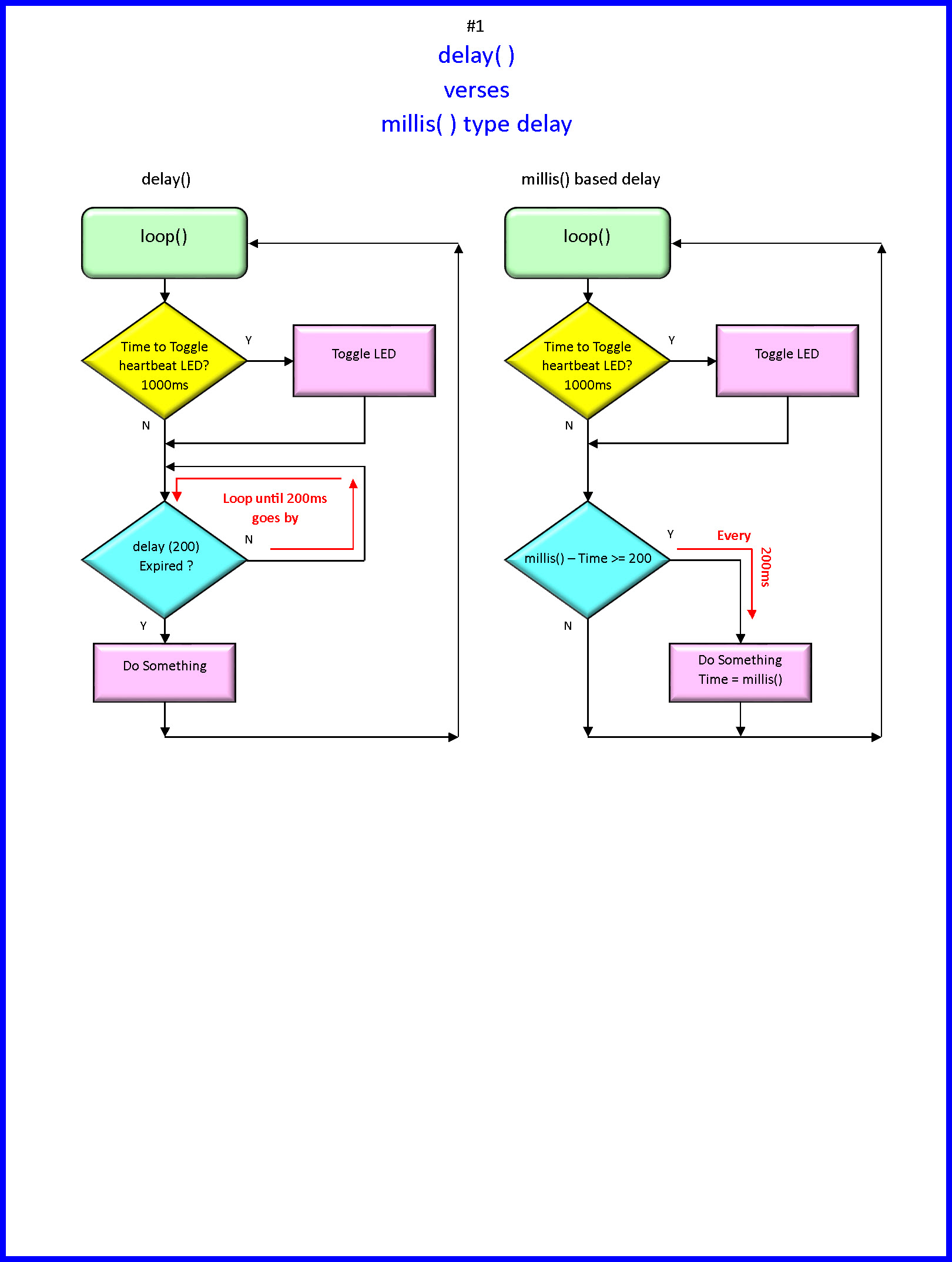
The BlinkWithoutDelay example shows how to toggle an LED on and off to make it blink. Try that first to turn a single solenoid on and off and report back.
You should at least post that code. It should be easy to do what you describe, using only the delay() function.
A design idea for you. There is really only one repeating interval of the same duration. Why not use the same interval for timing, but activate a different output each time? You can just keep a counter variable to indicate which output is currently active.
//
//  Version    YY/MM/DD    Comments
//  =======    ========    ====================================================================
//  1.00       23/02/02    Running code
//
//
//

const byte heartbeatLED      = 13;
const byte secondLED         = 2;

//timing stuff
unsigned long heartbeatTime;
unsigned long secondLedTime;

//                                       s e t u p ( )
//********************************************^************************************************
void setup()
{
  Serial.begin(115200);

  pinMode(heartbeatLED, OUTPUT);
  pinMode(secondLED, OUTPUT);

} //END of   setup()


//                                        l o o p ( )
//********************************************^************************************************
void loop()
{
  //**********************************************                h e a r t b e a t   T I M E R
  //is it time to toggle the heartbeatLED ?
  if (millis() - heartbeatTime > 1000ul)
  {
    //restart this TIMER
    heartbeatTime = millis();

    //toggle LED
    digitalWrite(heartbeatLED, digitalRead(heartbeatLED) == HIGH ? LOW : HIGH);
  }

  //**********************************************                s e c o n d L E D   T I M E R
  //is it time to toggle the 2nd LED ?
  if (millis() - secondLedTime >= 200ul)
  {
    //restart this TIMER
    secondLedTime = millis();

    //let's do something

    //toggle LED
    digitalWrite(secondLED, digitalRead(secondLED) == HIGH ? LOW : HIGH);
  }


  //**********************************************
  //Other non blocking code
  //**********************************************

} //END of   loop()


//********************************************^************************************************
First, I apologize for not posting my codes (1st timer.. please accept my sincere apologies).
Second, Thank you so much for all your responses. I may not be able to thank you individually. I will try all your suggestions and I'm hoping to learn from all these.
The 4th Sequence looks exactly like 1st in the table, and differs from the "HIGH, HIGH, LOW" in the 4th chunk of code. Is something inconsistent?
One possible non-code related problem is insufficient power-- if the solenoids overload the power supply/wires it could brown-out the Arduino and cause strange behavior where the outputs do not match the expected behavior.
Can you share a schematic and specifications on your power supply and parts?
If you've got adequate power and good connections, you might try adding print statements to show how the CPU progresses through your code, and to localize where things go wrong.
Here, "Time" is the vertical axis, at 1 sec per sequence, and the horizontal axis is the different solenoids, and their LOW/HIGH values.
That seems straightforward and very possible mapping into your code: each row would implement the time interval as the delay(1000) in your code. The digitalWrite(SOLx, val) sttements in your code would seem like they should match each row your table.
However, your worry that it might not be possible, and this on/off 1 sec bit:
...make me think that I might be interpreting your table incorrectly.