ec2021
March 27, 2023, 2:01pm
21
Ok. A specific sequence for turning on and off the three different parts is an additional requirement for the sketch.
The main problem of your solution is this kind of programming:
      while (state[2] == true) {
        for (int i = 0; i < 3; i++) {
          digitalWrite(led2[i], HIGH);
          delay(300);
          digitalWrite(led2[i], LOW);
        }
        delay(300);
      }
First: Once you come into this while() loop the variable state[2] will never change (except it would be changed in an interrupt routine what is not done). So the program will stay in that while-loop "forever" ...
Second: You use a for-loop with delay() to handle the sequences. During this for-loop other operations like monitoring the pushbuttons will not be performed
To solve you task you have to use the millis() function to schedule the different tasks so that you do not block the rest of it.
I recommend that you try to solve that just for one of the sequences to get an idea of "how to do it".
ec2021
Hi!
Your code does more or less what do you want.
You have just to remove while loop and use boolean variables only and instead use delay use millis() .
The while doesn't allows the execution of others tasks in parallel.
I have simplified your code a litle bit.
#define LED_PIN_1 11
#define LED_PIN_2 10
#define LED_PIN_3 9
#define LED_PIN_4 6
#define LED_PIN_5 5
#define LED_PIN_6 4

#define PUSH_PIN_1 12
#define PUSH_PIN_2 7
#define PUSH_PIN_3 3

#define BUZ_PIN 13

#define NUM_BUTTONS 3

int led[NUM_BUTTONS] = {LED_PIN_1, LED_PIN_2, LED_PIN_3};
int led2[NUM_BUTTONS] = {LED_PIN_4, LED_PIN_5, LED_PIN_6};
int push[NUM_BUTTONS] = {PUSH_PIN_1, PUSH_PIN_2, PUSH_PIN_3};

bool state[NUM_BUTTONS] = {false, false, false};
bool lastState[NUM_BUTTONS] = {true, true, true};
bool buttonReleased[NUM_BUTTONS] = {true, true, true};

void setup() {
  Serial.begin(9600);

  for (int i = 0; i < NUM_BUTTONS; i++) {
    pinMode(led[i], OUTPUT);
    pinMode(led2[i], OUTPUT);
    pinMode(push[i], INPUT_PULLUP);
  }

  pinMode(BUZ_PIN, OUTPUT);
}

void loop() {

  for (int i = 0; i < NUM_BUTTONS; i++) {
    if (digitalRead(push[i]) == LOW && buttonReleased[i]) {
      state[i] = !state[i];
      buttonReleased[i] = false;
    }
    else if (digitalRead(push[i]) == HIGH) {
      buttonReleased[i] = true;
    }

    if (state[i] != lastState[i]) {
      lastState[i] = state[i];
    }
  }

  if (state[0] == true) {
    for (int i = 0; i < 3; i++) {
      digitalWrite(led[i], HIGH);
      delay(300);
      digitalWrite(led[i], LOW);
    }
    delay(300);
    for (int i = 0; i < 3; i++) {
      digitalWrite(led[i], LOW);
    }
  }

  if (state[1] == true) {
    for (int i = 0; i < 3; i++) {
      tone(BUZ_PIN, 200 * (i + 1), 300);
      delay(300);
    }
    noTone(BUZ_PIN);
    delay(300);
  }

  if (state[2] == true) {
    for (int i = 0; i < 3; i++) {
      digitalWrite(led2[i], HIGH);
      delay(300);
      digitalWrite(led2[i], LOW);
    }
    delay(300);
    for (int i = 0; i < 3; i++) {
      digitalWrite(led2[i], LOW);
    }
  }
}
Take a look in this tutorial and you learn what do you need to finish your assignment.
Once you have mastered the basic blinking leds, simple sensors and buzzing motors, it’s time to move on to bigger and better projects. That usually involves combining bits and pieces of simpler sketches and trying to make them work together. The...
Here a simulation for your code:
Run IoT and embedded projects in your browser: ESP32, Arduino, Pi Pico, and more. No installation required!
Best regards.
gcjr
March 27, 2023, 2:32pm
23
does this mean all three sequence can be active at the same time?
and does it mean that all changes occur on the same 0.3s time interval?
adspig
March 27, 2023, 2:39pm
25
where
if (state[0] == true) {
    while (state[0] == true) {
      for (int i = 0; i < 3; i++) {
        digitalWrite(led[i], HIGH);
        delay(300);
        digitalWrite(led[i], LOW);
      }
      delay(300);
    }
    for (int i = 0; i < 3; i++) {
      digitalWrite(led[i], LOW);
    }
  }
So I just need to modify this?
Sorry I forgot to remove the first while. I have edited the code above.
You just needs change this section of code to use millis instead delay and you will allow the tasks to run in parallel.
Look the tutorial first.
  if (state[0] == true) {
    for (int i = 0; i < 3; i++) {
      digitalWrite(led[i], HIGH);
      delay(300);
      digitalWrite(led[i], LOW);
    }
    delay(300);
    for (int i = 0; i < 3; i++) {
      digitalWrite(led[i], LOW);
    }
  }

  if (state[1] == true) {
    for (int i = 0; i < 3; i++) {
      tone(BUZ_PIN, 200 * (i + 1), 300);
      delay(300);
    }
    noTone(BUZ_PIN);
    delay(300);
  }

  if (state[2] == true) {
    for (int i = 0; i < 3; i++) {
      digitalWrite(led2[i], HIGH);
      delay(300);
      digitalWrite(led2[i], LOW);
    }
    delay(300);
    for (int i = 0; i < 3; i++) {
      digitalWrite(led2[i], LOW);
    }
  }
adspig
March 27, 2023, 3:05pm
28
#define PUSH_PIN_1 12
#define PUSH_PIN_2 7
#define PUSH_PIN_3 3
then
#define NUM_BUTTONS 3
Why did you define it further?
You can use a global text search on "NUM_BUTTONS" to find out how and why it is used.
This not a definition to button pin. It's the amount of buttons and LEDs (per group).
It's used as reference in for loop:
for (int i = 0; i < NUM_BUTTONS; i++)
So you don't need to use this:
for (int i = 0; i < 3; i++)
It will make the code easily expandable and will prevent errors when increasing or decreasing the number of buttons and LEDs.
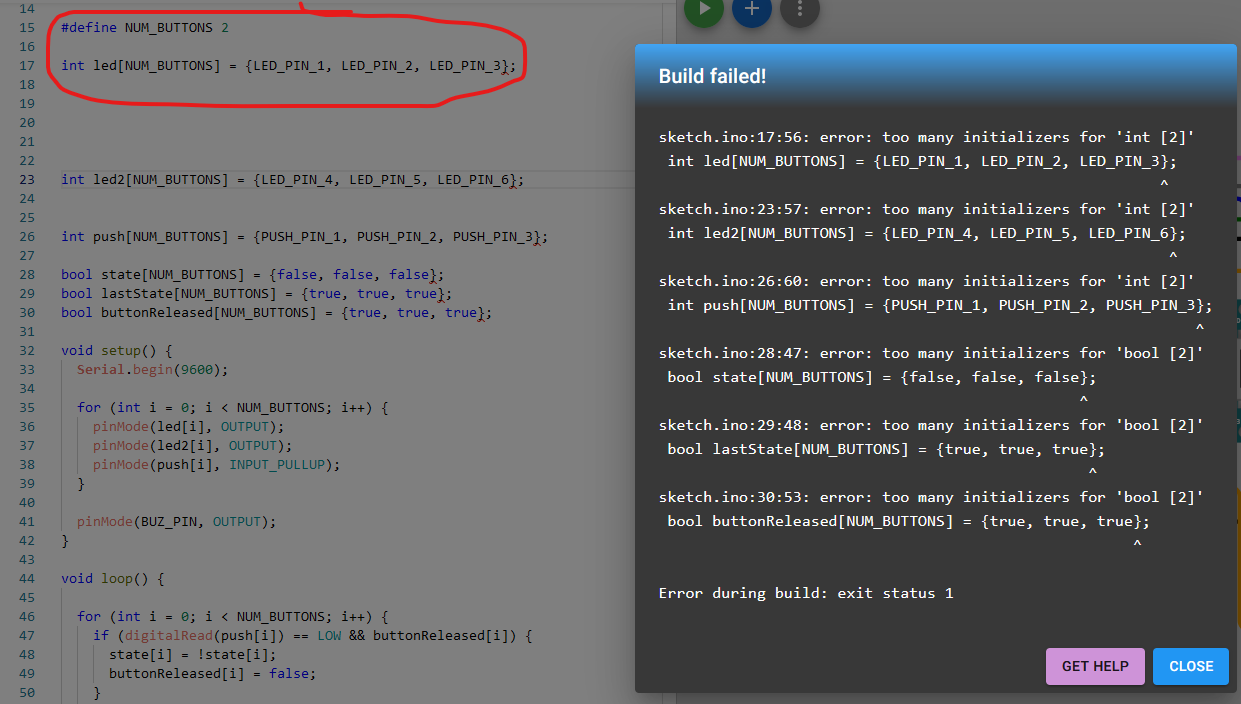
For example, this type of definition could throw a compiling error if you forget to remove the third value on pin array:
#define NUM_BUTTONS 2

int led[NUM_BUTTONS] = {LED_PIN_1, LED_PIN_2, LED_PIN_3};
gcjr
March 27, 2023, 3:18pm
31
look this over
#define MyHW
#ifdef MyHW
# include "sim.hh"

#define BUZ_PIN 9

const byte led1 [] = { 13, 9, 12 };
const byte led2 [] = { 11, 8, 10 };
const byte push [] = { A1, A2, A3 };

#else
#define BUZ_PIN 13

const byte led1 [] = { 11, 10, 9 };
const byte led2 [] = { 6, 5, 4 };
const byte push [] = { 12, 7, 3 };
#endif

const int  Nled1 = sizeof (led1);
const int  Nled2 = sizeof (led2);
const int Npush = sizeof (push);

byte butLst [Npush];
byte state  [Npush];

unsigned long msecLst;

enum { Off = HIGH, On = LOW };

// -----------------------------------------------------------------------------
void
seqLed1 (void)
{
    static int idx = 0;

    if (Nled1 <= idx) {
        for (int i = 0; i < Nled1; i++)
            digitalWrite (led1 [i], Off);
        idx = 0;
    }
    else
        digitalWrite (led1 [idx++], On);
}

// -------------------------------------
void
seqLed2 (void)
{
    static int idx = 0;

    if (Nled2 <= idx) {
        for (int i = 0; i < Nled2; i++)
            digitalWrite (led2 [i], Off);
        idx = 0;
    }
    else
        digitalWrite (led2 [idx++], On);
}

// -------------------------------------
void
ledsOff (
    const byte *led,
    int         nLed )
{
        for (int i = 0; i < nLed; i++)
            digitalWrite (led [i], Off);
}

// -------------------------------------
void
buzzer (void)
{
    static int idx = 0;

    if (3 <= idx)
        noTone (BUZ_PIN);
    else
        tone (BUZ_PIN, 200* (1+idx++), 300);
}

// -----------------------------------------------------------------------------
void loop ()
{
    unsigned long msec = millis ();
    if (msec - msecLst >= 300)  {
        msecLst = msec;

        for (int n = 0; n < Npush; n++) {
            if (state [n])  {
                if (0 == n)
                    seqLed1 ();
                else if (1 == n)
                    buzzer ();
                else if (2 == n)
                    seqLed2 ();
            }
        }
    }

    for (int n = 0; n < Npush; n++) {
        byte but = digitalRead (push [n]);
        if (butLst [n] != but)  {
            butLst [n] = but;
            delay (20);             // debounce
            if (LOW == but)  {      // pressed
                state [n] = ! state [n];

                if (0 == state [n]) {
                    if (0 == n)
                        ledsOff (led1, Nled1);
                    else if (1 == n)
                        noTone (BUZ_PIN);
                    else if (2 == n)
                        ledsOff (led2, Nled2);
                }
            }
        }
    }
}

void setup () {
    Serial.begin (9600);

    for (int i = 0; i < Nled1; i++) {
        pinMode (led1 [i], OUTPUT);
        digitalWrite (led1 [i], Off);
    }

    for (int i = 0; i < Nled2; i++) {
        pinMode (led2 [i], OUTPUT);
        digitalWrite (led2 [i], Off);
    }

    for (int i = 0; i < Npush; i++) {
        pinMode (push [i], INPUT_PULLUP);
        butLst [i] = digitalRead (push [i]);
    }

    pinMode (BUZ_PIN, OUTPUT);
}
6v6gt
March 27, 2023, 3:28pm
32
For a start, I doubt that he will have this.
gcjr:
# include "sim.hh"
Further, I could imagine that he has been given a template on which he must base his solution.
As has been made clear, this is homework assignment and throwing in a ready made solution is not, in my opinion at least, the best way to further someone's education.
adspig
March 27, 2023, 3:40pm
33
#define LED_PIN_1 11
#define LED_PIN_2 10
#define LED_PIN_3 9
#define LED_PIN_4 6
#define LED_PIN_5 5
#define LED_PIN_6 4

#define PUSH_PIN_1 12
#define PUSH_PIN_2 7
#define PUSH_PIN_3 3

#define BUZ_PIN 13

#define NUM_BUTTONS 3


int led[NUM_BUTTONS] = {LED_PIN_1, LED_PIN_2, LED_PIN_3};
int led2[NUM_BUTTONS] = {LED_PIN_4, LED_PIN_5, LED_PIN_6};
int push[NUM_BUTTONS] = {PUSH_PIN_1, PUSH_PIN_2, PUSH_PIN_3};

bool state[NUM_BUTTONS] = {false, false, false};
bool lastState[NUM_BUTTONS] = {true, true, true};
bool buttonReleased[NUM_BUTTONS] = {true, true, true};

long prev = 0;
long interval = 300;

void setup() {
  Serial.begin(9600);

  for (int i = 0; i < NUM_BUTTONS; i++) {
    pinMode(led[i], OUTPUT);
    pinMode(led2[i], OUTPUT);
    pinMode(push[i], INPUT_PULLUP);
  }

  pinMode(BUZ_PIN, OUTPUT);
}

void loop() {

unsigned long cnt = millis();

  for (int i = 0; i < NUM_BUTTONS; i++) {
    if (digitalRead(push[i]) == LOW && buttonReleased[i]) {
      state[i] = !state[i];
      buttonReleased[i] = false;
    }
    else if (digitalRead(push[i]) == HIGH) {
      buttonReleased[i] = true;
    }

    if (state[i] != lastState[i]) {
      lastState[i] = state[i];
    }
  }


  if (state[0] == true) {
  if (cnt - prev>=interval){
    	prev = cnt;
    for (int i = 0; i < 3; i++) {
      digitalWrite(led[i], HIGH);
      digitalWrite(led[i], LOW);
    }

    for (int i = 0; i < 3; i++) {
      digitalWrite(led[i], LOW);
    }
  }
  }


  if (state[1] == true) {
    if (cnt - prev>=interval){
    	prev = cnt;
    for (int i = 0; i < 3; i++) {
      tone(BUZ_PIN, 200 * (i + 1), 300);
    }
    noTone(BUZ_PIN);
  }

  }
  if (state[2] == true) {
   if (cnt - prev>=interval){
    	prev = cnt;
    for (int i = 0; i < 3; i++) {
      digitalWrite(led2[i], HIGH);

      digitalWrite(led2[i], LOW);
    }

    for (int i = 0; i < 3; i++) {
      digitalWrite(led2[i], LOW);
    }

 }
 }
 }
I tried millis(), but the LED lights up at a very dim brightness and fast speed. am I using millis() wrong?
It's extremely risky to nest a timing check inside any conditional statement. This might be a problem.
adspig
March 27, 2023, 3:45pm
35
if (cnt - prev>=interval){
prev = cnt;
if (state[0] == true) {
This does the same thing, is this the wrong way to do it?
What do you mean, it does the same thing? It certainly does not.
Please explain in words, not code, what you are trying to do (how you want the timing to work).
If that is a language problem, use diagrams.
prev = cnt;
You was doing a good job with your code. Don't start filling it with trash.
This variable names are not self explanatory.
amitf
March 27, 2023, 3:50pm
38
Look here
You Turning LEDs on and then turning it off in next step. That's why it is glowing dim.
Check out blink without delay example from Arduino ide
Looks like you don't have studied the tutorial above.
You could learn so much with this example:
// These variables store the flash pattern
// and the current state of the LED

int ledPin =  13;      // the number of the LED pin
int ledState = LOW;             // ledState used to set the LED
unsigned long previousMillis = 0;        // will store last time LED was updated
long OnTime = 250;           // milliseconds of on-time
long OffTime = 750;          // milliseconds of off-time

void setup()
{
  // set the digital pin as output:
  pinMode(ledPin, OUTPUT);
}

void loop()
{
  // check to see if it's time to change the state of the LED
  unsigned long currentMillis = millis();

  if((ledState == HIGH) && (currentMillis - previousMillis >= OnTime))
  {
    ledState = LOW;  // Turn it off
    previousMillis = currentMillis;  // Remember the time
    digitalWrite(ledPin, ledState);  // Update the actual LED
  }
  else if ((ledState == LOW) && (currentMillis - previousMillis >= OffTime))
  {
    ledState = HIGH;  // turn it on
    previousMillis = currentMillis;   // Remember the time
    digitalWrite(ledPin, ledState);	  // Update the actual LED
  }
}