I'm trying to use the library "BMP280_DEV" and trying out the user defined pins for i2c pin. My board is an esp32. But this error shows when trying to upload it on my board:
call of overloaded 'BMP280_DEV(int, int)' is ambiguous
What does the error mean? Am I using the code incorrectly? Any help is appreciated. The code Im trying is one of the built in example of the library:
#include <BMP280_DEV.h>                           // Include the BMP280_DEV.h library

float temperature, pressure, altitude;            // Create the temperature, pressure and altitude variables

BMP280_DEV bmp280(25, 26);                          // Instantiate (create) a BMP280 object and set-up for I2C operation on pins SDA: 25, SCL: 26

void setup()
{
  Serial.begin(115200);                           // Initialise the serial port
  bmp280.begin();                                 // Default initialisation, place the BMP280 into SLEEP_MODE
  bmp280.setTimeStandby(TIME_STANDBY_2000MS);     // Set the standby time to 2 seconds
  bmp280.startNormalConversion();                 // Start BMP280 continuous conversion in NORMAL_MODE
}

void loop()
{
  if (bmp280.getMeasurements(temperature, pressure, altitude))    // Check if the measurement is complete
  {
    Serial.print(temperature);                    // Display the results
    Serial.print(F("*C   "));
    Serial.print(pressure);
    Serial.print(F("hPa   "));
    Serial.print(altitude);
    Serial.println(F("m"));
  }
}
By the way, I've updated the BMP280_DEV library on Github. The new version V1.0.20 should soon become available as an update on the Arduino IDE in a few hours time.
I'm sorry to bother but it worked for me because I just verified the code on my arduino, but when uploading it on my esp32 and monitoring the results on my serial monitor, the serial monitor shows this error:
Ok, I've updated and released BMP280_DEV library version 1.0.21 that solves the issue. It should become available on the Arduino IDE through the library manager shortly.
Sorry about that. I recently updated the library to allow it to access multiple/alternative I2C ports, which all functioned OK, but rather embarrasingly didn't consider the ESP8266/ESP32 with user defined I2C pins.
Im sorry to bother again, i've tested the latest update, the good thing is I can now use the library with the default i2c pins on my esp32 and show the results on serial monitor, but with user defined pins, there's no reading that shows on serial monitor, is there a new way of initializing the user defined pins?
edit: I got it working with the wire.begin function, thanks for fixing the library
Im using pins 25 - sda and 26 - scl. Im using it like this:
#include <Wire.h>
#include <BMP280_DEV.h>                           // Include the BMP280_DEV.h library

float temperature, pressure, altitude;            // Create the temperature, pressure and altitude variables
BMP280_DEV bmp280;                                // Instantiate (create) a BMP280_DEV object and set-up for I2C operation
//BMP280_DEV bmp280(25,26);

void setup()
{
  Serial.begin(115200);                           // Initialise the serial port
  Wire.begin(25,26);
  bmp280.begin(BMP280_I2C_ALT_ADDR);              // Default initialisation with alternative I2C address (0x76), place the BMP280 into SLEEP_MODE
  bmp280.setTimeStandby(TIME_STANDBY_2000MS);     // Set the standby time to 2 seconds
  bmp280.startNormalConversion();                 // Start BMP280 continuous conversion in NORMAL_MODE
}

void loop()
{
  if (bmp280.getMeasurements(temperature, pressure, altitude))    // Check if the measurement is complete
  {
    Serial.print(temperature);                    // Display the results
    Serial.print(F("*C   "));
    Serial.print(pressure);
    Serial.print(F("hPa   "));
    Serial.print(altitude);
    Serial.println(F("m"));
  }
}
It shouldn't be necessary to call on the Wire library, since the BMP280_DEV library calls it itself.
Please could you try this code:
//////////////////////////////////////////////////////////////////////////////////////////////////////////
// BMP280_DEV - ESP32, I2C Communications, Default Configuration, Normal Conversion, User-Defined Pins
//////////////////////////////////////////////////////////////////////////////////////////////////////////

#include <BMP280_DEV.h>                           // Include the BMP280_DEV.h library

float temperature, pressure, altitude;            // Create the temperature, pressure and altitude variables
BMP280_DEV bmp280(25, 26);                        // Instantiate (create) a BMP280 object and set-up for I2C operation on pins SDA: 25, SCL: 26

void setup()
{
  Serial.begin(115200);                           // Initialise the serial port
  bmp280.begin(BMP280_I2C_ALT_ADDR);              // Default initialisation with alternative I2C address (0x76), place the BMP280 into SLEEP_MODE
  bmp280.setTimeStandby(TIME_STANDBY_2000MS);     // Set the standby time to 2 seconds
  bmp280.startNormalConversion();                 // Start BMP280 continuous conversion in NORMAL_MODE
}

void loop()
{
  if (bmp280.getMeasurements(temperature, pressure, altitude))    // Check if the measurement is complete
  {
    Serial.print(temperature);                    // Display the results
    Serial.print(F("*C   "));
    Serial.print(pressure);
    Serial.print(F("hPa   "));
    Serial.print(altitude);
    Serial.println(F("m"));
  }
}
I just tested the above code on ESP32 pins 25 (SDA) and 26 (SCL) together with the BMP280 configured for the alternate I2C address (0x76) and it works just fine.
Have you selected the correct I2C address for the barometer: 0x77 standard, 0x76 alternate?
Are you powering the barometer breakout board with 3.3V? The board should be powered with 3.3V.
Hi @MartinL, the bmp280 is powered through 3.3v of the esp32, but like I've said above the
Wire.begin(25,26); - worked with me.
But with this
BMP280_DEV bmp280(25, 26); - it doesn't.
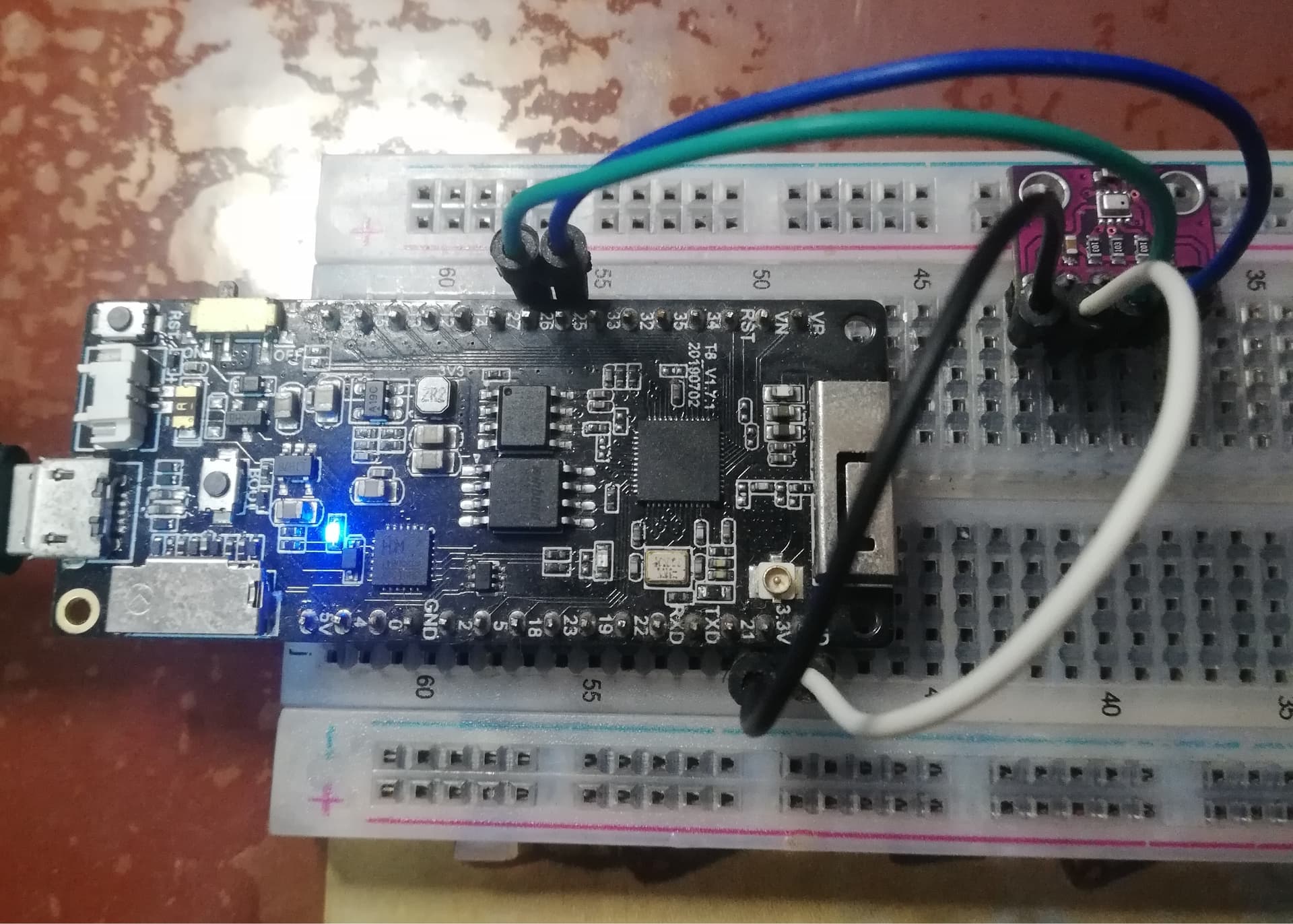
It uploads but nothing shows up at my serial monitor. I might borrow other esp32 to test if there's something wrong with my esp32. Btw the board I'm using is Lilygo TTGO T8 1.7.1
Please could you perhaps post an image of your current set-up and specify which make/model of ESP32 you're currently using?
I ask, because I'm currently unable to reproduce the problem on my set-up: Adafruit Huzzah 32 ESP32 and Adafruit BMP280 breakout. I'm getting barometer back readings using the user-defined I2C pins, but maybe it's something to do with the connections or type of ESP32?
 .
.