larryd:
Leave the breadboard cct. wired to the 7805 (with input 100nF capacitor).
Your cct. in Figure 1 will work, however, the .33 can be changed to .1uF (ceramic) mounted very close to the input of the regualtor.
those are both the same then, right ?
100 nF = 0.1 uF ?
or did you differentiate the 100nF from the ceramic one because it had to be a polarised electrolytic one ?
larryd:
Therefore the breadboard controller will be powered from the external 7805.
i don't have a polarised 100 nF cap so i just stayed with the 10 uF on both the 7805 power pins.
needless to say, it didn't fix the problem.
larryd:
This makes no sense, there must be a bad wire.
indeed - so i tried another component configuration like this;
EDIT: without the 10k on the RESET pin
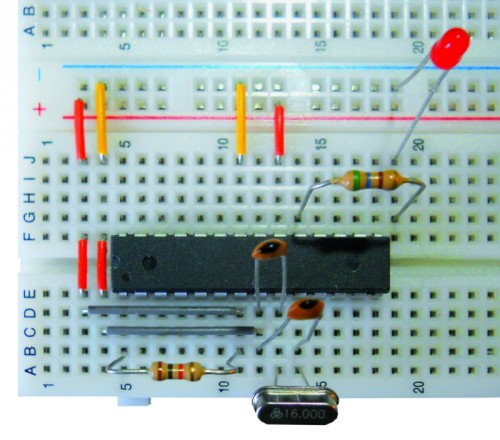
my previous setup where the wires joining the two power rails was a bit stretched, even though continuity was OK, perhaps it wasn't optimal, so i routed it along a path where it was a more than sufficient length - don't know if being higher off the breadboard (rather than flat on it) becomes a new issue...
if i ran the power wiring over the 328 chip would that be bad ?
the resistor for the LED is also bridging the 328 chip - might that be enough to cause interference ?
(it is high enough over the chip body that there's no contact, even to the casing, let alone the pins.)
i have also changed the TX/RX wires to a new set, what sort of LED flashing pattern should i be seeing during upload - i noticed the RX LED flickered briefly, but the TX one didn't light up.
should i just abort this TX/RX method and proceed to use the SPI connections ? (ie. usng ICSP instead.)
if i have to plug the Old 328 back into the UNO board to test that TX pin - i might as well just use the Old 328 as a programmer chip.
would that be a "better" option for trouble-shooting ?


 and this Breaduino is supposed to be its replacement.