Add 6 LEDs to the board
and a light sensor. Program the board so that the less light falls on the photoresistor, the more
LEDs have been turned on . This is how it should look like:
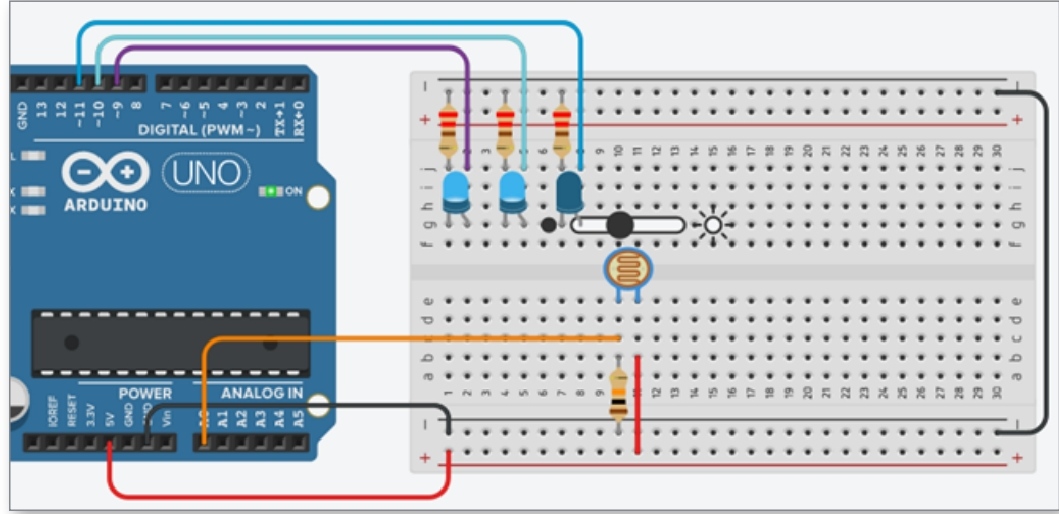
Write code.
You'd write code to read the LDR. Once that is done you'd write code for the LEDS.
I take it you want to use 4 LED's with all LED'S on with the brightest light and all LED's off with the darkest light with all LED's on. A set of 5 steps. or 20% increments. Then you'd want to measure the light, getting the readings of the brightest and the dimmest readings the LDR will produce. Once you got the LDR High and LOW A:D values, you'd relate the range to 20% increments.
What have you tried? What were the results?
Is this a school assignment?
this is the best way to do it.
a litle advice:
LDR is a anlog sensor, its means that u can have output between 0 and 1023. if u have 6 LEDs u need each LED to go on at 170 give or take (1023/6 = +/- 170)
good luck
Yep, that's the school work. I tried this,but I don't understand how to turn them off at the different time.
#define light Sensor A0

void setup() { pinMode (9, OUTPUT);

pinMode(10, OUTPUT);

pinMode(11. OUTPUT);

pinMode(light Sensor, INPUT);

Serial.begin(9600);

}


 void loop() {

 int lightLevel = analogRead(light Sensor);  Serial.println(lightLevel);

digitalWrite(9, HIGH); 10 digitalWrite(10, HIGH); 17 digitalWrite(11. HIGH); 18

if ( lightLevel > 935) { digitalWrite(lightLevel, LOW); //Turn led off

} }
Look into the else if and else structures. That may help with your question.
Please use the IDE autoformat tool (ctrl-t or Tools, Auto format) before posting code in code tags.
Can't have a white space in the constant name.
Multiple syntax issues. Please review basic C/C++ syntax and the documentation for digitalWrite.
lightLevel is the actual light level analog reading. Why are you treating it as a digital output?
#define light_Sensor A0 // cant do space between words

void setup() {
  pinMode (9, OUTPUT);

  pinMode(10, OUTPUT);

  pinMode(11, OUTPUT);

  pinMode(light_Sensor, INPUT);

  Serial.begin(9600);
}

void loop(){
  int lightLevel = analogRead(light_Sensor);  Serial.println(lightLevel);
  if(lightLevel <= 255){ // 1023 / 4 = 225
    digitalWrite(9,HIGH);
    digitalWrite(10,HIGH);
    digitalWrite(11,HIGH);
  }
  else if(lightLevel <= 510 && lightLevel >= 255){ // 225*2 = 510
    digitalWrite(9,HIGH);
    digitalWrite(10,HIGH);
    digitalWrite(11,LOW);
  }
  else if(lightLevel <= 765 && lightLevel >= 510){ // 225*3 = 765
    digitalWrite(9,HIGH);
    digitalWrite(10,LOW);
    digitalWrite(11,LOW);
  }
  else if(lightLevel <= 1023 && lightLevel >= 765){ // 225*4 = 1023
    digitalWrite(9,LOW);
    digitalWrite(10,LOW);
    digitalWrite(11,LOW);
  }
}
in short (just 3 leds) this is it.
u need to put the curect time (lightLevel <= 510 && lightLevel >= 255) and that it
i didnt change so much of ur code.
now just add 3 more leds, goos luck
some one please check me, i am not sure i am currect
uint8_t howManyLedsOn;

void loop ()
{
  howManyLedsOn = map (lightLevel, 0, 1023, 6, 0);
}
@milkytea Define the LED pins at the start of the program, then make an array of them in the same order you want to light them on. Use a while or a for loop limited by the variable howManyLedsOn to turn on and off the members of the array sequentially.
Thanks for all the help! My problem was more with the circuit not with the code. This is my current code( It's working)
#define lightSensor A0

void setup() {

  Serial.begin(9600);

  pinMode (9, OUTPUT);

  pinMode(10, OUTPUT);

  pinMode(11, OUTPUT);

  pinMode(lightSensor, INPUT);

}


 void loop() {

  int lightLevel = analogRead(lightSensor);
  Serial.println(lightLevel);

  digitalWrite(9, HIGH);
  digitalWrite(10, HIGH);
  digitalWrite(11, HIGH);
    if ( lightLevel > 475){
      digitalWrite(9, HIGH); //Turn led off
      digitalWrite(10, HIGH);
      digitalWrite(11, LOW);
    if ( lightLevel > 600){
      digitalWrite(9, HIGH); //Turn led off
      digitalWrite(10, LOW);
      digitalWrite(11, LOW);

  if ( lightLevel > 935){
      digitalWrite(9, LOW); //Turn led off
      digitalWrite(10, LOW);
      digitalWrite(11, LOW);
  }

}
   }
      }
This may be working for now, but it contains a lot of magic numbers and it won't scale well when you put in 3 extra LEDs. Consider refactoring it.
This topic was automatically closed 180 days after the last reply. New replies are no longer allowed.