How to hook an LD8001B

Hello everyone,

I received some documents from HiLink representative.
Then, I created a GitHub repository for the device. I guess, we will have to work together to make it work properly under Arduino.

Here is the GitHub repository

For sure, I'll need help to develop a proper library for that device.

Thanks for sharing your findings. I'm sure the other Arduino community members who try to work with this device will be very grateful!

I see this:

https://github.com/Patriboom/HLK-LD8001B/blob/main/doc/CommunicationProtocol_v1.0.pdf

2.3 Example code

If you want a demo for parsing TF frame data (including C language demo and Python language demo under Linux environment and Keil uVision5 environment), you can get it directly from the sales.

You might find the "C language demo" to be useful as a reference for writing the library. You might find that some adjustments are required to adapt the code, but I think it will probably be quite relevant.

This reference is mine. I exposed on github the document I've received from the company. I try to make is easier for other users.

This is from the documentation.
I emailed a saler from HiLink ... She replied me yesterday : « I am sorry that for source code we do not get, maybe you find in esproom for help? »

I asked her to transfer my request to a tech

I understand that. I added the link to indicate the source of the text I quoted below it:

First information from HiLink since a while:

  • The module is UART interface, do not support I2C
  • It uses its TX0 / RX0 pins to do so.

I'll come back later with more.

Hello everyone,

still no success.
HiLink provided some example code.
This code says something like : « Use as blabla device »
The code is developpment code with notes « todo ».

Anyways ... we have to make that device on march state
For now, I receive ton of data when hooked like this, no matter if S19 is attached (3.3V or GND) or not.
PWR (3.3V)
GND
TX

As soon as I connect RX: everthing stops.
If I understand good, I may need to send such a command « Send me your data once » and I'll receive the latest values.
But how ?

Here is my github repository where I copied the files I received from HiLink.

Thanks for your help.

Hi,
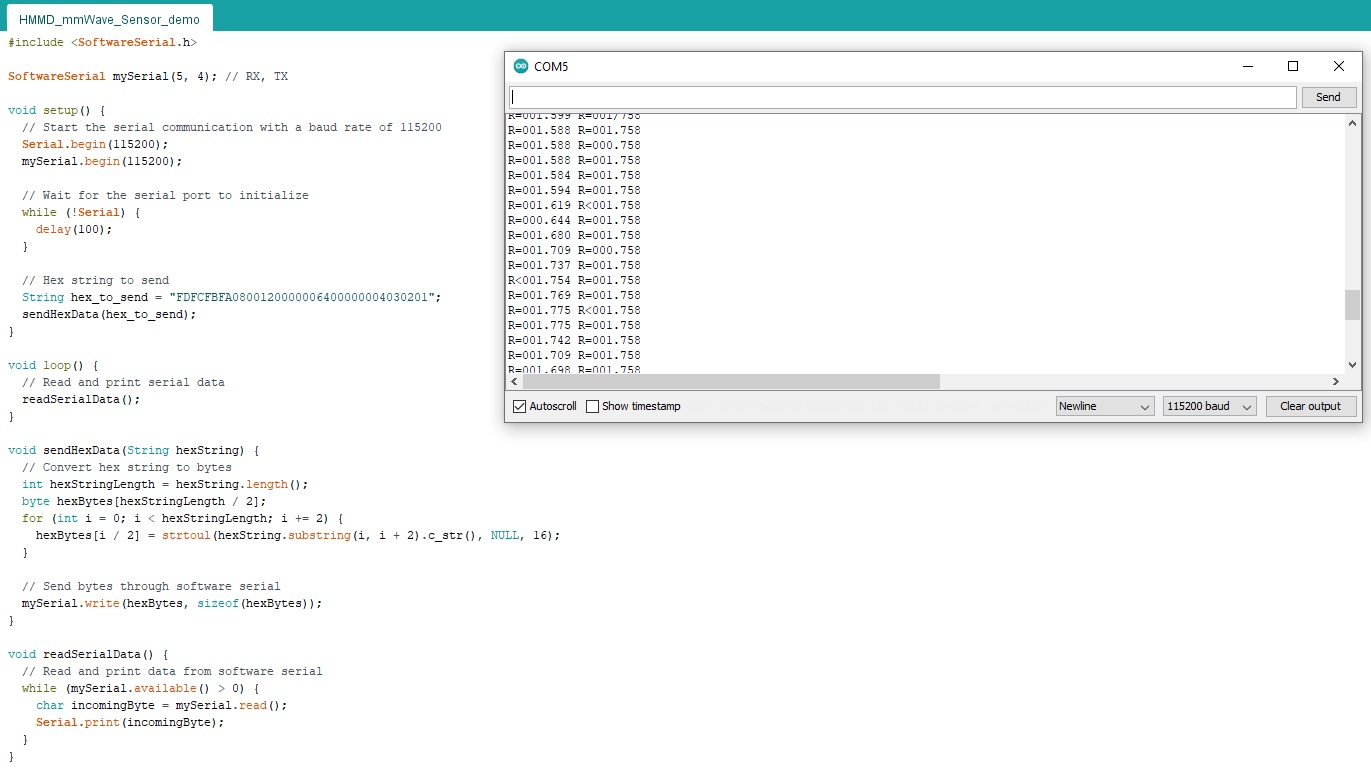
all, I use HLK-LD8001H, from somewhere I found Arduino demo code for this module and it's work, I guess it must work and for HLK-LD8001B. Rx pin from HLK-LD8001H I connected to softwareserial pin of Arduino Pin 5 and Tx pin from HLK-LD8001H to Tx softwareserial pin of Arduino (Pin 4). In Device Manager must be changed value of Baud rate for Arduino COM port to 115200 (it is default rate in HLK-LD8001H module). In Serial monitor i guess that R value is in meters, I measure distance to my ceiling moving sensor up and down.
I hope this will be useful for your.

#include <SoftwareSerial.h>

SoftwareSerial mySerial(5, 4); // RX, TX

void setup() {
  // Start the serial communication with a baud rate of 115200
  Serial.begin(115200);
  mySerial.begin(115200);

  // Wait for the serial port to initialize
  while (!Serial) {
    delay(100);
  }

  // Hex string to send
  String hex_to_send = "FDFCFBFA0800120000006400000004030201";
  sendHexData(hex_to_send);
}

void loop() {
  // Read and print serial data
  readSerialData();
}

void sendHexData(String hexString) {
  // Convert hex string to bytes
  int hexStringLength = hexString.length();
  byte hexBytes[hexStringLength / 2];
  for (int i = 0; i < hexStringLength; i += 2) {
    hexBytes[i / 2] = strtoul(hexString.substring(i, i + 2).c_str(), NULL, 16);
  }

  // Send bytes through software serial
  mySerial.write(hexBytes, sizeof(hexBytes));
}

void readSerialData() {
  // Read and print data from software serial
  while (mySerial.available() > 0) {
    char incomingByte = mySerial.read();
    Serial.print(incomingByte);
  }
}

Something I forgot:
For HLK-LD8001B it must be used level converter between radar sensor and Arduino (if Arduino module is whit 5V levels, HLK-LD8001B is whit 3.3V levels). HLK-LD8001H can work directly whit 5V.

Wow! What a good news!
I'll try it today or very soon.

A question ...
where is this command from

?

I mean ... how to understand the sentence if I want to build an other one ?

I'll be back with comment abuot my experience and - of course - I'll share it on github as soon as it is proven working for me.

HLK-LD8001B/H (and maybe all other radar sensor units from Hi-Link) are made all on ARM Cortex-M0+ microcontroller (chines version PY32F003F17U6TR of ARM32F003F6U6), they all are flashed with the same communication protocol and you can get it from other vendors that use same microcontroller with same internal code. On the link below you can find test software (I can't establish module port recognition with this software) and other things.


HMMD mmWave Sensor

Hello all,

first attempt did not work.
I've used those connections:

Arduino -> LD80001b
GND -> GND
3.3.V -> VCC
5 -> RX
4 -> TX

and

LD80001b -> LD80001b
P19 -> GND

I tried also with

LD80001b -> LD80001b
P12 -> GND
P19 -> GND

Both with Arduino IDE and CoolTerm

The only way I could receive something from LD80001 was with its own
RX1 and TX1 which did not have pins soldered on (when received)
I'll try the following connection set again and let you know.

Arduino -> LD80001b
GND -> GND
3.3.V -> VCC
5 -> RX1
4 -> TX1

and

LD80001b -> LD80001b
P19 -> GND

You gave me two good tips: the use of softSerial library and the init code.
Thanks for that.

According to datasheet, HLK-LD8001B is base on Cortez-M3

LD8001B is a radar sensing module developed based on ADT3102 chip, with monolithic
integration of 76-81GHz RF transceiver system, 1T1R PCB high gain antenna, 1MB flash, radar
signal processing unit, ARM® Cortex®-M3 core.

This picture from datasheet shows the ADT3102 fundamental connections

I've found a new set of .h sources. I'm not sure yet how to use them (in the sources section of my git deposit).
The board has i2c pins (cf pinout ) may possibly be used, since a i2c_xyz.h is provided.

If you use the code from #27, this connections are wrong.
You need to connect TX (transmitter) from one side to RX(receiver) on another. So you MUST to swap a pins 5 and 4.

I would like to note that using SoftwareSerial in your case is not advisable. As @ptillisch said above, SoftwareSerial works unstably at speeds above 19200, and this module requires a speed of 115200

Hello everyone,

topic is still alive .... talking with HLink representative.

Here are some important points :

  • The device has a pair of pins named SCL / SDA but the device is not i2c compatible.
  • We need a « UART TTL output device » to talk with the device
  • FT232RL seems to not be a proper tool for that.

I have now a copy of the software shown in the user manual (pdf). It works well under Windows, but needs the appropriate UART TTL to communicate with the HLK-LD8001b through USB

Any idea about UART communication is welcome.
I've tried unsuccessfully the SoftwareSerial.h library like this:

#include <SoftwareSerial.h>

SoftwareSerial mySerial(2, 3); // RX, TX
  byte message1[] = {0x01, 0x80, 0x00, 0x00, 0x04, 0x01, 0x00, 0x7B, 0x00, 0x00, 0x20, 0x40, 0x9F };
  byte message2[] = {0x01, 0x80, 0x01, 0x00, 0x04, 0x01, 0x01, 0x7B, 0x40, 0x1F, 0x00, 0x00, 0xA0};
  byte message3[] = {0x01, 0x80, 0x02, 0x00, 0x04, 0x01, 0x02, 0x7B, 0x3C, 0x00, 0x00, 0x00, 0xC3};
  byte message4[] = {0x01, 0x80, 0x03, 0x00, 0x04, 0x01, 0x03, 0x7B, 0x33, 0x33, 0x73, 0x40, 0xCC};
int rendu = 0;

void setup() {
  // Open serial communications and wait for port to open:
  Serial.begin(115200);
  while (!Serial) {
    ; // wait for serial port to connect. Needed for Native USB only
  }
  Serial.println("Début");

  // set the data rate for the SoftwareSerial port
  mySerial.begin(115200);
  mySerial.write(message1, sizeof(message1));
  mySerial.write(message2, sizeof(message2));
  mySerial.write(message3, sizeof(message3));
  mySerial.write(message4, sizeof(message4));
}

void loop() {
  Serial.print  ("Passage: ");
  Serial.println(++rendu);
  mySerial.write(message1, sizeof(message1));
  mySerial.write(message2, sizeof(message2));
  mySerial.write(message3, sizeof(message3));
  mySerial.write(message4, sizeof(message4));
  if (mySerial.available()) { Serial.println(mySerial.read()); }
  if (Serial.available())   { mySerial.write(Serial.read());   }
  delay(1500);
}
Please provide a detailed description of what it was that lead you to that impression.

Have you tried using it with the UNO board configured as a UART TTL, as described in post #9?

Hlink's tech said.

Yes I did.
In fact. I'm surprised it did not work.
Here is my method .... hopefully you can correct it and give me the final clue to have data out of the HLK-LD8001b

Arduino-IDE' terminal as observing point

UNO = Arduino UNO board
HLK = HLK-LD8001b device

Connections:
UNO DES <-> UNO GND
UNO RX <-> HLK RX
UNO TX <-> HLK TX
UNO 3.3 V <-> HLK 3.3V
UNO GND <-> HLK GND
HLK P19 <-> HLK GND

Please provide a detailed description of what you mean by "did not work".

As I said five months ago:

There might be some confusion because we have discussed two different configurations in this topic.

In post #9, I describe the use of the UNO board as a simple USB to serial bridge to allow communication directly between a serial terminal running on the computer and the sensor. In that case, counterintuitively, we must make what might seem to be an RX-RX, TX-TX connection (even though it is not actually that):

In post #27, a different configuration is described where the SoftwareSerial library is used to allow the sketch program running on the UNO board to communicate with the sensor. As you pointed out in post #33, the connections @Patriboom described in post #31 were incorrect for that configuration.

However, in post post #35 I asked @Patriboom about the results when using the configuration from post #9. It is my understanding from that context that the connections @Patriboom provided in post #36 were referring to that configuration.

@ptillisch
Thank for your clarification.

1 Like

I may have time today or tomorrow for some more tests. I'll let you know