shanren
February 2, 2023, 12:39am
1
Hi all.
rtc.setTime(30, 24, 15, 17, 1, 2021); // 17th Jan 2021 15:24:30
how to give rtc.setTime() a new time got from NTP?
#include <ESP32Time.h>

//ESP32Time rtc;
ESP32Time rtc(3600);  // offset in seconds GMT+1

void setup() {
  Serial.begin(115200);
  rtc.setTime(30, 24, 15, 17, 1, 2021);  // 17th Jan 2021 15:24:30
  //rtc.setTime(1609459200);  // 1st Jan 2021 00:00:00
  //rtc.offset = 7200; // change offset value

/*---------set with NTP---------------*/
//  configTime(gmtOffset_sec, daylightOffset_sec, ntpServer);
//  struct tm timeinfo;
//  if (getLocalTime(&timeinfo)){
//    rtc.setTimeStruct(timeinfo);
//  }
}

void loop() {
//  Serial.println(rtc.getTime());          //  (String) 15:24:38
//  Serial.println(rtc.getDate());          //  (String) Sun, Jan 17 2021
//  Serial.println(rtc.getDate(true));      //  (String) Sunday, January 17 2021
//  Serial.println(rtc.getDateTime());      //  (String) Sun, Jan 17 2021 15:24:38
//  Serial.println(rtc.getDateTime(true));  //  (String) Sunday, January 17 2021 15:24:38
//  Serial.println(rtc.getTimeDate());      //  (String) 15:24:38 Sun, Jan 17 2021
//  Serial.println(rtc.getTimeDate(true));  //  (String) 15:24:38 Sunday, January 17 2021
//
//  Serial.println(rtc.getMicros());        //  (long)    723546
//  Serial.println(rtc.getMillis());        //  (long)    723
//  Serial.println(rtc.getEpoch());         //  (long)    1609459200
//  Serial.println(rtc.getSecond());        //  (int)     38    (0-59)
//  Serial.println(rtc.getMinute());        //  (int)     24    (0-59)
//  Serial.println(rtc.getHour());          //  (int)     3     (0-12)
//  Serial.println(rtc.getHour(true));      //  (int)     15    (0-23)
//  Serial.println(rtc.getAmPm());          //  (String)  pm
//  Serial.println(rtc.getAmPm(true));      //  (String)  PM
//  Serial.println(rtc.getDay());           //  (int)     17    (1-31)
//  Serial.println(rtc.getDayofWeek());     //  (int)     0     (0-6)
//  Serial.println(rtc.getDayofYear());     //  (int)     16    (0-365)
//  Serial.println(rtc.getMonth());         //  (int)     0     (0-11)
//  Serial.println(rtc.getYear());          //  (int)     2021

//  Serial.println(rtc.getLocalEpoch());         //  (long)    1609459200 epoch without offset
  Serial.println(rtc.getTime("%A, %B %d %Y %H:%M:%S"));   // (String) returns time with specified format
  // formating options  http://www.cplusplus.com/reference/ctime/strftime/


  struct tm timeinfo = rtc.getTimeStruct();
  //Serial.println(&timeinfo, "%A, %B %d %Y %H:%M:%S");   //  (tm struct) Sunday, January 17 2021 07:24:38

  delay(1000);
}
terwal
February 2, 2023, 1:12am
4
You must define a WIFI connection that have access to internet and uncomment your NTP section.this
1 Like
Thanks.
I synch the ESP32's internal RTC to NTP using the code below (put it after the WiFi connection code)
#include "esp_sntp.h"

const char ntpServer[] = "pool.ntp.org";
const long gmtOffsetSec = -5 * 3600L;
const int daylightOffsetSec = 3600;

void setup() {
  timeval tv;
  time_t now;
  tm *timeinfo;
  char timeString[100];

  Serial.begin(115200);


  //*************************************************************************************
  //****************************** After WiFi is Connected ******************************
  //*************************************************************************************
  sntp_set_sync_mode(SNTP_SYNC_MODE_SMOOTH);
  configTime(gmtOffsetSec, daylightOffsetSec, ntpServer);
  sntp_sync_time(&tv);

  log_i("Waiting for Time Sync");
  while (true) {                 // Wait for NTP sync to take effect
    now = time(nullptr);
    timeinfo = localtime(&now);
    if (timeinfo->tm_year >= (2022 - 1900)) {
      break;
    }
    vTaskDelay(500);
  }

  sntp_sync_status_t syncStatus = sntp_get_sync_status();
  switch (syncStatus) {
    case SNTP_SYNC_STATUS_RESET:
      log_i("SNTP_SYNC_STATUS_RESET");
      break;

    case SNTP_SYNC_STATUS_COMPLETED:
      log_i("SNTP_SYNC_STATUS_COMPLETED");
      break;

    case SNTP_SYNC_STATUS_IN_PROGRESS:
      log_i("SNTP_SYNC_STATUS_IN_PROGRESS");
      break;

    default:
      log_e("Unknown Sync Status");
      break;
  }

  sntp_sync_mode_t mode = sntp_get_sync_mode();
  switch (mode) {
    case SNTP_SYNC_MODE_IMMED:
      log_i("SNTP_SYNC_MODE_IMMED");
      break;

    case SNTP_SYNC_MODE_SMOOTH:
      log_i("SNTP_SYNC_MODE_SMOOTH");
      break;

    default:
      log_e("Unknown Sync Mode");
      break;
  }

  uint32_t interval = sntp_get_sync_interval();
  log_i("NTP Sync Interval = %d", interval);

  strftime(timeString, 100, "%A, %B %d %Y %H:%M:%S", timeinfo);
  log_i("Local Time: %s", timeString);
}

void loop() {
}
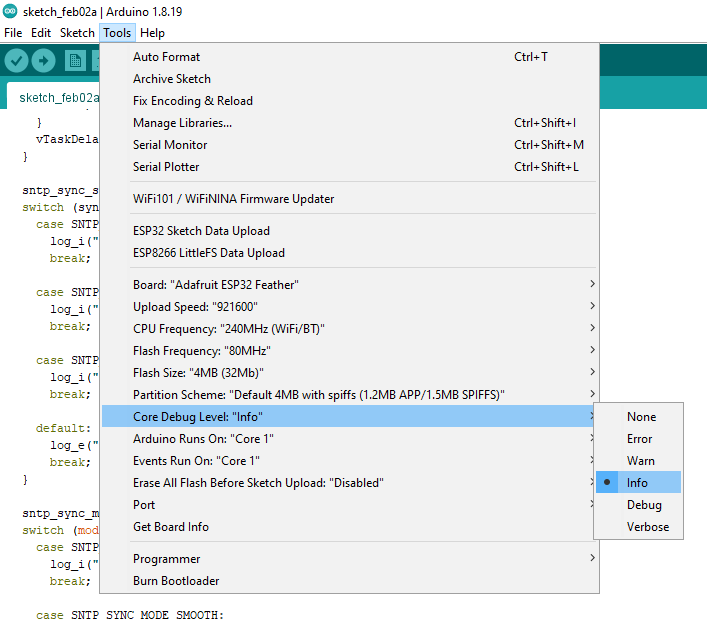
Set the core debug level to 'Info' to see the print outs.
1 Like
Thank you gfvalvo .
still which variable should I put into: rtc.setTime(variable);
What you want to do makes not sense. The 'ESP32Time' library is just a wrapper interface for the functions available in 'esp_sntp.h'. Those are the functions used in the code I posted. There's no need for ESP32Time.h.
Also as long as WiFi is connected, the ESP32's internal RTC will be periodically synched to NTP. The synch interval is reported by the code I posted and can be changed.
So, once synching periodically, just get the time using:
    now = time(nullptr);
    timeinfo = localtime(&now);
1 Like
system
August 2, 2023, 12:07am
11
This topic was automatically closed 180 days after the last reply. New replies are no longer allowed.