How to simplyfy switch cases with the same repeating codes but uses different variables

i have 6 serial objects here. Im coding for the raspberry pi pico using Earl E . Philhower's core.

Serial1 (hardware)
Serial2 (hardware)
Serial3 (SerialPIO)
Serial4 (SerialPIO)
Serial5 (SerialPIO)
Serial6 (SerialPIO)

and have a function

void myFunc(int deviceNumber, int x, int y) {

  switch (deviceNumber) {
    case 1:
      Serial1.println(x);
      Serial1.println(y);
      //some more codes that uses Serial 1
      Serial1.println(x + y);
      break;
    case 2:
      Serial2.println(x);
      Serial2.println(y);
      //some more codes that uses Serial 2
      Serial2.println(x + y);
      break;
    case 3:
      Serial3.println(x);
      Serial3.println(y);
      //some more codes that uses Serial 3
      Serial3.println(x + y);
      break;
    case 4:
      Serial4.println(x);
      Serial4.println(y);
      //some more codes that uses Serial 4
      Serial4.println(x + y);
      break;
    case 5:
      Serial5.println(x);
      Serial5.println(y);
      //some more codes that uses Serial 5
      Serial5.println(x + y);
      break;
    case 6:
      Serial6.println(x);
      Serial6.println(y);
      //some more codes that uses Serial 6
      Serial6.println(x + y);
      break;
    default:
      break;
  }
}

Each case statement is identical the only difference is which serial object i am using. I find this to be cluttered as if i need to edit 1 case statement i have to edit them all, which will leads me to sometimes miss a case. There has to be a better way of writing this that is more clean.

I would like to get something like this, its much more cleaner and not confusing to the eyes as there is no repeating lines of codes

void myFunc(int deviceNumber, int x, int y) {

  switch (deviceNumber) {
    case 1:
      HardwareSerial* ptr = Serial1;
      break;
    case 2:
      HardwareSerial* ptr = Serial2;
      break;
    case 3:
      SerialPIO* ptr = Serial3;
      break;
    case 4:
      SerialPIO* ptr = Serial4;
      break;
    case 5:
      SerialPIO* ptr = Serial5;
      break;
    case 6:
      SerialPIO* ptr = Serial6;
      break;
  }

  ptr -> println(x);
  ptr -> Serial1.println(y);
  //some more codes that uses SerialX
  ptr -> Serial1.println(x + y);
}

How can i do this?

Almost as you did probably as SerialPIO inherits from HardwareSerial you just define ptr as a local variable in your function (not in each case) and assign it.

Try


void myFunc(int deviceNumber, int x, int y) {
  HardwareSerial* ptr = nullptr;
  switch (deviceNumber) {
    case 1: ptr = &Serial1; break;
    case 2: ptr = &Serial2; break;
    case 3: ptr = (HardwareSerial*) &Serial3; break;
    case 4: ptr = (HardwareSerial*) &Serial4; break;
    case 5: ptr = (HardwareSerial*) &Serial5; break;
    case 6: ptr = (HardwareSerial*) &Serial6; break;
  }
  
  if (ptr != nullptr) {
    ptr -> println(x);
    ptr -> println(y);
    //some more codes that uses ptr
    ptr ->println(x + y);
  }
}

Serial generally inherits from Stream, so you could do something like this (has not been tested)


void myFunc(int deviceNumber, int x, int y) {
  Stream* serials[] = {
    &Serial1,
    &Serial2,
    &Serial3,
    &Serial4,
    &Serial5,
    &Serial6
  };

  if ((deviceNumber >= 1) && (deviceNumber <= 6)) {
    serials[deviceNumber]->println(x);
    serials[deviceNumber]->println(y);
    serials[deviceNumber]->println(x + y);
  }
}

This, if it works, is a little better, but still not very nice

void myFunc(int deviceNumber, int x, int y) {

  static HardwareSerial hwser[2] = {Serial1, Serial2};
  static SerialPIO pioser[4] = {Serial3, Serial4, Serial5, Serial6};

  if (deviceNumber<3) {
      hwser[deviceNumber-1].println(x);
      hwser[deviceNumber-1].println(y);
      hwser[deviceNumber-1].println(x + y);
      }
  else {
      pioser[deviceNumber-3].println(x);
      pioser[deviceNumber-3].println(y);
      pioser[deviceNumber-3].println(x + y);
  }
}

But does it? Or do both inherit from some other class like Stream? We need a Pico expert!

EDIT: @david_2018 may have cracked it

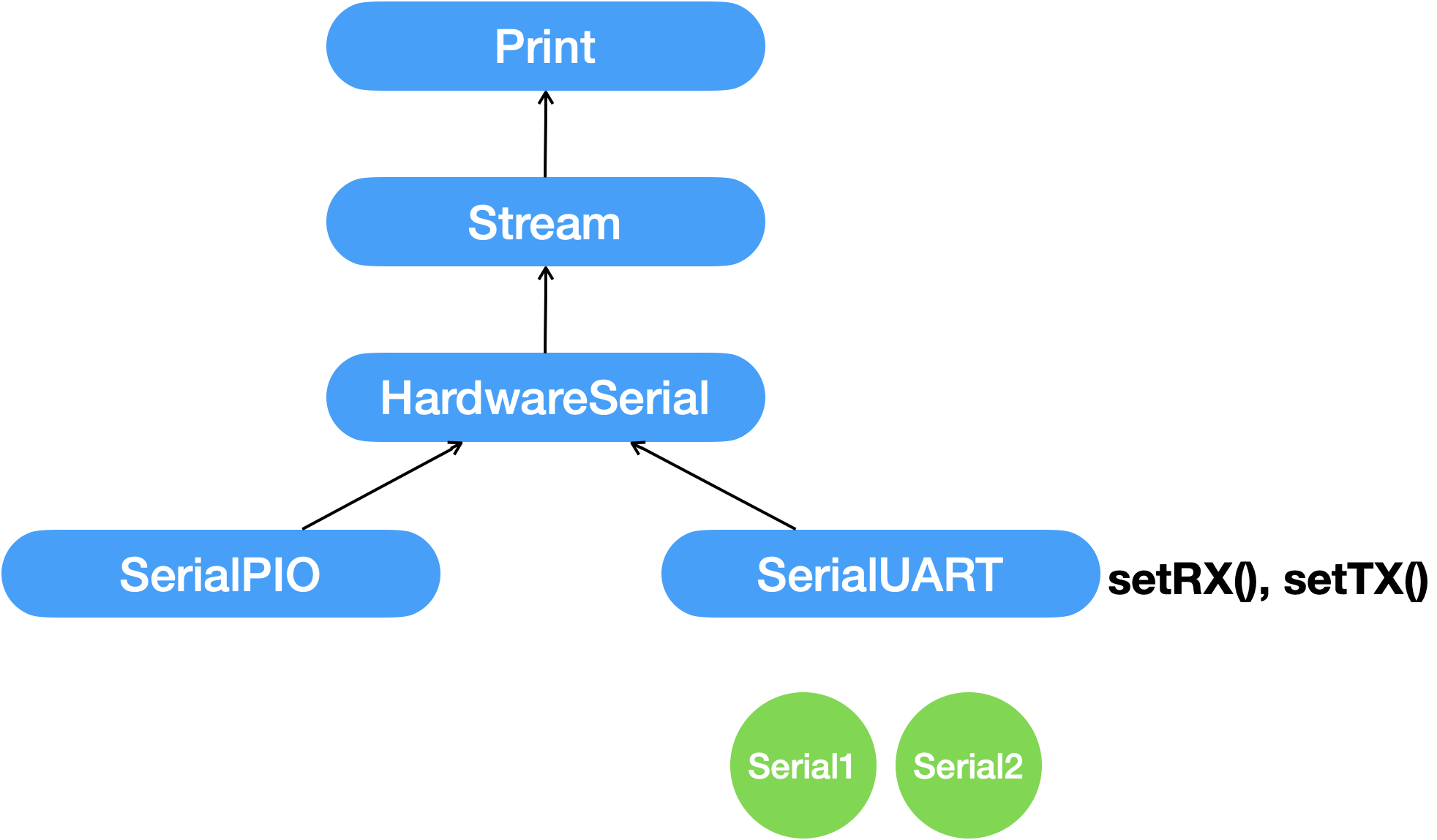
Stream inherits from Print.
All "stream like" I/O classes (HardwareSerial, SoftwareSerial, Wire, USBSerial, etc) inherit from Stream.

Well i checked in the source code before answering…

So there yo go:

 SerialPIO
    ^
    |
HardwareSerial
    ^
    |
  Stream
    ^
    |
   Print

what about

HardwareSerial serial [] = { Serial, Serial1, Serial2, Serial3 };

void
myFunc (
    int deviceNumber, int x, int y)
{
    serial [deviceNumber].println(x);
    serial [deviceNumber].println(y);
    serial [deviceNumber].println(x + y);
}

Or simply:

void myFunc(Stream& serial, int const x, int const y) {
  serial.println(x);
  serial.println(y);
  serial.println(x + y);
}

if indexing of the devices is not a requirement.

No.
That creates copies of the Serial, Serial1, Serial2, Serial3 objects in the array. It makes no sense to copy an object like Serial as it controls specific hardware resources. Having two such objects trying to control the same resources is asking for trouble.

ok, how about

HardwareSerial *serial [] = { &Serial, &Serial1, &Serial2, &Serial3 };

void
myFunc (
    int deviceNumber, int x, int y)
{
    serial [deviceNumber]->println(x);
    serial [deviceNumber]->println(y);
    serial [deviceNumber]->println(x + y);
}

Similar as Post #3, but not as good.

It only works for objects that are of type HardwareSerial. Would not work for objects of type SerialPIO (OP's example) because that class inherits from HardwareSerial.

Using a pointer to the base class (even if base class is purely abstract) gets you the polymorphism required. A references to the base class would also work, but you can't have an array of references.

Thank you, i find you answer to be the best and is easiest to understand. And of course it works

I was thinking of making it into a class to how would it be done then? when i tried i get an error

error: 'class arduino::HardwareSerial' has no member named 'setRX'

Here is my attempt

class uartDevice{

public:

  uartDevice(int serialDeviceNumber, uint8_t GPIO_TX, uint8_t GPIO_RX, uint8_t GPIO_RST, uint32_t FIFO_SIZE = 512) {

    txPin = GPIO_TX;
    rxPin = GPIO_RX;
    resetPin = GPIO_RST;
    bufferSize = FIFO_SIZE;

    pinMode(resetPin, OUTPUT);
    digitalWrite(resetPin, LOW);

    switch (serialDeviceNumber) {
      case 1:
        serialDevice = &Serial1;
        serialDevice->setRX(rxPin);
        serialDevice->setTX(txPin);
        serialDevice->setFIFOSize(bufferSize);
        break;
      case 2:
        serialDevice = &Serial2;
        serialDevice->setRX(rxPin);
        serialDevice->setTX(txPin);
        serialDevice->setFIFOSize(bufferSize);
        break;
      case 3:
      case 4:
      case 5:
      case 6:
        serialDevice = new SerialPIO(txPin, rxPin, bufferSize);
        break;
        default;
        return;
    }
  }

  void begin() {
    serialDevice->begin(9600);
  }

private:
  uint8_t txPin;
  uint8_t rxPin;
  uint8_t resetPin;
  uint32_t bufferSize;

  HardwareSerial* serialDevice = nullptr;
};

A possible work around is to just use Serial1 directly. This solution feels a bit hacky and not really the proper aproach.

      case 1:
        serialDevice = &Serial1;
        // serialDevice->setRX(rxPin);
        // serialDevice->setTX(txPin);
        // serialDevice->setFIFOSize(bufferSize);
        Serial1.setRX(rxPin);
        Serial1.setTX(txPin);
        Serial1.setFIFOSize(bufferSize);
        break;
      case 2:
        serialDevice = &Serial2;
        // serialDevice->setRX(rxPin);
        // serialDevice->setTX(txPin);
        // serialDevice->setFIFOSize(bufferSize);
        Serial2.setRX(rxPin);
        Serial2.setTX(txPin);
        Serial2.setFIFOSize(bufferSize);
        break;

How was this declared ?

Under private of the class

@J-M-L ,

I read this this morning and thought it was interesting, now I've just used it. Something new I've learned how to do.

Thank you! :grinning:

OK so it's an instance variable of type pointer to HardwareSerial

Serial1 and Serial2 are indeed related to that type but the methods setRX() and setTX() are defined in a child class, SerialUART (which inherits from HardwareSerial)

looking at the source code

#if defined(PIN_SERIAL1_RTS)
SerialUART Serial1(__SERIAL1_DEVICE, PIN_SERIAL1_TX, PIN_SERIAL1_RX, PIN_SERIAL1_RTS, PIN_SERIAL1_CTS);
#else
SerialUART Serial1(__SERIAL1_DEVICE, PIN_SERIAL1_TX, PIN_SERIAL1_RX);
#endif

#if defined(PIN_SERIAL2_RTS)
SerialUART Serial2(__SERIAL2_DEVICE, PIN_SERIAL2_TX, PIN_SERIAL2_RX, PIN_SERIAL2_RTS, PIN_SERIAL2_CTS);
#else
SerialUART Serial2(__SERIAL2_DEVICE, PIN_SERIAL2_TX, PIN_SERIAL2_RX);
#endif

it turns out that Serial1 and Serial2 are instances of SerialUART and the challenge is that the class SerialPIO also inherits from HardwareSerial but not from SerialUART where setRx and setTx exists

that's the inheritance tree

when you call serialDevice->setRX(rxPin); it fails because an HardwareSerial object does not have the setRx() method.

a bad hack would be to cast it to what it is for the call as we know for sure it's a SerialUART pointer in reality so you could have a static_cast< SerialUART*> before calling the method but as you know exactly what's the object at that stage, it's best to write it like this

class uartDevice{

public:

  uartDevice(int serialDeviceNumber, uint8_t GPIO_TX, uint8_t GPIO_RX, uint8_t GPIO_RST, uint32_t FIFO_SIZE = 512) {

    txPin = GPIO_TX;
    rxPin = GPIO_RX;
    resetPin = GPIO_RST;
    bufferSize = FIFO_SIZE;

    pinMode(resetPin, OUTPUT);
    digitalWrite(resetPin, LOW);

    switch (serialDeviceNumber) {
      case 1:
        Serial1->setRX(rxPin);
        Serial1->setTX(txPin);
        Serial1->setFIFOSize(bufferSize);
        serialDevice = &Serial1;
        break;
      case 2:
        Serial2->setRX(rxPin);
        Serial2->setTX(txPin);
        Serial2->setFIFOSize(bufferSize);
        serialDevice = &Serial2;
        break;
      case 3:
      case 4:
      case 5:
      case 6:
        serialDevice = new SerialPIO(txPin, rxPin, bufferSize);
        break;
        default;
        return;
    }
  }

  void begin() {
    serialDevice->begin(9600);
  }

private:
  uint8_t txPin;
  uint8_t rxPin;
  uint8_t resetPin;
  uint32_t bufferSize;

  HardwareSerial* serialDevice = nullptr;
};

I see that there is no other way around.

Since ww basically came up with the same code, there is actually a slight problem with the code that for the last 24 hours i have been trying to fix

calling Serial2.setTx() and Serial2.setRX() inside a class is causing problems, calling them in setup() for example does not. When those functions are called inside a class it causes the pico to freeze up and is not detectable by the PC anymore. You will need to use the BOOTSEL button in order to upload new code again. The worst part is it wont even go into setup() and loop().

class uartDevice {

  public:

    uartDevice(int serialDeviceNumber, uint8_t GPIO_TX, uint8_t GPIO_RX, uint8_t GPIO_RST, uint32_t FIFO_SIZE = 512) {

      deviceNumber = serialDeviceNumber;
      txPin = GPIO_TX;
      rxPin = GPIO_RX;
      resetPin = GPIO_RST;
      bufferSize = FIFO_SIZE;

      pinMode(resetPin, OUTPUT);
      digitalWrite(resetPin, LOW);

      switch (serialDeviceNumber) {
        case 1:
          Serial1.setTX(txPin);
          Serial1.setRX(rxPin);
          Serial1.setFIFOSize(bufferSize);
          serialDevice = &Serial1;
          break;
        case 2:
          Serial2.setTX(4); // Same exact code as in the setup() but this is causing hangs up
          Serial2.setRX(5);
          Serial2.setFIFOSize(512);
          serialDevice = &Serial2;
          break;
        default:
          return;
      }
    }

  private:
    uint8_t deviceNumber;
    uint8_t txPin;
    uint8_t rxPin;
    uint8_t resetPin;
    uint32_t bufferSize;

    HardwareSerial* serialDevice = nullptr;
};


uartDevice dev2(2,  4,  5,  6, 512); // <- this line causes the freeze


void setup() {
  pinMode(LED_BUILTIN, OUTPUT);

  //    Serial2.setTX(4); // When executed here works no problem
  //    Serial2.setRX(5);
  //    Serial2.setFIFOSize(512);

}

void loop() {
  digitalWrite(LED_BUILTIN, HIGH);
  delay(200);
  digitalWrite(LED_BUILTIN, LOW);
  delay(200);
}

So i finally found out what was going on.. In short its a C++ issue. This was explained to me by Earle E Philhower himself

You are running into a C++ issue, not a core one here. The order that constructors are called is not guaranteed, so you cannot call another global object safely. That's why there are the ::begin methods which do most of the work in the Arduino core. The object constructors just set a couple entries and call no other objects.

In the case which "does nothing" your constructor is called before the Serial2 one, so the Serial2::Serial2() constructor overwrites the values you just set.
- earlephilhower

So the solution is to move the lines of code into the begin function.

class uartDevice {

  public:

    uartDevice(int serialDeviceNumber, uint8_t GPIO_TX, uint8_t GPIO_RX, uint8_t GPIO_RST, uint32_t FIFO_SIZE = 512) {

      deviceNumber = serialDeviceNumber;
      txPin = GPIO_TX;
      rxPin = GPIO_RX;
      resetPin = GPIO_RST;
      bufferSize = FIFO_SIZE;
    }

  void begin(){
      pinMode(resetPin, OUTPUT);
      digitalWrite(resetPin, LOW);

      switch (serialDeviceNumber) {
        case 1:
          Serial1.setTX(txPin);
          Serial1.setRX(rxPin);
          Serial1.setFIFOSize(bufferSize);
          serialDevice = &Serial1;
          break;
        case 2:
          Serial2.setTX(4); // Same exact code as in the setup() but this is causing hangs up
          Serial2.setRX(5);
          Serial2.setFIFOSize(512);
          serialDevice = &Serial2;
          break;
        default:
          return;
      }
 }
  private:
    uint8_t deviceNumber;
    uint8_t txPin;
    uint8_t rxPin;
    uint8_t resetPin;
    uint32_t bufferSize;

    HardwareSerial* serialDevice = nullptr;
};

I did not realize it was the constructor. I just focused on the code

Yes that’s why there is a begin function to many classes