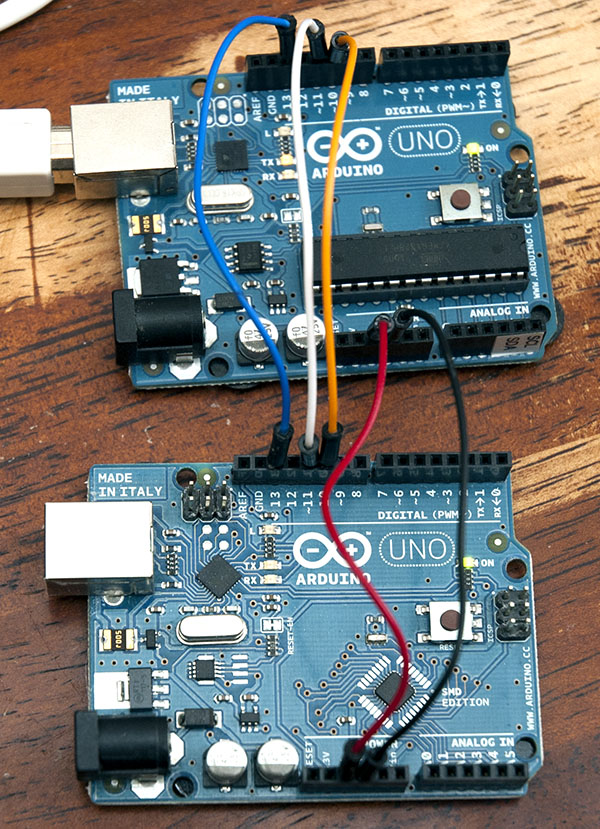
I have made a posting (link below) which describes how you can use SPI to output debugging messages from a processor "under test" to a second one which simply echoes the messages to a serial port.
This is particularly useful if you are debugging serial messages, because it can be tricky to connect up a serial device for two-way communication, and also do debugging prints at the same time.
To make this work you only need to connect 5 wires from one Uno (or similar) to the other.
I used the WD interrupt on the target system (the server) and had a fairly comprehensive monitor program running on the second Arduino (the client). It allowed memory dumps, IO read/write etc as per a normal monitor.
Yeah, I haven't done any more on this but it could be a useful tool I reckon. Maybe I'll get back onto it one day :), truth is I haven't done much software since (been designing hardware) so I haven't had the incentive to finish it off.
This is the thing that troubles me about the forum,
Could post to an appropriate section, and make it sticky.
Though I'm not exactly sure what the appropriate section would be.
Maybe a new section over at the Playground for debug techniques?
Are you using the I2C port + 2nd Uno as the equivalent of a second serial port? 'Cos this is also doable with the (New)SoftSerial library, and for one-way data flow only occupies one DIO pin.
Absolutely. There are quite a few ways of doing it. Using software serial is a viable approach under many circumstances. However the software serial does tend, I believe, to be rather CPU intensive as it relies on software rather than hardware. Also serial comms in general tends to be slower than I2C or SPI.
It depends a lot on what pins (if any) you have free for debugging. If your main project uses SPI, then you might need to use serial, software serial, or I2C for debugging messages. Or if the main project uses I2C then SPI might work for you.
Another debugging approach is to just turn a pin on or off (eg. to a LED) if timing is critical.
What I like about the SPI approach is that it has a minimal impact on the program execution (as clocking out SPI is quite fast).
I posted to your other thread, but am not sure that you still monitor it, so at risk of being wrapped over the knuckles for cross posting I will repeat it here
I installed and tested the code that Nick Gammon posted (Thanks Nick) and was interested to try the additional features that you have implemented.
I am using two MEGA2560 boards and have connected them via the SPI pins (50 - 53).
Nicks' Code is working fine, so I am reasonably confident that my cabling is correct, but when I run your code the serial monitor reports:
QUUBmon v1.0
Compiled for
  Server: ATmega2560
  Client: ATmega2560
on Sep  2 2011

QM> Server offline.
QM> bad frame
I have confirmed that both Server and Client have the settings:
//#define RUNNING_ON_328 #define RUNNING_ON_2560
and have confirmed that the pins defined for SPI are 50 - 53.
Any suggestions of where I should start looking to debug it?