I am encountering a bug with my driver in the IDE that i cannot fix

. Variables and constants in RAM (global, static), used 28268 / 80192 bytes (35%)
║ SEGMENT BYTES DESCRIPTION
╠══ DATA 1524 initialized variables
╠══ RODATA 1032 constants
╚══ BSS 25712 zeroed variables
. Instruction RAM (IRAM_ATTR, ICACHE_RAM_ATTR), used 59747 / 65536 bytes (91%)
║ SEGMENT BYTES DESCRIPTION
╠══ ICACHE 32768 reserved space for flash instruction cache
╚══ IRAM 26979 code in IRAM
. Code in flash (default, ICACHE_FLASH_ATTR), used 237744 / 1048576 bytes (22%)
║ SEGMENT BYTES DESCRIPTION
╚══ IROM 237744 code in flash
esptool.py v3.0
Serial port COM4

A fatal esptool.py error occurred: Cannot configure port, something went wrong. Original message: PermissionError(13, 'A device attached to the system is not functioning.', None, 31)

Is your bughopper in port 4? https://www.youtube.com/live/oBQTn2shxho?t=3843s

it is

Hi @foxfurious05. Please tell us which USB to serial bridge chip your Arduino board has. This is a black chip near the USB socket.

The chip will usually be identified by writing on the top. This might say something like "WCH CH340G" or "SILABS CP2102".

Examples:

WCH CH340

📷

SparkFun - CC BY-SA 4.0 (cropped)

There are some boards on the market that have a USB chip with the same IC package as the WCH CH340, and which are identified by the computer as a CH340. However, these chips don't have the "WCH CH340C ..." labeling like you see on the chip in the picture above:

📷

NodeMCU Lua Lol1n V3.jpg by Popolon - CC BY-SA 4.0 (cropped)

These mysterious unlabeled chips have different characteristics than the labeled CH340 chips, so please let us know if yours is labeled or not.

Silicon Labs CP2102

CP2102

📷

SparkFun - CC BY-SA 4.0 (cropped)


If it isn't clear, alternatively you can provide the link to where you bought the board from and we'll see if we can determine the chip from the product listing.

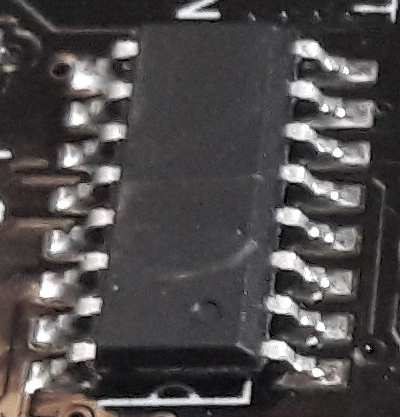
I can’t really see it but here is the board i bought

I also bought the board on amazon with the arduino official seller account

i also noticed this
image
and i don't think its supposed to be here

I do not have a Windoz unit however this is what I have observed over time on this Forum.

  1. Close Serial Monitor and Serial Plotter.
  2. Close any other program using COM4.
  3. Unplug the board, wait a few seconds, plug it back in.
  4. Check Tools -> Port and make sure COM4 is still the board.
  5. Try a different USB cable.
  6. Try a different USB port.
  7. If it uses CH340, reinstall or update the CH340 driver.
  8. Lower upload speed if available.
  9. Try Linux

I will try that and give feedback on it also thanks for providing a fix but on the other hand i also think its because of the DFU

Found this in the arduino docs

Would it be possible to get the link ?

Here it is @foxfurious05:

https://docs.arduino.cc/tutorials/nano-esp32/getting-started-nano-esp32/#install-board-package

Thank you very much i will give feedback if anything goes wrong

it seems everything is working thanks everyone