As the title says, I'm trying to set up I2C connection between Arduino UNO as master to Digispark ATTiny85 as slave.
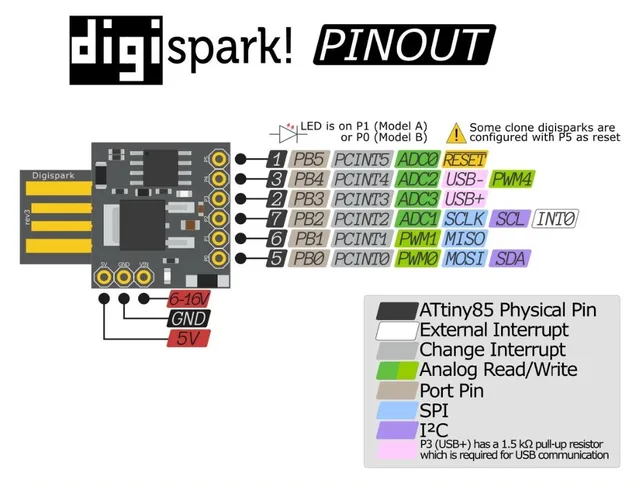
This is the device I have.
Connections:
Arduino UNO ---------> ATTiny85
Pin A5 (SCL) ---------> PB2
Pin A4 (SDA) ---------> PB0
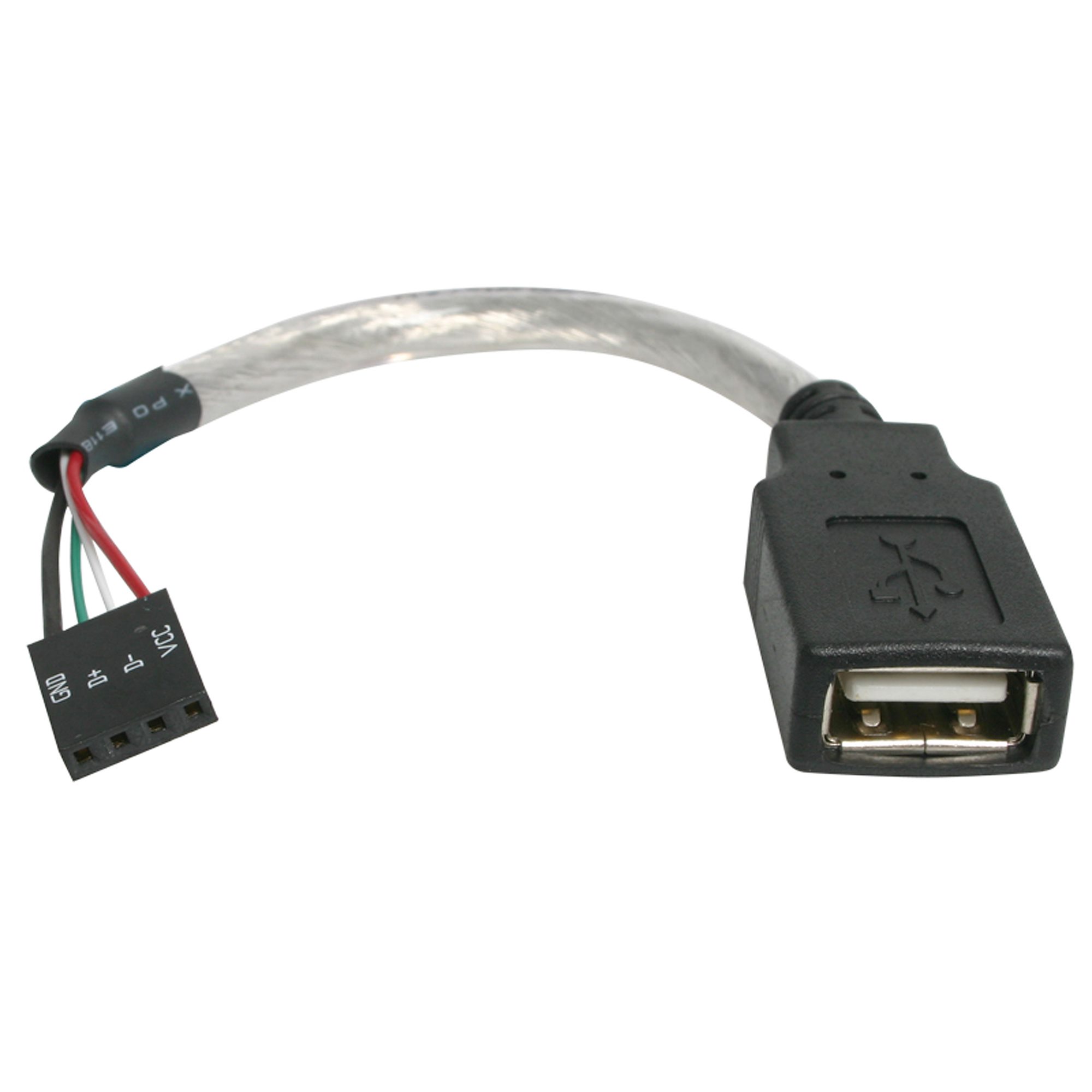
5V and GND ---------> Female usb plug to which the ATTiny is plugged into.
5.1kΩ Pull-Up Resistors on SDA to 5V.
5.1kΩ Pull-Up Resistors on SCL to 5V.
This is what I'm using for the USB connection.
Diagram:

This is the code for the Arduino:
#include <Arduino.h>
#include <Wire.h>
#include "IRremote.h"

// IR Receiver
int receiver = 13;                // Signal Pin of IR receiver to Arduino Digital Pin 13
IRrecv irrecv(receiver);          // create instance of 'irrecv'
uint32_t last_decodedRawData = 0; // variable used to store the last decodedRawData

const byte SLAVE_ADDR = 100; // ATtiny84A I2C address

void sendToATTiny(byte command)
{
    Wire.beginTransmission(SLAVE_ADDR);
    Wire.write(command);
    byte error = Wire.endTransmission();
    Serial.print("Transmission status: ");
    Serial.println(error == 0 ? "Success" : "Failed");
}

void setup()
{
    Serial.begin(9600);
    Wire.begin();

    // I2C Scanner
    Serial.println("I2C Scanner starting...");
    byte error, address;
    int nDevices = 0;

    for (address = 1; address < 127; address++)
    {
        Wire.beginTransmission(address);
        error = Wire.endTransmission();

        if (error == 0)
        {
            Serial.print("I2C device found at address 0x");
            if (address < 16)
            {
                Serial.print("0");
            }
            Serial.println(address, HEX);
            nDevices++;
        }
    }

    if (nDevices == 0)
    {
        Serial.println("No I2C devices found");
    }

    irrecv.enableIRIn(); // Start the receiver
    Serial.println("Setup complete");
}

void loop()
{
    if (irrecv.decode())
    {
        if (irrecv.decodedIRData.flags)
        {
            irrecv.decodedIRData.decodedRawData = last_decodedRawData;
        }
        Serial.print("Raw HEX: 0x");
        Serial.println(irrecv.decodedIRData.decodedRawData, HEX);
        Serial.print("Command: 0x");
        Serial.println(irrecv.decodedIRData.command, HEX);
        Serial.print("Address: 0x");
        Serial.println(irrecv.decodedIRData.address, HEX);
        Serial.println("------------------------");

        switch (irrecv.decodedIRData.decodedRawData)
        {
        case 0xF30CFF00: // Button 1 pressed
            sendToATTiny(1);
            break;
        case 0xE718FF00: // Button 2 pressed
            sendToATTiny(2);
            break;
            // Add more buttons as needed
        }

        last_decodedRawData = irrecv.decodedIRData.decodedRawData;
        irrecv.resume();
    }
}
This is for the ATTiny:
// ATTiny85 Code (Updated)
#include <Arduino.h>
#include "TinyWireS.h"

const byte SLAVE_ADDR = 0x64;
volatile byte receivedCommand = 0;
unsigned long previousMillis = 0;
byte ledState = LOW;
int interval = 0;

void setup() {
  pinMode(1, OUTPUT);
  TinyWireS.begin(SLAVE_ADDR);
  TinyWireS.onReceive(receiveEvent);
}

void loop() {
  if (receivedCommand != 0) {
    // Set interval based on command
    switch (receivedCommand) {
      case 1: interval = 1000; break; // 1-second blinks
      case 2: interval = 100;  break; // 0.1-second blinks
    }
    receivedCommand = 0; // Reset command
    previousMillis = millis(); // Reset timer
  }

  // Non-blocking blink logic
  if (interval > 0 && (millis() - previousMillis >= interval)) {
    previousMillis = millis();
    ledState = !ledState;
    digitalWrite(1, ledState);
  }
}

void receiveEvent(uint8_t numBytes) {
  if (TinyWireS.available()) {
    receivedCommand = TinyWireS.read();
    // Quick blink to acknowledge receipt
    digitalWrite(1, HIGH);
    delay(50); // Short delay (non-critical here)
    digitalWrite(1, LOW);
  }
}
These are the logs:
I2C Scanner starting...
I2C device found at address 0x64
Setup complete
I2C Scanner starting...
I2C device found at address 0x64
Setup complete
Raw HEX: 0xF30CFF00
Command: 0xC
Address: 0x0
------------------------
Transmission status: Success
Raw HEX: 0xE718FF00
Command: 0x18
Address: 0x0
------------------------
Transmission status: Success
Raw HEX: 0xE718FF00
Command: 0x18
Address: 0x0
------------------------
Transmission status: Success
Raw HEX: 0xF30CFF00
Command: 0xC
Address: 0x0
But the led on the Digispark Attiny doesn't blink (I tested that same code on the tiny without the counditionals and it does blink as intended)
- Do I require the pullup resistors for this set up?
- Am I missing anything else?
- Any other suggestions?