LCD menu with encoder

Is this LCD menu missing code for the encoder?
https://forum.arduino.cc/index.php?topic=53265.0

I plan to integrate this code with the previous, if needed. I thought
#define MOVECURSOR 1
#define MOVELIST 2
were pins for the encoder...

The function read_encoder() is not declared--because it doesn't exist!

So I inserted this:

int8_t read_encoder(){ // By Oleg Mazurov
// returns change in encoder state (-1,0,1) 
static int8_t enc_states[] = {0,-1,1,0,1,0,0,-1,-1,0,0,1,0,1,-1,0}; 
static uint8_t old_AB = 0; 
/**/ 
old_AB <<= 2; //remember previous state 
old_AB |= ( ENC_PORT & 0x03 ); //add current state 
return ( enc_states[( old_AB & 0x0f )]); 
}

Still working on other bugs, but the "Simple universal LCD menu code" is missing something involving the encoder, right?

Why not take an encoder example and expand that to do your LCD menu?

econjack:
Why not take an encoder example and expand that to do your LCD menu?

I plan to integrate this code with the previous, if needed. I thought
#define MOVECURSOR 1
#define MOVELIST 2
were pins for the encoder...

Well, I know there is something that needs to be taken out. The LCD menu seemed to have some code for the encoder. Wish someone would've commented on if all that is needed is the read_encoder() routine.

/*
  Mega 2560 (Tools → Board)
*/
#include <LiquidCrystal.h>
#include <OneWire.h> 
#include <DallasTemperature.h>

#define MOVECURSOR 9  // constants for indicating whether cursor should be redrawn
#define MOVELIST 10
#define ENC_PORT PINC // https://arduino.stackexchange.com/a/21296/47871

const byte totRows = 4;  // total rows of LCD
const byte totCols = 20;  // total columns of LCD
unsigned long timeoutTime = 0;  // this is set and compared to millis to see when the user last did something.
const int menuTimeout = 10000; // time to timeout in a menu when user doesn't do anything.
const int a = 30;  // Paragon // 30 mm = 1.2" = 0.1'
const int b = 61;  // 0.2 foot paragon
const int c = 91;  // 0.3 foot paragon        
const int d = 122;  // 0.4 foot paragon
const int e = 152;  // 0.5 foot paragon
const int f = 183;  // 0.6 foot paragon        
const int g = 213;  // 0.7 foot paragon

unsigned long startMillis;
unsigned long currentMillis;
unsigned long currentMillisA;
unsigned long currentMillisD;
unsigned long currentMillis1;
const unsigned long period = 1000;
const byte txPin3 = 14;
const byte rxPin3 = 15;
const byte txPin2 = 16;
const byte rxPin2 = 17;
const byte pinAnalog = 2;
const byte pinDigital = 3;  // slide switch switch allows user to select (input) test
const byte pinOneWire = 4;
const byte oneWireBus = 5;
const byte pinAnalogW = 6;    // write (output) to test datalogger
const byte pinDigitalW = 7;   //                                  ----------------
const byte pinOneWireW = 8;   //                                  ----------------
const byte pinA = 22; // 1st hardware interrupt: CLK
const byte pinB = 26; // 2nd hardware interrupt: DT
volatile int diffFromParagon = 0;
volatile int inch = 0;
// https://forum.arduino.cc/index.php?topic=418692.0 // volatile
volatile byte aFlag = 0; // indicates when expected rising edge: pinA to signal that the encoder has arrived at a detent
volatile byte bFlag = 0; // (opposite direction to when aFlag is set for pinB)
volatile byte encoderPos = 0; // encoder position. Change to int or uin16_t instead of byte if you want to record a larger range than 0-255
volatile byte oldEncPos = 0; // last encoder position value, compares to current reading (to know when to print to the serial monitor)
volatile byte reading = 0; // stores direct values read from interrupt pins before checking to see if moved a whole detent

LiquidCrystal lcd(52, 50, 49, 47, 43, 41); // Arduino pins. Creates object.
    // LCD pin (RS enable D4 D5 D6 D7) parameters
OneWire oneWire(oneWireBus);
    // Setup a oneWire instance to communicate with any OneWire devices  
    // (not just Maxim/Dallas temperature ICs) 
DallasTemperature sensors(&oneWire);
    // Passes oneWireBus reference to Dallas Temperature. 

void setup() {
  startMillis = millis();  // initial start time
  
// LCD code:
  Serial.begin(9600);
  lcd.begin(20, 4);
  
// pinMode not needed for INPUT (default) operator
  pinMode(8, OUTPUT);
  pinMode(9, OUTPUT);
  pinMode(10, OUTPUT);
  pinMode(11, OUTPUT);
  pinMode(12, OUTPUT);
  pinMode(13, OUTPUT);
  pinMode(14, OUTPUT);
  pinMode(15, OUTPUT);
  pinMode(2, OUTPUT);
  pinMode(3, OUTPUT);
  pinMode(4, OUTPUT);
  
// encoder code:
  pinMode(pinA, INPUT_PULLUP); // pulled HIGH to the logic voltage (5V or 3.3V for most cases)
  pinMode(pinB, INPUT_PULLUP);
  attachInterrupt(0,PinA,RISING); // interrupt, looking for rising edge signal and 
  attachInterrupt(1,PinB,RISING); // executing the "PinX" Interrupt Service Routine (below)
  Serial1.begin(115200); // pin 18 (TX) & 19 (RX)
  digitalWrite(pinB, HIGH);

// oneWire sensors:
  sensors.begin();
}

void loop() {
  currentMillis = millis(); // milliseconds since start
  
  lcd.setCursor(0, 0);
  lcd.print("Welcome.");
  lcd.setCursor(0, 1);
  lcd.print("Ready to make a selection.");
  
  byte analogSelection = digitalRead(pinAnalog);   // 2
  byte digitalSelection = digitalRead(pinDigital); // 3
  byte oneWireSelection = digitalRead(pinOneWire); // 4

  if(analogSelection == HIGH)
  {
    currentMillisA = millis();
    if(currentMillisA - startMillis > 1000*60) // one min.
    {
      lcd.clear();
      lcd.setCursor(0, 0);        // 1st line
      lcd.print("Testing...");
      lcd.setCursor(0, 1);        // 2nd
      lcd.print("Analog inputs");
      lcd.setCursor(0, 2);        // 3rd
      lcd.print("Please wait.");     
      for(int pin = 0; pin < 8; pin++)
        for(int s = 63; s <= 255; s += 64)
          {          // PWM: 255 = 5V
            analogWrite(pin, s);      // sweeps 1.24, 2.5, 3.75 & 5V
            delay(500);
         }
    }
  }
  else if(digitalSelection == HIGH)
  {
    currentMillisD = millis();
    if(currentMillisD - startMillis > 1000*60) // one min.
    basicMenu();    /////////////////////////////////////////////////// TEST CONTIUNITY FOR THE SENSOR ON PIN 4 TO CHEDFKCK!@!#@
  }  
  else if(oneWireSelection == HIGH)
  {
    currentMillis1 = millis();
    if(currentMillis1 - startMillis > 1000*60); // one min.
    lcd.print("Testing temperatures...");
    sensors.requestTemperatures(); // gets temperature readings
    lcd.print("Temperature is: "); 
    lcd.print(sensors.getTempCByIndex(0)); // Why "byIndex"?  
   // "0" refers to the first IC on the wire
   // (You can have more than one DS18B20 on the same bus.)
  }
  else  // multiple inputs toggled at once, error message:
    lcd.print("Only select one test at a time.");
  // https://forum.arduino.cc/index.php?topic=223286.0  Maybe multiple things can happen...

   
  // Original encoder code (but it was incomple: had to read_encoder() routine
 static byte counter = 0;      //this variable will be changed by encoder input
 char tmpdata;
 tmpdata = read_encoder();

  // New encoder code (might conflict with original above)
  if(oldEncPos != encoderPos) 
  {
    Serial1.println(encoderPos);
    oldEncPos = encoderPos;
  }    
}

The rest of the code--the function definitions--is in the complete sketch attached.

sketch_jul17.ino (16.1 KB)

I inserted the menu routine which seemed like it was for an encoder. I found it was incomplete (also asked about on that arduino forum's page).

So I added read_encoder(). I then integrated the "bloated" code because I think the menu routine is still missing things. So now I believe I have unnecessary code.

...Good this is my full-time job right now; it's taking forever for what I thought was adding a simple LCD menu functionality. I'll spend more hours trying to understand what is needed for it to work...

I took a C++ course about three years ago, and now mostly use MATLAB during the semester. (I'm a senior electrical engineering student.)

I just want to complete this summer project, whatever the means. I decided to see if the current program works, and I'm getting a timeout error after uploading to the Mega 2560.

Thanks! You are right. (Took IT half-a-day to install the driver.) Blink is now blinking the LCD screen too...just trying to get the LCD examples to work...

Delta_G:
but you need to have some C++ knowledge to work with it.GitHub - delta-G/REBL_UI: Simple menu UI for Arduino with 16x2 LCD, rotary encoder, and a single button

Rotary Encoder, Button, and LCD User interface with Menu - Exhibition / Gallery - Arduino Forum

I do not know C++ classes that well. Although, I am still trying. Is Time.h built in? I couldn't find that on your GitHub.

OK, well I found a Time library: GitHub - PaulStoffregen/Time: Time library for Arduino

I'm just trying to get the REBL_UI_Example to work:

MenuItem PROGMEM menuItems[] = {
 { "display", fun1   }  ,
 {"press", pressToExit   }  ,
 {"enter number", pickNumber   }  ,
 {"enter string", fourLetterWord   }  ,
 {"set time", enterTime   }  ,
 {"show time", showTime   }
};

fun1, pressToExit, etc

Says they're not declared.

Today, I put the function definitions before void loop(). No change. I think I'll try to make the half-baked program work instead. That one compiles, at least for me. Although, I really hoped to use a menu + rotary encoder library; I will be using this HMI for future projects.

I thought you saw it in the other post. Here it is again:

Arduino: 1.8.5 (Windows 7), Board: "Arduino/Genuino Mega or Mega 2560, ATmega2560 (Mega 2560)"

REBL_UI_Example:17: error: 'fun1' was not declared in this scope

    "display", fun1   }

               ^

REBL_UI_Example:20: error: 'pressToExit' was not declared in this scope

    "press", pressToExit   }

             ^

REBL_UI_Example:23: error: 'pickNumber' was not declared in this scope

    "enter number", pickNumber   }

                    ^

REBL_UI_Example:26: error: 'fourLetterWord' was not declared in this scope

    "enter string", fourLetterWord   }

                    ^

REBL_UI_Example:29: error: 'enterTime' was not declared in this scope

    "set time", enterTime   }

                ^

REBL_UI_Example:32: error: 'showTime' was not declared in this scope

    "show time", showTime   }

                 ^

C:\Users\uraynara\Documents\Arduino\REBL_UI_Example\REBL_UI_Example.ino: In function 'boolean enterTime()':

REBL_UI_Example:161: error: 'now' was not declared in this scope

      timeSetTime = now();

                        ^

REBL_UI_Example:169: error: 'setTime' was not declared in this scope

        setTime(timeSetTime);

                           ^

REBL_UI_Example:175: error: 'now' was not declared in this scope

      displayTime(now());

                      ^

C:\Users\uraynara\Documents\Arduino\REBL_UI_Example\REBL_UI_Example.ino: In function 'boolean showTime()':

REBL_UI_Example:192: error: 'now' was not declared in this scope

  displayTime(now());  // display the running time

                  ^

exit status 1
'fun1' was not declared in this scope

[Wish I could give thumbs-up like on AllAboutCircuits]

Why did I probably needed to know C++ stuff?
Isn't it just changing/having the correct pinout, and changing the menu list to my own functions?

I feel like it's something to do with the Time library. I left one function (fun1), and this is the error message:

Arduino: 1.8.5 (Windows 7), Board: "Arduino/Genuino Mega or Mega 2560, ATmega2560 (Mega 2560)"

C:\Users\uraynara\Documents\Arduino\libraries\REBL_UI-master\REBL_Functions.cpp: In function 'boolean inputTime(time_t&)':

C:\Users\uraynara\Documents\Arduino\libraries\REBL_UI-master\REBL_Functions.cpp:81:9: error: 'tmElements_t' does not name a type

  static tmElements_t tmElem;

         ^

C:\Users\uraynara\Documents\Arduino\libraries\REBL_UI-master\REBL_Functions.cpp:82:17: error: 'tmElem' was not declared in this scope

  breakTime(var, tmElem);

                 ^

C:\Users\uraynara\Documents\Arduino\libraries\REBL_UI-master\REBL_Functions.cpp:82:23: error: 'breakTime' was not declared in this scope

  breakTime(var, tmElem);

                       ^

C:\Users\uraynara\Documents\Arduino\libraries\REBL_UI-master\REBL_Functions.cpp:157:23: error: 'makeTime' was not declared in this scope

  var = makeTime(tmElem);

                       ^

C:\Users\uraynara\Documents\Arduino\libraries\REBL_UI-master\REBL_Functions.cpp: In function 'void displayTime(time_t)':

C:\Users\uraynara\Documents\Arduino\libraries\REBL_UI-master\REBL_Functions.cpp:175:2: error: 'tmElements_t' was not declared in this scope

  tmElements_t tmElem;

  ^

C:\Users\uraynara\Documents\Arduino\libraries\REBL_UI-master\REBL_Functions.cpp:176:19: error: 'tmElem' was not declared in this scope

  breakTime(aTime, tmElem);

                   ^

C:\Users\uraynara\Documents\Arduino\libraries\REBL_UI-master\REBL_Functions.cpp:176:25: error: 'breakTime' was not declared in this scope

  breakTime(aTime, tmElem);

                         ^

exit status 1
Error compiling for board Arduino/Genuino Mega or Mega 2560.

This report would have more information with
"Show verbose output during compilation"
option enabled in File -> Preferences.

Also, attached is the (just fun1) program.

REBL_UI_Example.ino (1.11 KB)

So I tried to do this:

vangalvin:
in REBLDisplay.cpp

change to this...
void initLCD(uint8_t aRsPin, uint8_t aEnablePin, uint8_t aD1, uint8_t aD2, uint8_t aD3, uint8_t aD4) {

#ifdef USING_SERIAL
Serial.begin(19200);
#else
LCD = new LiquidCrystal(aRsPin, aEnablePin, aD1, aD2, aD3, aD4);
LCD->begin(NUM_LCD_COLS, NUM_LCD_ROWS);
LCD->noCursor();
LCD->clear();
//setColor(BLUE);

#endif
}

in REBLDisplay.h
Change to this
void initLCD(uint8_t, uint8_t, uint8_t, uint8_t, uint8_t, uint8_t);

In your sketch add these
#define LCD_D1 4
#define LCD_D2 5
#define LCD_D3 6
#define LCD_D4 7

and change to this.
initLCD(LCD_RS_PIN, LCD_ENABLE_PIN, LCD_D1, LCD_D2, LCD_D3, LCD_D4);

Pretty sure that was all i used to make it work :slight_smile:

Oh and I changed the include to use
#include <LiquidCrystal.h>
instead of the SPI one.

#include "REBL_UI.h"
#include <LiquidCrystal.h>
#include <TimeLib.h>

#define ENCODER_INTERRUPT_PIN 2 // CLK: Must keep pin 2.
#define ENCODER_B_PIN A0 // DT
#define BUTTON_PIN A1 // SW

#define LCD_ENABLE_PIN 13
#define LCD_RS_PIN 12
//#define HEART_BEAT_PIN A5
//#define LCD_BLUE A0
//#define LCD_GREEN A2
//#define LCD_RED A4

#define LCD_D1 4 // New ↓
#define LCD_D2 5
#define LCD_D3 6
#define LCD_D4 7
// const int contrast = 20; // min. PWM value

//forward declaration for the functions
boolean fun1();
boolean pressToExit();
boolean pickNumber();
boolean fourLetterWord();
boolean enterTime();
boolean showTime();

MenuItem PROGMEM menuItems[] = {
{
"display", fun1 }
,
{
"press", pressToExit }
,
{
"enter number", pickNumber }
,
{
"enter string", fourLetterWord }
,
{
"set time", enterTime }
,
{
"show time", showTime }
};

MenuList menuList(menuItems, menuListSize(menuItems));

//LiquidCrystal lcd( 12, 13, 5, 4, 3, 7); // Arduino pins. Creates object.
// LCD:GND,5V(RS=2 en=3 11 12 13 14) 16=GND

void setup() {
initLCD(LCD_RS_PIN, LCD_ENABLE_PIN, LCD_D1, LCD_D2, LCD_D3, LCD_D4); // New
initInterface(BUTTON_PIN, ENCODER_INTERRUPT_PIN, ENCODER_B_PIN);
reblMenu.setCurrentMenu(&menuList);
// LCD code:
// pinMode(7,HIGH); // LCD pin 15: backlight (anode)
// pinMode(11,OUTPUT);
// analogWrite(11,700);
// analogWrite(6,contrast); // PWM~ pins: 3,5,(6),9,10,11

}

Attached is this edited version (where I attempted to swap the LCD libraries), but this error:

Arduino: 1.8.5 (Windows 7), Board: "Arduino/Genuino Mega or Mega 2560, ATmega2560 (Mega 2560)"

C:\Users\uraynara\Documents\Arduino\REBL_UI_Example\REBL_UI_Example.ino: In function 'void setup()':

REBL_UI_Example:56: error: too many arguments to function 'void initLCD(uint8_t, uint8_t, uint8_t, uint8_t, uint8_t)'

   initLCD(LCD_RS_PIN, LCD_ENABLE_PIN, LCD_D1, LCD_D2, LCD_D3, LCD_D4); // New

                                                                     ^

In file included from C:\Users\uraynara\Documents\Arduino\libraries\REBL_UI-master/REBL_UI.h:14:0,

                 from C:\Users\uraynara\Documents\Arduino\REBL_UI_Example\REBL_UI_Example.ino:1:

C:\Users\uraynara\Documents\Arduino\libraries\REBL_UI-master/REBLDisplay.h:13:6: note: declared here

 void initLCD(uint8_t, uint8_t, uint8_t, uint8_t, uint8_t);

      ^

exit status 1
too many arguments to function 'void initLCD(uint8_t, uint8_t, uint8_t, uint8_t, uint8_t)'

This report would have more information with
"Show verbose output during compilation"
option enabled in File -> Preferences.

I haven't uploaded it yet, but I have a 4x20 LCD. Pinout to Arduino Mega + rotary encoder attached.

REBLDisplay.cpp (4.32 KB)

REBL_UI_Example.ino (4.2 KB)

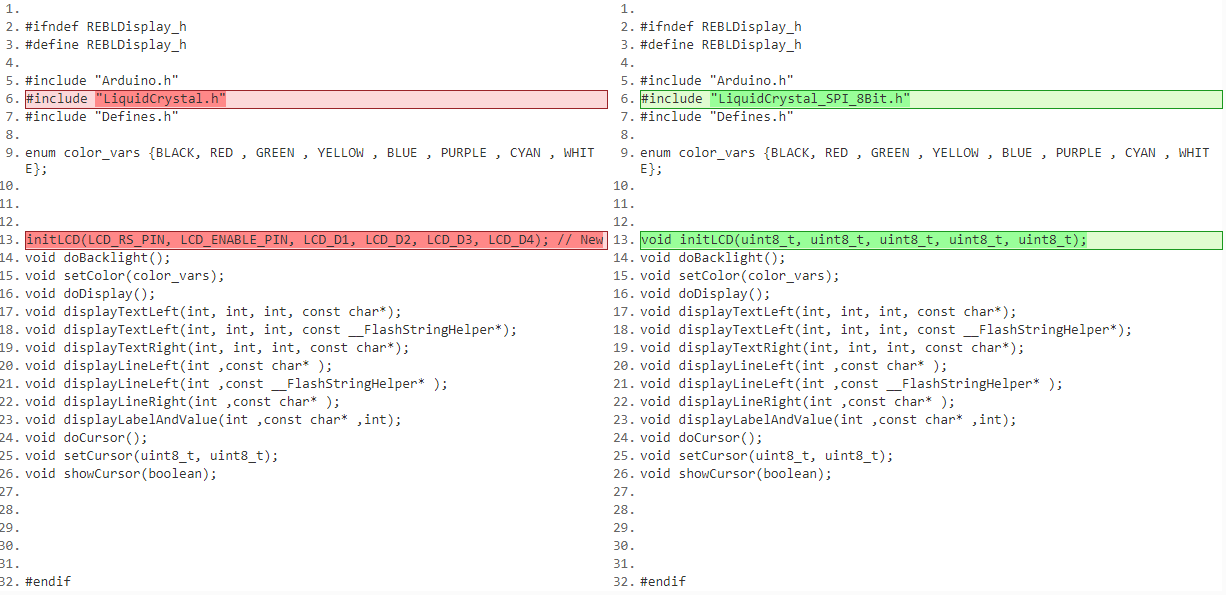
I made a change (first attached picture shows) to REBLDisplay.h too now.

Not sure what to do for that last part near the end (where the line is pointed to in red).

Wondering if there needs to be a change in the second, middle, attachment?

AAAdisplayCPP.PNG

REBLDisplay.h (783 Bytes)

Error message

Arduino: 1.8.5 (Windows 7), Board: "Arduino/Genuino Mega or Mega 2560, ATmega2560 (Mega 2560)"

In file included from C:\Users\uraynara\Documents\Arduino\libraries\REBL_UI-master/REBL_UI.h:14:0,

                 from C:\Users\uraynara\Documents\Arduino\libraries\REBL_UI-master\Example\REBL_UI_Example\REBL_UI_Example.ino:1:

C:\Users\uraynara\Documents\Arduino\libraries\REBL_UI-master/REBLDisplay.h:13:8: error: expected constructor, destructor, or type conversion before '(' token

 initLCD(LCD_RS_PIN, LCD_ENABLE_PIN, LCD_D1, LCD_D2, LCD_D3, LCD_D4); // New

        ^

C:\Users\uraynara\Documents\Arduino\libraries\REBL_UI-master\Example\REBL_UI_Example\REBL_UI_Example.ino: In function 'void setup()':

REBL_UI_Example:53: error: 'initLCD' was not declared in this scope

   initLCD(LCD_RS_PIN, LCD_ENABLE_PIN, LCD_D1, LCD_D2, LCD_D3, LCD_D4); // New

                                                                     ^

exit status 1
'initLCD' was not declared in this scope

This report would have more information with
"Show verbose output during compilation"
option enabled in File -> Preferences.

I posted the same question here:
stackoverflow.com/questions/51828915/how-to-retrofit-an-8-bit-lcd-library-menu-rotary-encoder-for-a-regular-lcd

Tomorrow I will give up and resort to using a bunch of toggle switches instead.

Line 13, the line that is generating the error is NOT in a function. It MUST be.

@Rebel_G, they are the same files I already posted. The images of those files are supplementary. (One is actually an image of the same file attached to the same post.)

PaulS:
Line 13, the line that is generating the error is NOT in a function. It MUST be.

In the REBLDisplay.h file, how do I fix it? It's not much different from the original (see attached comparison of the code).

Ohh, I think I forgot "void".........