I was given a Arduino Duemilanove, which looks exactly like the board shown in "The Arduino Playground"
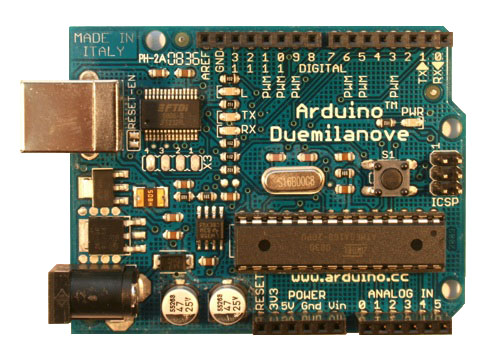
right down to the "RESET-EN" trace, and the text between 'MADE IN ITALY' and pin13. So I started to play just the board (not extra electronics or external power) connected to my Dell Laptop running Fedora 14, with the arduino 0022 software installed.
Now I tryed the 'LED Blink' sktech from the web site, but all I even got after the program was uploaded to the arduino was a solid unblinking LED!
However other example sketches (mostly serial communications) worked fine, including 'PhysicalPixel' where you send the arduino 'H' and 'L' characters to turn on and of the LED! Just the LED blink sketch fails to do what it what it is supposed to do! Playing with the delay() values would sometimes result in the LED flashing breifly then just turning off, but typically the LED would just be a steady on with no other action.
Then I tried a different 'Blink' the LED example from the 0022 adruino 'examples' sub menu.
IT WORKED!
The only difference between the two is that instead of using a integer value of 13 directly as on the web site, the working example used a variable to hold that integer value of 13. They were functionally equivalent!
So after some playing with the code, this is what it came down to.
This failes (solid on board LED after uploading)
/*
  Blink
  Turns on an LED on for one second, then off for one second, repeatedly.

  This example code is in the public domain.
 */

int L3 = 13;
void setup() {
  // initialize the digital pin as an output.
  // Pin 13 has an LED connected on most Arduino boards:
  pinMode(13, OUTPUT);
}

void loop() {
  digitalWrite(13, HIGH);   // set the LED on
  delay(1000);              // wait for a second
  digitalWrite(13, LOW);    // set the LED off
  delay(1000);              // wait for a second
}
But this works (change a '1' to a 'L' in setup() )
/*
  Blink
  Turns on an LED on for one second, then off for one second, repeatedly.

  This example code is in the public domain.
 */

int L3 = 13;
void setup() {
  // initialize the digital pin as an output.
  // Pin 13 has an LED connected on most Arduino boards:
  pinMode(L3, OUTPUT);
}

void loop() {
  digitalWrite(13, HIGH);   // set the LED on
  delay(1000);              // wait for a second
  digitalWrite(13, LOW);    // set the LED off
  delay(1000);              // wait for a second
}
In other words, if I do the setup of the pin using a variable it works, but fails if I use a number directly.
No change was made to loop(), just the use of the variable in setup()
In the compiled 'C program' this should make no difference to the call structure, only adding a 'retrieve variable contents' before the actual call to the pin setup library function. Both should be seting a integer value to the library function. The two programs should be functionally equivalent, but that is not what happens!
In fact this small difference is reflected in the upload code sizes...
Using '13' directly creates a code size of 1020 bytes
Using a variable, (any name, though I used L3 for the test for ease of editing) I get a code size of 1024.
The 4 extra bytes would be the machine code to 'retrieve value from memory'. Note that the code size going from 1020 (fail) to 1024 (success) is very suggestive, though I have not tried to played with that fact.
ASIDE:I am not a novice in programming or electronics, just a novice with the arduino!
I was programming in Z80 CPU machine language (ZX81) in the 1980's after all!
I have no idea why this small change causes it to fail/work. My only thoughts on this is that...
- I am hitting a bug either in compiled code
- or in the specific hardware I am using,
- or perhaps it is the upload code (code size less than 1Kbyte)
and as a result of whatever it is, the arduino is crashing during setup, before it gets to loop().
It will be hard to figure out too as any change, such as adding "Serial.begin(9600);" to the setup() makes the sketch work again!
Does anyone have any suggestions as to why one sketch works and the other does not? If you give me some instructions I am also willing to go to a deeper level and upload the compiled code, or even assembly language to see what is the real difference.
Another user on the forum tried both the stetches his arduino, though it wasn't the same model as mine, and he said they both work!
Would others with a Arduino Duemilanove (especially if you have one with the 'RESET-EN' trace on the board next to the USB input), please try and see if they can get similar results?
