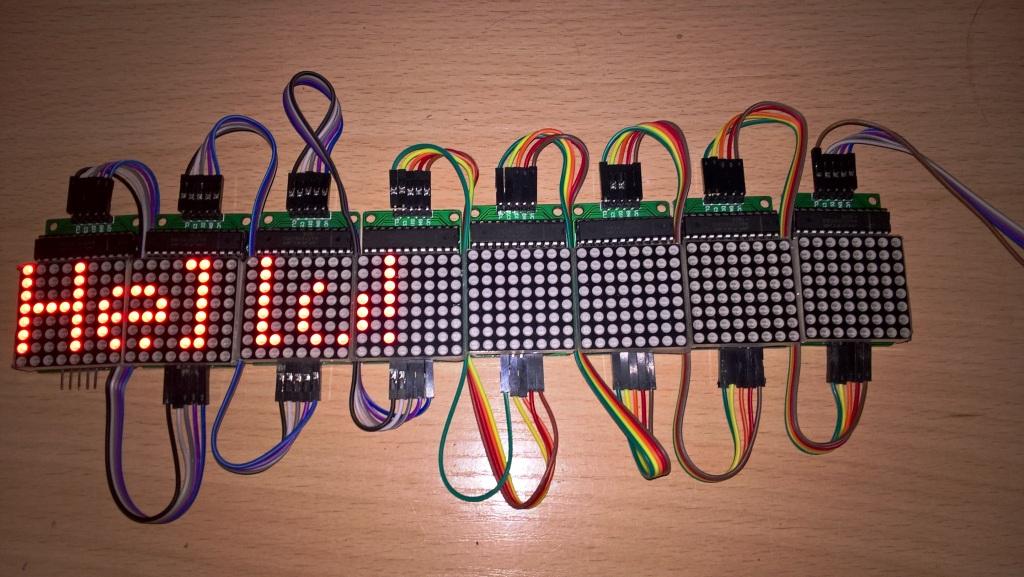
MD_Parola is designed to handle text animation. It therefore takes control of the animation and makes it easy for the user by doing all the work. This also means that it has to prevent the user form interfering as it needs to know exactly where everything is at any time. It deals in text and characters and there no concept of rows or columns. So here you can define a space invader as a custom character and it will be moved across the screen for you.
MD_MAX72xx is designed to run the hardware and rows/columns is what it deals in. Even the fonts are just treated like columns of data. This allows total flexibility for the user but the library does nothing for you - you are in total control of the hardware.
Moving animations need to have different bitmaps for each frame of the animation. So, if you want to animate a space invader (like the Daft Punk example), then MD_MAX72xx library is where it needs to be done as you have control. MD_Parola is the wrong place for it.
Other forum contributors have told me that they have mixed graphics and text by using different zones (in which case the animation zone is not touched by Parola), but that needs some careful planning and I am not sure how the interactions could interfere with each other (ie, no guarantees or support from me, so you need to troubleshoot this yourself).
I'm progressing with my steep learning curve as a complete newbie and would appreciate a little help. I have successfully completed a project to use bluetooth to input text to the matrix using the example Parola_Scrolling as a basis. In addition I can send commands to invert text, change speed, direction etc.
What I am trying to do now is to look at animating text in line with the example Parola_Test through a bluetooth connection. Initially I would look to use the Serial Monitor as the input method. I understand the input needs to be in this format char *pc[] = {"Parola for","Arduino","LED Matrix","Display"}; format with each of the "xxxxx" statements no greater than the maximum size of the display matrix (in my case eight).
My problem is I have no idea how to achieve this. Do you have any examples or pointers that may help me?
This declares an array of pointers to strings, auto sized by the compiler. As the data never changes (effectively a constant) this works fine and the compiler will just allocate some space and initialise the data to the strings I have specified.
However, if you want to change the data, then you need to declare an array of arrays of characters (ie, a two dimensional array)
#define MAX_STRING 30
char pc[4][MAX_STRING+1];
This allocates the space for the char arrays to be a known size (MAX_STRING). I add 1 to the definition so that the '\0' terminator can also fit in and I actually get the number of characters I need.
To access the first string use pc[0], then pc[1], etc, just like in the previous declaration.
You probably don't have the right hardware configured in the MD_MAx72xx library. Please read the documentation that comes with the library describing how to edit the header file foe the type of hardware you are using. There are lots of different types of matrix modules that are wired in different ways to the MAX7219 IC.
I use the EPS8266 in combination with a Arduino Pro Micro to control a scrolling Parola based sign (24 Parola modules). The 8266 displays a web page, sends the results of the page selections via serial to the Arduino that's running the displays.
I probably could have ran it directly from the 8266 and skipped the Arduino, but I was retro fitting the original design that used an RF module via a serial interface to the Arduino. Thus it was easier to just program the 8266 (NodeMcu 1.0) with the same serial protocol as I was using for the original RF module.
Many grateful thanks to Marco_c for developing and sharing the Parola library for driving 8 connected 8x8 LED matrix modules, it is very much appreciated.
Although I have implemented the 'switches' for my 8 module matrices line, the resulting display occasionally (more often than not) is missing letters or has some artefacts in them. Example images of the anomalies are attached to this message.
I've successfully implemented the 'HW_' switches in the library header file, as I mention above, and which orientates the letters correctly on the devices I'm using.
However, as can be seen from the attachments, when 8 modules are linked together, the matrices don't reproduce the word(s) or sentence correctly.
I've tried reading through the many postings in this thread but I'm still unable to resolve this problem with my devices. I'm concerned that the modules I've bought, which were sourced through Amazon and came from China may not be the genuine article, so to speak. The dealer is not helpful either.
All help is gratefully received as obviously I'm missing something out in my attempts to make these modules work together correctly.
came from China may not be the genuine article, so to speak. The dealer is not helpful either.
Not sure what the 'genuine article' could be as they are all from China. No surprises about the dealer not being helpful - they have generally got no idea what they are selling.
I have implemented the 'switches' for my 8 module matrices line
Don't know what you mean by this.
A few things you could try:
Verify that you are running the latest version of MD_Parola and MD_MAX72xx. The official distribution is from my code repositories (links in the email signature below). The release has been stable for some time, so I don't think this is a likely issue.
Are you powering all this from the Arduino? Try using an external power supply (make sure that the Arduino and Power Supply GNDs are all connected), to see if this improves things. Also try adding one module at a time and see when the errors start. Mindful of item 3 below, when you get the error try different modules in that position to eliminate the possibility of a faulty unit.
The errors you show always seem to be in the second and third last modules. Move these modules somewhere else in the chain and see if the errors move with the modules. If they do you have faulty modules.
These are the most common causes of problems, so try these fixes first.
First of all, I would like to thank you for the great job you made with the LED matrices.
I'm new to to the world of LED matrices. recently, I purchased 10 modules along with the Arduino Mega, and I am using your Parola_Test code.
The one thing I want to do is increasing the scroll speed when using:
P.displayText(pc[curString], Center, P.getSpeed(), PAUSE_TIME, SCROLL_LEFT, SCROLL_LEFT);
The scrolling speed is always the same regardless of the values of Speed and Pause_time (on the other functions like Print, it is working perfect).
The Parola_Test uses an external pot to set the speed. If youwant to control your own speed, you need to modify the sketch to remove the pot dependency or add a pot to A5 to control the speed. Look in the doUI() function for the pot speed mapping.
wabbitguy,
Thank you for the reply.
This is how I modified the sketch to remove the pot dependency:
Example: P.displayText(pc[curString], Center, 10, 1000, SCROLL_LEFT, SCROLL_LEFT);
I tried different values, but the speed still always the same.(just when scrolling left).
I have just tested my setup and SCROLL_LEFT works fine for all alignments (LEFT, RIGHT, CENTER). Logically I would expect this result as, in the library code, animation timing is independent of animation type.
The only other suggestion I can make is for you to check that you are not resetting the delay to something else in another part of the executing code. The delay setting takes immediate effect, even in the middle of an executing animation.
Thank you for coming back to me, Marco. It is very much appreciated.
What I meant by "genuine article" was that another poster to this forum thread seemed to suggest some 'Chinese-sourced MAX7219 modules may not be genuine MAX7219 devices. Hence I was thinking that the problem I was having in driving my 'Chinese-sourced' modules was due to the unpredictable/unreliable performance of "copy" non-genuine MAX devices.
In the end the symptom I was explaining about, in my original posting, was due to one of the jumper leads making poor intermittent continuity with the 4th module in a line of 8 modules. Although the jumper was fully pushed home to the module pin, the wire was defective within the header plug causing signal driving errors.
I have since hard-wired 6 modules together on a perfboard, to remove the doubt about jumper connections, while learning about these modules and from your fantastic Parola code.
With respect to the latter point, I'm trying to find a way of using your library to develop a LED display (consisting of 6 modules) that displays real time information, i.e. speed data I'm filtering via a CANBUS adapter.
I've built a simple speed message display system for my car that uses data filtered from the CAN BUS of my car. However, at the moment, finding a way of displaying a real time speed variable (string) concatenated with the fixed string value of 'MPH' is proving a challenge. E.g. 30 (the real time speed value derived from the CAN filter code) + ' MPH', i.e. 30 MPH . . . . . . or whatever the speed value of the car is.
Thank you once again for authoring and sharing the Parola code and for helping with my query too.