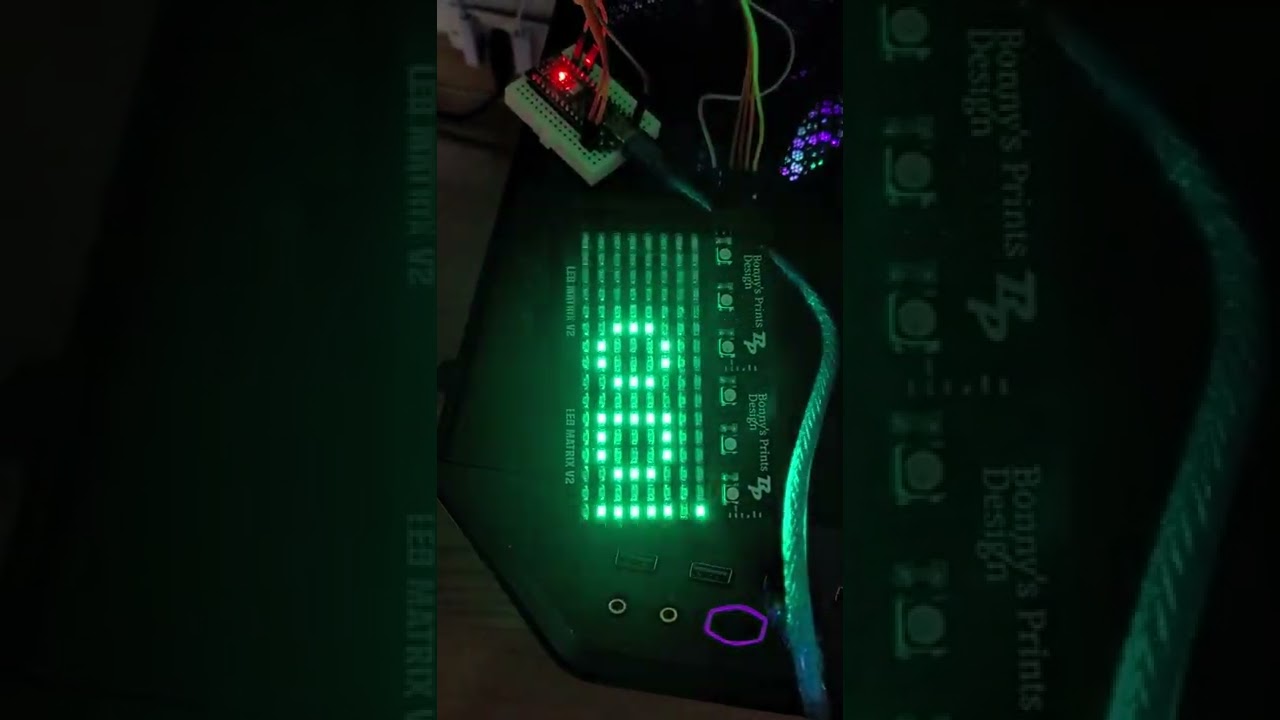
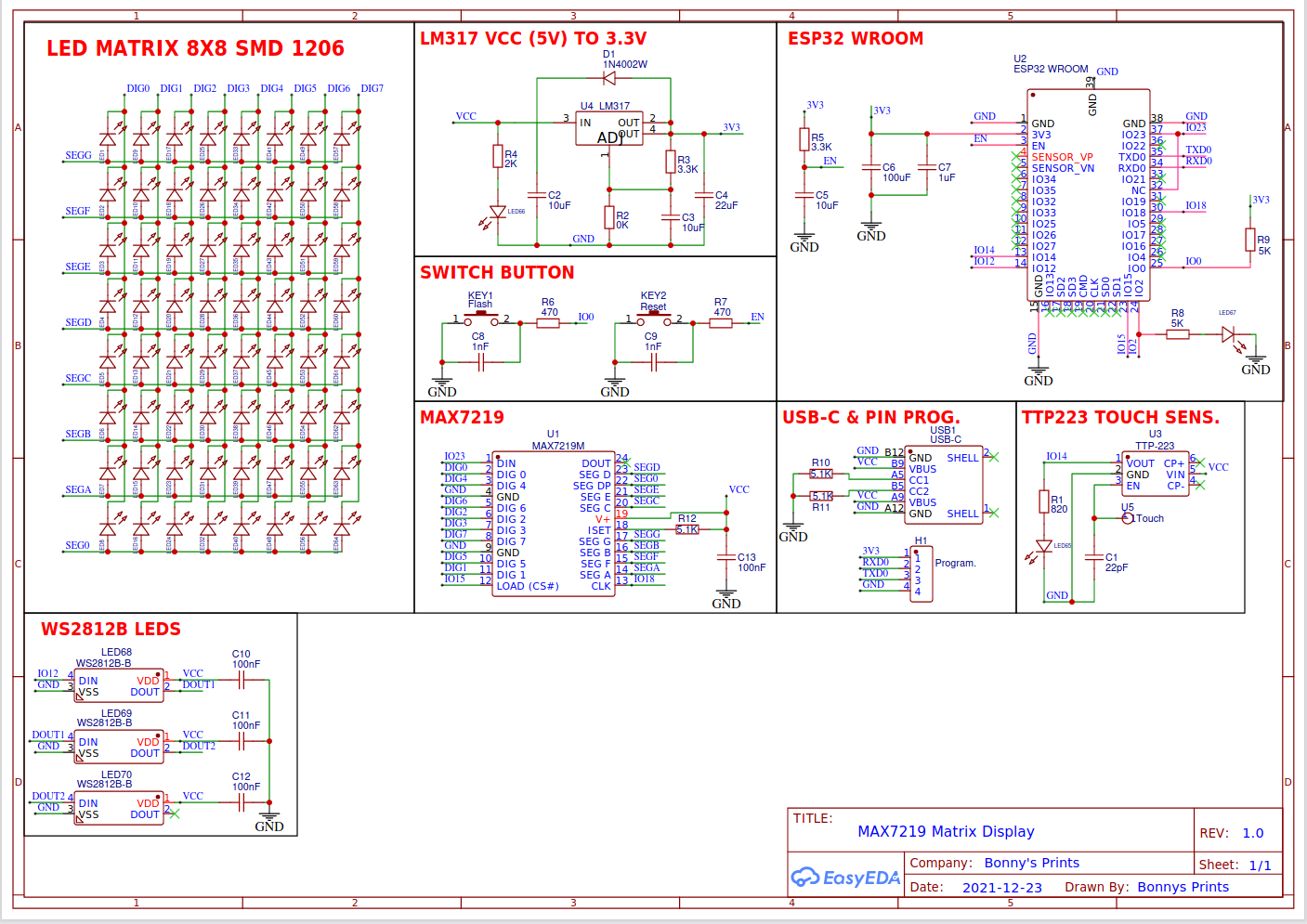
Hi, I'm working on a new version of my LED matrix. I've implemented on my pcb a MAX7219 chip. To program my display, i'm using MD_PAROLA Scrolling basic example. My problem corcerns about the mirroring of the text. I attach the program that I've used, the schematic and a video of the problem.
Thanks
#include <MD_Parola.h>
#include <MD_MAX72xx.h>
#include <SPI.h>

// set to 1 if we are implementing the user interface pot, switch, etc
#define USE_UI_CONTROL 0

#if USE_UI_CONTROL
#include <MD_UISwitch.h>
#endif

// Turn on debug statements to the serial output
#define DEBUG 0

#if DEBUG
#define PRINT(s, x) { Serial.print(F(s)); Serial.print(x); }
#define PRINTS(x) Serial.print(F(x))
#define PRINTX(x) Serial.println(x, HEX)
#else
#define PRINT(s, x)
#define PRINTS(x)
#define PRINTX(x)
#endif

// Define the number of devices we have in the chain and the hardware interface
// NOTE: These pin numbers will probably not work with your hardware and may
// need to be adapted
#define HARDWARE_TYPE MD_MAX72XX::DR0CR0RR0_HW
#define MAX_DEVICES 2
#define CLK_PIN   13
#define DATA_PIN  11
#define CS_PIN    10

// HARDWARE SPI
MD_Parola P = MD_Parola(HARDWARE_TYPE, CS_PIN, MAX_DEVICES);

// SOFTWARE SPI
//MD_Parola P = MD_Parola(HARDWARE_TYPE, DATA_PIN, CLK_PIN, CS_PIN, MAX_DEVICES);

// Scrolling parameters
#if USE_UI_CONTROL
const uint8_t SPEED_IN = A5;
const uint8_t DIRECTION_SET = 8;  // change the effect
const uint8_t INVERT_SET = 9;     // change the invert

const uint8_t SPEED_DEADBAND = 5;
#endif // USE_UI_CONTROL

uint8_t scrollSpeed = 100;    // default frame delay value
textEffect_t scrollEffect = PA_SCROLL_RIGHT;
textPosition_t scrollAlign = PA_RIGHT;

uint16_t scrollPause = 0; // in milliseconds

// Global message buffers shared by Serial and Scrolling functions
#define	BUF_SIZE	75
char curMessage[BUF_SIZE] = { "" };
char newMessage[BUF_SIZE] = { "Ciao" };
bool newMessageAvailable = true;

bool MD_MAX72XX::transform(transformType_t TFLR);

#if USE_UI_CONTROL

MD_UISwitch_Digital uiDirection(DIRECTION_SET);
MD_UISwitch_Digital uiInvert(INVERT_SET);

void doUI(void)
{
  // set the speed if it has changed
  {
    int16_t speed = map(analogRead(SPEED_IN), 0, 1023, 10, 150);

    if ((speed >= ((int16_t)P.getSpeed() + SPEED_DEADBAND)) ||
      (speed <= ((int16_t)P.getSpeed() - SPEED_DEADBAND)))
    {
      P.setSpeed(speed);
      scrollSpeed = speed;
      PRINT("\nChanged speed to ", P.getSpeed());
    }
  }

  if (uiDirection.read() == MD_UISwitch::KEY_PRESS) // SCROLL DIRECTION
  {
    PRINTS("\nChanging scroll direction");
    scrollEffect = (scrollEffect == PA_SCROLL_RIGHT ? PA_SCROLL_LEFT : PA_SCROLL_RIGHT);
    P.setTextEffect(scrollEffect, scrollEffect);
    P.displayClear();
    P.displayReset();
  }

  if (uiInvert.read() == MD_UISwitch::KEY_PRESS)  // INVERT MODE
  {
    PRINTS("\nChanging invert mode");
    P.setInvert(!P.getInvert());
  }
}
#endif // USE_UI_CONTROL

void readSerial(void)
{
  static char *cp = newMessage;

  while (Serial.available())
  {
    *cp = (char)Serial.read();
    if ((*cp == '\n') || (cp - newMessage >= BUF_SIZE-2)) // end of message character or full buffer
    {
      *cp = '\0'; // end the string
      // restart the index for next filling spree and flag we have a message waiting
      cp = newMessage;
      newMessageAvailable = true;
    }
    else  // move char pointer to next position
      cp++;
  }
}

void setup()
{
  Serial.begin(57600);
  Serial.print("\n[Parola Scrolling Display]\nType a message for the scrolling display\nEnd message line with a newline");

#if USE_UI_CONTROL
  uiDirection.begin();
  uiInvert.begin();
  pinMode(SPEED_IN, INPUT);

  doUI();
#endif // USE_UI_CONTROL

  P.begin();
  P.displayText(curMessage, scrollAlign, scrollSpeed, scrollPause, scrollEffect, scrollEffect);
}

void loop()
{
#if USE_UI_CONTROL
  doUI();
#endif // USE_UI_CONTROL

  if (P.displayAnimate())
  {
    if (newMessageAvailable)
    {
      strcpy(curMessage, newMessage);
      newMessageAvailable = false;
    }
    P.displayReset();
  }
  readSerial();
}
You need to set the right hardware and it will probably work. The MD_MAX72xx library Dynamic Hardware example tests all the different types. The one you can read is the one to use.
In this schematic is figured the main board, but now I want to program an Arduino nano to test the expander boards. I made these ones as second version of another led matrix that it use the 74HC595 shift registers
Yes, it is.
I tried every single hardware type without finding the right one. I need only mirroring the text, and in your site, I found some commands, like this:
But it doesn't work. I spent 3 hours to try to find a right solution
Not all text effects will work with this setting, however. Scrolling is one of them (from memory).
It is important that you are using this library with the modules arranged so that DATA_IN is on the right hand side of the display, with the MD_MAX72xx modules numbered from 0 on the right to n on the left.
I tried your solution and now the text si flipped but scroll correctly. Now I only need to rotate the text of 180 degrees.
The connections are OK, I tested them using tester
Usually when the 'text' needs to be rotated 180 degrees the display is upside down. As I said before, it is important that you are using this library with the modules arranged so that DATA_IN is on the right hand side of the display, with the MD_MAX72xx modules numbered from 0 on the right to n on the left.
In your video it is hard to see the directions as the modules are placed vertically.
If you want, I can send on your email a better video about my problem. I found various schematic on internet, but the majority of these were similar. I hope I have connected correctly every MAX7219s on my custom boards, but I shared the schematic (first post of this conversation) and I think that the connections are corrects
There are at least 4 major variations (not similar). Please read this blog post: https://arduinoplusplus.wordpress.com/2017/04/14/parola-a-to-z-adapting-for-different-hardware/. If your schematic follows one of these then the MD_MAX72xx standard configurations (PAROLA, GENERIC, FC16 and ICSTATION) will be suitable. The different types of modules are also documented in the MD_MAX72xx library documentation under docs in the MD_MAX72xx library folder.
I would also try an animation different from SCROLL for testing (PRINT is the easiest and always works) because once you use the zoneTextEffect() method, not all animation will work properly.
As you have designed your own hardware it is up to you to work out if this library will suit your design. However, I must emphasise again that the Parola/MD_MAX72xx frame of reference is to have the display oriented so that the DATA IN signal is on the RIGHT side of the modules (ie the wires from the processor are joined to the right side of the display) and the display modules 'grow' from right to left.
If you want to post another video please make sure the display is oriented horizontally and it is clear where the input wires are connected. Posting as per the previous video is fine.
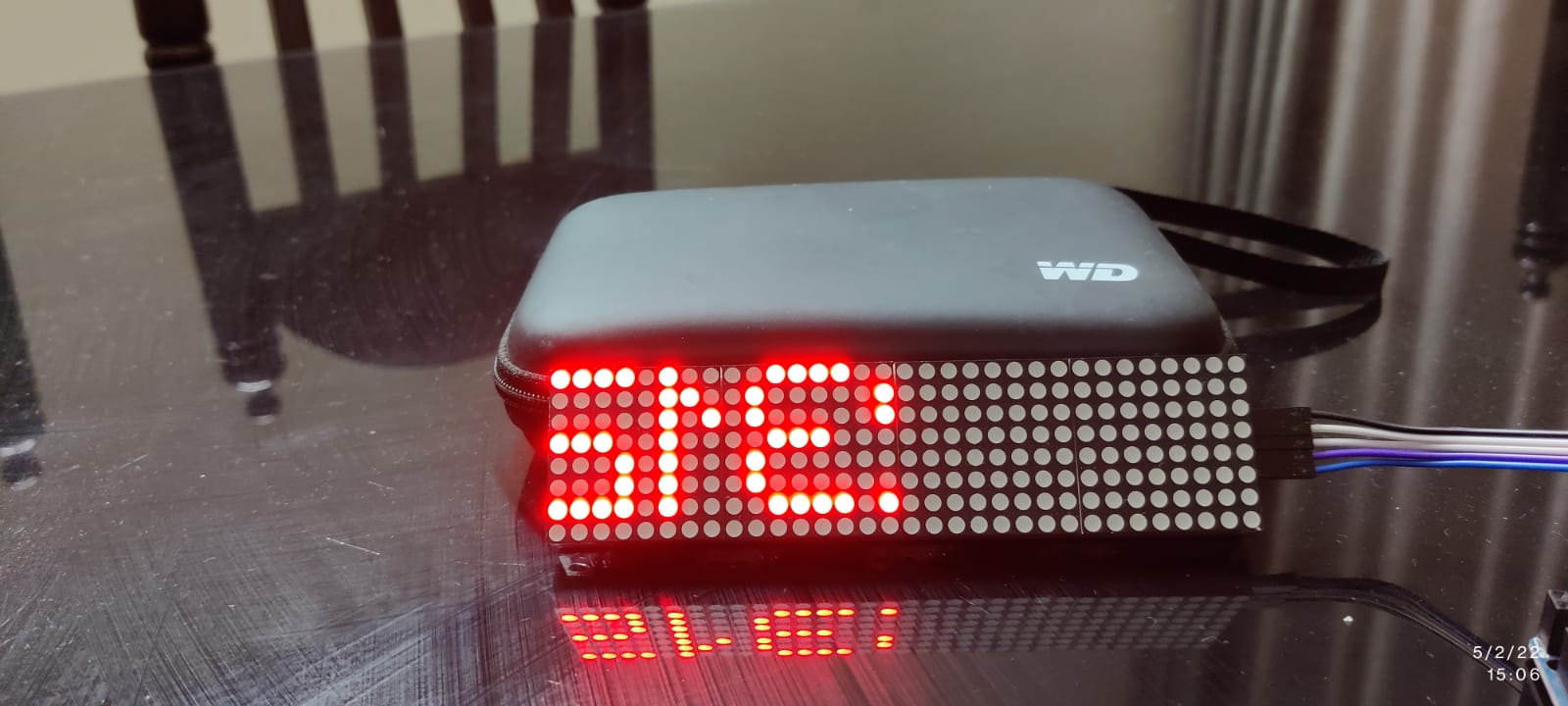
Hello all, thank you for sharing such a lot of information. I came here trying to find a solution to my problem with the 7219 (4in1) board display.
My code is straight from the example of Parola (special thanks to him), and have tried all the 4 possible hardware configurations without luck.
In my case, the display is both mirrored and jumbled. For eg. If the word THANK is to be displayed, it shows TNAHK and is also mirrored.
Any suggestions to resolve would be welcome and thank you in advance..
Please read the instructions in order to post the code you actually. tried.
Also give us a Web link for the display you have. The fact that it actually shows characters does assure us you have it wired correctly so we will accept that part.
Thanks for your answare. I red all your blog for try to find a solution, but nothing help me. I tried every possible configuration, but no one works. I check all connections and all of these are ok. Probably, when I designed my own board, i follow the wrong schematicthat I found on internet. I can try to cut all connections (only ones for leds) and soldering again in the reverse mode (first one becomes the last one, ecc.). Now I don't know what solution could be the right one.
Anyway, I appreciate a lot your library and the help you give me
As I have said before, your problem is probably that you have not put the DATA-IN on the right side of the display (turn the modules over). The Parola/MD_MAX72xx frame of reference is to have the display oriented so that the DATA IN signal is on the RIGHT side of the modules (ie the wires from the processor are joined to the right side of the display) and the display modules 'grow' from right to left. You will need to try the module types again after this re-orientation of the hardware.
// Use the Parola library to scroll text on the display
//
// Demonstrates the use of the scrolling function to display text received
// from the serial interface
//
// User can enter text on the serial monitor and this will display as a
// scrolling message on the display.
// Speed for the display is controlled by a pot on SPEED_IN analog in.
// Scrolling direction is controlled by a switch on DIRECTION_SET digital in.
// Invert ON/OFF is set by a switch on INVERT_SET digital in.
//
// UISwitch library can be found at https://github.com/MajicDesigns/MD_UISwitch
// MD_MAX72XX library can be found at https://github.com/MajicDesigns/MD_MAX72XX
//

#include <MD_Parola.h>
#include <MD_MAX72xx.h>
#include <SPI.h>

// set to 1 if we are implementing the user interface pot, switch, etc
#define USE_UI_CONTROL 0

#if USE_UI_CONTROL
#include <MD_UISwitch.h>
#endif

// Turn on debug statements to the serial output
#define DEBUG 0

#if DEBUG
#define PRINT(s, x) { Serial.print(F(s)); Serial.print(x); }
#define PRINTS(x) Serial.print(F(x))
#define PRINTX(x) Serial.println(x, HEX)
#else
#define PRINT(s, x)
#define PRINTS(x)
#define PRINTX(x)
#endif

// Define the number of devices we have in the chain and the hardware interface
// NOTE: These pin numbers will probably not work with your hardware and may
// need to be adapted
#define HARDWARE_TYPE MD_MAX72XX::PAROLA_HW
#define MAX_DEVICES 4  // The changes made for Mega2560
#define CLK_PIN   52   // The changes made for Mega2560
#define DATA_PIN  51   // The changes made for Mega2560
#define CS_PIN    53   // The changes made for Mega2560

// HARDWARE SPI
MD_Parola P = MD_Parola(HARDWARE_TYPE, CS_PIN, MAX_DEVICES);
// SOFTWARE SPI
//MD_Parola P = MD_Parola(HARDWARE_TYPE, DATA_PIN, CLK_PIN, CS_PIN, MAX_DEVICES);

// Scrolling parameters
#if USE_UI_CONTROL
const uint8_t SPEED_IN = A5;
const uint8_t DIRECTION_SET = 8;  // change the effect
const uint8_t INVERT_SET = 9;     // change the invert

const uint8_t SPEED_DEADBAND = 5;
#endif // USE_UI_CONTROL

uint8_t scrollSpeed = 25;    // default frame delay value
textEffect_t scrollEffect = PA_SCROLL_LEFT;
textPosition_t scrollAlign = PA_LEFT;
uint16_t scrollPause = 2000; // in milliseconds

// Global message buffers shared by Serial and Scrolling functions
#define	BUF_SIZE	75
char curMessage[BUF_SIZE] = { "" };
char newMessage[BUF_SIZE] = { "Hello! Enter new message?" };
bool newMessageAvailable = true;

#if USE_UI_CONTROL

MD_UISwitch_Digital uiDirection(DIRECTION_SET);
MD_UISwitch_Digital uiInvert(INVERT_SET);

void doUI(void)
{
  // set the speed if it has changed
  {
    int16_t speed = map(analogRead(SPEED_IN), 0, 1023, 10, 150);

    if ((speed >= ((int16_t)P.getSpeed() + SPEED_DEADBAND)) ||
        (speed <= ((int16_t)P.getSpeed() - SPEED_DEADBAND)))
    {
      P.setSpeed(speed);
      scrollSpeed = speed;
      PRINT("\nChanged speed to ", P.getSpeed());
    }
  }

  if (uiDirection.read() == MD_UISwitch::KEY_PRESS) // SCROLL DIRECTION
  {
    PRINTS("\nChanging scroll direction");
    scrollEffect = (scrollEffect == PA_SCROLL_LEFT ? PA_SCROLL_RIGHT : PA_SCROLL_LEFT);
    P.setTextEffect(scrollEffect, scrollEffect);
    P.displayClear();
    P.displayReset();
  }

  if (uiInvert.read() == MD_UISwitch::KEY_PRESS)  // INVERT MODE
  {
    PRINTS("\nChanging invert mode");
    P.setInvert(!P.getInvert());
  }
}
#endif // USE_UI_CONTROL

void readSerial(void)
{
  static char *cp = newMessage;

  while (Serial.available())
  {
    *cp = (char)Serial.read();
    if ((*cp == '\n') || (cp - newMessage >= BUF_SIZE - 2)) // end of message character or full buffer
    {
      *cp = '\0'; // end the string
      // restart the index for next filling spree and flag we have a message waiting
      cp = newMessage;
      newMessageAvailable = true;
    }
    else  // move char pointer to next position
      cp++;
  }
}

void setup()
{
  Serial.begin(57600);
  Serial.print("\n[Parola Scrolling Display]\nType a message for the scrolling display\nEnd message line with a newline");

#if USE_UI_CONTROL
  uiDirection.begin();
  uiInvert.begin();
  pinMode(SPEED_IN, INPUT);

  doUI();
#endif // USE_UI_CONTROL

  P.begin();
  P.displayText(curMessage, scrollAlign, scrollSpeed, scrollPause, scrollEffect, scrollEffect);
}

void loop()
{
#if USE_UI_CONTROL
  doUI();
#endif // USE_UI_CONTROL

  if (P.displayAnimate())
  {
    if (newMessageAvailable)
    {
      strcpy(curMessage, newMessage);
      newMessageAvailable = false;
    }
    P.displayReset();
  }
  readSerial();
}
a. Instead of 11 modules, edited to 4
b. CLK, DIN and CS edited to 52,51 and 53 respectively for my Mega2560
c. Hardware type selected as PAROLA_HW and toggled between GENERIC_HW, FC16_HW too.
I didn't solve my problem. I tried for a long time to solve it but unfortunately I didn't. I switched between all hardware types (generic, FC16, ecc...) but no ones work for what I want to do