LED strip sequence PWM add pushbutton change sequence

This is what I tried:

#include <OneButton.h>

#define BTN_PIN   5

const byte redPin = 2;
const byte greenPin = 3;
const byte bluePin = 4;

uint8_t patternCounter = 0;
bool isRunning = false;

void checkTimer();

// Push button connected between pin 7 and GND (no resistor required)
OneButton btn = OneButton(BTN_PIN, true, true);

#include "ElectricZero.h"
#include "RainbowOne.h"

void setup() {
  pinMode(redPin, OUTPUT);  //Red Relay
  pinMode(greenPin, OUTPUT);  //Green Relay
  pinMode(bluePin, OUTPUT);  //Blue Relay

  btn.attachClick(nextPattern);
}

void loop() {
  
  switch (patternCounter) {
    case 0:
      runElectricZero();
      break;
    case 1:
      runRainbowOne();
      break;
  }
}

void nextPattern() {
  isRunning = false;
  patternCounter = (patternCounter + 1) % 2;
}

void runElectricZero(){
  isRunning = true;
  ElectricZero electricZero = ElectricZero();
  while(isRunning) electricZero.runPattern();
}

void runRainbowOne(){
  isRunning = true;
 RainbowOne rainbowOne = RainbowOne();
  while(isRunning) rainbowOne.runPattern();
}

ElectricZero.h

#include "Arduino.h"

const uint16_t interval[] {100, 1500, 100, 250, 100, 1000, 500, 1000};  // time to wait in each intervall
int prevRed,prevGreen, prevBlue; 

class ElectricZero {
  public:
    ElectricZero(){
      // Blank constructor  
    };
    void runPattern();
  private:
};

void colorRGB(int red, int green, int blue) {

  red = constrain(red, 0, 255);
  green = constrain(green, 0, 255);
  blue = constrain(blue, 0, 255);

  for (int i = 0; i < 50; i++) {
    analogWrite(redPin, map(i, 0, 999, prevRed, red));
    analogWrite(greenPin, map(i, 0, 999, prevGreen, green));
    analogWrite(bluePin, map(i, 0, 999, prevBlue, blue));
    delay(1);
  }
  
  prevRed = red;
  prevGreen = green;
  prevBlue = blue;
}

void ElectricZero() 
{
  static uint32_t previousMillis = 0;
  static byte state = 7;
  if (millis() - previousMillis >= interval[state])
  {
    // it's time for next state
    state++;
    state = state % 8;
    Serial.print(F("state=")); Serial.println(state);

    // act according state
    switch (state)
    {
      case 0: // 1 1000
        colorRGB(0, 0, 255); //blue
        break;
      case 1: // 2 2000                             
        colorRGB(0, 255, 255); //cyan
        break;
      case 2: // 3 3000
        colorRGB(0, 0, 255); //blue
        break;
      case 3: // 4 4000 
        colorRGB(255, 100, 0); //yellow
        break;                   
      case 4: // 5 5000
        colorRGB(0, 0, 255); //blue
        break;
      case 5: // 6 6000
        colorRGB(255, 100, 0); //yellow
        break;       
      case 6: // 7 7000
        colorRGB(0, 0, 255); //blue
        break;
      case 7: // 8 8000
        colorRGB(0, 255, 255); //cyan
        break;        
    }
    previousMillis = millis();
  }
}

RainbowOne.H (Trying just one page first)

#include "Arduino.h"

class RainbowOne {
  public:
    RainbowOne(){};
    void runPattern();
  private:
};

void RainbowOne::runPattern() {

  digitalWrite(redPin, LOW);  //Red Relay (OFF)
  digitalWrite(greenPin, LOW);  //Green Relay (ON)
  digitalWrite(bluePin, HIGH);  //Blue Relay (ON)
  btn.tick();
  }

Would this line in ElectricZero.h be (following RainbowOne.h)...

void ElectricZero::runPattern()

Tried what you suggested, it didn't work. It seems to be stuck on:

void runElectricZero(){
  isRunning = true;
  ElectricZero electricZero = ElectricZero();
  while(isRunning) electricZero.runPattern();
}

09_classesHybrid_RGB_Redefine_4:47:16: error: expected ';' before 'electricZero'
ElectricZero electricZero = ElectricZero();
^~~~~~~~~~~~
09_classesHybrid_RGB_Redefine_4:48:20: error: 'electricZero' was not declared in this scope
while(isRunning) electricZero.runPattern();

while(isRunning) electricZero.runPattern();
^~~~~~~~~~~~
ElectricZero
exit status 1
expected ';' before 'electricZero'

Weird thing is when I'm just firing simple outputs, it sees everything fine. I'm trying to run a RGB chase sequence, I'm sure I'm scrambling things. I just don't know where to put things to make everything happy.

I think you just had a typeo, because all I did was I add "Serial.begin(115200)" in setup() and inserted this void ElectricZero::runPattern() and your code compiles (serial monitor shows state 0 through 7).

sketch.ino

#include <OneButton.h>

#define BTN_PIN   5

const byte redPin = 2;
const byte greenPin = 3;
const byte bluePin = 4;

uint8_t patternCounter = 0;
bool isRunning = false;

void checkTimer();

// Push button connected between pin 7 and GND (no resistor required)
OneButton btn = OneButton(BTN_PIN, true, true);

#include "ElectricZero.h"
#include "RainbowOne.h"

void setup() {
  Serial.begin(115200);
  pinMode(redPin, OUTPUT);  //Red Relay
  pinMode(greenPin, OUTPUT);  //Green Relay
  pinMode(bluePin, OUTPUT);  //Blue Relay

  btn.attachClick(nextPattern);
}

void loop() {

  switch (patternCounter) {
    case 0:
      runElectricZero();
      break;
    case 1:
      runRainbowOne();
      break;
  }
}

void nextPattern() {
  isRunning = false;
  patternCounter = (patternCounter + 1) % 2;
}

void runElectricZero() {
  isRunning = true;
  ElectricZero electricZero = ElectricZero();
  while (isRunning) electricZero.runPattern();
}

void runRainbowOne() {
  isRunning = true;
  RainbowOne rainbowOne = RainbowOne();
  while (isRunning) rainbowOne.runPattern();
}

ElectricZero.h

#include "Arduino.h"

const uint16_t interval[] {100, 1500, 100, 250, 100, 1000, 500, 1000};  // time to wait in each intervall
int prevRed, prevGreen, prevBlue;

class ElectricZero {
  public:
    ElectricZero() {};
    void runPattern();
  private:
};

void colorRGB(int red, int green, int blue) {

  red = constrain(red, 0, 255);
  green = constrain(green, 0, 255);
  blue = constrain(blue, 0, 255);

  for (int i = 0; i < 50; i++) {
    analogWrite(redPin, map(i, 0, 999, prevRed, red));
    analogWrite(greenPin, map(i, 0, 999, prevGreen, green));
    analogWrite(bluePin, map(i, 0, 999, prevBlue, blue));
    delay(1);
  }

  prevRed = red;
  prevGreen = green;
  prevBlue = blue;
}

void ElectricZero::runPattern()
{
  static uint32_t previousMillis = 0;
  static byte state = 7;
  if (millis() - previousMillis >= interval[state])
  {
    // it's time for next state
    state++;
    state = state % 8;
    Serial.print(F("state=")); Serial.println(state);

    // act according state
    switch (state)
    {
      case 0: // 1 1000
        colorRGB(0, 0, 255); //blue
        break;
      case 1: // 2 2000
        colorRGB(0, 255, 255); //cyan
        break;
      case 2: // 3 3000
        colorRGB(0, 0, 255); //blue
        break;
      case 3: // 4 4000
        colorRGB(255, 100, 0); //yellow
        break;
      case 4: // 5 5000
        colorRGB(0, 0, 255); //blue
        break;
      case 5: // 6 6000
        colorRGB(255, 100, 0); //yellow
        break;
      case 6: // 7 7000
        colorRGB(0, 0, 255); //blue
        break;
      case 7: // 8 8000
        colorRGB(0, 255, 255); //cyan
        break;
    }
    previousMillis = millis();
  }
}

Rainbow.h

#include "Arduino.h"

class RainbowOne {
  public:
    RainbowOne() {};
    void runPattern();
  private:
};

void RainbowOne::runPattern() {
  digitalWrite(redPin, LOW);  //Red Relay (OFF)
  digitalWrite(greenPin, LOW);  //Green Relay (ON)
  digitalWrite(bluePin, HIGH);  //Blue Relay (ON)
  btn.tick();
}
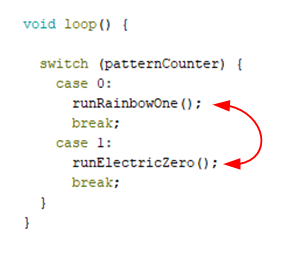
*** I think this is where the typeo was... I forgot that I changed the old code to this (braces together, no extra lines)

  public:
    ElectricZero() {};

Copy/paste the files I posted.

Man! We are really close. The good news is that your catch fixed it, (Thank you!) in that it runs the Electric portion, however it doesn't switch to Rainbow with the button push. (Place holder with fixed output on blue for now.) At least if fits within the scheme. Now to find that one little booger somewhere.

What effect should the button have? I set pinMode(BTN_PIN, INPUT_PULLUP); and the button seems to pause the LED state (color) but does not stop the state change. (I am using an RGB LED). I figured your RGB is common anode.

Yes, common anode. So it should switch to Rainbow which just sets the bluepin for now. I would like to swap out with the code below and run the state change within that page.

Rainbow new:

const uint16_t interval[] {500, 500, 500, 500, 500, 500, 500};  // time to wait in each intervall

const byte redPin = 2;
const byte greenPin = 3;
const byte bluePin = 4;

int prevRed, prevGreen, prevBlue;

void handleLeds()
{

  static uint32_t previousMillis = 0;
  static byte state = 6;
  if (millis() - previousMillis >= interval[state])
  {
    // it's time for next state
    state++;
    state = state % 8;
    Serial.print(F("state=")); Serial.println(state);

    // act according state
    switch (state)
    {
      case 0:
        colorRGB(255, 0, 0); //red
        break;
      case 1:                             
        colorRGB(255, 25, 0); //orange
        break;
      case 2:
        colorRGB(255, 75, 0); //yellow
        break;
      case 3: 
        colorRGB(0, 255, 0); //green 
        break;                   
      case 4:
        colorRGB(0, 255, 255); //cyan
        break;
      case 5:
        colorRGB(0, 0, 255); //blue
        break;       
      case 6:
        colorRGB(255, 0, 150); //purple
        break;
    }
    previousMillis = millis();
  }
}

void setup() {
  pinMode(redPin, OUTPUT);
  pinMode(greenPin, OUTPUT);
  pinMode(bluePin, OUTPUT);
}

void colorRGB(int red, int green, int blue) {

  red = constrain(red, 0, 255);
  green = constrain(green, 0, 255);
  blue = constrain(blue, 0, 255);

  for (int i = 0; i < 1000; i++) {
    analogWrite(redPin, map(i, 0, 999, prevRed, red));
    analogWrite(greenPin, map(i, 0, 999, prevGreen, green));
    analogWrite(bluePin, map(i, 0, 999, prevBlue, blue));
    delay(1);
  }
  
  prevRed = red;
  prevGreen = green;
  prevBlue = blue;
}

void loop() {
  handleLeds();  // checks if something is todo with the LEDs
  //do other important stuff here
}

Your code compiles and runs, but you need this in setup()

  Serial.begin(115200);

What effect does the button have?... I see the button is now removed.

That is page 3, which is a child per say? So the project has the main .ino file, then two .h files. (ElectricZero.h and RainbowOne.h)

setup is on the .ino file, so do I need it on each .h file as well?

Snap

No. Only one setup() and only one loop() for all the files. Usually found in the .ino file.

Never (as far as I know) are the values of a PWM signal to an LED over 255. The "1000" should be a maximum of 256, and the map max value of 999 should be 255.

Remove the delay(1) as it makes no difference in the LED output.

5 posts were split to a new topic: Help with RGB led code for academic fair

I wasn't able to try anything yesterday, so today I am looking at this with somewhat of a new approach. I tried switching my cases around to see what happens.

So it runs Rainbow. The switch works and runs Electric, but then never returns to Rainbow with the next button push. Is there something blocking in Electric.h or can something be added there to listen to the button again?

Please post entire code, not a snippet. Context is everything, we have no idea which bits of the codes before this have been incorporated/left out.

There is no button in your most recent code in post #28.

Okay,
I'm restructuring to avoid so many state / cases. I bashed this one together to try to just use millis. It doesn't break anything, but I'm not getting any delays. (millis) I'm sure there is something glaring, so maybe someone could point me in the right direction.

//define variables
int redValue;
int greenValue;
int blueValue;

int red = 2;
int green = 3;
int blue = 4;

unsigned long currentMillis = 0;   // [currentMillis] stores the current time
unsigned long previousMillis = 0;  // [previousMillis] will store last time LED was updated
const long interval = 1000;        // [interval] at which to wait (= milliseconds)

void setup() {

pinMode(red, OUTPUT);
pinMode(green, OUTPUT);
pinMode(blue, OUTPUT);

digitalWrite (red, LOW);
digitalWrite (green, LOW);
digitalWrite (blue, LOW);
}

void loop() {
  //check millis for the current time
  fadeLED(); //run the fadeLED function
}

void fadeLED() 
{

for(int i = 0; i < 255; i += 1) // fades out red, green fades in when i = 255
{
  redValue -= 1;
  greenValue += 1;
  analogWrite(red, redValue);
  analogWrite(green, greenValue);
  if(currentMillis - previousMillis >= interval){
    previousMillis = currentMillis;
  }
}

for(int i = 0; i < 255; i += 1) // fades out red, green fades in when i = 255
  {
  greenValue -= 1;
  blueValue += 1;
  analogWrite(green, greenValue);
  analogWrite(blue, blueValue);
  if(currentMillis - previousMillis >= interval){
    previousMillis = currentMillis;
  }
  }

for(int i = 0; i < 255; i += 1) // fades out red, green fades in when i = 255
  {
  blueValue -= 1;
  redValue += 1;
  analogWrite(blue, blueValue);
  analogWrite(red, redValue);
  if(currentMillis - previousMillis >= interval){
    previousMillis = currentMillis;
  }
}
}

Do you ever actually call millis()? I don't see it anywhere.

[edit] referencing post #40.

Also, I see no use of i to change colors. As it stands, the sketch holds blue and green ON, and the "timer" (I inserted millis() in appropriate places) calls nothing, so nothing is done.

I see your code is trying to decrease one color and increase another, but decreasing "redvalue" from zero to negative 255 will probably keep it turned off.

My code?