Library RP2040_pwm don't compile

Hello,

I have a problem with getting the libray RP2040_PWM to work and can't understand what's going wrong:

I need this library to by able to control the PWM frequency sent to a Hbridge to control the speed of a motor. The actual frequency makes the motor too noisy and that is why I would like to increase te PWM freqhency...

I use a nano RP2040 connect. The board is installed on my IDE and correctly selected in the settings of the IDE. I can install, use libraries, compile and run my other sketches on the board with no problem.

But as soon as I try to use this RP2040_PWM library, I have a compilation error (the sketch does not even begin to download). Below are the sketch and the error message with trying to compile it (PWM_BASIC example from the library) . The error message is the same with any other sketches using this library).

Sketch:

/****************************************************************************************************************************
  basic_pwm.ino
  For RP2040 boards
  Written by Dr. Benjamin Bird

  A basic example to get you up and running.

  Library by Khoi Hoang https://github.com/khoih-prog/RP2040_PWM
  Licensed under MIT license

  The RP2040 PWM block has 8 identical slices. Each slice can drive two PWM output signals, or measure the frequency
  or duty cycle of an input signal. This gives a total of up to 16 controllable PWM outputs. All 30 GPIO pins can be driven
  by the PWM block
*****************************************************************************************************************************/

#define _PWM_LOGLEVEL_        3
#include "RP2040_PWM.h"

//creates pwm instance
RP2040_PWM* PWM_Instance;

float frequency;
float dutyCycle;

#define pinToUse      10

void setup()
{
  //assigns pin 25 (built in LED), with frequency of 20 KHz and a duty cycle of 0%
  PWM_Instance = new RP2040_PWM(pinToUse, 20000, 0);
}

void loop()
{
  delay(1000);
  frequency = 20000;
  dutyCycle = 90;

  PWM_Instance->setPWM(pinToUse, frequency, dutyCycle);

  delay(1000);
  dutyCycle = 10;

  PWM_Instance->setPWM(pinToUse, frequency, dutyCycle);
}```


Error message on the IDE console when trying to compile.

In file included from C:\Users\bcrep\Document\Arduino\libraries\RP2040_PWM\examples\PWM_Basic\PWM_Basic.ino:17:0:
C:\Users\bcrep\Document\Arduino\libraries\RP2040_PWM\src/RP2040_PWM.h: In member function 'bool RP2040_PWM::setPWM_manual(const uint8_t&, const uint16_t&, const uint8_t&, uint16_t&, bool)':
C:\Users\bcrep\Document\Arduino\libraries\RP2040_PWM\src/RP2040_PWM.h:340:26: error: invalid conversion from 'pwm_config*' to 'uint {aka unsigned int}' [-fpermissive]
     pwm_init(_slice_num, &config, true);
                          ^~~~~~~
C:\Users\bcrep\Document\Arduino\libraries\RP2040_PWM\src/RP2040_PWM.h:340:39: error: cannot convert 'bool' to 'pwm_config*' for argument '3' to 'void pwm_init(uint, uint, pwm_config*, bool)'
     pwm_init(_slice_num, &config, true);
                                       ^
C:\Users\bcrep\Document\Arduino\libraries\RP2040_PWM\src/RP2040_PWM.h: In member function 'bool RP2040_PWM::setPWMPushPull_Int(const uint8_t&, const uint8_t&, const float&, const uint32_t&)':
C:\Users\bcrep\Document\Arduino\libraries\RP2040_PWM\src/RP2040_PWM.h:478:32: error: invalid conversion from 'pwm_config*' to 'uint {aka unsigned int}' [-fpermissive]
           pwm_init(_slice_num, &config, true);
                                ^~~~~~~
C:\Users\bcrep\Document\Arduino\libraries\RP2040_PWM\src/RP2040_PWM.h:478:45: error: cannot convert 'bool' to 'pwm_config*' for argument '3' to 'void pwm_init(uint, uint, pwm_config*, bool)'
           pwm_init(_slice_num, &config, true);
                                             ^
C:\Users\bcrep\Document\Arduino\libraries\RP2040_PWM\src/RP2040_PWM.h: In member function 'bool RP2040_PWM::setPWM_Int(const uint8_t&, const float&, const uint32_t&, bool)':
C:\Users\bcrep\Document\Arduino\libraries\RP2040_PWM\src/RP2040_PWM.h:617:32: error: invalid conversion from 'pwm_config*' to 'uint {aka unsigned int}' [-fpermissive]
           pwm_init(_slice_num, &config, true);
                                ^~~~~~~
C:\Users\bcrep\Document\Arduino\libraries\RP2040_PWM\src/RP2040_PWM.h:617:45: error: cannot convert 'bool' to 'pwm_config*' for argument '3' to 'void pwm_init(uint, uint, pwm_config*, bool)'
           pwm_init(_slice_num, &config, true);
                                             ^
exit status 1
Erreur de compilation pour la carte Arduino Nano RP2040 Connect


Tried to uninstall/reinstall, different releases of the library and different installation methods, with the same result.
I tried also to compile this sketch using the arduino web editor with the same result (same error message).

I saw on the forum plenty of conversations about this library which looks to be great and to work fine, and I don't understand what I am doing wrong... :woozy_face:

Could someone help?

Hi @glenton. I investigated and found that the developers of the "Arduino Mbed OS Nano Boards" platform apply a patch to the "Pico C SDK" of the RP2040 microcontroller that makes an undocumented breaking change to the API:

That change to the Pico SDK API breaks the "RP2040_PWM" library.

I'll provide three options for fixing/working around this problem. You can pick whichever one of the three that is most convenient to you.

A. Use the "Raspberry Pi Pico/RP2040" boards platform

The "Raspberry Pi Pico/RP2040" boards platform from Earle F. Philhower, III is an excellent 3rd party platform that provides support for boards based on the RP2040 microcontroller, including the Nano RP2040 Connect. This platform uses the stock Pico SDK, so you will not experience that error if you compile the "RP2040_PWM" library when you have a board of the "Raspberry Pi Pico/RP2040" platform selected in Arduino IDE.

I'll provide instructions you can follow to install and use the platform:

  1. Click the following link to open the platform's official documentation in your web browser:
    Installation — Arduino-Pico 3.5.0 documentation
  2. Copy the package_rp2040_index.json URL you find on that page.
  3. Select File > Preferences... (or Arduino IDE > Settings... for macOS users) from the Arduino IDE menus.
    The "Preferences" dialog will open.
  4. Enter the URL you copied during the previous step into the "Additional Boards Manager URLs" field in the "Preferences" dialog.
    :exclamation: If there are already Boards Manager URLs in the field, separate them with commas.
  5. Click the "OK" button.
  6. You will now see a "Downloading index: ..." notification at the bottom right corner of the IDE window. Wait for that notification to close.
  7. Select Tools > Board > Boards Manager from the Arduino IDE menus to open the "Boards Manager" view in the left side panel.
  8. Scroll down through the list of boards platforms until you see the "Raspberry Pi Pico/RP2040" entry.
  9. Click the "INSTALL" button at the bottom of the entry.
  10. Wait for the installation to finish.
  11. Select Tools > Board > Raspberry Pi Pico/RP2040 > Arduino Nano RP2040 Connect from the Arduino IDE menus.

You should now be able to compile your sketch without encountering the error. Please note that there are significant differences between the "Arduino Mbed OS Nano Boards" and "Raspberry Pi Pico/RP2040" platforms so when you find documentation/tutorials/etc. on the Internet, you should check whether it is specific to one platform or another. You will still have the "Arduino Mbed OS Nano Boards" platform installed, so you are welcome to select Tools > Board > Arduino Mbed OS Nano Boards > Arduino Nano RP2040 Connect from the Arduino IDE menus if you prefer to use the official platform when compiling sketches that don't use the "RP2040_PWM" library.

B. Roll back to compatible version of "Arduino Mbed OS Nano Boards" platform

The breaking change was introduced in version 4.0.2 of the "Arduino Mbed OS Nano Boards" platform, so if you install the previous version (3.5.4), you will be able to compile the "RP2040_PWM" library with the board from that platform selected.

I'll provide instructions you can follow to roll back to version 3.5.4 of the platform:

  1. Select Tools > Board > Boards Manager from the Arduino IDE menus to open the "Boards Manager" view in the left side panel.
  2. Scroll down through the list of boards platforms until you see the "Arduino Mbed OS Nano Boards" entry.
  3. Select "3.5.4" from the drop-down menu in the "Arduino Mbed OS Nano Boards" entry.
  4. Click the "INSTALL" button at the bottom of the entry.
  5. Wait for the installation to finish.

Arduino IDE will occasionally notify you that a new version of the boards platform is available, you'll need to refrain from accepting the offer that will cause an update back to the problematic version of the platform. If you find these notifications annoying, you can disable them via the advanced settings. I'll provide instructions for doing that:

  1. Press the Ctrl+Shift+P keyboard shortcut (Command+Shift+P for macOS users) to open the "Command Palette".
    A menu will appear on the editor toolbar:
    image
  2. Select the "Preferences: Open Settings (UI)" command from the menu.
    You can scroll down through the list of commands to find it or type the name in the field.
    A "Preferences" tab will open in the Arduino IDE main panel.
  3. Type arduino.checkForUpdates in the "Search Settings" field of the "Preferences" tab.
  4. Uncheck the box under the "Arduino: Check For Updates" setting.
  5. Close the Preferences tab by clicking its X icon.

If you disable the automatic update check, make sure to periodically do a manual check for newer versions of Arduino IDE and your installed boards platforms and libraries. You can check for new versions of Arduino IDE by selecting Help > Check for Arduino IDE Updates from the Arduino IDE menus. You can check for new versions of boards platforms and libraries by selecting "Updatable" from the "Type" menu in the Boards Manager and Library Manager views.

C. Update the library

You can update the source code of the "RP2040_PWM" library to be compatible with the modified Pico SDK API. This can be done by opening the file at the following path in any text editor:

C:\Users\bcrep\Document\Arduino\libraries\RP2040_PWM\src\RP2040_PWM.h

I believe the following changes will be sufficient:

diff --git a/src/RP2040_PWM.h b/src/RP2040_PWM.h
index 182a75b..111eed0 100644
--- a/src/RP2040_PWM.h
+++ b/src/RP2040_PWM.h
@@ -337,7 +337,7 @@ class RP2040_PWM
     pwm_config_set_wrap(&config, _PWM_config.top);
     
     // auto start running once configured
-    pwm_init(_slice_num, &config, true);
+    pwm_init(_slice_num, pwm_gpio_to_channel(_pin), &config, true);
     pwm_set_gpio_level(_pin, level);
     
     // Store and flag so that simpler setPWM_manual() can be called without top and div
@@ -475,7 +475,7 @@ class RP2040_PWM
         else
         {
           // auto start running once configured
-          pwm_init(_slice_num, &config, true);
+          pwm_init(_slice_num, pwm_gpio_to_channel(_pin), &config, true);
         }
         
         uint32_t PWM_level = ( _PWM_config.top * (_dutycycle / 2) ) / 50000;
@@ -614,7 +614,7 @@ class RP2040_PWM
         else
         {
           // auto start running once configured
-          pwm_init(_slice_num, &config, true);
+          pwm_init(_slice_num, pwm_gpio_to_channel(_pin), &config, true);
         }
         
         uint32_t PWM_level = ( _PWM_config.top * (_dutycycle / 2) ) / 50000;
2 Likes

Thank you ptillisch for your very complete and very well explained answer :+1:!

I tried option B and then option C (not both at the same time). With both option, the sketch now compiles !

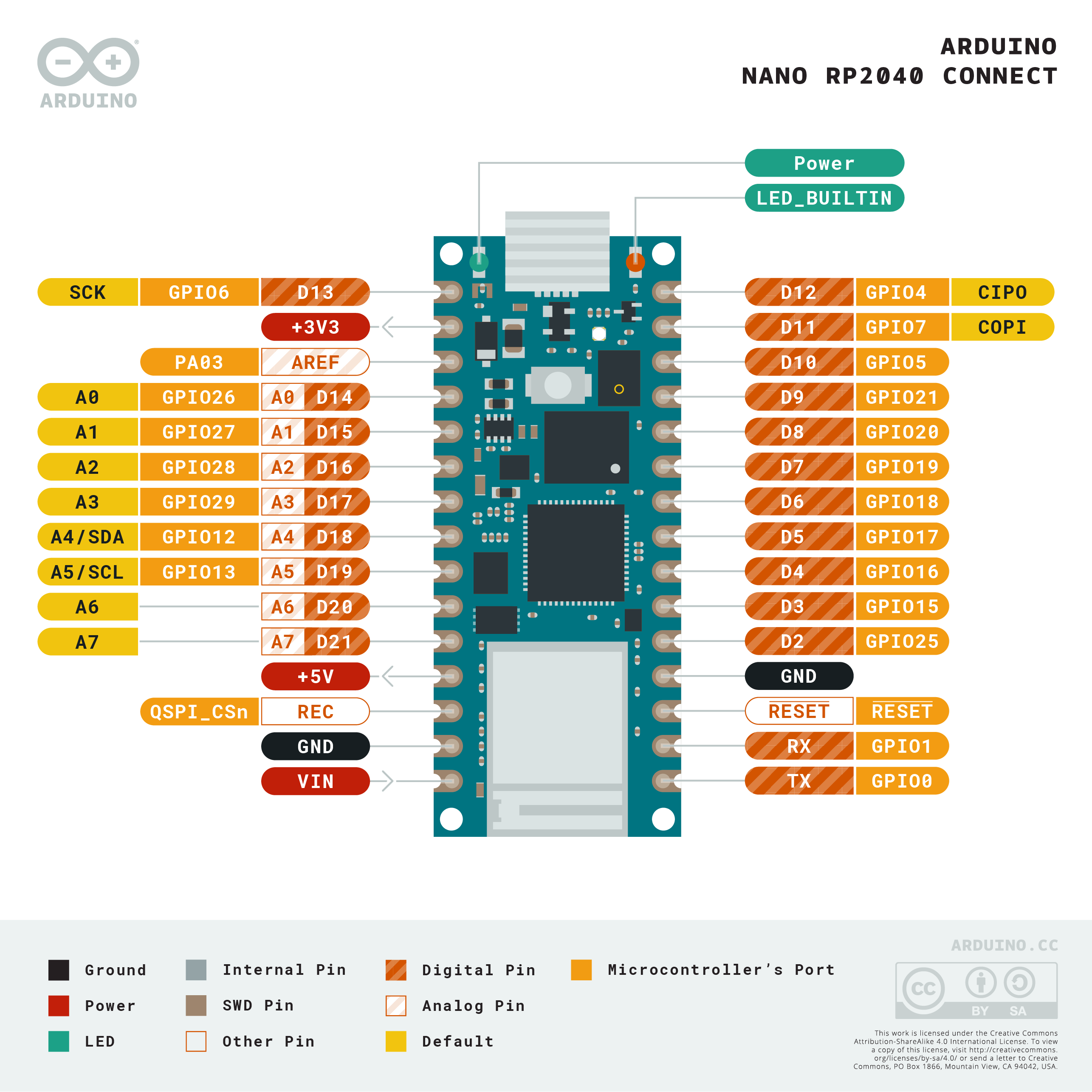
There is just a thing that I don't understand: I get no output from the pins I expect to send the PWM signal... It seem to not work but actually, the PWM outpout is on an other pin!

For example with this command:

PWM_Instance->setPWM(7, frequency, dutyCycle);

The PWM output is not on the pin 7 but on the pin 12.
It took me some times to figure this out ... Is there an explanation for this? Is there an easy way to find the corresponding pins for this library?

1 Like

I just figured out what the problem was: the "pin_to_use" number in the command:

PWM_Instance->setPWM(pin_to_use, frequency, dutyCycle);

is not the usual pin number used for arduino sketches (1 for pin D1, 2 for pin D2 ect...). This library uses the microcontroler's GPIO pin number:. For example pin_to_use = 25 to use pin D2, pin_to_use = 7 to use pin D11 (not D12 as I wrote before)....

The corresponding pins are on the nano RP2040 connect pinout drawing, in the orange labels...

This topic was automatically closed 180 days after the last reply. New replies are no longer allowed.