I see your problem. I was thinking of it like the RTC, which can be pounded without cost. Hitting the time 30x per second might be, um, rude,
There should be a way to avoid the delay and have a glitch-free clock, important if you are a perfectionist (!) but also if you ever want the loop to be running freely to accomplish other tasks.
There is a library that can keep a local RTC synched with network served time, which service would need to be very infrequently (relatively speaking) hit.
But this is outside my own experience. I will say that I am onto this trick because I build all kindsa clocks, and have become very sensitive to missed updates or those that come at anything other than every 1.0000000000000000 seconds.
The ESP32 Arduino Core has a software RTC built in, you don't need to use other libraries, and it's simple to use. Here's some example code, courtesy of forum member @noiasca :
This software RTC, by default, only fetches time from the NTP servers once per hour to keep itself accurate. You can get the current time as often as you like without impacting your WLAN.
There's another way to control the r, g & b channels of each led independently which may be easier to understand than accessing the bytes with pointers, and easier than using complex logic to decide whether to set the pixel to red, yellow or white:
  // ...or as members of a three-element array:
  leds[i][0] = 50;  // red
  leds[i][1] = 100; // green
  leds[i][2] = 150; // blue
+1
NTP is built into the new ESP core.
The libraries for the NTP code can be removed and the code reduced to a few lines.
This is basically all you need.
So now the idea of watching for the change of seconds works, meaning you retain the ability to exploit a freely running loop should you need.
void loop () {

// control passes here very frequently

  time(&now); // epoch
  localtime_r(&now, &tm); // local offset

  static int lastDisplayed = -1;  // impossible initial value

  if (tm.tm_sec == lastDisplayed) return;  // not time yet

  lastDisplayed = tm.tm_sec;

// rest of the loop runs once a second on the second
Thank you all for so many solutions you have suggested.
This one seems to be a convincing solution, even if I don't understand the formula at all. I'll have to look into it more closely.
I will also try to implement the built-in RTC with the hourly adjustment.
Now that the sketch is running, it was time to adjust the layout of the board. I've added a WS2811 so that none of them have an overarching function (seconds to minutes or minutes to hours). But that also means that one blue channel remains unused in each area.
Next step will be to order the pcb and look how it works.
I changed that from 1 hour (default) to ~10-hourly NTP updates.
My ESP32 stayed within one or two seconds in that time.
If... you want to change it, then study the link in post#22.
Leo..
This is my attempt with directly addressing the individual bytes in the leds array.
The only major concern I see is if the red/green/blue order of the array does not match the actual wiring of the LEDs.
I thought that it would be a Good Idea for the type you use for time, here time_t to be the same for all variables used for time.
Since time_t is implementation dependent, you can't rely on it being a 32 bit integer.
In this instance, it is actually a signed integer, and you compare it to an unsigned integer, which elicits a warning.
In other cases it's a 64 bit integer.
Theoretically, it could be implemented in any conceivable way, and assuming it's an integer of any size and signedness is just wrong. You aren't supposed to know, or need to care, what it is or how it works beyond what the API provides.
So for portability.
Now I was shocked (shocked!) to discover that typedef does not invoke strong type checking, a hallmark of C++… if the base type is integer you get no special help from the compikler.
Which led me to find very I-don't-understand-them-at all methods for creating and using new types that would enjoy strong type checking.
By mentioning my age, I mean I come from the wild past where all this strong type checking was unavailable, or underutilized. We didn't need no stinkin' type checking and if something got in our way a cast was always a means to get around things.
Yes, our arms are scarred with the bite marks from those bad habits. I appreciate that with code after a few thousand lines strong type checking is a lifes saver. I assumed that C++ would extend to typedef the ability to work within that philosophy.
So file that under I learnt, or am trying to, something around this; sry for the cage-rattle if that's what it came over like.
Hi David,
thank you for your attempt. I just tried it out: the clock also runs perfectly with your solution. Disconnecting the power and reconnecting it also works without any problems.
Hello everyone,
I have finally made my way through all of your posts and also worked through the linked websites. I have now summarized the most suitable approaches in a sketch that combines all the good ideas. The time is now retrieved from the NTP server every hour.
I assume that the clock will be way too bright at full brightness.
The HEX value for half brightness is #7F7F7F.
Replacing 0xFF with 0x7F in the last line will halve the brightness.
In principle, any HEX value can be used here. For the sake of simplicity, the ten values 0F to 9F and the six values AF to FF are suitable. This corresponds to a gradation of 6.25% (1/16) per brightness level.
By using these two symbols, the brightness of the entire clock can be dimmed in 255 levels (nobody will set level 0). The HEX value can be converted from the RGB values 1-255 on the following website: https://www.rgbtohex.net/
Thank you all for the time you sacrificed and the valuable tips
Here is the final sketch:
/*
  Project: Linearuhr NTC Zeit Server mit ESP32
  Author: Michael Todtenbier
  Date: Created 05.07.2024
  Version: V1.1
  IDE: Arduino IDE 1.8.19

  NTC Time:   Thomas Edlinger for www.edistechlab.com
  Website:    https://edistechlab.com/ntp-server
  NTP-Update: Werner Rothschopf
  Webseite:   https://werner.rothschopf.net/microcontroller/202103_arduino_esp32_ntp_en.htm
  Thanks to:  kolaha, david_2018, PaulRB
  Webseite:   https://forum.arduino.cc/t/linear-clock-does-not-show-all-leds-when-starting-ws2811/1277873

  Required libraries (sketch -> include library -> manage libraries)
*/


#ifdef ESP8266
#include <ESP8266WiFi.h>
#else
#include <WiFi.h>
#endif
#include <time.h>
#include "esp_sntp.h"
#include <FastLED.h>

// Wi-Fi Settings
const char *wifi_ssid     = "YourSSID";
const char *wifi_password = "YourPassword";
const char * NTP_SERVER   = "de.pool.ntp.org";
const char * TZ_INFO      = "CET-1CEST-2,M3.5.0/02:00:00,M10.5.0/03:00:00";

time_t now;               // Vergangene Sekunden seit dem 1. Januar 1970 - UTC
tm tm;                    // Sekunden in richtige Uhrzeit wandeln

// Configuration Neopixels
#define DATA_PIN 27       // Pin für LED-Streifen
const byte NUM_LEDS = 14; // Anzahl der WS2811-Chips
CRGB leds[NUM_LEDS];

void setup_wifi() {
  delay(10);
  WiFi.begin(wifi_ssid, wifi_password);
  int counter = 0;
  while (WiFi.status() != WL_CONNECTED) {
    delay(500);
    if (++counter > 100) ESP.restart();
    Serial.print(".");
  }
  Serial.println("WiFi connected");
}

void setup () {
  Serial.begin(115200);
  setup_wifi();
  configTime(0, 0, NTP_SERVER);
  setenv("TZ", TZ_INFO, 1);

  sntp_set_sync_interval(60 * 60 * 1000UL); // Abfrageintervall: 1 Stunde
  sntp_set_time_sync_notification_cb(cbSyncTime);  // set a Callback function for time synchronization notification

  //FastLED aktivieren
  FastLED.addLeds<WS2811, DATA_PIN, RGB>(leds, NUM_LEDS);

}

void cbSyncTime(struct timeval *tv)  { // callback function to show when NTP was synchronized
  Serial.println(F("NTP time synched"));
}

  //byte location of LEDs within leds array
  const byte offset_1s  =  0; // 0- 8
  const byte offset_10s =  9; // 9-13
  const byte offset_1m  = 15; //15-23
  const byte offset_10m = 24; //24-28
  const byte offset_1h  = 30; //30-38
  const byte offset_10h = 39; //39-40

  void loop () {
  time(&now);                       // Liest die aktuelle Zeit
  localtime_r(&now, &tm);           // Beschreibt tm mit der aktuelle Zeit  timeClient.update();

  int hours = tm.tm_hour;
  int minutes = tm.tm_min;
  int seconds = tm.tm_sec;

  Serial.printf(" \tUhrzeit: %02d:%02d:%02d \n", hours, minutes, seconds);

  FastLED.clear();
  setLeds(seconds % 10, offset_1s);
  setLeds(seconds / 10, offset_10s);
  setLeds(minutes % 10, offset_1m);
  setLeds(minutes / 10, offset_10m);
  setLeds(hours % 10, offset_1h);
  setLeds(hours / 10, offset_10h);

  FastLED.show();
  FastLED.delay(1000);
}

void setLeds(byte num, byte offset) {
  //prevent writing past end of array
  if ((offset + num) > sizeof(leds))
    num = sizeof(leds) - offset;
  byte* ptr = (byte*)&leds + offset;
  for (byte i = 0; i < num; i++)
        *ptr++ = 0x3F;    // Helligkeit 0F(6%), 1F(13%), 2F(19%), ..., 9F(69%), AF(75%), BF(81%), CF(88%), DF(94%), FF(100%)
}
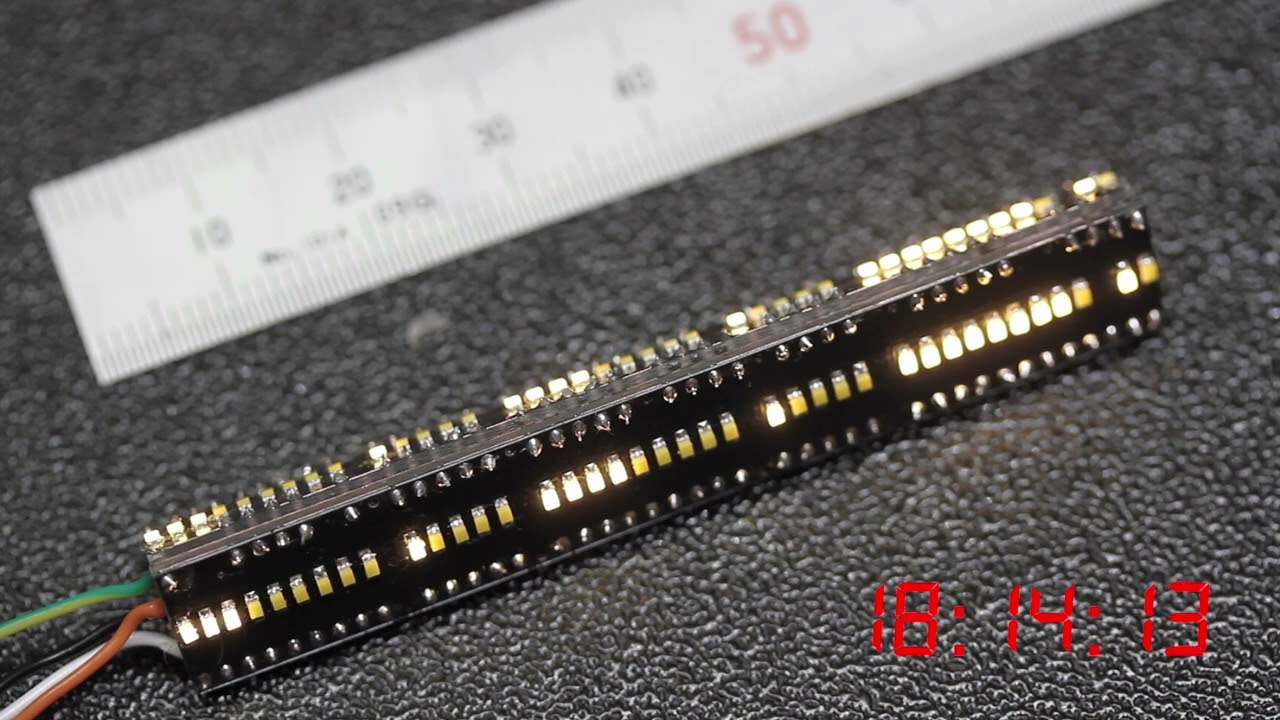
as a small thank you for your active support, I would like to present you the final result (without the disguise yet). I would never have managed this without your help!
Ein Teil des Sketchs beruht ja bereits auf einigen Ihrer Codezeilen, woraus ich im Sketch auch kein Geheimnis gemacht habe
Vielen Dank also auch für das Bereitstellen der Infos rund um die integrierte Software RTC!