Loss in received serial data

Hi everyone! I'm ashwin

I try to get 54KB of data using sim800l(Retrive from HTTP Server) with mega and stored to SD.Actually i got the data both softwareserial and hardwareserial but initially i got big loss of data and after i also get loss in each line per single byte data loss
i didn't know why i get this using this code
Using Serial baudrate is 9600 for both serial and myserial

if(myserial.available()){
   while(true){
      c = myserial.read();
      Serial.print(c);
      // save file byte
      if (c == '}'){
         break; 
      }
   }
}

Acutal data;
actualdata.txt (54.0 KB)
while i get data;
char gsmdata.txt (48.9 KB)

here you all can see the loss of data.

Meanwhile i try to storing the char gsmdata to SD card i facing here lots of '?' marks using the code

void(){
   myFile = SD.open("54kbdata.txt", FILE_WRITE);
   if (myFile) 
   {
    Serial.println("Writing to 54kbdata.txt...");
    if(myserial.available()){
       while(true){
        c = myserial.read();
        myFile.print(c);
        if (c == '}'){
           break;  
         }
       }
     }
    myFile.close();
    Serial.println("done.");
    } 
   else 
     {
       Serial.println("error opening 54kbdata.txt");
     }


actuall data is above the code

here you all can see the difference actual data and sd file size .

question data;
chargsmdatawithsd.txt (98.6 KB)

Im stuck here please help me.

Thanks Advance everyone!
As you wrote, your code merely MUST lost a most of data.
You test the serial for only ONE byte available and then try to read whole the data?

Start from testing the availability before reading an every byte:

if(myserial.available()){
   while(myserial.available()){
    ...

In this case, the first if() can be omitted.

I agree with @b707 and I'm just adding one more hint, with a do...while loop started if data is available, reading/writing the received char and exiting if the terminating character has been received:

  if (myserial.available()) {
    char c;
    do {
      if (myserial.available()) {
        c = myserial.read();
        myFile.print(c);
      }
    } while(c != '}');
}

Hello
I am trying to fetch 100Kb of data from server through sim800L and copy on SD card.
While i am trying to fetch i am loosing data in between and some times at the start.

void recvWithStartEndMarkers() {
 myFile = SD.open("test1.txt", FILE_WRITE);
static boolean recvInProgress = false;
    static byte ndx = 0;
    char startMarker = '<';
    char endMarker = '>';
    char rc;
   // if the file opened okay, write to it:
   if (myFile) 
   {
    Serial.println("Writing to test1.txt...");
    
 
    while (Serial.available() > 0 && newData == false) {
        rc = Serial.read();

        if (recvInProgress == true) {
            if (rc != endMarker) {
               // receivedChars[ndx] = rc;
               // ndx++;
               // if (ndx >= numChars) {
                   // ndx = numChars - 1;
                //}
                Serial.println(rc);
               myFile.print(rc);

            }
            else {
               // receivedChars[ndx] = '\0'; // terminate the string
                recvInProgress = false;
                //ndx = 0;
                newData = true;
            }
        }

        else if (rc == startMarker) {
            recvInProgress = true;
        }
    }
     myFile.close();
    Serial.println("done.");
    } 
   else 
     {
       // if the file didn't open, print an error:
       Serial.println("error opening test1.txt");
     }
    
}


Edit : Sorry for the earlier code.
I have two issues here .

  1. The data i get on serial monitor is not the full data, either in between bits are lost or entire line i dont receive
  2. When i write on SD card , the data is printed with '?'

With this code you would lose all the data. Nothing is printed to the file.

Solution: never post code snippets.

But thanks for posting your snippet in code tags!

writing to SD-card is done with

myFile.print(i);

myFile.print(message);

Anyway you should post your complete sketch as a code-section
Printing to serial should be done much faster than the receiving.

This all could be already answered if you would have posted your complete sketch

best regards Stefan

which arduino? at what baud rate do you receive on mySerial?

  • printing the data will slow things down, hope Serial is set with a much faster baud rate than mySerial
  • writing to the file (which you don't do) will be done in chunks of 0.5Kb and sometimes the write can be slow. Depending on how this is managed and how slow it gets, you might fill up the incoming buffer and loose data.

side note: why do you have comments that are irrelevant ? just don't comment at all rather than write something wrong

Hi @jonna_9431

Are you and @ashwin21 the one man?

Your questions and code almost the same:

Compare

When you post your code, it looks like that:

but you edited it at the short time...

You shouldn't open a multiple threads about the same subject.
Registering a false accounts is prohibited.

Actually we are same team, working on this module. So he might have posted the same code.

Good to gain experience how working in a team is.
You might should communicate with each other more often or divide responsabilites.
In case of this and the other thread. Report the second thread to the moderators by using the flag-symbol below the postings and ask the moderator for merging your two threads. And then simply post both in one thread.

best regards Stefan

I merged both discussions as they refer to the same project

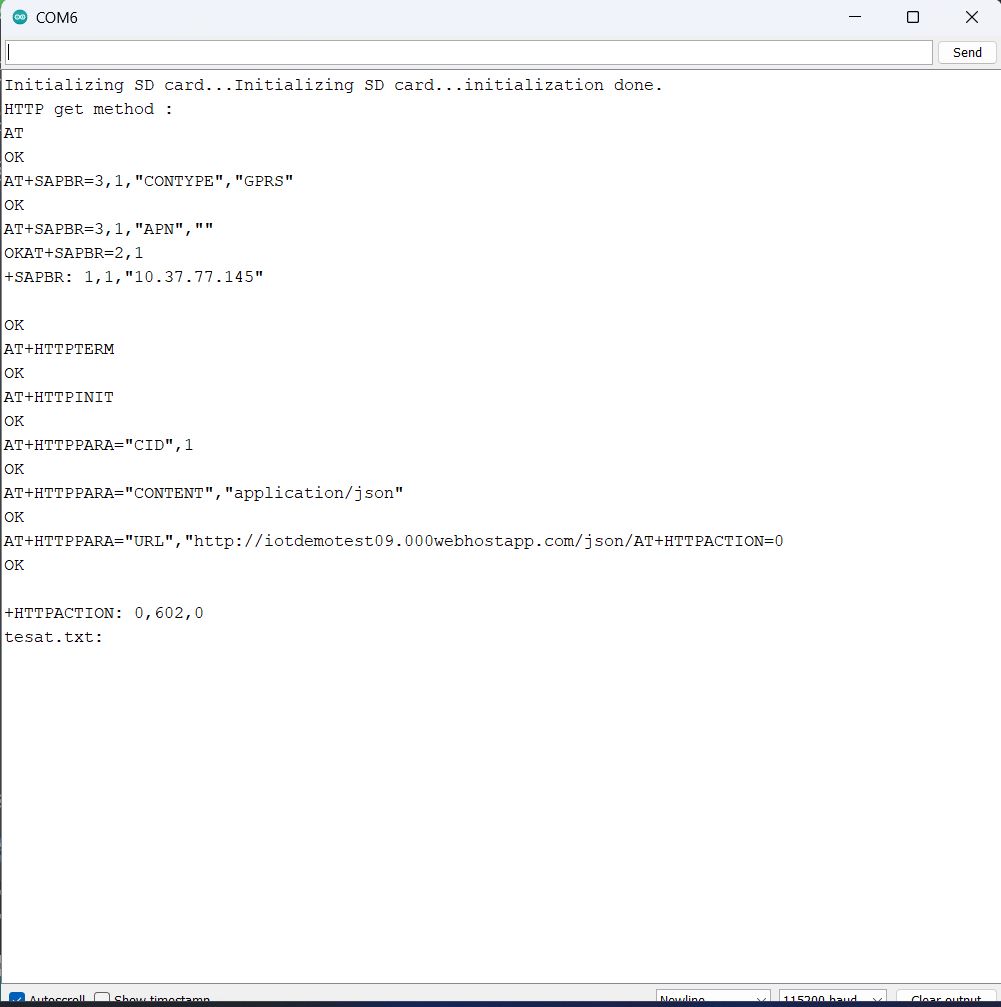
Hello sorry for the confusion earlier. Now I am able to fetch data but if the data is more 300KB, I am getting 602 error for command AT+ HTTPACTION=0

When i checked in AT command sim800l document it is "No Memory" Error .
Is this limit for sim800L module?

You should post an overview about your entire project. What are you doing all in all?
What kind of data is this?
What is the sender-device?
What is the receiver-device?
What is the distance between sender and receiver?
Do you have all details of the data that will be stored on the SD-card under your own control?
Would it be possible to divide the datafiles into smaller chunks?
What happends with the data in the receiver?

All these questions get answered if you give an overview about your project .
Based on this answers much better or at least more solutions can be suggested

best regards Stefan

any particular reasom for using HTTP GET?
if you are simply downloading a file why not use FTP which is designed for processing large file transfers

would this be more efficient if multiple bytes, a string, be written to myFIle instead of a char at a time?

From the error-message

I conclude that the sim800L-module has a No memory error. As far as I understand it
the code creates a huge JSON-coded data from the SD-card-file and then this huge amout of data is transferred by http-get through the sim800L module .

If the amount of data is larger than the inputbuffer of the sim800L-module this error
no memory occurs

So the problem is the limited memory of the sim800L-module.

I second that

best regards Stefan

We have not tried FTP. Could you help us with snippet ?
The purpose is to download BMP image file and display it on TFT screen.
The BMP data can be 20KB to 1 MB.
We are trying to get BMP data from the link and display on TFT screen .BMP_Data_link

try a web search for sim800 FTP

The Project as described is to Fetch BMP data and display on TFT screen.
I am using SIM800L to fetch data from the server and copying it on the SD card.
Controller used is Atmega 2560.
The BMP file size can be between 20 KB to 1 MB
I am trying to store all the data into SD card using serial.read function.

the file contains ASCII codes for the hexadecimal representation

0x42, 0x4D, 0x32, 0x04, 0x00, 0x00, 0x00, 0x00, 0x00, 0x00, 0x36, 0x00, 0x00, 0x00, 0x28, 0x00, 
0x00, 0x00, 0x14, 0x00, 0x00, 0x00, 0x11, 0x00, 0x00, 0x00, 0x01, 0x00, 0x18, 0x00, 0x00, 0x00, 
0x00, 0x00, 0xFC, 0x03, 0x00, 0x00, 0x00, 0x00, 0x00, 0x00, 0x00, 0x00, 0x00, 0x00, 0x00, 0x00, 
0x00, 0x00, 0x00, 0x00, 0x00, 0x00, 0x9C, 0x89, 0xBA, 0x96, 0x83, 0xB4, 0x92, 0x7F, 0xB0, 0x93, 
0x80, 0xB1, 0x93, 0x80, 0xB1, 0x91, 0x7E, 0xAF, 0x8E, 0x7B, 0xAC, 0x8D, 0x7A, 0xAB, 0x94, 0x7F, 
...

if you want to store the file in binary form on the SD card you'll need to parse the data

also the initial code was showing

I don't see any closing curly bracket in the file.


so do you have already a working code that actually performs the HTTP GET? can you share that?