I, like many others, keep loosing the ISB Port. I have tried various methods to regain the port but none work.
Any help would be much appreciated.
It would help if you provided some details. E.g. operating system, version of the IDE and most importantly the board that you're using.
A more complete description would be useful as well; e.g. do you have to throw the board away and use a new one? Or do you have to close the serial monitor before you can upload again? Or ...
1 Like
What does that mean?
1 Like
Are you referring to ISB Institute for Systematic Botany: http://www.florida.plantatlas.usf.edu/
If you meant to type USB, as @sterretje suggested, we’ll need more information. What hardware is connected to it? Please post an annotated schematic showing all connections, including links to the technical documentation for all hardware devices. Be sure to include details about all power sources. This information will help us provide a more accurate and helpful response.
After "STM32 MCU based board" updated to ver. 2.8.0 the port became 'grey'. I install ver. 2.7.1 to fix this issue.
I run IDE 1.8.19 on Win7.
Hi @zoltan65. You are correct that there was a bug in version 2.8.0 of the "STM32 MCU based boards" platform (AKA "STM32duino"):
However, that bug was fixed in the 2.9.0 release of the platform:
So instead of downgrading your platform as a workaround to the bug, you can upgrade to the latest version.
Thank you. But my board is Arduino UNO
Peter
If you don't have the STM32duino board package installed, the problem referred to by @zoltan65 is not applicable to your situation.
Please provide details as requested in posts #2 .. post #4.
We now know which board you have. What is the ttl-to-usb converter on the board? What is all connected to your Uno? Where does the port disappear (IDE or operating system or both)? What does your (unknown) operating system think of your board? Provide all the information that you can think off; better too much than not enough.
Thank you. I have an Arduino UNO R3 connect toy Windows 10 desktop computer. Initially, when switched on it finds Port 12 UDB Serial port. This can also be seen in Device Manager on the computer and Ports on the Arduino. However, if I unplug the Arduino a couple of times, to test a circuit, and attempt to upload a sketch, I get Port 12 not found. It no longer appears under Ports on the Arduino but sometimes it still appears in Device Manager. I have tried closing Arduino and rebooting the computer.
Any help would be much appreciated as this is spoiling my enjoyment of learning about the Arduino and many of it's accessories.
Peter
I can't say what's going wrong.
Which circuit? I would start by disconnecting the Uno from the circuit and test again if disconnecting/connecting USB a few times results in the same behaviour.
I think that a schematic / wiring diagram will be useful; all connections between Uno and circuit as well as all power lines.
It occurs even with the basic Blink sketch.
Peter
Do you have a link to the board that you bought? I'm specifically interested in the chip closest to the USB connector. In below image of an official Arduino Uno it's an Atmel 16U2.
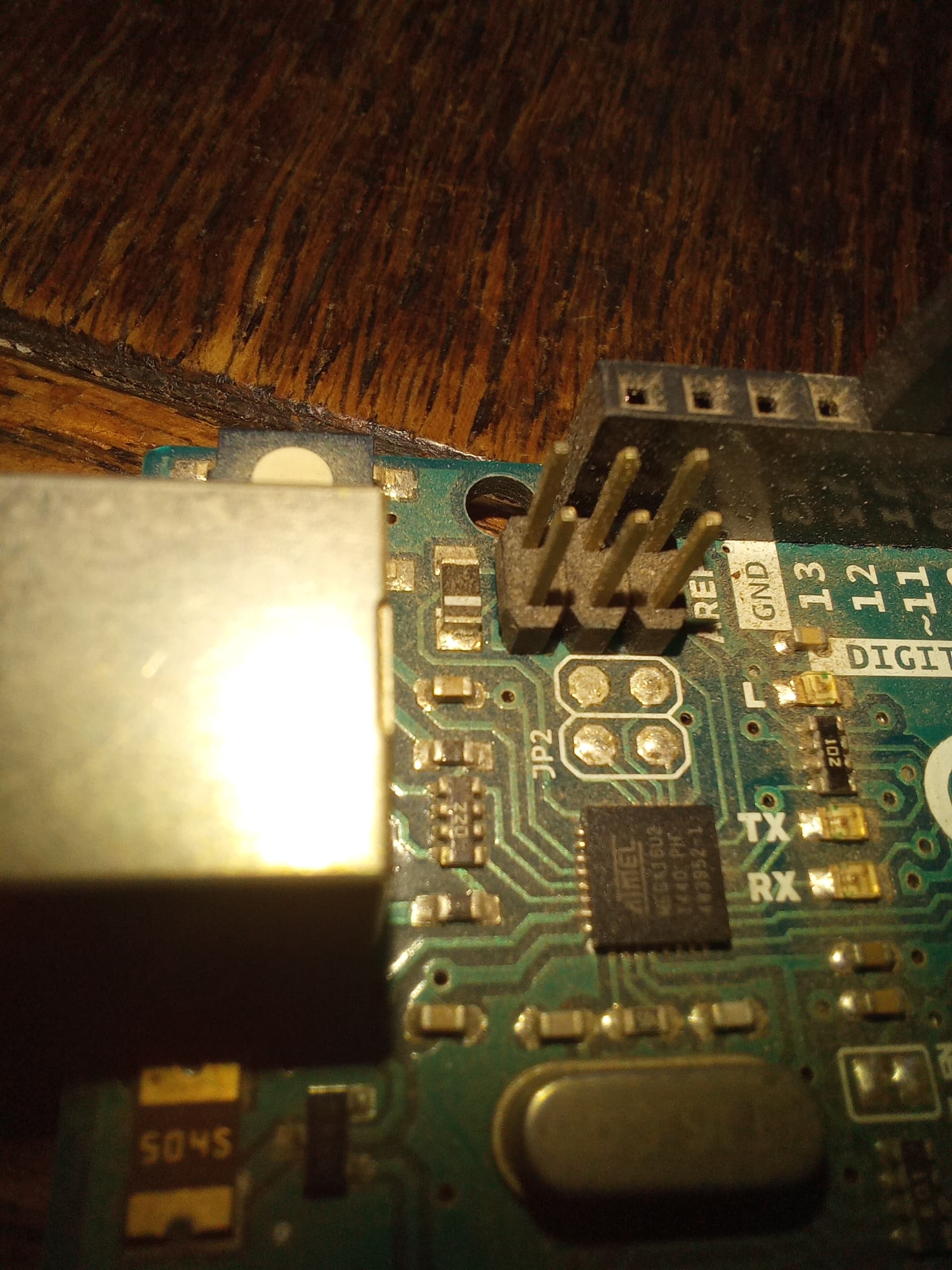
Other options can be CH340 (very common for clones), CP210x or FT232x.
I've never read about disappearing USB ports for an Uno. Those that have the of disappearing ports are using boards with native USB where the processor handles the USB connectivity instead of a dedicated serial-to-usb converter.
Did your board ever work normal when you just got it?
I used two Arduino s, both of which are genuine. I have taken a photo of one of those boards but am unable to send it to you as my reply is not html. Not sure why that has happened. The chip you mentioned has no writing on it so cannot say what it is.
Peter
I think that that is because you used email to reply. If you visit the website with a browser you can simply drag-and-drop a photo.
When taking photos, you might have to play a little with the light and the angle. In my image, the camera was in macro mode under an angle and the flash was aimed slightly left of the chip.
Is the chip a square chip like shown with legs (pins) at all sides or rectangular with legs (pins) only at the long sides?
I don't think that I can help much further. If you have other cables, try those.
You did not answer the question if the board(s) worked properly when you just got them.
In case it will supplement what @sterretje wrote, I'll add a picture of what is meant by "rectangular with legs (pins) only at the long sides":

Don't worry about whether the writing on the chip shown in the picture matches your chip. We need to know whether your chip has the same general form as the one in the picture, even if there is no writing at all on your chip.

It helps in so far that that is not an original Arduino Uno but a clone.
Assuming the chip is a CH340 or CH341, I think that the 6.7458 MHz crystal is odd; I would expect 12 MHz. That might well be the cause of your problem.
Ok, thanks for your suggestions.
This topic was automatically closed 180 days after the last reply. New replies are no longer allowed.