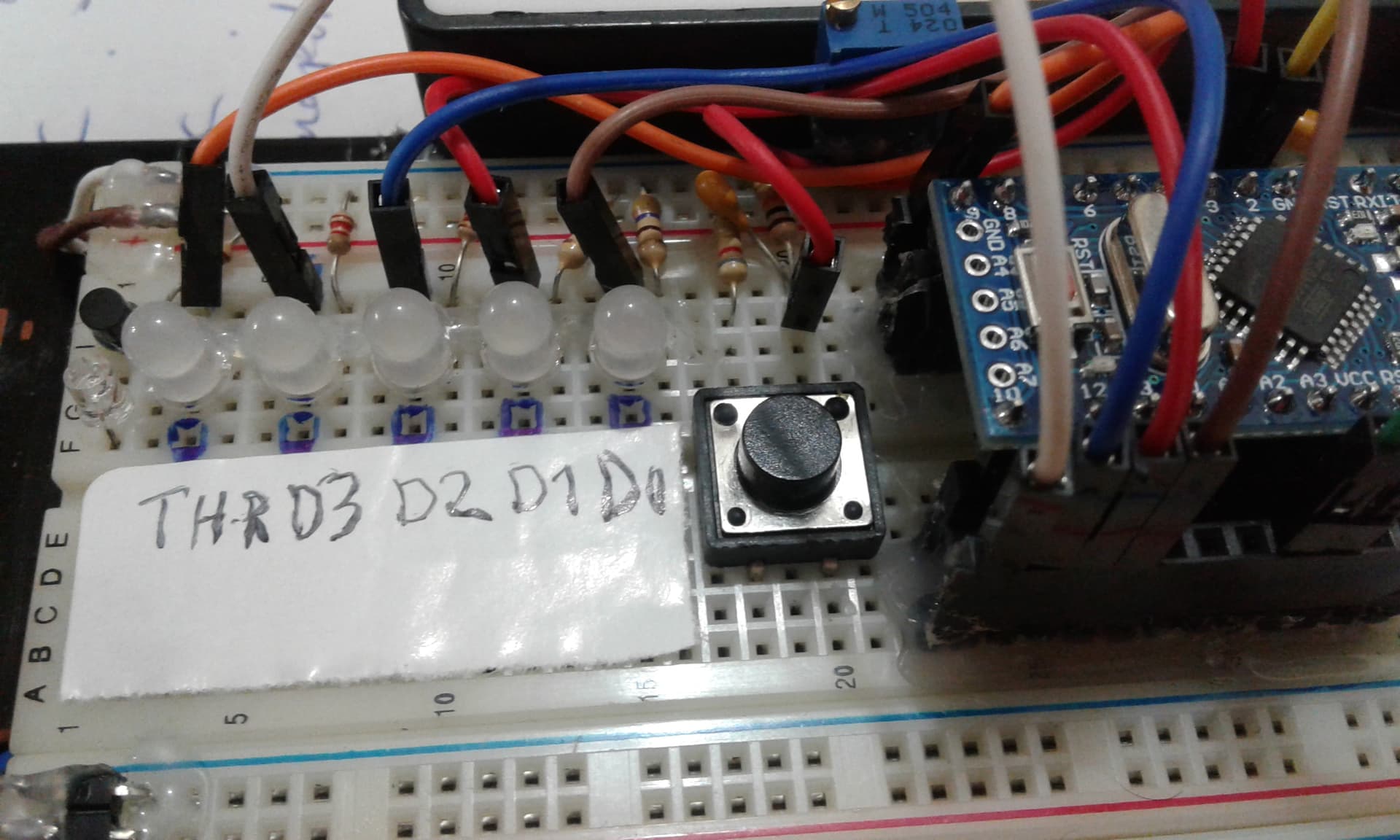
I ordered the ltc6915 IC to test and use in thermocouple temperature measurements.
I use this because of the programmable gain feature
I'm considering a registered gain controlled in parallel with the eeprom. I designed and compiled it easily with the potentiometer. Can you help me write a program consisting of four different records with one click?
I tried to adapt some button implementations to this, it's a bit of a sloppy rookie job so I'm trying to improve it. I've just started .I will share all documents
const int sensorMin = 0;      // sensor minimum, discovered through experiment
const int sensorMax = 1023;    // sensor maximum, discovered through experiment
 byte ledG1 = 13;    //  kayıt 1 kazanc cıkış:
 byte ledG2 = 12;     //  kayıt 2 kazanc cıkış:
 byte ledG3 = 11;    //  kayıt 1 kazanc cıkış:
 byte ledG4 = 10;
 byte ButtonPin = 2; // buton gırış:

void setup() {
 pinMode(ledG1, OUTPUT);
  pinMode(ledG2, OUTPUT);
  pinMode(ledG3, OUTPUT);
  pinMode(ledG4, OUTPUT);
  pinMode(ButtonPin, INPUT);   //  buton gırış modlar :


}

void loop() {
  // read the sensor:
  int sensorReading = analogRead(A3);
  // map the sensor range to a range of four options:
  int range = map(sensorReading, sensorMin, sensorMax, 0, 4);


  switch (range) {
  case 0:    // your hand is on the sensor
               digitalWrite(ledG1, 1);
                digitalWrite(ledG2, 1);
               digitalWrite(ledG3, 0);
               digitalWrite(ledG4, 0);

    break;
  case 1:    // your hand is close to the sensor
                digitalWrite(ledG1, 1);
                digitalWrite(ledG2, 1);
               digitalWrite(ledG3, 0);
               digitalWrite(ledG4, 0);

    break;
  case 2:    // your hand is a few inches from the sensor
                digitalWrite(ledG1, 1);
                digitalWrite(ledG2, 1);
               digitalWrite(ledG3, 0);
               digitalWrite(ledG4, 0);
    break;
  case 3:    // your hand is nowhere near the sensor
                digitalWrite(ledG1, 1);
                digitalWrite(ledG2, 1);
               digitalWrite(ledG3, 0);
               digitalWrite(ledG4, 0);
    break;
  }
  delay(1);
}
#include <EEPROM.h>
int switchPin = 2;              // switch is connected to pin 2
int gain1 = 10;               // green led pin
int gain2 = 11;                 // red led pin
int gain3 = 12;                // blue led pin
int gain4 = 13;
int HDtru = 13;

int val;                        // variable for reading the pin status
int val2;                       // variable for reading the delayed status
int buttonState;                // variable to hold the button state
int Mode = 0;                   // What mode is the light in?

void setup() {
  pinMode(switchPin, INPUT);    // Set the switch pin as input
  pinMode(gain1, OUTPUT);
  pinMode(gain2, OUTPUT);
  pinMode(gain3, OUTPUT);
  pinMode(gain4, OUTPUT);
  pinMode(HDtru, OUTPUT);       // HOLD_THRU CONNECTİNG  1-0 OUT  :

  buttonState = digitalRead(switchPin);   // read the initial state

}

void loop() {
   Mode = EEPROM.read(100);
  val = digitalRead(switchPin);        // read input value and store it in val
  delay(10);                           // 10 milliseconds is a good amount of time
  val2 = digitalRead(switchPin);       // read the input again to check for bounces
  if (val == val2) {                   // make sure we got 2 consistant readings!
    if (val != buttonState) {          // the button state has changed!
      if (val == LOW) {                // check if the button is pressed
        if (Mode == 0) {
          Mode = 1;
          EEPROM.write(100, Mode);     // store mode to eeprom
          digitalWrite(gain1, 1);
          digitalWrite(gain2, 0);   // 128 gain 1000 code:
          digitalWrite(gain3, 0);
          digitalWrite(gain4, 0);
                digitalWrite(HDtru, 1);  // HOLD_THRU CONNECTİNG  1-0 OUT  :
                 delay (50);
                digitalWrite(HDtru, 0);
        } else {
          if (Mode == 1) {
            Mode = 2;
            EEPROM.write(100, Mode);
          digitalWrite(gain1, 1);
          digitalWrite(gain2, 0);   // 256 gain 1001 code:
          digitalWrite(gain3, 0);
          digitalWrite(gain4, 1);
                digitalWrite(HDtru, 1);
                 delay (50);
                digitalWrite(HDtru, 0);

          } else {
            if (Mode == 2) {
              Mode =3;
              EEPROM.write(100, Mode);
            } else {
              if (Mode == 3) {
                Mode = 4;
                EEPROM.write(100, Mode);
          digitalWrite(gain1, 1);
          digitalWrite(gain2, 0);
          digitalWrite(gain3, 1);   // 512 gain 1010 code
          digitalWrite(gain4, 0);
                digitalWrite(HDtru, 1);
                 delay (50);
                digitalWrite(HDtru, 0);
              } else {
                if (Mode == 4) {
                  Mode = 0;
                  EEPROM.write(100, Mode);
          digitalWrite(gain1, 1);
          digitalWrite(gain2, 0);  // 1024 gain 1011 code  parallel control bits
          digitalWrite(gain3, 1);
          digitalWrite(gain4, 1);
                digitalWrite(HDtru, 1);
                 delay (50);
                digitalWrite(HDtru, 0);

               }
              }
            }
          }
        }
      }
    }
    buttonState = val;            // save the new state in our variable
  }
  EEPROM.update(100, Mode);       // while looping store current mode ONLY if different that currently stored address.
}
I changed it by making changes in a program with 4 different gains and compiled it. the problem is i didn't try in real i will try
You may have a different design contribution. whole team work design
It will serve a different system.
Unfortunately the codes are not working. The codes of the above sites. The four-output encoder doesn't look as simple as I thought. It would be nice if it worked as written. it does not give an installation error, but actually the installed board does not work.
to different earnings. I have compiled the codes that have. It works exactly as I want it. Let's make other users benefit as well and make revisions to make it more organized. There will definitely be something you want to add
thanks
#include <EEPROM.h>  // kayıt:
const byte ButtonPin = 2; // buton gırış:
int kayit_adress,kaydelicek_veri;
int okunacak_adress,okunacak_veri;
unsigned long currentTime ;


byte a1=10;
byte a2 =11;
byte a3=12;
byte a4 =13;
byte hdt =9;
byte flasor =3;
int sayac ;


void setup() {
  pinMode(ButtonPin, INPUT);
  pinMode(10, OUTPUT);
  pinMode(11, OUTPUT);
  pinMode(12, OUTPUT);
  pinMode(13, OUTPUT);
  pinMode(9, OUTPUT);
  pinMode(3, OUTPUT);


}

void loop() {

   unsigned long currentTime = millis();
  static boolean buttonWasPressed = false;      // son düğme durumunu hatırlamak için değişken:
  boolean buttonIsPressed = digitalRead(ButtonPin) == HIGH;
  static unsigned long lastStateChangeTime = 0;
  if (buttonIsPressed != buttonWasPressed && currentTime - lastStateChangeTime > 25)
  {
    buttonWasPressed = buttonIsPressed;
    lastStateChangeTime = currentTime;
    if (buttonIsPressed)

          sayac++;
      delay (10);
      if (sayac>5)
  {
    sayac= 0;   // set modları kayıt:
  }

      kayit_adress = 10;
      kaydelicek_veri= sayac ;
       EEPROM.write (kayit_adress,kaydelicek_veri);  //  kaydet  mode 0 adrese :
        delay(10);
  }


          okunacak_adress =10 ;
     okunacak_veri= EEPROM.read (okunacak_adress);     // mod geçersizse (örn. fabrikada yeni eeprom 0xFF içeriyorsa), 0'a sıfırlayın:
      sayac =  okunacak_veri ;

   delay (10);


  if (okunacak_veri==0)
  {

    digitalWrite(a1,HIGH); // 1000//:  gain  // 128 //
    digitalWrite(a2,LOW);
    digitalWrite(a3,LOW);
    digitalWrite(a4,LOW);


  }

 else if (okunacak_veri==1)
 {

    digitalWrite(a1,HIGH);  // 1001 //: gain  // 256 //
    digitalWrite(a2,LOW);
    digitalWrite(a3,LOW);
    digitalWrite(a4,HIGH);
  }

 else if (okunacak_veri==2)
 {

    digitalWrite(a1,HIGH);   // 1010//:  gain 512 //
    digitalWrite(a2,LOW);
    digitalWrite(a3,HIGH);
    digitalWrite(a4,LOW);

  }

 else if (okunacak_veri==3)
 {

    digitalWrite(a1,HIGH);  // 1011//:  gain 1024 //
    digitalWrite(a2,LOW);
    digitalWrite(a3,HIGH);
    digitalWrite(a4,HIGH);
  }

 else if (okunacak_veri==4)
 {

    digitalWrite(a1,HIGH);   // 1100 //:  gain 2048 //
    digitalWrite(a2,HIGH);
    digitalWrite(a3,LOW);
    digitalWrite(a4,LOW);
  }

   else

 {

    digitalWrite(a1,LOW);     // 0110 // gain 32 //
    digitalWrite(a2,HIGH);
    digitalWrite(a3,HIGH);
    digitalWrite(a4,LOW);


}

}