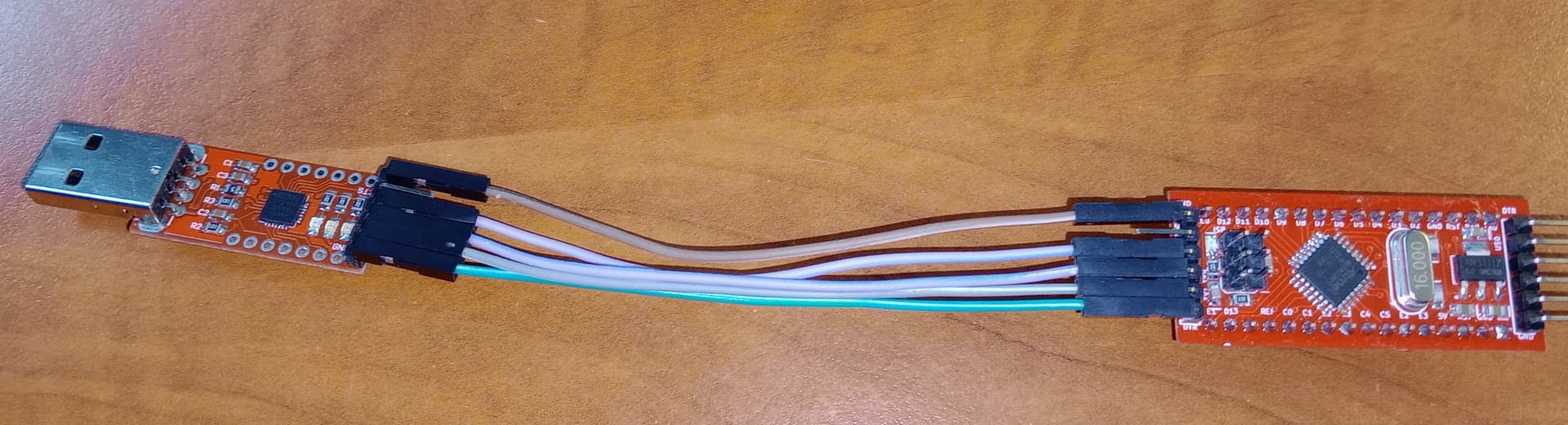
Using USBtinyISP programmer I can't succesfully burn the MCUdude's MiniCore bootloader to a Pro Mini 328P 16MHz; I think.
Writing sketches afterwards with a external UART (CP2102 USB-to-UART bridge) is not working after burning a bootloader.
Setup:
USBtinyISP programmer, connected to the ISP pins of a Pro Mini ATmega328 16MHz (SPI pins MOSI/PB3, MISO/PB4, SCK/PB5, GND, Vcc, RST/PC6).
I can succesfully write any program or bootloader; but does the bootloader get installed correctly?
Issue:
after loading Optiboot versions 6.2, 7.0 or 8.0, or MiniCore's 3.0.0 bootloaders into AVRDudess 2.14 (avrdude version 7.0) and then programming this into the Pro Mini with an USBtinyISP works I think.
But I am unable to write a sketch to the Pro Mini from the Arduino IDE with the MiniCore AT328 at 16MHz.
Also burning the bootloader using the Arduino IDE using the USBtinyISP from the MiniCore's "ATmega328" core does work, but afterwards no sketch can be downloaded from the Arduino IDE.
Same issue on a number of Pro Mini 328P 16MHz.
What must be done to get this to work?
EDIT:
this is the error output on the Arduin IDE
avrdude error: bootloader might be optiboot 8.0? Please use -xbootsize=<num>

avrdude error: unable to read signature data for part ATmega328P, rc=-1
avrdude error: unable to read signature data, rc=-1
avrdude error: unable to read signature data, rc=-1
Your problem seems not with the ISP programmer as you mentioned that works fine. More like a connection problem with the CP2102 USB-to-UART bridge.
Check the pins and the wiring.
I have one in my collection that has the VCC and CTS swapped. Cost me some time before I saw it.
When using the Arduino IDE "Burn bootloader" for the MiniCore 3.0.0 I get following output (whci to me means all well?):
C:\Users\Erik Arckens\AppData\Local\Arduino15\packages\MiniCore\tools\avrdude\7.2-arduino.1/bin/avrdude -CC:\Users\Erik Arckens\AppData\Local\Arduino15\packages\MiniCore\hardware\avr\3.0.0/avrdude.conf -v -patmega328p -cusbtiny -e -Ulock:w:0xff:m -Uefuse:w:0b11111101:m -Uhfuse:w:0xd7:m -Ulfuse:w:0b11110111:m

avrdude: Version 7.2-arduino.1
         Copyright the AVRDUDE authors;
         see https://github.com/avrdudes/avrdude/blob/main/AUTHORS

         System wide configuration file is C:\Users\Erik Arckens\AppData\Local\Arduino15\packages\MiniCore\hardware\avr\3.0.0\avrdude.conf

         Using Port                    : usb
         Using Programmer              : usbtiny
avrdude: usbdev_open(): found USBtinyISP, bus:device: 001:010
         AVR Part                      : ATmega328P
         Chip Erase delay              : 9000 us
         PAGEL                         : PD7
         BS2                           : PC2
         RESET disposition             : possible i/o
         RETRY pulse                   : SCK
         Serial program mode           : yes
         Parallel program mode         : yes
         Timeout                       : 200
         StabDelay                     : 100
         CmdexeDelay                   : 25
         SyncLoops                     : 32
         PollIndex                     : 3
         PollValue                     : 0x53
         Memory Detail                 :

                                           Block Poll               Page                       Polled
           Memory Type Alias    Mode Delay Size  Indx Paged  Size   Size #Pages MinW  MaxW   ReadBack
           ----------- -------- ---- ----- ----- ---- ------ ------ ---- ------ ----- ----- ---------
           eeprom                 65    20     4    0 no       1024    4      0  3600  3600 0x00 0x00
           flash                  65    10   128    0 yes     32768  128    256  4500  4500 0x00 0x00
           lfuse                   0     0     0    0 no          1    1      0  4500  4500 0x00 0x00
           hfuse                   0     0     0    0 no          1    1      0  4500  4500 0x00 0x00
           efuse                   0     0     0    0 no          1    1      0  4500  4500 0x00 0x00
           lock                    0     0     0    0 no          1    1      0  4500  4500 0x00 0x00
           signature               0     0     0    0 no          3    1      0     0     0 0x00 0x00
           calibration             0     0     0    0 no          1    1      0     0     0 0x00 0x00

         Programmer Type : USBtiny
         Description     : USBtiny simple USB programmer
avrdude: using SCK period of 10 usec
avrdude: AVR device initialized and ready to accept instructions
avrdude: device signature = 0x1e950f (probably m328p)
avrdude: erasing chip
avrdude: using SCK period of 10 usec

avrdude: processing -U lock:w:0xff:m
avrdude: reading input file 0xff for lock
         with 1 byte in 1 section within [0, 0]
avrdude: writing 1 byte lock ...
avrdude: 1 byte of lock written
avrdude: verifying lock memory against 0xff
avrdude: 1 byte of lock verified

avrdude: processing -U efuse:w:0b11111101:m
avrdude: reading input file 0b11111101 for efuse
         with 1 byte in 1 section within [0, 0]
avrdude: writing 1 byte efuse ...
avrdude: 1 byte of efuse written
avrdude: verifying efuse memory against 0b11111101
avrdude: 1 byte of efuse verified

avrdude: processing -U hfuse:w:0xd7:m
avrdude: reading input file 0xd7 for hfuse
         with 1 byte in 1 section within [0, 0]
avrdude: writing 1 byte hfuse ...
avrdude: 1 byte of hfuse written
avrdude: verifying hfuse memory against 0xd7
avrdude: 1 byte of hfuse verified

avrdude: processing -U lfuse:w:0b11110111:m
avrdude: reading input file 0b11110111 for lfuse
         with 1 byte in 1 section within [0, 0]
avrdude: writing 1 byte lfuse ...
avrdude: 1 byte of lfuse written
avrdude: verifying lfuse memory against 0b11110111
avrdude: 1 byte of lfuse verified

avrdude done.  Thank you.

C:\Users\Erik Arckens\AppData\Local\Arduino15\packages\MiniCore\tools\avrdude\7.2-arduino.1/bin/avrdude -CC:\Users\Erik Arckens\AppData\Local\Arduino15\packages\MiniCore\hardware\avr\3.0.0/avrdude.conf -v -patmega328p -cusbtiny -Uflash:w:C:\Users\Erik Arckens\AppData\Local\Arduino15\packages\MiniCore\hardware\avr\3.0.0/bootloaders/urboot/atmega328p/watchdog_1_s/autobaud/uart0_rxd0_txd1/led+b5/urboot_atmega328p_pr_ee_ce.hex:i -Ulock:w:0xff:m

avrdude: Version 7.2-arduino.1
         Copyright the AVRDUDE authors;
         see https://github.com/avrdudes/avrdude/blob/main/AUTHORS

         System wide configuration file is C:\Users\Erik Arckens\AppData\Local\Arduino15\packages\MiniCore\hardware\avr\3.0.0\avrdude.conf

         Using Port                    : usb
         Using Programmer              : usbtiny
avrdude: usbdev_open(): found USBtinyISP, bus:device: 001:010
         AVR Part                      : ATmega328P
         Chip Erase delay              : 9000 us
         PAGEL                         : PD7
         BS2                           : PC2
         RESET disposition             : possible i/o
         RETRY pulse                   : SCK
         Serial program mode           : yes
         Parallel program mode         : yes
         Timeout                       : 200
         StabDelay                     : 100
         CmdexeDelay                   : 25
         SyncLoops                     : 32
         PollIndex                     : 3
         PollValue                     : 0x53
         Memory Detail                 :

                                           Block Poll               Page                       Polled
           Memory Type Alias    Mode Delay Size  Indx Paged  Size   Size #Pages MinW  MaxW   ReadBack
           ----------- -------- ---- ----- ----- ---- ------ ------ ---- ------ ----- ----- ---------
           eeprom                 65    20     4    0 no       1024    4      0  3600  3600 0x00 0x00
           flash                  65    10   128    0 yes     32768  128    256  4500  4500 0x00 0x00
           lfuse                   0     0     0    0 no          1    1      0  4500  4500 0x00 0x00
           hfuse                   0     0     0    0 no          1    1      0  4500  4500 0x00 0x00
           efuse                   0     0     0    0 no          1    1      0  4500  4500 0x00 0x00
           lock                    0     0     0    0 no          1    1      0  4500  4500 0x00 0x00
           signature               0     0     0    0 no          3    1      0     0     0 0x00 0x00
           calibration             0     0     0    0 no          1    1      0     0     0 0x00 0x00

         Programmer Type : USBtiny
         Description     : USBtiny simple USB programmer
avrdude: using SCK period of 10 usec
avrdude: AVR device initialized and ready to accept instructions
avrdude: device signature = 0x1e950f (probably m328p)
avrdude: Note: flash memory has been specified, an erase cycle will be performed.
         To disable this feature, specify the -D option.
avrdude: erasing chip
avrdude: using SCK period of 10 usec

avrdude: processing -U flash:w:C:\Users\Erik Arckens\AppData\Local\Arduino15\packages\MiniCore\hardware\avr\3.0.0/bootloaders/urboot/atmega328p/watchdog_1_s/autobaud/uart0_rxd0_txd1/led+b5/urboot_atmega328p_pr_ee_ce.hex:i
avrdude: reading input file C:\Users\Erik Arckens\AppData\Local\Arduino15\packages\MiniCore\hardware\avr\3.0.0/bootloaders/urboot/atmega328p/watchdog_1_s/autobaud/uart0_rxd0_txd1/led+b5/urboot_atmega328p_pr_ee_ce.hex for flash
         with 368 bytes in 2 sections within [0x7e80, 0x7fff]
         using 3 pages and 16 pad bytes
avrdude: writing 368 bytes flash ...
Writing | ################################################## | 100% 0.13s
avrdude: 368 bytes of flash written
avrdude: verifying flash memory against C:\Users\Erik Arckens\AppData\Local\Arduino15\packages\MiniCore\hardware\avr\3.0.0/bootloaders/urboot/atmega328p/watchdog_1_s/autobaud/uart0_rxd0_txd1/led+b5/urboot_atmega328p_pr_ee_ce.hex
Reading | ################################################## | 100% 0.00s
avrdude: 368 bytes of flash verified

avrdude: processing -U lock:w:0xff:m
avrdude: reading input file 0xff for lock
         with 1 byte in 1 section within [0, 0]
avrdude: writing 1 byte lock ...
avrdude: 1 byte of lock written
avrdude: verifying lock memory against 0xff
avrdude: 1 byte of lock verified

avrdude done.  Thank you.
Now when using an USB->UART (CP2102), and using the Arduino IDE "upload" button (arrow to the right), and having selected the correct gate to which the CP2102 is connected, I can't upload any sketch. Not with a CP2102, not with an FTDI; each time selecting the correct gate.
At the end of the error code is the message that the erial gate does not exist or that the board is not connected.
C:\Program Files (x86)\Arduino\arduino-builder -dump-prefs -logger=machine -hardware C:\Program Files (x86)\Arduino\hardware -hardware C:\Users\Erik Arckens\AppData\Local\Arduino15\packages -hardware C:\Users\Erik Arckens\Google Drive\documents\Arduino\hardware -tools C:\Program Files (x86)\Arduino\tools-builder -tools C:\Program Files (x86)\Arduino\hardware\tools\avr -tools C:\Users\Erik Arckens\AppData\Local\Arduino15\packages -built-in-libraries C:\Program Files (x86)\Arduino\libraries -libraries C:\Users\Erik Arckens\Google Drive\documents\Arduino\libraries -fqbn=MiniCore:avr:328:bootloader=uart0,eeprom=keep,variant=modelP,BOD=2v7,LTO=Os_flto,clock=16MHz_external -vid-pid=0403_6001 -ide-version=10813 -build-path C:\Users\ERIKAR~1\AppData\Local\Temp\arduino_build_539373 -warnings=more -build-cache C:\Users\ERIKAR~1\AppData\Local\Temp\arduino_cache_184079 -prefs=build.warn_data_percentage=75 -prefs=runtime.tools.avrdude.path=C:\Users\Erik Arckens\AppData\Local\Arduino15\packages\MiniCore\tools\avrdude\7.2-arduino.1 -prefs=runtime.tools.avrdude-7.2-arduino.1.path=C:\Users\Erik Arckens\AppData\Local\Arduino15\packages\MiniCore\tools\avrdude\7.2-arduino.1 -prefs=runtime.tools.avr-gcc.path=C:\Users\Erik Arckens\AppData\Local\Arduino15\packages\arduino\tools\avr-gcc\7.3.0-atmel3.6.1-arduino7 -prefs=runtime.tools.avr-gcc-7.3.0-atmel3.6.1-arduino7.path=C:\Users\Erik Arckens\AppData\Local\Arduino15\packages\arduino\tools\avr-gcc\7.3.0-atmel3.6.1-arduino7 -prefs=runtime.tools.arduinoOTA.path=C:\Users\Erik Arckens\AppData\Local\Arduino15\packages\arduino\tools\arduinoOTA\1.3.0 -prefs=runtime.tools.arduinoOTA-1.3.0.path=C:\Users\Erik Arckens\AppData\Local\Arduino15\packages\arduino\tools\arduinoOTA\1.3.0 -verbose C:\Users\ERIKAR~1\AppData\Local\Temp\arduino_modified_sketch_512450\Blink.ino
C:\Program Files (x86)\Arduino\arduino-builder -compile -logger=machine -hardware C:\Program Files (x86)\Arduino\hardware -hardware C:\Users\Erik Arckens\AppData\Local\Arduino15\packages -hardware C:\Users\Erik Arckens\Google Drive\documents\Arduino\hardware -tools C:\Program Files (x86)\Arduino\tools-builder -tools C:\Program Files (x86)\Arduino\hardware\tools\avr -tools C:\Users\Erik Arckens\AppData\Local\Arduino15\packages -built-in-libraries C:\Program Files (x86)\Arduino\libraries -libraries C:\Users\Erik Arckens\Google Drive\documents\Arduino\libraries -fqbn=MiniCore:avr:328:bootloader=uart0,eeprom=keep,variant=modelP,BOD=2v7,LTO=Os_flto,clock=16MHz_external -vid-pid=0403_6001 -ide-version=10813 -build-path C:\Users\ERIKAR~1\AppData\Local\Temp\arduino_build_539373 -warnings=more -build-cache C:\Users\ERIKAR~1\AppData\Local\Temp\arduino_cache_184079 -prefs=build.warn_data_percentage=75 -prefs=runtime.tools.avrdude.path=C:\Users\Erik Arckens\AppData\Local\Arduino15\packages\MiniCore\tools\avrdude\7.2-arduino.1 -prefs=runtime.tools.avrdude-7.2-arduino.1.path=C:\Users\Erik Arckens\AppData\Local\Arduino15\packages\MiniCore\tools\avrdude\7.2-arduino.1 -prefs=runtime.tools.avr-gcc.path=C:\Users\Erik Arckens\AppData\Local\Arduino15\packages\arduino\tools\avr-gcc\7.3.0-atmel3.6.1-arduino7 -prefs=runtime.tools.avr-gcc-7.3.0-atmel3.6.1-arduino7.path=C:\Users\Erik Arckens\AppData\Local\Arduino15\packages\arduino\tools\avr-gcc\7.3.0-atmel3.6.1-arduino7 -prefs=runtime.tools.arduinoOTA.path=C:\Users\Erik Arckens\AppData\Local\Arduino15\packages\arduino\tools\arduinoOTA\1.3.0 -prefs=runtime.tools.arduinoOTA-1.3.0.path=C:\Users\Erik Arckens\AppData\Local\Arduino15\packages\arduino\tools\arduinoOTA\1.3.0 -verbose C:\Users\ERIKAR~1\AppData\Local\Temp\arduino_modified_sketch_512450\Blink.ino
Using board '328' from platform in folder: C:\Users\Erik Arckens\AppData\Local\Arduino15\packages\MiniCore\hardware\avr\3.0.0
Using core 'MCUdude_corefiles' from platform in folder: C:\Users\Erik Arckens\AppData\Local\Arduino15\packages\MiniCore\hardware\avr\3.0.0
Detecting libraries used...
"C:\\Users\\Erik Arckens\\AppData\\Local\\Arduino15\\packages\\arduino\\tools\\avr-gcc\\7.3.0-atmel3.6.1-arduino7/bin/avr-g++" -c -g -Os -std=gnu++17 -fpermissive -fno-exceptions -ffunction-sections -fdata-sections -fno-threadsafe-statics -w -x c++ -E -CC -mmcu=atmega328p -DF_CPU=16000000L -DARDUINO=10813 -DARDUINO_AVR_ATmega328 -DARDUINO_ARCH_AVR -Wextra -flto -g "-IC:\\Users\\Erik Arckens\\AppData\\Local\\Arduino15\\packages\\MiniCore\\hardware\\avr\\3.0.0\\cores\\MCUdude_corefiles" "-IC:\\Users\\Erik Arckens\\AppData\\Local\\Arduino15\\packages\\MiniCore\\hardware\\avr\\3.0.0\\variants\\standard" "C:\\Users\\ERIKAR~1\\AppData\\Local\\Temp\\arduino_build_539373\\sketch\\Blink.ino.cpp" -o nul -DARDUINO_LIB_DISCOVERY_PHASE
Generating function prototypes...
"C:\\Users\\Erik Arckens\\AppData\\Local\\Arduino15\\packages\\arduino\\tools\\avr-gcc\\7.3.0-atmel3.6.1-arduino7/bin/avr-g++" -c -g -Os -std=gnu++17 -fpermissive -fno-exceptions -ffunction-sections -fdata-sections -fno-threadsafe-statics -w -x c++ -E -CC -mmcu=atmega328p -DF_CPU=16000000L -DARDUINO=10813 -DARDUINO_AVR_ATmega328 -DARDUINO_ARCH_AVR -Wextra -flto -g "-IC:\\Users\\Erik Arckens\\AppData\\Local\\Arduino15\\packages\\MiniCore\\hardware\\avr\\3.0.0\\cores\\MCUdude_corefiles" "-IC:\\Users\\Erik Arckens\\AppData\\Local\\Arduino15\\packages\\MiniCore\\hardware\\avr\\3.0.0\\variants\\standard" "C:\\Users\\ERIKAR~1\\AppData\\Local\\Temp\\arduino_build_539373\\sketch\\Blink.ino.cpp" -o "C:\\Users\\ERIKAR~1\\AppData\\Local\\Temp\\arduino_build_539373\\preproc\\ctags_target_for_gcc_minus_e.cpp" -DARDUINO_LIB_DISCOVERY_PHASE
"C:\\Users\\Erik Arckens\\AppData\\Local\\Arduino15\\packages\\builtin\\tools\\ctags\\5.8-arduino11/ctags" -u --language-force=c++ -f - --c++-kinds=svpf --fields=KSTtzns --line-directives "C:\\Users\\ERIKAR~1\\AppData\\Local\\Temp\\arduino_build_539373\\preproc\\ctags_target_for_gcc_minus_e.cpp"
Bezig met het compileren van de schets...
"C:\\Users\\Erik Arckens\\AppData\\Local\\Arduino15\\packages\\arduino\\tools\\avr-gcc\\7.3.0-atmel3.6.1-arduino7/bin/avr-g++" -c -g -Os -Wall -std=gnu++17 -fpermissive -fno-exceptions -ffunction-sections -fdata-sections -fno-threadsafe-statics -MMD -mmcu=atmega328p -DF_CPU=16000000L -DARDUINO=10813 -DARDUINO_AVR_ATmega328 -DARDUINO_ARCH_AVR -Wextra -flto -g "-IC:\\Users\\Erik Arckens\\AppData\\Local\\Arduino15\\packages\\MiniCore\\hardware\\avr\\3.0.0\\cores\\MCUdude_corefiles" "-IC:\\Users\\Erik Arckens\\AppData\\Local\\Arduino15\\packages\\MiniCore\\hardware\\avr\\3.0.0\\variants\\standard" "C:\\Users\\ERIKAR~1\\AppData\\Local\\Temp\\arduino_build_539373\\sketch\\Blink.ino.cpp" -o "C:\\Users\\ERIKAR~1\\AppData\\Local\\Temp\\arduino_build_539373\\sketch\\Blink.ino.cpp.o"
Compiling libraries...
Compiling core...
Using precompiled core: C:\Users\ERIKAR~1\AppData\Local\Temp\arduino_cache_184079\core\core_1ab2776ed266bcb3adf0982300ba8903.a
Linking everything together...
"C:\\Users\\Erik Arckens\\AppData\\Local\\Arduino15\\packages\\arduino\\tools\\avr-gcc\\7.3.0-atmel3.6.1-arduino7/bin/avr-gcc" -Wall -Os -Wl,--gc-sections -mmcu=atmega328p -w -flto -g -o "C:\\Users\\ERIKAR~1\\AppData\\Local\\Temp\\arduino_build_539373/Blink.ino.elf" "C:\\Users\\ERIKAR~1\\AppData\\Local\\Temp\\arduino_build_539373\\sketch\\Blink.ino.cpp.o" "C:\\Users\\ERIKAR~1\\AppData\\Local\\Temp\\arduino_build_539373/..\\arduino_cache_184079\\core\\core_1ab2776ed266bcb3adf0982300ba8903.a" "-LC:\\Users\\ERIKAR~1\\AppData\\Local\\Temp\\arduino_build_539373" -lm
"C:\\Users\\Erik Arckens\\AppData\\Local\\Arduino15\\packages\\arduino\\tools\\avr-gcc\\7.3.0-atmel3.6.1-arduino7/bin/avr-objcopy" -O ihex -j .eeprom --set-section-flags=.eeprom=alloc,load --no-change-warnings --change-section-lma .eeprom=0 "C:\\Users\\ERIKAR~1\\AppData\\Local\\Temp\\arduino_build_539373/Blink.ino.elf" "C:\\Users\\ERIKAR~1\\AppData\\Local\\Temp\\arduino_build_539373/Blink.ino.eep"
"C:\\Users\\Erik Arckens\\AppData\\Local\\Arduino15\\packages\\arduino\\tools\\avr-gcc\\7.3.0-atmel3.6.1-arduino7/bin/avr-objcopy" -O ihex -R .eeprom "C:\\Users\\ERIKAR~1\\AppData\\Local\\Temp\\arduino_build_539373/Blink.ino.elf" "C:\\Users\\ERIKAR~1\\AppData\\Local\\Temp\\arduino_build_539373/Blink.ino.hex"
cmd /C echo. && "C:\\Users\\Erik Arckens\\AppData\\Local\\Arduino15\\packages\\arduino\\tools\\avr-gcc\\7.3.0-atmel3.6.1-arduino7/bin/avr-objdump" --disassemble --source --line-numbers --demangle --section=.text "C:\\Users\\ERIKAR~1\\AppData\\Local\\Temp\\arduino_build_539373/Blink.ino.elf" > "C:\\Users\\ERIKAR~1\\AppData\\Local\\Temp\\arduino_build_539373/Blink.ino_atmega328p_16000000L.lst"

"C:\\Users\\Erik Arckens\\AppData\\Local\\Arduino15\\packages\\arduino\\tools\\avr-gcc\\7.3.0-atmel3.6.1-arduino7/bin/avr-size" -A "C:\\Users\\ERIKAR~1\\AppData\\Local\\Temp\\arduino_build_539373/Blink.ino.elf"
De schets gebruikt 888 bytes (2%)  programma-opslagruimte. Maximum is 32384 bytes.
Globale variabelen gebruiken 9 bytes (0%) van het dynamisch geheugen. Resteren 2039 bytes voor lokale variabelen. Maximum is 2048 bytes.
C:\Users\Erik Arckens\AppData\Local\Arduino15\packages\MiniCore\tools\avrdude\7.2-arduino.1/bin/avrdude -CC:\Users\Erik Arckens\AppData\Local\Arduino15\packages\MiniCore\hardware\avr\3.0.0/avrdude.conf -v -patmega328p -curclock -PCOM3 -b115200 -D -xnometadata -Ueeprom:w:C:\Users\ERIKAR~1\AppData\Local\Temp\arduino_build_539373/Blink.ino.eep:i -Uflash:w:C:\Users\ERIKAR~1\AppData\Local\Temp\arduino_build_539373/Blink.ino.hex:i

avrdude: Version 7.2-arduino.1
         Copyright the AVRDUDE authors;
         see https://github.com/avrdudes/avrdude/blob/main/AUTHORS

         System wide configuration file is C:\Users\Erik Arckens\AppData\Local\Arduino15\packages\MiniCore\hardware\avr\3.0.0\avrdude.conf

         Using Port                    : COM3
         Using Programmer              : urclock
         Overriding Baud Rate          : 115200
avrdude urclock_getsync() warning: attempt 1 of 10: not in sync
avrdude urclock_getsync() warning: attempt 2 of 10: not in sync
avrdude urclock_getsync() warning: attempt 3 of 10: not in sync
avrdude urclock_getsync() warning: attempt 4 of 10: not in sync
avrdude urclock_getsync() warning: attempt 5 of 10: not in sync
avrdude urclock_getsync() warning: attempt 6 of 10: not in sync
avrdude urclock_getsync() warning: attempt 7 of 10: not in sync
avrdude urclock_getsync() warning: attempt 8 of 10: not in sync
avrdude urclock_getsync() warning: attempt 9 of 10: not in sync
avrdude urclock_getsync() warning: attempt 10 of 10: not in sync
avrdude urclock_recv() warning: programmer is not responding; try -xstrict and/or vary -xdelay=100
avrdude main() error: unable to open programmer urclock on port COM3

avrdude done.  Thank you.

de geselecteerde seriële poort
 bestaat niet of uw board is niet aangesloten.
And now with bootloader burned through USBtinyISP directly, taking the bootloader from MCUDude's MiniCore 3.0.0 bootloader for atmega328p at 16000000L (seems succesful to me:
>>>: avrdude -c usbtiny -p m328p -P usb -b 19200 -U flash:w:"C:\Users\Erik Arckens\AppData\Local\Arduino15\packages\MiniCore\hardware\avr\3.0.0\bootloaders\optiboot_flash\bootloaders\atmega328p\16000000L\optiboot_flash_atmega328p_UART0_115200_16000000L_B5.hex":a

avrdude.exe: AVR device initialized and ready to accept instructions

Reading | ################################################## | 100% 0.00s

avrdude.exe: Device signature = 0x1e950f (probably m328p)
avrdude.exe: NOTE: "flash" memory has been specified, an erase cycle will be performed
             To disable this feature, specify the -D option.
avrdude.exe: erasing chip
avrdude.exe: reading input file "C:\Users\Erik Arckens\AppData\Local\Arduino15\packages\MiniCore\hardware\avr\3.0.0\bootloaders\optiboot_flash\bootloaders\atmega328p\16000000L\optiboot_flash_atmega328p_UART0_115200_16000000L_B5.hex"
avrdude.exe: input file C:\Users\Erik Arckens\AppData\Local\Arduino15\packages\MiniCore\hardware\avr\3.0.0\bootloaders\optiboot_flash\bootloaders\atmega328p\16000000L\optiboot_flash_atmega328p_UART0_115200_16000000L_B5.hex auto detected as Intel Hex
avrdude.exe: writing flash (32768 bytes):

Writing | ################################################## | 100% 0.00s

avrdude.exe: 32768 bytes of flash written
avrdude.exe: verifying flash memory against C:\Users\Erik Arckens\AppData\Local\Arduino15\packages\MiniCore\hardware\avr\3.0.0\bootloaders\optiboot_flash\bootloaders\atmega328p\16000000L\optiboot_flash_atmega328p_UART0_115200_16000000L_B5.hex:
avrdude.exe: input file C:\Users\Erik Arckens\AppData\Local\Arduino15\packages\MiniCore\hardware\avr\3.0.0\bootloaders\optiboot_flash\bootloaders\atmega328p\16000000L\optiboot_flash_atmega328p_UART0_115200_16000000L_B5.hex auto detected as Intel Hex

Reading | ################################################## | 100% 0.00s

avrdude.exe: 32768 bytes of flash verified

avrdude.exe done.  Thank you.
But then when uploading the sketch (simple blink.ino) with Arduino IDE using sketch upload (right-pointing arrow), and selecting the "no bootloader" option in the MiniCore ATmega328 menu, the onboard LED does not blink in the programmed pattern (300ms ON, 700ms OFF).
Serial monitor output:
avrdude: Version 7.2-arduino.1
         Copyright the AVRDUDE authors;
         see https://github.com/avrdudes/avrdude/blob/main/AUTHORS

         System wide configuration file is C:\Users\Erik Arckens\AppData\Local\Arduino15\packages\MiniCore\hardware\avr\3.0.0\avrdude.conf

         Using Port                    : usb
         Using Programmer              : usbtiny
avrdude: usbdev_open(): found USBtinyISP, bus:device: 001:010
         AVR Part                      : ATmega328P
         Chip Erase delay              : 9000 us
         PAGEL                         : PD7
         BS2                           : PC2
         RESET disposition             : possible i/o
         RETRY pulse                   : SCK
         Serial program mode           : yes
         Parallel program mode         : yes
         Timeout                       : 200
         StabDelay                     : 100
         CmdexeDelay                   : 25
         SyncLoops                     : 32
         PollIndex                     : 3
         PollValue                     : 0x53
         Memory Detail                 :

                                           Block Poll               Page                       Polled
           Memory Type Alias    Mode Delay Size  Indx Paged  Size   Size #Pages MinW  MaxW   ReadBack
           ----------- -------- ---- ----- ----- ---- ------ ------ ---- ------ ----- ----- ---------
           eeprom                 65    20     4    0 no       1024    4      0  3600  3600 0x00 0x00
           flash                  65    10   128    0 yes     32768  128    256  4500  4500 0x00 0x00
           lfuse                   0     0     0    0 no          1    1      0  4500  4500 0x00 0x00
           hfuse                   0     0     0    0 no          1    1      0  4500  4500 0x00 0x00
           efuse                   0     0     0    0 no          1    1      0  4500  4500 0x00 0x00
           lock                    0     0     0    0 no          1    1      0  4500  4500 0x00 0x00
           signature               0     0     0    0 no          3    1      0     0     0 0x00 0x00
           calibration             0     0     0    0 no          1    1      0     0     0 0x00 0x00

         Programmer Type : USBtiny
         Description     : USBtiny simple USB programmer
avrdude: using SCK period of 10 usec
avrdude: AVR device initialized and ready to accept instructions
avrdude: device signature = 0x1e950f (probably m328p)
avrdude: Note: flash memory has been specified, an erase cycle will be performed.
         To disable this feature, specify the -D option.
avrdude: erasing chip
avrdude: using SCK period of 10 usec

avrdude: processing -U eeprom:w:C:\Users\ERIKAR~1\AppData\Local\Temp\arduino_build_539373/Blink.ino.eep:i
avrdude: reading input file C:\Users\ERIKAR~1\AppData\Local\Temp\arduino_build_539373/Blink.ino.eep for eeprom
         with 0 bytes in 0 sections within [0, -1]
         using 0 pages and 0 pad bytes
avrdude: writing 0 bytes eeprom ...
Writing | ################################################## | 100% 0.00s
avrdude: 0 bytes of eeprom written
avrdude: verifying eeprom memory against C:\Users\ERIKAR~1\AppData\Local\Temp\arduino_build_539373/Blink.ino.eep
Reading | ################################################## | 100% 0.00s
avrdude: 0 bytes of eeprom verified

avrdude: processing -U flash:w:C:\Users\ERIKAR~1\AppData\Local\Temp\arduino_build_539373/Blink.ino.hex:i
avrdude: reading input file C:\Users\ERIKAR~1\AppData\Local\Temp\arduino_build_539373/Blink.ino.hex for flash
         with 888 bytes in 1 section within [0, 0x377]
         using 7 pages and 8 pad bytes
avrdude: writing 888 bytes flash ...
Writing | ################################################## | 100% 1.82s
avrdude: 888 bytes of flash written
avrdude: verifying flash memory against C:\Users\ERIKAR~1\AppData\Local\Temp\arduino_build_539373/Blink.ino.hex
Reading | ################################################## | 100% 1.65s
avrdude: 888 bytes of flash verified

avrdude done.  Thank you.
When uploading with bootloader from the MiniCore menu, this error shows ("port does not exist or board not connected"):
avrdude: Version 7.2-arduino.1
         Copyright the AVRDUDE authors;
         see https://github.com/avrdudes/avrdude/blob/main/AUTHORS

         System wide configuration file is C:\Users\Erik Arckens\AppData\Local\Arduino15\packages\MiniCore\hardware\avr\3.0.0\avrdude.conf

         Using Port                    : COM5
         Using Programmer              : urclock
         Overriding Baud Rate          : 115200
avrdude urclock_getsync() warning: attempt 1 of 10: not in sync
avrdude urclock_getsync() warning: attempt 2 of 10: not in sync
avrdude urclock_getsync() warning: attempt 3 of 10: not in sync
avrdude urclock_getsync() warning: attempt 4 of 10: not in sync
avrdude urclock_getsync() warning: attempt 5 of 10: not in sync
avrdude urclock_getsync() warning: attempt 6 of 10: not in sync
avrdude urclock_getsync() warning: attempt 7 of 10: not in sync
avrdude urclock_getsync() warning: attempt 8 of 10: not in sync
avrdude urclock_getsync() warning: attempt 9 of 10: not in sync
avrdude urclock_getsync() warning: attempt 10 of 10: not in sync
avrdude urclock_recv() warning: programmer is not responding; try -xstrict and/or vary -xdelay=100
avrdude main() error: unable to open programmer urclock on port COM5

avrdude done.  Thank you.

de geselecteerde seriële poort
 bestaat niet of uw board is niet aangesloten.
When using the Arduino "Burn bootloader" on USBtinyISP the bootloader does get burned, the serial monitor output testifies.
But then when connecting the Pro Mini to an FTDI or CP2102 sometimes it gives the error cited above ("Gate does not exist or board not connected), and at other times, (same CP2102, same gat, same board, same sketch, same MiniCore setup,..) it works:
avrdude: Version 7.2-arduino.1
         Copyright the AVRDUDE authors;
         see https://github.com/avrdudes/avrdude/blob/main/AUTHORS

         System wide configuration file is C:\Users\Erik Arckens\AppData\Local\Arduino15\packages\MiniCore\hardware\avr\3.0.0\avrdude.conf

         Using Port                    : COM5
         Using Programmer              : urclock
         Overriding Baud Rate          : 115200
         AVR Part                      : ATmega328P
         Chip Erase delay              : 9000 us
         PAGEL                         : PD7
         BS2                           : PC2
         RESET disposition             : possible i/o
         RETRY pulse                   : SCK
         Serial program mode           : yes
         Parallel program mode         : yes
         Timeout                       : 200
         StabDelay                     : 100
         CmdexeDelay                   : 25
         SyncLoops                     : 32
         PollIndex                     : 3
         PollValue                     : 0x53
         Memory Detail                 :

                                           Block Poll               Page                       Polled
           Memory Type Alias    Mode Delay Size  Indx Paged  Size   Size #Pages MinW  MaxW   ReadBack
           ----------- -------- ---- ----- ----- ---- ------ ------ ---- ------ ----- ----- ---------
           eeprom                 65    20     4    0 no       1024    4      0  3600  3600 0x00 0x00
           flash                  65    10   128    0 yes     32768  128    256  4500  4500 0x00 0x00
           lfuse                   0     0     0    0 no          1    1      0  4500  4500 0x00 0x00
           hfuse                   0     0     0    0 no          1    1      0  4500  4500 0x00 0x00
           efuse                   0     0     0    0 no          1    1      0  4500  4500 0x00 0x00
           lock                    0     0     0    0 no          1    1      0  4500  4500 0x00 0x00
           signature               0     0     0    0 no          3    1      0     0     0 0x00 0x00
           calibration             0     0     0    0 no          1    1      0     0     0 0x00 0x00

         Programmer Type : Urclock
         Description     : Urclock programmer for urboot bootloaders using urprotocol
         Urboot protocol for ATmega328P
avrdude: AVR device initialized and ready to accept instructions
avrdude: device signature = 0x1e950f (probably m328p)

avrdude: processing -U eeprom:w:C:\Users\ERIKAR~1\AppData\Local\Temp\arduino_build_539373/Blink.ino.eep:i
avrdude: reading input file C:\Users\ERIKAR~1\AppData\Local\Temp\arduino_build_539373/Blink.ino.eep for eeprom
         with 0 bytes in 0 sections within [0, -1]
         using 0 pages and 0 pad bytes
avrdude: writing 0 bytes eeprom ...
Writing | ################################################## | 100% 0.00s
avrdude: 0 bytes of eeprom written
avrdude: verifying eeprom memory against C:\Users\ERIKAR~1\AppData\Local\Temp\arduino_build_539373/Blink.ino.eep
Reading | ################################################## | 100% 0.00s
avrdude: 0 bytes of eeprom verified

avrdude: processing -U flash:w:C:\Users\ERIKAR~1\AppData\Local\Temp\arduino_build_539373/Blink.ino.hex:i
avrdude: reading input file C:\Users\ERIKAR~1\AppData\Local\Temp\arduino_build_539373/Blink.ino.hex for flash
         with 888 bytes in 1 section within [0, 0x377]
         using 7 pages and 8 pad bytes
avrdude: preparing flash input for device bootloader
avrdude: writing 888 bytes flash ...
Writing | ################################################## | 100% 0.15s
avrdude: 888 bytes of flash written
avrdude: verifying flash memory against C:\Users\ERIKAR~1\AppData\Local\Temp\arduino_build_539373/Blink.ino.hex
Reading | ################################################## | 100% 0.09s
avrdude: 888 bytes of flash verified

avrdude done.  Thank you.
This is driving me nuts.
Some assistance would be very much appreciated!!
EDIT: and it seems as if burning the bootloader directly from AVRDUDESS and an Optiboot either from MiniCore, or Optiboot version 6 or 7 or 8 does not work??
Anyway, this is not the issue.
At issue is the "erratic" behaviour with Optiboot bootloader (500B) in the conditions described above.
This does not concern the regular "old" Pro Mini 2kB bootloader.
That is a good one.
Will be investigated right away.
But why does a "Burn bootloader" from the Arduino IDE, when MiniCore is selected, still give these problems?
This implies that either the bootloader burned, even under MiniCore, is not the right one? Or some other underlying issue?
I have no idea if maybe Urboot has a more constraint time window for allowing you to manually press the reset button than Optiboot.
I just burned the bootloader on mine and it must be Urboot, as I get the same error when disconnecting DTR.
Let me try if mine allows me to manually reset for an upload
[edit] with Optiboot your upload method seems to sort of work. Your "superb button pressing skills" are probably a lot better than mine. With Urboot I had no chance.
URBoot defaults to a 500ms timeout, rather than the 1s timeout in Optiboot.
While this is not a bug, per-se, I've submitted issues for both urboot and minicore.
-c urclock is the right programmer for this bootloader.
Uploading should work with the DTR/RTS signal triggering reset on the board (if that has a suitable reset circuit attached to that line).
Manual reset can be tricky. I recommend resetting the board first and then uploading. I hear there is an unknown delay when pressing upload (as the arduino environment compiles first?).
There are small differences in timing between -c arduino and optiboot on the one hand and -c urclock and urboot on the other hand: for example, -c arduino sleeps 200 ms before doing anything.
Why assuming that the upload board has a reset circuitry?
Manual reset "may be tricky", but that is how a Pro Mini is designed: bare bones without onboard uart. With this new bootloader setup it is impossible to program controllers without the use of DTR.
Why having to add an extra line (extra pcb cost) while a simple reset button does the job for other bootloaders?
For bare-bone boards I recommend using a bootloader with a timeout of 2 s or more. The timeout of 1 s is better suited for boards that allow avrdude to reset it using the DTR/RTS line.
It's also a matter of the IDE. Ideally, starting upload does this without an unknown delay of compiling first.
I personally am a bare-bones programmer: I compile my hex file that is to be uploaded and then manually upload using avrdude -c urclock. I like zippy response times when resetting my board through its external reset button, hence, my personal preference for bootloader timeouts is 500 ms. On bare-bone boards, I press reset first, then press enter on the pre-typed avrdude command line within half a second. Works.
I don't use the arduino IDE. I hear, but do not know, that pressing upload first compiles (which takes an unknown time) and then starts avrdude. So, I imagine it can be tricky to figure out when to press reset, as that might need to be done after starting upload.
I think it all comes down to personal preference. I find the upload method with reset button utterly cumbersome and design my boards even without a reset button. Never used it, never needed it.
On my A328PB nano-promini I have an ISP header where the reset button was. I only use a bootloader when I want to be sure that I do not accidentally change the fuses.
So far urboot has worked flawless for me, so compliments to you Stefan.