No. Only one I²C transaction ever occurs at any one time so there is no conflict.
Note that the OP is accessing the EEPROM from both the UNO and the Pro Mini, I have not looked at the code closely enough to see if he is implementing some technique to prevent simultaneous access form both arduinos.
2 Likes
Can you repost the code for the UNO? Several functions are missing.
@david_2018
Sorry for that. Code is updated with all function.
@GolamMostafa
Now you can try to compile it. I forget to put some function. Now I add them.
@david_2018
I think your are right. But don't know how to implement some technique to prevent simultaneous access form both Arduinos.
Can please suggest me how can i do this?
In one time, UNo is accessing EEPROM as Master. In another time, Pro is accessing EEPROM as Master. It must be sure that both are not accessing EEPROM at the same time. This can be implemented through handshake mechanism. UNO will inform Pro that it is accessing EEPROM and Pro will delay accessing EEPROM until UNO informs that it has finished operation with EEPROM. One way of implementing this mechanism is through interrupt or polling.
What exactly is being stored on the EEPROM? Are you just using it as a way to pass data between the UNO and Pro Mini, or does it contain other data from outside the master/slave code?
You appear at places to be storing numbers on the EEPROM by converting to a String, it is much easier to directly store numbers as byte, int, float, etc, without converting to String.
@david_2018
Name of some Location and their Latitude, Longitude are stored on the EEPROM.
No, I don't use them for passing between the UNO and Pro Mini.
I store them (between 0-1790 index) to select location, latitude, longitude of user's location.
And selected location are stored in another index between (1800-1830) .
Then I directly access them from EEPROM using Pro Mini for some calculation.
Yes, I stored them as byte, int format. But when I use them i convert them into String because i need String.
@GolamMostafa
As a beginner, I am not implementing the handshake mechanism before. So i google it now.
If you give me some code hint about how to do this with interrupt or polling it may help me much.
Thanks to all.
The simplest implementation would be to connect any digital pin that's available on the UNO to one on the Pro Mini, and set it at startup to 'INPUT_PULLUP' on both Arduino's. Then as either Arduino wants to start using the EEPROM, it changes its pin state to OUTPUT and you write 'LOW' to the pin. This signals that the EEPROM is busy and should not be used. Once the EEPROM access is done, the Arduino sets its pin state back to INPUT_PULLUP.
At the same time, both Arduino's need to poll their pin whenever they want to start using the EEPROM (using digitalRead); if the digitalRead gives 0, the Arduino knows the other board is using the EEPROM and they cannot access it and need to try again later.
I'll leave it up to you to determine which pins you want to use and to come up with some code that does this. It's fairly straightforward and a good exercise to do this. PLEASE NOTE that this assumes that both Arduino's use the same Vcc (so don't have one of them running at 5V and the other at 3.3V...), but since they're using the same EEPROM anyway, I assume this is already the case.
However...linking two (or more) Arduino boards together often seems to lead to confusion for people who are new to this. My recommendation therefore would be to prevent this situation. It's almost always possible to handle all tasks within a single Arduino/microcontroller, and that eliminates the need to interface between them and the complexities it brings. It also makes your hardware more compact, cheaper to make, it only requires programming one board and maintaining one piece of software, you don't have to bother with testing two boards at the same time with two serial monitors, etc. In short: it's just easier. Consider it.
2 Likes
Thanks for your valuable information. I will try it as your description.
Yes you are right. But I have no way to do this. Because don't have enough memory in my UNO to do this. That's I need to connect another one.
If I use another board like Mega i will do this easily. But the cost will be much more than the two Uno, Pro Mini or two Atmega328 chip.
One of the requirements is to do this project at low cost as I can.
I get what you say about lack of memory, but you've already been told that your approach to storing text in program memory doesn't work as you think it does. Currently it only succeeds in slowing things down without freeing up RAM.
Overall, your code could be optimized a lot, especially since you already have an external EEPROM where you could conveniently store large parts of text so they don't take up flash or RAM.
Furthermore, you mention cost being a factor, but if this is really the case and we're talking about a decent number of products, then it will be cheaper anyway to only use Arduino boards for testing and move to a custom PCB for the final product. In that situation, a microcontroller with plenty of memory (flash and/or ram) would not be cost-prohibitive at all in comparison with two Arduino boards. If you are talking about only one or two systems (let's say one for you and one for your friend), then I would offer for consideration the value of your own time - if you spend a week getting the interface between two boards to work, you're effectively saying that one week of your time is apparently less valuable than the cost difference between the two Arduino boards you have now and one slightly more expensive one.
So whatever which way I turn your argument of "I need two boards due to costs", it doesn't add up. Your logic is flawed in this sense and you've talked yourself into a hole. It's up to you to climb out of that hole.
With a Mega, you would not need the external EEPROM either.
Could you show some example of the data stored in locations 0-1790? From your code, it appears the latitude and longitude are being stored as text (as part of a String) then converted to floats, much more efficient to store as floats (note that the UNO and Pro Mini implement double as float).
It might even be possible to store the data in the 1024 bytes of internal EEPROM on the UNO.
I also do not notice this data being accessed on the Pro Mini - is there some reason you cannot do all the EEPROM access on the UNO and pass any needed information to the Pro Mini by I2C?
The vast majority of your use of String is completely unnecessary. In the slave code, it appears that a few places you are converting a float to two integers, concatenating the integers into a String, then immediately converting back to integers by taking substrings of the String - why not just go directly from the float to two integers and eliminate the String entirely? Similarly, in the display code you are using String to add a leading zero to a number when it is only a single digit, much simpler to just print the leading zero to the display.
Here is an example of handshaking between 2 i2c masters
https://create.arduino.cc/projecthub/chipmc/arduino-i2c-multi-master-approach-why-and-how-93f638
1 Like
The hardware semaphore is unbeatable in speed and simplicity. +1 for recommending it.
@blh64
Thank you.....may be this will help me a lot.
@david_2018
Mega has only 4KB of internal EEPROM. But I need more than that. I have to store data below :
 Bagerhat-22.195,92.218
 Bandarban-22.201,92.216
 Barguna-22.159,90.117
 Barisal-22.709,90.354
 Bhola-22.687,90.644
 Bogra-24.845,89.376
 Brahmanbaria-23.975,91.109
 Chandpur-23.274,90.796
 Chittagong-22.412,91.931
 Chuadanga-23.623,88.846
 Comilla-23.462,91.077
 Cox'sBazar-21.554,92.039
 Dhaka-23.794,90.418
 Dinajpur-25.703,88.716
 Faridpur-23.497,89.830
 Feni-22.986,91.402
 Gaibandha-25.312,89.547
 Gazipur-24.099,90.401
 Gopalganj-23.118,89.871
 Habiganj-24.415,91.440
 Jamalpur-25.022,89.789
 Jessore-23.101,89.175
 Jhalokati-22.608,90.209
 Jhenaidah-23.549,89.172
 Joypurhat-25.093,89.094
 Khagrachhari-23.159,91.974
 Khulna-22.702,89.423
 Kishoreganj-24.395,90.958
 Kurigram-25.814,89.654
 Kushtia-23.887,89.072
 Lakshmipur-22.961,90.834
 Lalmonirhat-26.008,89.252
 Madaripur-23.166,90.194
 Magura-23.488,89.419
 Manikganj-23.867,89.956
 Meherpur-23.818,88.747
 Moulvibazar-24.482,91.772
 Munshiganj-23.543,90.527
 Mymensingh-24.750,90.393
 Naogaon-24.804,88.932
 Narail-23.172,89.501
 Narayanganj-23.620,90.500
 Narsingdi-23.922,90.716
 Natore-24.411,88.982
 Nawabganj-23.675,90.161
 Netrakona-24.879,90.837
 Nilphamari-26.026,88.923
 Noakhali-22.840,91.122
 Pabna-24.014,89.247
 Panchagarh-26.331,88.552
 Patuakhali-22.354,90.333
 Pirojpur-22.566,90.018
 Rajbari-23.707,89.581
 Rajshahi-24.382,88.610
 Rangamati-22.655,92.173
 Rangpur-25.749,89.262
 Satkhira-22.714,89.072
 Shariatpur-23.265,90.422
 Sherpur-25.029,90.013
 Sirajganj-24.448,89.693
 Sunamganj-25.068,91.405
 Sylhet-24.880,91.870
 Tangail-24.244,89.911
 Thakurgaon-26.027,88.464
N.B: I also store setting here. Data may be increased in future.
In index 0-24 I store this data Bagerhat-22.195,92.218 and its length.
In index 25-50 I store this data Bandarban-22.201,92.216 and its length.
........................................................ And then so on up to index 0-1791.
Here Bagerhat-22.195,92.218 location name is Bagerhat latitude is 22.195 and longitude is 92.218.
I need more than that.
See below code where data is being accessed on the Pro Mini.
String methodNo = read_String(1800);
String mazhubNo = read_String(1803);
String data = read_String(1806);
int readIndex(int index) {
 int newStrLen =  readAddress(index);
 return newStrLen;
}

String read_String(int index) {
 int len = readAddress(index);
 char data[len + 1];
 for (int i = 0; i < len; i++) {
   data[i] = (char)readAddress(i + index + 1);
 }
 data[len] = '\0';
 return String(data);
}

int writeString(int index, String data) {
 int strLen = data.length() + 1;
 char string[strLen];
 data.toCharArray(string, strLen);
 writeAddress(index, strLen);
 int i = 0;
 for (i = 0; i < strLen; i++) {
   writeAddress(i + index + 1, string[i]);
 }
 writeAddress(index + i + 1, strLen);
 return index + strLen + 1;
}

void writeAddress(int address, byte val) {
 Wire.beginTransmission(EEPROM_I2C_ADDRESS);
 Wire.write((int)(address >> 8));   // MSB
 Wire.write((int)(address & 0xFF)); // LSB
 Wire.write(val);
 Wire.endTransmission();
 delay(5);
}
No reason. Ok i will do all the EEPROM access on the UNO and pass any needed information to the Pro Mini by I2C.
Hi,
What is your application?
What does you program do?
Thanks.. Tom.. 


You could also structure your code such that only 1 of the controllers reads the EEPROM and then sends the data to the other one...
The Mega also has 256K bytes of program memory, if the data will not be changed at runtime.
With the current code for the UNO, the data posted in reply #36 will fit in the available program memory.
GIven below an example in which the Master (UNO) writes a string into EEPROM at 1-sec interval being interrupted by TC1; after that the Master interrupts the Slave. The Slave (NANO) reads those data from the EEPROM and shows on SM2.
Test Setup:
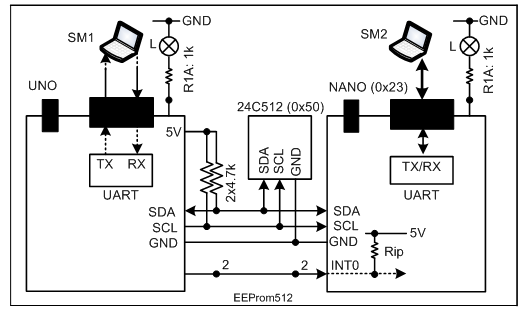
Figure-1:
Master Sketch:
#include<Wire.h>
char myData[] = "Cox's Bazar-21.554,92.039Q";
char recData[50];
int i = 0;
volatile bool flag = false;

void setup()
{
  Serial.begin(9600);
  Wire.begin();
  pinMode(2, OUTPUT); //to infor NANO that UNO is accessing EEPROM
  //----------------
  TCCR1A = 0x00;
  TCCR1B = 0x00;
  TCNT1 = 0xC2F7;  //time delay arameter for 1-sec time dealy with clkcTC1 = 16 MHz/1024
  bitSet(TIMSK1, TOIE1);
  sei();
  TCCR1B = 0x05;   //START Tc1 with division factor 1024
}

void loop()
{
  if (flag == true)
  {
    digitalWrite(2, HIGH);  //UNO is accessing EEPROM
    //-------------------------------------------------
    Wire.beginTransmission(0x23);
    Wire.write(sizeof(myData));
    Wire.endTransmission();

    Wire.beginTransmission(0x50);
    Wire.write(0x12);
    Wire.write(0x34);
    Wire.write(myData, sizeof(myData));
    Wire.endTransmission();
    delay(5); //write cycle delay
    //--------------------------------------
    Wire.beginTransmission(0x50); //pointing location 0x1234
    Wire.write(0x12);
    Wire.write(0x34);
    Wire.endTransmission();

    Wire.requestFrom(0x50, sizeof(myData));
    while (Wire.available() > 0)
    {
      recData[i] = Wire.read();
      i++;
    }
    recData[i] = '\0';
    Serial.println(recData);
    i = 0;
    flag = false;
  }
  digitalWrite(2, LOW);  //EEPROM operation done ; interrupt Slave
  delayMicroseconds(50);//to ensure full ramp-up to Vcc @koraks
  digitalWrite(2, HIGH);
  delay(2);     //allow the Slve to finish operation on EEPROM
}

ISR(TIMER1_OVF_vect)
{
  TCNT1 = 0xC2F7;
  flag = true;
}
Master's Serial Monitor:
Cox's Bazar-21.554,92.039Q
Cox's Bazar-21.554,92.039Q
Cox's Bazar-21.554,92.039Q
Cox's Bazar-21.554,92.039Q
Cox's Bazar-21.554,92.039Q
Cox's Bazar-21.554,92.039Q
Cox's Bazar-21.554,92.039Q
Cox's Bazar-21.554,92.039Q
Slave Sketch:
#include<Wire.h>
volatile bool flag = false;
int n;
char myData[50];
int i = 0;

void setup()
{
  Serial.begin(9600);
  Wire.begin(0x23);
  pinMode(2, INPUT_PULLUP);
  Wire.onReceive(receiveEvent);
  //-----------------------
  attachInterrupt(digitalPinToInterrupt(2), ISRINT0, FALLING);
}

void loop()
{
  if (flag == true)
  {
    //Serial.println(n);
    Wire.beginTransmission(0x50);
    Wire.write(0x12);
    Wire.write(0x34);
    Wire.endTransmission();

    Wire.requestFrom(0x50, n);
    while (Wire.available() > 0)
    {
      myData[i] = Wire.read();
      i++;
    }
    myData[n] = '\0';
    Serial.println(myData);
    i = 0;
    flag = false;
  }
}

void receiveEvent(int howMany)
{
  n = Wire.read();
}

void ISRINT0()
{
  flag = true;
}
Slave's Serial Monitor:
Cox's Bazar-21.554,92.039Q
Cox's Bazar-21.554,92.039Q
Cox's Bazar-21.554,92.039Q
Cox's Bazar-21.554,92.039Q
Cox's Bazar-21.554,92.039Q
Cox's Bazar-21.554,92.039Q
Cox's Bazar-21.554,92.039Q
1 Like