Multitasking help

Hello
Would need some help with coding.
I have a problem with a Photometric Stereo texture scanner that I built. The problem occurred when I changed light bulbs on the lid.

Before the change the lights turned on and camera focused and took a picture then it turned off.
now the lights turns on but turns off when the camera focuses and takes a picture and then turns on again for a second and then turns off.

I think the problem is that the old light bulb has a delay when it turns on/off so when lid lights goes from on to camera focus/shutter and on again, light bulb does not have time to switch off before it has to be on again due to delay so when i made it mutitasking wasn't needed.

new bulbs doesn't have that so i need help create multitasking for the light on the lid only.

I'am not a coder and have extremly limited knowledge of coding. so iam looking for someone to just send me a fix.

Pin for lights on the lid is 11

Here is two video of my scanner in action.
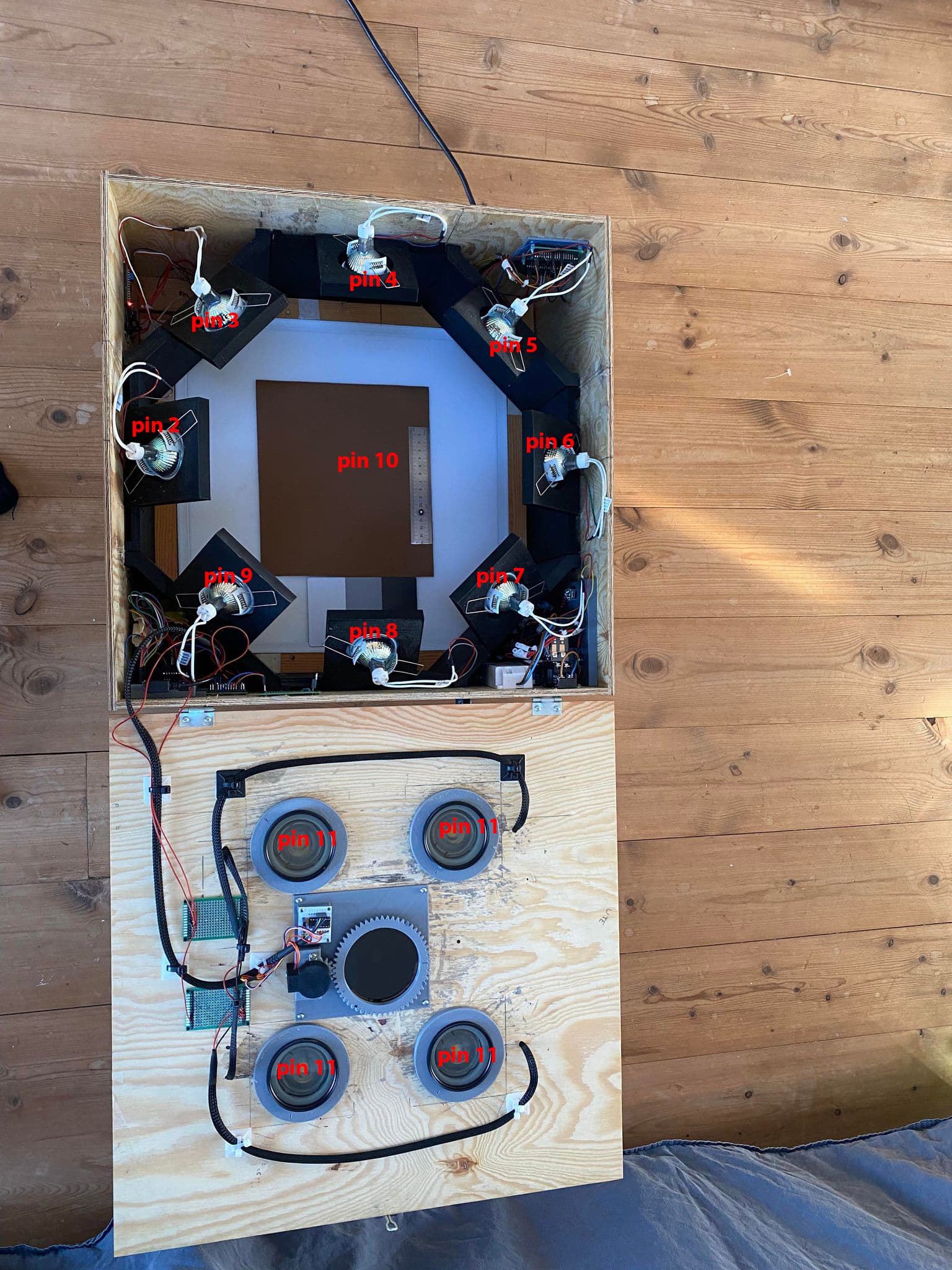
Inside my scanner
Outside my scanner

Here is the code. it has five tabs.

#include <Wire.h>
#include <LiquidCrystal_I2C.h>
#include <Stepper.h>
#include "led.h"
#include "buzzer.h"
const int stepsPerRevolution = 2048;
LiquidCrystal_I2C lcd(0x27, 16, 2);
Stepper myStepper = Stepper(stepsPerRevolution, 46, 50, 48, 52);
int DSLR_FOCUS = 38;
int DSLR_SHUTTER = 36;
int MOTOR_POWER = 34;
int BLUETOOTH_SHUTTER = 12;
int upButton = 44;
int downButton = 42;
int selectButton = 40;
int menu = 1;

void setup() {
  lcd.init();
  lcd.backlight();
  lcd.setCursor(1, 0);
  lcd.print("SCANNER BOX V2");
  delay(5000);
  lcd.clear();
  myStepper.setSpeed(5);
  Serial.begin(9600);
  pinMode(upButton, INPUT_PULLUP);
  pinMode(downButton, INPUT_PULLUP);
  pinMode(selectButton, INPUT_PULLUP);
  pinMode(LED_TWO, OUTPUT);
  pinMode(LED_THREE, OUTPUT);
  pinMode(LED_FOUR, OUTPUT);
  pinMode(LED_FIVE, OUTPUT);
  pinMode(LED_SIX, OUTPUT);
  pinMode(LED_SEVEN, OUTPUT);
  pinMode(LED_EIGHT, OUTPUT);
  pinMode(LED_NINE, OUTPUT);
  pinMode(LED_TEN, OUTPUT);
  pinMode(LED_ELEVEN, OUTPUT);
  pinMode(DSLR_FOCUS, OUTPUT);
  pinMode(DSLR_SHUTTER, OUTPUT);
  pinMode(BLUETOOTH_SHUTTER, OUTPUT);
  pinMode(MOTOR_POWER, OUTPUT);
  updateMenu();
}

void loop() {
  if (!digitalRead(downButton)) {
    menu++;
    updateMenu();
    delay(100);
    while (!digitalRead(downButton));
  }
  if (!digitalRead(upButton)) {
    menu--;
    updateMenu();
    delay(100);
    while (!digitalRead(upButton));
  }
  if (!digitalRead(selectButton)) {
    executeAction();
    updateMenu();
    delay(100);
    while (!digitalRead(selectButton));
  }
}

void updateMenu() {
  switch (menu) {
    case 0:
      menu = 1;
      break;
    case 1:
      lcd.clear();
      lcd.print(">Textile");
      lcd.setCursor(0, 1);
      lcd.print(" Foliage");
      break;
    case 2:
      lcd.clear();
      lcd.print(" Textile");
      lcd.setCursor(0, 1);
      lcd.print(">Foliage");
      break;
    case 3:
      lcd.clear();
      lcd.print(" Foliage");
      lcd.setCursor(0, 1);
      lcd.print(">calibrate");
      break;
    case 4:
      lcd.clear();
      lcd.print(" calibrate");
      lcd.setCursor(0, 1);
      lcd.print(">Settings");
      break;
    case 5:
      menu = 3;
      break;
  }
}

void executeAction() {
  switch (menu) {
    case 1:
      action1();
      break;
    case 2:
      action2();
      break;
    case 3:
      action3();
      break;
    case 4:
      action4();
      break;

  }
}

void action1() {
  lcd.clear();
  lcd.print(">SCAN");
  delay(2500);
  lcd.clear();
  lcd.setCursor(4, 0);
  lcd.print("SCANNING");
  delay(1000);
  blink_led(LED_TWO);
  delay(200);
  blink_led(LED_THREE);
  delay(200);
  blink_led(LED_FOUR);
  delay(200);
  blink_led(LED_FIVE);
  delay(200);
  blink_led(LED_SIX);
  delay(200);
  blink_led(LED_SEVEN);
  delay(200);
  blink_led(LED_EIGHT);
  delay(200);
  blink_led(LED_NINE);
  delay(200);
  blink_led(LED_ELEVEN);
  delay(200);
  digitalWrite(MOTOR_POWER, HIGH);
  Serial.println("clockwise");
  myStepper.step(stepsPerRevolution);
  delay(5000);
  blink_led(LED_ELEVEN);
  delay(200);
  Serial.println("counterclockwise");
  myStepper.step(-stepsPerRevolution);
  delay(5000);
  digitalWrite(MOTOR_POWER, LOW);
  delay(1000);
  lcd.clear();
  lcd.setCursor(6, 0);
  lcd.print("DONE");
  blink_buzzer(BUZZER_PIN);
  delay(500);
}
void action2() {
  lcd.clear();
  lcd.print(">SCAN");
  delay(2500);
  lcd.clear();
  lcd.setCursor(4, 0);
  lcd.print("SCANNING");
  delay(1000);
  blink_led(LED_TWO);
  delay(200);
  blink_led(LED_THREE);
  delay(200);
  blink_led(LED_FOUR);
  delay(200);
  blink_led(LED_FIVE);
  delay(200);
  blink_led(LED_SIX);
  delay(200);
  blink_led(LED_SEVEN);
  delay(200);
  blink_led(LED_EIGHT);
  delay(200);
  blink_led(LED_NINE);
  delay(200);
  blink_led(LED_ELEVEN);
  delay(200);
  digitalWrite(MOTOR_POWER, HIGH);
  Serial.println("clockwise");
  myStepper.step(stepsPerRevolution);
  delay(5000);
  blink_led(LED_ELEVEN);
  delay(200);
  Serial.println("counterclockwise");
  myStepper.step(-stepsPerRevolution);
  delay(5000);
  digitalWrite(MOTOR_POWER, LOW);
  delay(1000);
  blink_led(LED_TEN);
  delay(200);
  lcd.clear();
  lcd.setCursor(6, 0);
  lcd.print("DONE");
  blink_buzzer(BUZZER_PIN);
  delay(500);
}
void action3() {
  lcd.clear();
  lcd.print(">Calibrate");
  delay(2500);
  lcd.clear();
  lcd.setCursor(2, 0);
  lcd.print("CALIBRATING");
  delay(1000);
  digitalWrite(LED_ELEVEN, HIGH);
  delay(100000);
  digitalWrite(LED_ELEVEN, LOW);
  lcd.clear();
  lcd.setCursor(6, 0);
  lcd.print("DONE");
  blink_buzzer(BUZZER_PIN);
  delay(500);
}
void action4() {
  lcd.clear();
  lcd.print(">Bluetooth");
  delay(2500);
  digitalWrite(12, HIGH);
  delay(4000);
  digitalWrite(12, LOW);
  lcd.clear();
  lcd.setCursor(6, 0);
  lcd.print("ON/OFF");
  blink_buzzer(BUZZER_PIN);
  delay(500);

}
#include "pitches.h"
const int BUZZER_PIN = 13;
int melody[] = {NOTE_C6, NOTE_D6, NOTE_E6, NOTE_G6, NOTE_B6, NOTE_G7, NOTE_B7, NOTE_C7,};
int noteDurations[] = {12, 12, 8, 8, 8, 8, 4, 4, 4,};

void blink_buzzer(int buzzer){
int size = sizeof(noteDurations) / sizeof(int);
for (int thisNote = 0; thisNote < size; thisNote++) {
int noteDuration = 1000 / noteDurations[thisNote];
tone(BUZZER_PIN, melody[thisNote], noteDuration);
int pauseBetweenNotes = noteDuration * 1.30;
delay(pauseBetweenNotes);
noTone(BUZZER_PIN);
  }
}
#ifndef LED_H
#define LED_H

#define LED_TWO 2
#define LED_THREE 3
#define LED_FOUR 4
#define LED_FIVE 5
#define LED_SIX 6
#define LED_SEVEN 7
#define LED_EIGHT 8
#define LED_NINE 9
#define LED_TEN 10
#define LED_ELEVEN 11
#endif
void blink_led(int led){
  digitalWrite(led, HIGH);
  delay(10000);
  digitalWrite(DSLR_FOCUS, HIGH);
  delay(2000);
  digitalWrite(DSLR_SHUTTER, HIGH);
  delay(1000);
  digitalWrite(BLUETOOTH_SHUTTER, HIGH);
  delay(100);
  digitalWrite(DSLR_SHUTTER, LOW);
  digitalWrite(BLUETOOTH_SHUTTER, LOW);
  digitalWrite(DSLR_FOCUS, LOW);
  delay(10000);
  digitalWrite(led, LOW);
  delay(1000);

  
}
/*************************************************
   Public Constants
 *************************************************/

#define NOTE_B0  31
#define NOTE_C1  33
#define NOTE_CS1 35
#define NOTE_D1  37
#define NOTE_DS1 39
#define NOTE_E1  41
#define NOTE_F1  44
#define NOTE_FS1 46
#define NOTE_G1  49
#define NOTE_GS1 52
#define NOTE_A1  55
#define NOTE_AS1 58
#define NOTE_B1  62
#define NOTE_C2  65
#define NOTE_CS2 69
#define NOTE_D2  73
#define NOTE_DS2 78
#define NOTE_E2  82
#define NOTE_F2  87
#define NOTE_FS2 93
#define NOTE_G2  98
#define NOTE_GS2 104
#define NOTE_A2  110
#define NOTE_AS2 117
#define NOTE_B2  123
#define NOTE_C3  131
#define NOTE_CS3 139
#define NOTE_D3  147
#define NOTE_DS3 156
#define NOTE_E3  165
#define NOTE_F3  175
#define NOTE_FS3 185
#define NOTE_G3  196
#define NOTE_GS3 208
#define NOTE_A3  220
#define NOTE_AS3 233
#define NOTE_B3  247
#define NOTE_C4  262
#define NOTE_CS4 277
#define NOTE_D4  294
#define NOTE_DS4 311
#define NOTE_E4  330
#define NOTE_F4  349
#define NOTE_FS4 370
#define NOTE_G4  392
#define NOTE_GS4 415
#define NOTE_A4  440
#define NOTE_AS4 466
#define NOTE_B4  494
#define NOTE_C5  523
#define NOTE_CS5 554
#define NOTE_D5  587
#define NOTE_DS5 622
#define NOTE_E5  659
#define NOTE_F5  698
#define NOTE_FS5 740
#define NOTE_G5  784
#define NOTE_GS5 831
#define NOTE_A5  880
#define NOTE_AS5 932
#define NOTE_B5  988
#define NOTE_C6  1047
#define NOTE_CS6 1109
#define NOTE_D6  1175
#define NOTE_DS6 1245
#define NOTE_E6  1319
#define NOTE_F6  1397
#define NOTE_FS6 1480
#define NOTE_G6  1568
#define NOTE_GS6 1661
#define NOTE_A6  1760
#define NOTE_AS6 1865
#define NOTE_B6  1976
#define NOTE_C7  2093
#define NOTE_CS7 2217
#define NOTE_D7  2349
#define NOTE_DS7 2489
#define NOTE_E7  2637
#define NOTE_F7  2794
#define NOTE_FS7 2960
#define NOTE_G7  3136
#define NOTE_GS7 3322
#define NOTE_A7  3520
#define NOTE_AS7 3729
#define NOTE_B7  3951
#define NOTE_C8  4186
#define NOTE_CS8 4435
#define NOTE_D8  4699
#define NOTE_DS8 4978
Please send a moderator request to move this to the "Jobs and Paid Consultancy" section.

Are you looking to send that someone some money back?

Simples

You'll anyway have to pack the entire sketch folder (which also contains led.h, buzzer.h, pitches.h etc.) into a zip file in order to get any help on this.
But, from your description, it seems you need only an additional delay somewhere.
What about the person who wrote the original code for you ?

Scaningbox_v2.zip (2.6 KB)

You could say I've made it. it is basically spliced ​​together from tutorials, forums and examples.
as i said before I Am not a coder and have extremely limited knowledge of coding. everything have worked until i changed lightbulb( new light bulb has diffrent scattering angle, same volt but slighly lower watt ).

Okay, you want to fix it yourself with our help? First step would be to start giving the variables meaningful names so people can begin to understand the code.

#define LED_ELEVEN 11
...
  blink_led(LED_EIGHT);
  delay(200);
  blink_led(LED_NINE);
  delay(200);
  blink_led(LED_ELEVEN);
  delay(200);

You referred to "the old light bulb" but if pin 11 is a LED, what are all the other similar named pins, and what happened to LED 10?

Also, nobody can make sense of an essentially undocumented program without any schematic.

I think the problem is that the old light bulb has a delay when it turns on/off so when lid lights goes from on to camera focus/shutter and on again, light bulb does not have time to switch off before it has to be on again due to delay so when i made it mutitasking wasn't needed.

Here it sounds like you have a clue where the problem is located, but you haven't shown us where. What line is this delay in?

What specific aspect of the program operation requires multitasking?

it is basically spliced ​​together from tutorials, forums and examples

In other words, the worst possible way, almost guaranteed to produce problems that neither you, nor other people, can solve without a struggle. A way that discourages people who might be able to help, from participating. Hence the suggestion that you should offer payment.

If you want to learn how to DIY, you have to actually DIY to get the experience you need. If you write your own code that you actually understand, you will only have specific problems, which are narrow and possible to solve yourself with research and troubleshooting. If not, it's helpful that you can explain it to helpers so they don't need to waste time (or charge for it) vetting the entire sketch.

You referred to "the old light bulb" but if pin 11 is a LED, what are all the other similar named pins, and what happened to LED 10?

void blink_led(int led){ // all led pin uses this
  digitalWrite(led, HIGH); // led on
  delay(10000);
  digitalWrite(DSLR_FOCUS, HIGH); // focus on
  delay(2000);
  digitalWrite(DSLR_SHUTTER, HIGH); // takes a picture with dslr camera
  delay(1000);
  digitalWrite(BLUETOOTH_SHUTTER, HIGH); // takes a picture with iphone camera (only uses this if it's on)
  delay(100);
  digitalWrite(DSLR_SHUTTER, LOW); // dslr remote off
  digitalWrite(BLUETOOTH_SHUTTER, LOW); 
  digitalWrite(DSLR_FOCUS, LOW);  // dslr remote off
  delay(10000);
  digitalWrite(led, LOW); // led off
  delay(1000);

You replied with an image and a code snippet. I was hoping more for an actual reply.

You labelled the lights with pin numbers. That presentation is more like an exam question or puzzle challenge than technical documentation. I would like to see everything tied together in one place. That is called a schematic.

Also you replied to only one of my several technical questions. Please consider and answer the rest.

If you have difficulties with English, try using Google translate.

if you just ignore everything that i have written.
Can you show me a code where i have three led lights
call them Led1, Led2, Led3.
I want led1 to turn on and then have led2 and led3 turn on after five seconds with 2 seconds apart, then both led 2, led 3 turn off after 2 seconds.
while led1 is still on. basically what i want to achieve. implementing it to menu system i can figure rest by myself.

digitalWrite(led1, HIGH); // I want led1 to turn on 
delay(5000); // after five seconds
digitalWrite(led2, HIGH);
delay(2000); // with 2 seconds apart
digitalWrite(led3, HIGH); 

this will not work, code need to be multitask

I guarantee it works

  • turns on led1
  • wait 5 seconds
  • turns on led2
  • wait 2 seconds
  • turns on led3

isn't that what you asked for?

what do you call multi-task? what else are you doing at the same time?

Right now i use this exact code, but the problem is that led bulbs turns off when camera focus and takes a picture and then turn back on again.

old led bulb have a delay when you turn them on/off so the camera have time to focus and take a picture and turn light bulb on again.
New led bulb doesn't have that delay.

there is no reason for the LED to turn off when you take a picture unless you instruct the led to be off or if the board cannot provide enough power to drive the LEDs

Are you using relays ?

PS/ that would be an example of using millis() but I don't think that's what you need

How much of a delay do you want?

Which MCU are you using?

What will trigger LED1 to come on and start the sequence?

I asked you why, still no reply.

if you just ignore everything that i have written.

Sure, okay. Please then, follow the forum guidelines for providing all the information that it takes for a helper to analyze the problem.

This code multitasks and does as the OP noted in post#10. I use a ESP32 hardware timer as the trigger event not knowing what the OP is going to use as a trigger event.

/*
   Toggles 2 GPIO pins at the same time.
   Each task is ran on its own core.
   Each task is triggered by an event.
   Two events are grouped together with an event.
   When the group event is triggered, each task is triggered.
   Each task is on its own core and each task is set to the same priority.
   Each task, when triggered runs at the same time.
*/
#include "sdkconfig.h"
#include "esp_system.h"
#include "freertos/FreeRTOS.h"
#include "freertos/task.h"
////
#define evtDo0           ( 1 << 0 )
#define evtDo1           ( 1 << 1 )
#define evtDoBoth ( evtDo0 | evtDo1 )
EventGroupHandle_t eg;
////
void IRAM_ATTR onTimer()
{
  BaseType_t xHigherPriorityTaskWoken;
  xEventGroupSetBitsFromISR(eg, evtDoBoth, &xHigherPriorityTaskWoken);
} // void IRAM_ATTR onTimer()
////
////
void setup()
{
  eg = xEventGroupCreate(); // get an event group handle
  //
  gpio_config_t io_cfg = {}; // initialize the gpio configuration structure
  io_cfg.mode = GPIO_MODE_OUTPUT;
  io_cfg.pin_bit_mask = ( (1ULL << GPIO_NUM_0) | (1ULL << GPIO_NUM_2) | (1ULL << GPIO_NUM_5)| (1ULL << GPIO_NUM_15) ); //bit mask of the pins to set, assign gpio number to be configured
  gpio_config(&io_cfg);
  gpio_set_level( GPIO_NUM_0, LOW);
  gpio_set_level( GPIO_NUM_2, LOW);
  gpio_set_level( GPIO_NUM_5, LOW);
  gpio_set_level( GPIO_NUM_15, LOW);
  //
  // hardware timer 4 set to alarm
  /*
     because of the way ESP32Servo uses the hardware timer
     to prevent hardware timer conflicts.
     I make it a habit to start with hardware timer 4
     and work backwards with my use of the timers.
     https://docs.espressif.com/projects/esp-idf/en/latest/esp32/api-reference/peripherals/gptimer.html?highlight=hardware%20timer
     https://docs.espressif.com/projects/esp-idf/en/latest/esp32/api-reference/system/esp_timer.html?highlight=hardware%20timer
  */
  hw_timer_t * timer = NULL;
  timer = timerBegin( 3, 80, true );
  timerAttachInterrupt( timer, &onTimer, true );
  timerAlarmWrite(timer, 100000, true); // uS time setting
  //timerAlarmWrite(timer, 2, true); // uS time setting
  timerAlarmEnable(timer);
  //
  xTaskCreatePinnedToCore( fNoBlockingBlinkLED0, "fNoBlockingBlinkLED0", 2000, NULL, 3, NULL, 1 );
  xTaskCreatePinnedToCore( fNoBlockingBlinkLED1, "fNoBlockingBlinkLED1", 2000, NULL, 3, NULL, 0 );
} // setup()
////
/*
   both tasks are set to trigger at the same time of every 100mS
   requires externally wired LED with current limiting resistor
   hook a LED and 330 ohm reisitor to GPIO_NUM_X
*/
void fNoBlockingBlinkLED0( void * pvParameters )
{
  bool Tick = true;

  for (;;)
  {
    xEventGroupWaitBits (eg, evtDo0, pdTRUE, pdTRUE, portMAX_DELAY );
    ////whats the trigger event?
    gpio_set_level( GPIO_NUM_0, HIGH );
    vTaskDelay(5000);
    gpio_set_level( GPIO_NUM_2, HIGH );
    vTaskDelay(2000);
    gpio_set_level( GPIO_NUM_5, HIGH );
    vTaskDelay(2000);
    gpio_set_level( GPIO_NUM_2, LOW );
    gpio_set_level( GPIO_NUM_5, LOW );
    gpio_set_level( GPIO_NUM_0, LOW );

  }
  vTaskDelete( NULL );
} //void fNoBlockingBlinkLED( void * pvParameters )
////
/*
   requires externally wired LED with current limiting resistor
   hook a LED and 330 ohm reisitor to GPIO_NUM_X
*/
void fNoBlockingBlinkLED1( void * pvParameters )
{
  bool Tick = true;
  for (;;)
  {
    xEventGroupWaitBits (eg, evtDo1, pdTRUE, pdTRUE, portMAX_DELAY );
    if (Tick )
    {
      gpio_set_level( GPIO_NUM_15, HIGH);
      Tick = !Tick;
    } else {
      gpio_set_level( GPIO_NUM_15, LOW);
      Tick = !Tick;
    }
  }
  vTaskDelete( NULL );
} //void fNoBlockingBlinkLED( void * pvParameters )
////
void loop() {} //loop()

Written for a ESP32.

This is how i focus and take picture with my dslr camera. (ignore the push button) i have diffrent remote that are made for dslr camera.


I use mosfet to control the led bulbs(they are 12v).
There is no power issue, new bulb draws less then old led bulbs.
I can't see that i have instruced it to turn off, the other led lights uses the same code and they work.
I use a total of 12 led bulbs in the project, four of them are new and they mounted to the lid, the remaining ones are the old light bulbs.

It remains unclear why you need multitasking code in this scheme?