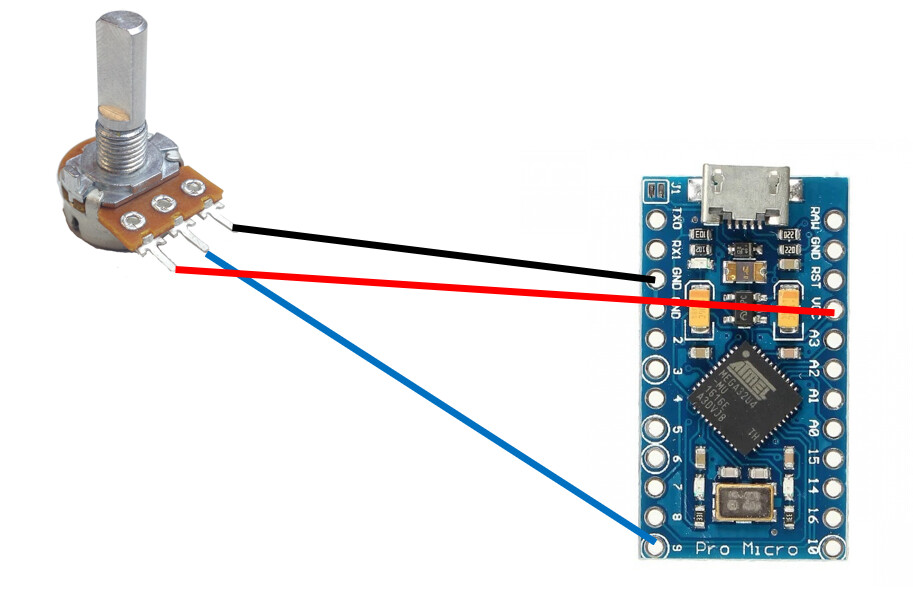
I have code working for my custom game controller, but I want to modify the controller which means adding 2 potentiometers. The code is made for a button matrix and an arduino joystick module. (picture below). The module consists of a potentiometer for each axis so in theory I should be able to remove the current arduino joystick and plug in a potentiometer (linked below) and it should work... Good news is the PC recognizes it without a problem, but the game does not. Does anyone have an idea why this is happening? Both are 10K pots and I know everything is wired correctly because the pot works on the PC, just not in the game.
I have my code posted in case there might be an issue with that, but I don't think that is the culprit. Any guidance would be appreciated. Thanks

#include <Joystick.h>

#define joyButton1 14
#define NUMROWS 3
#define NUMCOLS 2

char buttons[NUMROWS][NUMCOLS] = {
  {1,2},
  {3,4},
  {5,6}
};

byte rowPins[NUMROWS] = {A0,A1,A2};
byte colPins[NUMCOLS] = {2,3};

Keypad buttbx = Keypad( makeKeymap(buttons), rowPins, colPins, NUMROWS, NUMCOLS);
Joystick_ Joystick(0x03, JOYSTICK_TYPE_JOYSTICK, 7, 0, true, true, false, false, false, false, false, false, false, false, false);


void joylights(int x){

    for (int c=0;c<x+1;c++)
    {
    Joystick.setButton(1, true);
    Joystick.sendState();
    delay(1000);
    Joystick.setButton(1, false);
    Joystick.sendState();
    }

}

void setup() {
  pinMode(joyButton1, INPUT_PULLUP);
  Joystick.begin(false);
  delay(5000);
  joylights(4);
  }

void loop() {
  int thebuttonnumber=0;
  Joystick.setXAxis(analogRead(A9));
  Joystick.setYAxis(1024 - analogRead(A10));
  Joystick.setButton(0, !digitalRead(joyButton1));

  if (buttbx.getKeys())
  {
    for (int i = 0; i < LIST_MAX; i++) // Scan the whole key list.
    {
      if ( buttbx.key[i].stateChanged )   // Only find keys that have changed state.
      {
       switch (buttbx.key[i].kstate) {
          case PRESSED:
            Joystick.setButton(buttbx.key[i].kcode+1, true);
            break;
          case RELEASED:
            Joystick.setButton(buttbx.key[i].kcode+1, false);
            break;
        }
      }
    }
  }
  Joystick.sendState();
  }