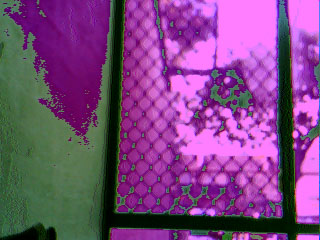
hmm, good point 
I didn't think the hex colour values for the whole image would do me much good (because I have no idea how to go about translating them), but i tried saving the r5 g6 b5 values to the SD like this:
void writeBMP(File outFile){

  char VH, VL;
  uint8_t temp,temp_last;
  int i, j, posn, nextNum;
  unsigned int r5, g6, b5;

    //Write the BMP header
  for( i = 0; i < 54; i++)
  {
    char ch = pgm_read_byte(&bmp_header[i]);
    outFile.write((uint8_t*)&ch,1);
  }

  //Read the first dummy byte from FIFO
  temp = myCAM1.read_fifo();
  //Read 320x240x2 byte from FIFO
  for(i = 0; i < 240; i++)
    for(j = 0; j < 320; j++)
    {
      VH = myCAM1.read_fifo();
      VL = myCAM1.read_fifo();


b5 = VH & 0x1F;
g6 = ((VH & 0xE0) >> 5 | (VL & 0x03) << 3) & 0x3F;
r5 = (VL >> 3) & 0x1F;


      //Write image data to file

      outFile.write(b5);
      outFile.write(g6);
      outFile.write(r5);

      }
Interestingly, it only worked with the 24-bit header to give IMAGE01.bmp (I assume this has something to do with the way it saves -- The 16-bit header gave green and blue garbage). The image is darkened, but still has the magenta staining issue. IMAGE02.bmp shows the result with the original scaling code. Any ideas? Have I got the bits wrong or am I shifting them the incorrect amount?