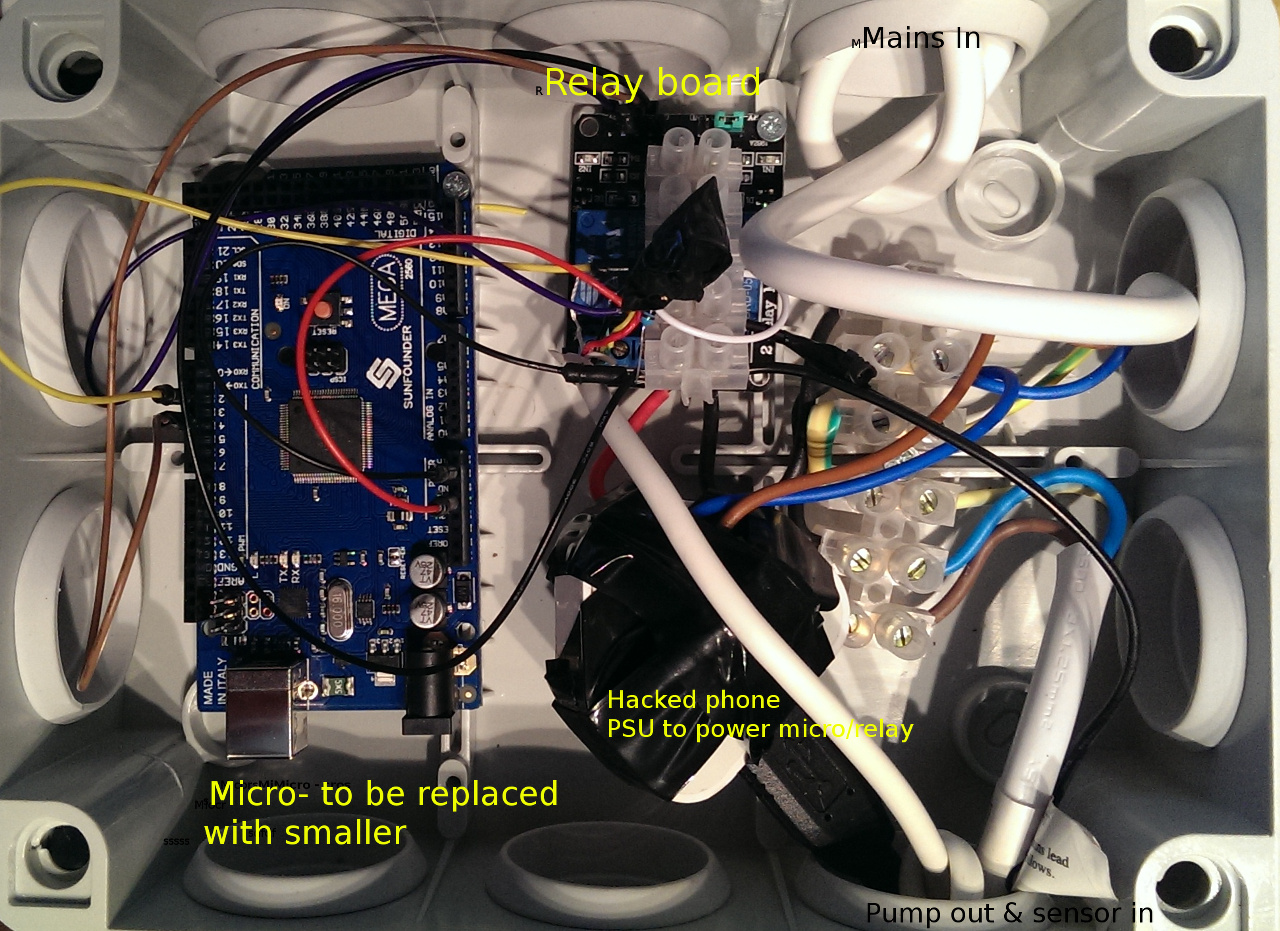
Hi there, never used this Andruino stuff before but having found how accessible (cheap) it is to get into I thought I might give is a go to control a pump removing flood water from my patio/soak-aways.
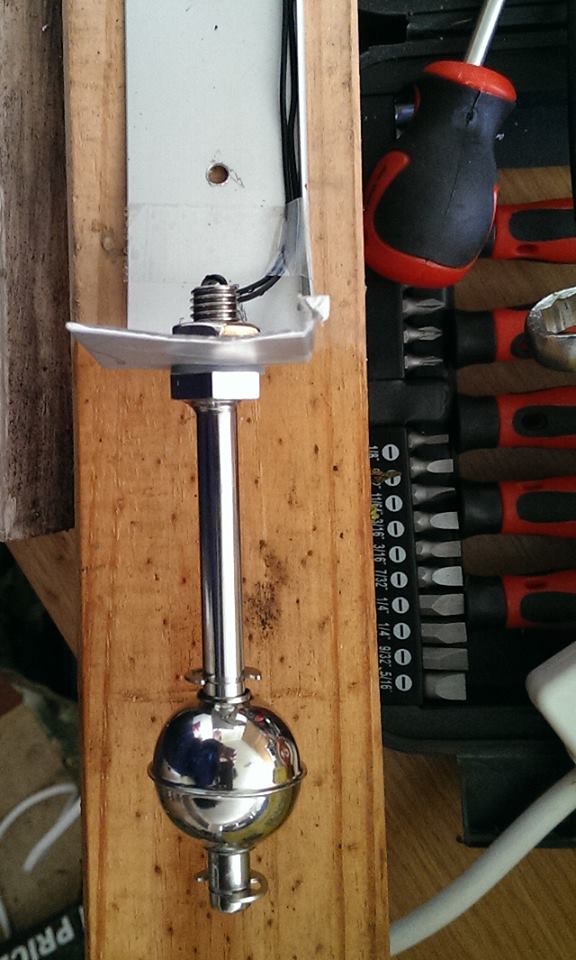
I could not use a float switch as not enough depth so a fish tank switch was used as a sensor. A relay was procured for the pump activation (mains) and the andruino program used to add some hysterisis.
I have powered it from a cheap plugin phone charger (hacked) and it seems to all work - yes it is a quick & dirty hack but time was pressing (and water rising). Just thought I would share. The mega board is overkill and is to be replaced by a nano when it arrives.
To see what the programming was doing I added debug down the serial. Haven't used a soldering Iron in years!
Picture and code follow (code would be pretty printed if the IDE didn't throw a java exception when i asked it to copy).
/*
       Mains water pump controller.
       Input:  float switch or water sensor
               (alt temperature sensor)
       Output:  relay actuator.

       Also has hysterisis

        Jan 2014
       $Id: waterContoller.ino v0.3$

 */

 // are you testing, then set isTest = true
 // and data will be shown in serial output
 // put monitor on.
 //
const boolean isTest = true;
void dump();


//
// Variable Declaratoins
//
long pumpOnTime=0;                           // time pump has been on
long pumpOffTime=0;                          // time pump has been off ( for hysterisis )
//  declare hysterisis constants - miliseconds
const long pumpHysterisisTime = 20 * 1000;
const long pumpOnTimeout = (long)600 * (long)1000;            // turn pump off after x minutes
// define Pins on micropro to be used
const int sensorPin = 2;                      // water level
const int outputPin = 4;                      // pump relay
const int ledPin = 13;
// define booleans for convenience.
const boolean ON = true;
const boolean OFF = false;
// define state of pump - start with off
boolean pumpIsOn = false;


//
// Setup
//
void setup() {

  pinMode(outputPin, OUTPUT);
  pinMode(sensorPin, INPUT);
  pinMode(ledPin, OUTPUT);
  if ( isTest)  Serial.begin(9600);
  digitalWrite(outputPin,OFF);
  digitalWrite(ledPin,OFF);
}

//
// Loop
//
void loop() {

  if ( isTest) dump();

  if ( digitalRead(sensorPin) )  {
    (void) turnPumpOn( );
  }
  else
  {
    (void) turnPumpOff( );
  }
  // only need to check every second
  delay(1000);
}


boolean checkHysterisis(long start, long timeout)
{
  return ( (millis()-start) > timeout ) ? true : false;
}
//
int turnPumpOn()
{
  int retval=0;
  //  check timeout if already on
  if ( pumpIsOn )
  {
    // check pump timout
    long pumpOperationTime = millis()-pumpOnTime;
    if  ( pumpOperationTime > pumpOnTimeout )
    {
      turnPumpOff();
    }
  }
  else
  {
    // check how long it has been off
    // state change
    if ( checkHysterisis(pumpOffTime, pumpHysterisisTime) )
    {
      pumpIsOn = true;
      pumpOnTime = millis();
      digitalWrite(ledPin,ON);
      // warnign - relay needs low on - go figure
      digitalWrite(outputPin,LOW);
    }
  }
  return retval;
}
int turnPumpOff()
{
  int retval=0;

  if ( ! pumpIsOn )
  {
    // do nothing
    ;
  }
  else
  {
    // check how long it has been on
    if ( checkHysterisis(pumpOnTime,pumpHysterisisTime) )
    {
      pumpIsOn = false;
      pumpOffTime = millis();
      // warnign - relay needs high off - go figure
      digitalWrite(outputPin,HIGH);
      digitalWrite(ledPin,OFF);
    }
  }
  return retval;
}

//
// test and debug code
//
void debug(String msg,int val)
{
  if ( ! isTest ) return;
  Serial.print(msg);
  Serial.print(val);
  Serial.print("\n");
}
void dump()
{
  debug("\n------------------>TimeNow(seconds):",millis()/1000);
  debug("pumpOnTime:",pumpOnTime/1000);
  debug("pumpOffTime:",pumpOffTime/1000);
  debug("pumpIsOn:",pumpIsOn);
  debug("pumpHysterisTime:",pumpHysterisisTime/1000);
  debug("pumpOnTimeout:",pumpOnTimeout/1000);
  debug("sensorIs:",digitalRead(sensorPin));
}
Moderator edit:
</mark> <mark>[code]</mark> <mark>
</mark> <mark>[/code]</mark> <mark>
tags added.