I think that @ptillisch answered your question, but just in case here is a picture with others values you may be looking for
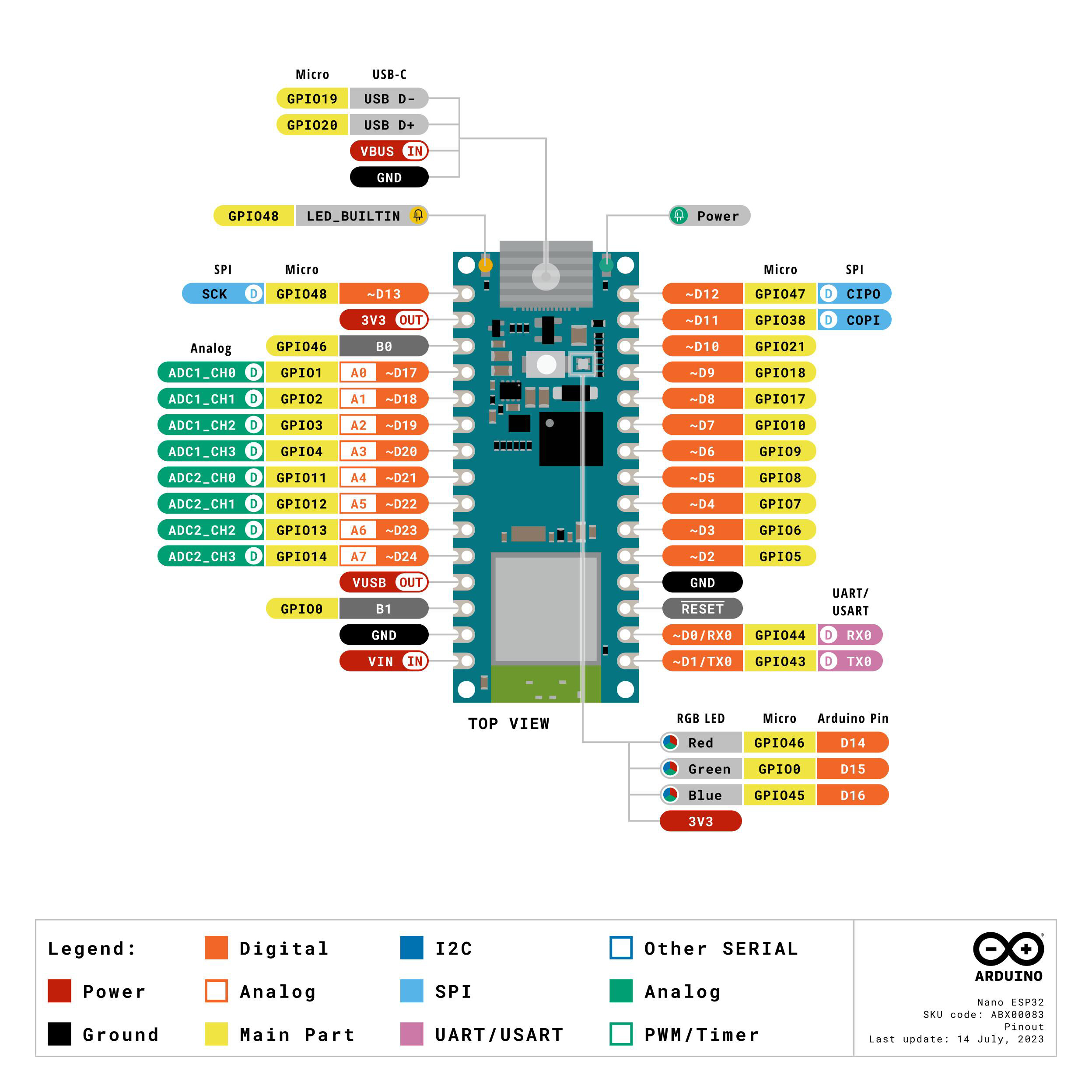
I think this second file (pins_arduino.h) might indicate the reason why my sketch trying to output to pin 9 actually outputs to pin 6 and so on. And I assume the functions digitalPinToGPIONumber and gpioNumberToDigitalPin should be being called???
The commentary states it is to fix things which is good... but I still don't k what has to be #defined or which package to use to sort this out.
And I don't have these files on my PC anyway  despite installing the Espressif package through the IDE
You don't need to call either of them when passing an Arduino pin number to a function that takes a pin number.
For example, if you wanted to configure the pin marked "D3" on the Nano ESP32 board's silkscreen as an output, you can simply do this, just as you would with any other official Arduino board:
pinMode(3, OUTPUT);
If for some reason you do need or want to work directly with ESP32 GPIO numbers in your code, then you can use those functions to make conversions between the two pin identifiers.
Something to note is that the developers didn't provide a prototype for the gpioNumberToDigitalPin function, so if you do decide to use it in your code for some reason, you'll need to do that in your own code before the references to the function. For example:
byte LEDGPIO = 46;
unsigned int duration = 1000;

int8_t gpioNumberToDigitalPin(int8_t gpioNumber);  // Function prototype

void setup() {
  pinMode(gpioNumberToDigitalPin(LEDGPIO), OUTPUT);
}

void loop() {
  digitalWrite(gpioNumberToDigitalPin(LEDGPIO), HIGH);
  delay(duration);
  digitalWrite(gpioNumberToDigitalPin(LEDGPIO), LOW);
  delay(duration);
}
Which version did you install? The Nano ESP32 board is very new so it was only added to the platform very recently. If you have an older version then that would explain why you don't find it.
It might also cause you to select some other random ESP32-S3 board from the Tools > Board menu, which would explain why you are having problems with pin numbers (since the correct mapping is only available when you have the Nano ESP32 board selected from the menu.
I tried a number of options from the packages and boards. None of the ones which uploaded were right. There was one that insisted I use DFU to upload but I dont understand if that is a feature of the board or a driver I have to use/install.
I wasnt expecting to have to call those functions directly but wondered if they were being called behind the scenes.
I believe I tried the latest of everything. Also tried it on 1.8.x and 2.x of the IDE.
Please check to be certain. I'm not asking about the version of your Arduino IDE. I'm asking about the version of the boards platform. The two things are completely independent.
Please do this:
- Open the Arduino IDE Boards Manager (accessible via Tools > Board > Boards Manager... in the Arduino IDE menus).
- Scroll down through the list of boards platforms in Boards Manager until you find the entry for the ESP32 platform.
- You should see a label that says which version number is installed (note this is different from the menu that allows you to select the version to be installed). Reply here on this forum thread to tell me which version number you see there.
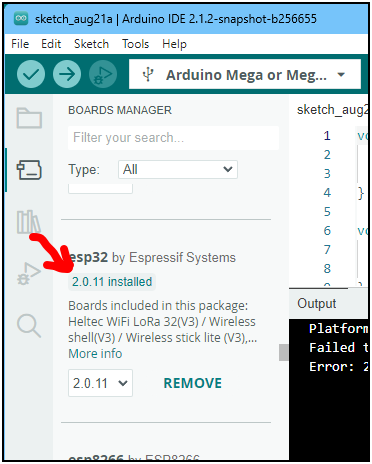
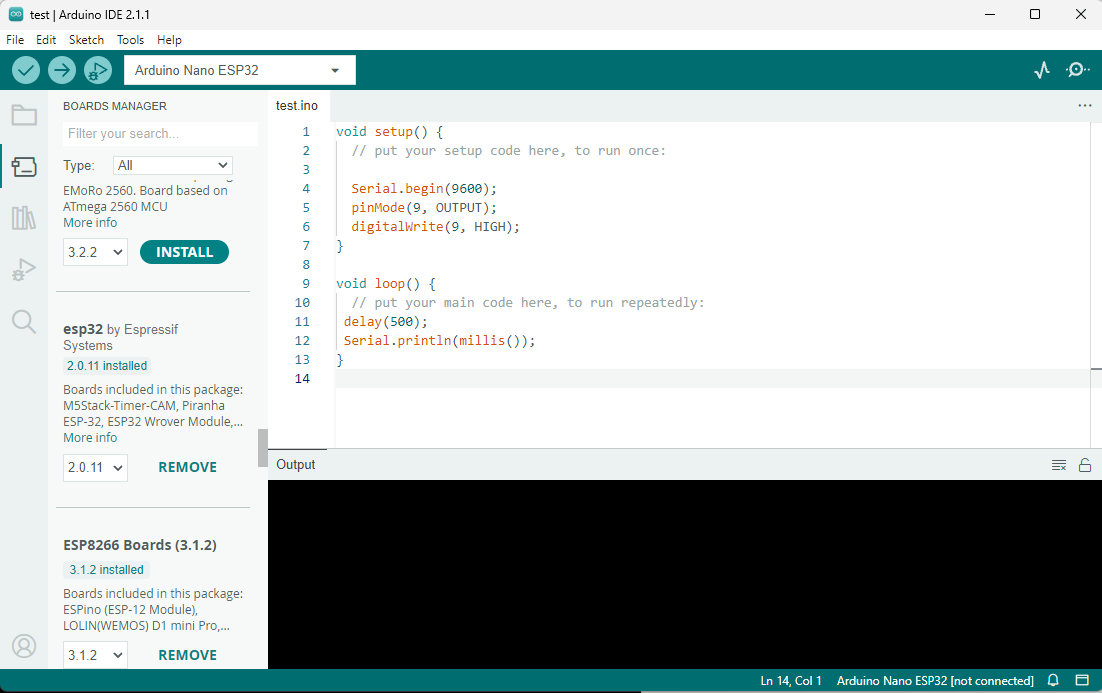

Thanks for checking. The fact that you have version 2.0.11 of the "esp32" boards platform installed disproves my hypothesis that the reason you couldn't find the core variant files on your computer is because you had an older version of the platform from before the addition of the Arduino Nano ESP32 board support.
I also see that you have the correct board selected in Arduino IDE.
Which operating system are you using (e.g., "Windows")?
I ask because I would like to give you the appropriate instructions for your operating system.
Windows 11
OK, so the local copies of the arduino_nano_nora core variant files I linked to in post #2 should be located under this path on your computer:
C:\Users\<username>\AppData\Local\Arduino15\packages\esp32\hardware\esp32\2.0.11\variants\arduino_nano_nora\
(where <username> is your Windows username)
 If looking for it with your file manager or command line, note that the
 AppData folder is hidden by default. On Windows "File Explorer", you can make it visible by opening the "View" menu, then checking the box next to "☐ Hidden items".
I have those files.
So what does that mean? How or why does that sample sketch which is supposed to set pin 9 high and then low actually do nothing to 9 but does affect pin 6.
I can see a 'lookup' in io_pin_remap.cpp where [D6] = 9
That kind of points to something related.
But why not let 9 = 9?
I don't know why it would do that. It certainly doesn't do it for me.
If I upload this sketch to my Nano ESP32 board:
void setup() {
  pinMode(9, OUTPUT);
}
void loop() {
  digitalWrite(9, HIGH);
  delay(1000);
  digitalWrite(9, LOW);
  delay(1000);
}
Then the pin marked "D9" on the silkscreen of the Nano ESP32 is toggled at 0.5 Hz, just the same as the behavior of that sketch on any other official Arduino board. The pin marked "D6" on the board is not affected at all.
Are you experiencing something different?
I was not involved in the design of the board or the pin mapping, so I may miss some of the reasons, but I can provide several possibilities:
Pin Functionality
Each GPIO pin may have specific special functionality. The established general Nano board format also associates specific functionality with specific pins. So the GPIO pins with the expected functionality must be connected to the appropriate pins on the board.
For example, we expect Arduino pin 0 on a Nano format board to be usable as a UART RX pin and also as a standard digital pin. GPIO0 on the ESP32 has a special functionality and can or should not be used for either of those things.
Routing
The PCB designers must work within physical, technical, and economic (i.e., number of layers) constraints. Having a required routing of every single GPIO pin to a specific location on the board might make routing within those constraints infeasible. The task becomes easier when you have a choice of connecting each header pin to any convenient GPIO that has the required characteristics.
You will find that the arbitrary mapping between header pin designators and GPIO numbers has always been common in the ESP32 and ESP8266 boards from various manufacturers.
The important thing to understand is that an Arduino pin number is only an arbitrary code identifier for an I/O pin. We shouldn't get hung up on the fact that Arduino pin 9 on the Nano ESP32 happens to be mapped to GPIO18 on the ESP32 microcontroller, just the same as we shouldn't get hung up about the fact that pin 9 on the classic Nano happens to be mapped to PB1 on the ATmega328P microcontroller.
You tell me. You are the one who asked for the location of the files at the initiation of this discussion. I was only answering your question.
I have been able to ignore the real world pin mapping for nearly all of the time I've been using the Arduino (since 2013) - occasionally I access ports directly for performance.
My concern developed when I discovered that using D9 in the sample sketch was actually affecting pin 6.
Although I've got something running now the explanation as to why it was picking up pins that appeared to be related to that pin mapping file still eludes me. I am nervously expecting something to still go wrong or the system to revert to strange behaviour.
As an experienced user of Arduinos I was surprised to find that it was necessary to upload as using Programmer. Definitely something I only normally do using a separate device. Neither was I expecting to have to use the reset button. Again not a typical Arduino activity.
The only place I found some instruction about Programmer and Reset was here Reset the Arduino bootloader on the Nano ESP32 which is, once again, not a typical thing to have to think about as an Arduino user.
Currently the documentation feels a mess and the path required to follow is not in the "keep it simple' mind set of Arduino. I am not a novice at programming having done this professionally since 1984 (just went the abacus was being phased out). The expectation of sufficient prior knowledge (in this case about ESP32s) seems high and is not adequately explained in my opinion.
Don't post that.
By all means, keep everyone guessing.
What do you mean?
I quoted your post stating you "got something running now".
What is it that you "got running"?
The Arduino Nano ESP32. It wouldn't upload and when it did, it incorrectly mapped the pins.
Same here.
Quite understandable!
I can make a wild guess: You mention that when you first used the board you found it necessary to perform a special procedure:
When you do that, the board temporarily uses the generic USB VID/PID pair provided by Espressif instead of the custom VID/PID owned by Arduino that is specific to the Nano ESP32. While the board is in that state of using the generic VID/PID pair, Arduino IDE identifies it as a random board from the ESP32 boards platform. If you aren't careful, it is possible to accidentally select the wrong board at this time. If you uploaded the sketch while the wrong board was selected, then it was compiled for the pin mappings of whatever that board was, which could very well result in a different pin being toggled than expected.
The poor user experience in Arduino IDE that results from the unique characteristics of this board and the questionable choice of the ESP32 boards platform developers to associate many different board definitions with the same VID/PID pair (such associations are traditionally only done for unique VID/PID pairs dedicated to a single board) was identified by the project managers and has already been improved on:
That work was done after the time of the Arduino IDE 2.1.1 release so it is currently only available when using the nightly build of Arduino IDE, but it will be in the next release.
You are welcome to submit reports of specific defects or suggestions for improvement (either to the issue trackers, or better yet as pull requests) to the public GitHub repositories where the documentation content is developed:
I have merged your topics due to them having too much overlap on the same subject matter @acboother.
In the future, please only create one topic for each distinct subject matter and be careful not to cause them to converge into parallel discussions.
The reason is that generating multiple threads on the same subject matter can waste the time of the people trying to help. Someone might spend a lot of time investigating and writing a detailed answer on one topic, without knowing that someone else already did the same in the other topic.
Thanks in advance for your cooperation.
Hello everyone (esp. @acboother, the OP)!
Just wanted to point out that Arduino ESP32 core 2.0.12 is out, and it adds a new menu option to use a more library-compatible pin numbering scheme. The documentation should help to explain the issues described in this thread. Read all about it and try it out!
Happy hacking! 