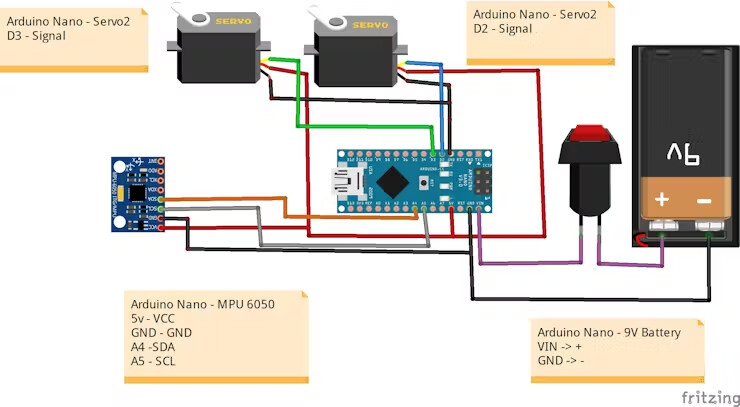
Hello! I am trying to use a MPU6050 and Arduino Nano as an accelerometer. When I initially tried to run my code, I put the serial monitor at a baud rate of 115200, but no values were coming out of the serial.print function, I only got error "i2C Write failed: 3" and "i2C Write failed: 4" repeating. I switched out my MPU6050 to a new one as I thought it may be the problem, but still having difficulties getting readings. Not sure if this is code issue or something wrong with the hardware. I've put my code below, please let me know if you spot any mistakes. Any advice greatly appreciated! Using Kalman filter and PID control libraries.
/*
* Arduino PID Library - Version 1.2.1
* by Brett Beauregard <br3ttb@gmail.com> brettbeauregard.com
*
* This Library is licensed under the MIT License

*/


#include <Wire.h>
#include <Kalman.h>  // Source: https://github.com/TKJElectronics/KalmanFilter
#include <PID_v1.h>  // Using Arduino-PID-Library : https://github.com/br3ttb/Arduino-PID-Library
#include "Servo.h"
#define RESTRICT_PITCH // Comment out to restrict roll to 90deg instead - please read: http://www.freescale.com/files/sensors/doc/app_note/AN3461.pdf

Kalman kalmanX; // Create the Kalman instances
Kalman kalmanY;

/* IMU Data */
double accX, accY, accZ;
double gyroX, gyroY, gyroZ;

Servo servo1;
Servo servo2;


double gyroXangle, gyroYangle; // Angle calculate using the gyro only
double compAngleX, compAngleY; // Calculated angle using a complementary filter
double kalAngleX, kalAngleY; // Calculated angle using a Kalman filter

uint32_t timer;
uint8_t i2cData[14]; // Buffer for I2C data

//PID data X
double SetpointX ,InputX,OutputX ;
double KpX =1, KiX = 0, KdX = 0;
PID PIDX(&InputX , &OutputX , &SetpointX , KpX, KiX , KdX, DIRECT) ;

// PID data Y
double SetpointY ,InputY,OutputY ;
double KpY = 1 , KiY = 0, KdY = 0;
PID PIDY(&InputY , &OutputY , &SetpointY , KpY, KiY , KdY, DIRECT) ;

// TODO: Make calibration routine

void setup() {
  Serial.begin(115200);
  Wire.begin();
  servo1.attach(2);
  servo2.attach(3);

#if ARDUINO >= 157
  Wire.setClock(400000UL); // Set I2C frequency to 400kHz
#else
  TWBR = ((F_CPU / 400000UL) - 16) / 2; // Set I2C frequency to 400kHz
#endif

  i2cData[0] = 7; // Set the sample rate to 1000Hz - 8kHz/(7+1) = 1000Hz
  i2cData[1] = 0x00; // Disable FSYNC and set 260 Hz Acc filtering, 256 Hz Gyro filtering, 8 KHz sampling
  i2cData[2] = 0x00; // Set Gyro Full Scale Range to 250deg/s
  i2cData[3] = 0x00; // Set Accelerometer Full Scale Range to 2g
  while (i2cWrite(0x19, i2cData, 4, false)); // Write to all four registers at once
  while (i2cWrite(0x6B, 0x01, true)); // PLL with X axis gyroscope reference and disable sleep mode

  while (i2cRead(0x75, i2cData, 1));
  if (i2cData[0] != 0x68) { // Read "WHO_AM_I" register
    Serial.print(F("Error reading sensor"));
    while (1);
  }

  delay(100); // Wait for sensor to stabilize

  /* Set kalman and gyro starting angle */
  while (i2cRead(0x3B, i2cData, 6));
  accX = (int16_t)((i2cData[0] << 8) | i2cData[1]);
  accY = (int16_t)((i2cData[2] << 8) | i2cData[3]);
  accZ = (int16_t)((i2cData[4] << 8) | i2cData[5]);

  // Source: http://www.freescale.com/files/sensors/doc/app_note/AN3461.pdf eq. 25 and eq. 26
  // atan2 outputs the value of - to  (radians) - see http://en.wikipedia.org/wiki/Atan2
  // It is then converted from radians to degrees
#ifdef RESTRICT_PITCH // Eq. 25 and 26
  double roll  = atan2(accY, accZ) * RAD_TO_DEG;
  double pitch = atan(-accX / sqrt(accY * accY + accZ * accZ)) * RAD_TO_DEG;
#else // Eq. 28 and 29
  double roll  = atan(accY / sqrt(accX * accX + accZ * accZ)) * RAD_TO_DEG;
  double pitch = atan2(-accX, accZ) * RAD_TO_DEG;
#endif

  kalmanX.setAngle(roll); // Set starting angle
  kalmanY.setAngle(pitch);
  gyroXangle = roll;
  gyroYangle = pitch;
  compAngleX = roll;
  compAngleY = pitch;
  timer = micros();

  // The desired value
  SetpointX = 90;
  SetpointY = 90;

  servo1.write(0);
  servo2.write(0);


  //Turn the PID
  PIDX.SetMode(AUTOMATIC);
  PIDY.SetMode(AUTOMATIC);
  PIDX.SetSampleTime(10);
  PIDY.SetSampleTime(10);
}

void loop() {
  // Read all the values from the MPU6050 sensor, calculates the angles and filters them
  mpuKalman();

   // The desired value
  SetpointX = 90;
  SetpointY = 90;


  InputX = kalAngleX;
  InputY = kalAngleY;

  if(InputX < -90.0 ) {
    InputX = -90.0 ;
  } else if (InputX > 90.0) {
    InputX = 90.0 ;
  }

  if(InputY < -90.0 ) {
    InputY = -90.0 ;
  } else if (InputY > 90.0) {
    InputY = 90.0 ;
  }

  //Compute the Output
  PIDX.Compute();
  PIDY.Compute();

   servo1.write(OutputY);
  servo2.write(OutputX);


  /* Print Data */

  Serial.print(InputX); Serial.print("\t");
  Serial.print(InputY); Serial.print("\t");
  Serial.print(SetpointY); Serial.print("\t");
  Serial.print(OutputX); Serial.print("\t");
  Serial.println(OutputY); Serial.print("\t");


}

// Read all the values from the MPU6050 sensor, calculates the angles and filters them
void mpuKalman() {
  /* Update all the values */
  while (i2cRead(0x3B, i2cData, 14));
  accX = (int16_t)((i2cData[0] << 8) | i2cData[1]);
  accY = (int16_t)((i2cData[2] << 8) | i2cData[3]);
  accZ = (int16_t)((i2cData[4] << 8) | i2cData[5]);
  gyroX = (int16_t)((i2cData[8] << 8) | i2cData[9]);
  gyroY = (int16_t)((i2cData[10] << 8) | i2cData[11]);
  gyroZ = (int16_t)((i2cData[12] << 8) | i2cData[13]);;

  double dt = (double)(micros() - timer) / 1000000; // Calculate delta time
  timer = micros();

  // Source: http://www.freescale.com/files/sensors/doc/app_note/AN3461.pdf eq. 25 and eq. 26
  // atan2 outputs the value of - to  (radians) - see http://en.wikipedia.org/wiki/Atan2
  // It is then converted from radians to degrees
#ifdef RESTRICT_PITCH // Eq. 25 and 26
  double roll  = atan2(accY, accZ) * RAD_TO_DEG;
  double pitch = atan(-accX / sqrt(accY * accY + accZ * accZ)) * RAD_TO_DEG;
#else // Eq. 28 and 29
  double roll  = atan(accY / sqrt(accX * accX + accZ * accZ)) * RAD_TO_DEG;
  double pitch = atan2(-accX, accZ) * RAD_TO_DEG;
#endif

  double gyroXrate = gyroX / 131.0; // Convert to deg/s
  double gyroYrate = gyroY / 131.0; // Convert to deg/s

#ifdef RESTRICT_PITCH
  // This fixes the transition problem when the accelerometer angle jumps between -180 and 180 degrees
  if ((roll < -90 && kalAngleX > 90) || (roll > 90 && kalAngleX < -90)) {
    kalmanX.setAngle(roll);
    compAngleX = roll;
    kalAngleX = roll;
    gyroXangle = roll;
  } else
    kalAngleX = kalmanX.getAngle(roll, gyroXrate, dt); // Calculate the angle using a Kalman filter

  if (abs(kalAngleX) > 90)
    gyroYrate = -gyroYrate; // Invert rate, so it fits the restriced accelerometer reading
  kalAngleY = kalmanY.getAngle(pitch, gyroYrate, dt);
#else
  // This fixes the transition problem when the accelerometer angle jumps between -180 and 180 degrees
  if ((pitch < -90 && kalAngleY > 90) || (pitch > 90 && kalAngleY < -90)) {
    kalmanY.setAngle(pitch);
    compAngleY = pitch;
    kalAngleY = pitch;
    gyroYangle = pitch;
  } else
    kalAngleY = kalmanY.getAngle(pitch, gyroYrate, dt); // Calculate the angle using a Kalman filter

  if (abs(kalAngleY) > 90)
    gyroXrate = -gyroXrate; // Invert rate, so it fits the restriced accelerometer reading
  kalAngleX = kalmanX.getAngle(roll, gyroXrate, dt); // Calculate the angle using a Kalman filter
#endif

  gyroXangle += gyroXrate * dt; // Calculate gyro angle without any filter
  gyroYangle += gyroYrate * dt;
  //gyroXangle += kalmanX.getRate() * dt; // Calculate gyro angle using the unbiased rate
  //gyroYangle += kalmanY.getRate() * dt;

  compAngleX = 0.93 * (compAngleX + gyroXrate * dt) + 0.07 * roll; // Calculate the angle using a Complimentary filter
  compAngleY = 0.93 * (compAngleY + gyroYrate * dt) + 0.07 * pitch;

  // Reset the gyro angle when it has drifted too much
  if (gyroXangle < -180 || gyroXangle > 180)
    gyroXangle = kalAngleX;
  if (gyroYangle < -180 || gyroYangle > 180)
    gyroYangle = kalAngleY;

}


const uint8_t IMUAddress = 0x68; // AD0 is logic low on the PCB
const uint16_t I2C_TIMEOUT = 1000; // Used to check for errors in I2C communication

uint8_t i2cWrite(uint8_t registerAddress, uint8_t data, bool sendStop) {
  return i2cWrite(registerAddress, &data, 1, sendStop); // Returns 0 on success
}

uint8_t i2cWrite(uint8_t registerAddress, uint8_t *data, uint8_t length, bool sendStop) {
  Wire.beginTransmission(IMUAddress);
  Wire.write(registerAddress);
  Wire.write(data, length);
  uint8_t rcode = Wire.endTransmission(sendStop); // Returns 0 on success
  if (rcode) {
    Serial.print(F("i2cWrite failed: "));
    Serial.println(rcode);
  }
  return rcode; // See: http://arduino.cc/en/Reference/WireEndTransmission
}

uint8_t i2cRead(uint8_t registerAddress, uint8_t *data, uint8_t nbytes) {
  uint32_t timeOutTimer;
  Wire.beginTransmission(IMUAddress);
  Wire.write(registerAddress);
  uint8_t rcode = Wire.endTransmission(false); // Don't release the bus
  if (rcode) {
    Serial.print(F("i2cRead failed: "));
    Serial.println(rcode);
    return rcode; // See: http://arduino.cc/en/Reference/WireEndTransmission
  }
  Wire.requestFrom(IMUAddress, nbytes, (uint8_t)true); // Send a repeated start and then release the bus after reading
  for (uint8_t i = 0; i < nbytes; i++) {
    if (Wire.available())
      data[i] = Wire.read();
    else {
      timeOutTimer = micros();
      while (((micros() - timeOutTimer) < I2C_TIMEOUT) && !Wire.available());
      if (Wire.available())
        data[i] = Wire.read();
      else {
        Serial.println(F("i2cRead timeout"));
        return 5; // This error value is not already taken by endTransmission
      }
    }
  }
  return 0; // Success
}