NTP server doesn't get the right date (ESP8266)

Hello! Hope you're doing fine!

I'm developing a small project, based on a ESP8266 module, to get date & time via an NTP server, since a RTC module wouldn't work for me. Iv'e tested a code where I get date & time using the NTPClient library in my circuit.

My system, prints time just fine, it's really accurate and syncronized with the timezone in my country. The problem comes regarding the date, because it gets inconsistent (and maybe random) data.

I mean, every time I load the code to my board, I get a different month, day and year, like if it was randomized so I can't just use an "offset" to set a date, because I don't know if the next time I load it it's gonna be the same number (it could print the current month is either january, september, may...).

Some examples from the Seril Monitor are these:

06:15:16.430 -> Epoch Time: 1640153824
06:15:16.430 -> Formatted Time: 06:17:04
06:15:16.430 -> Hour: 6
06:15:16.430 -> Minutes: 17
06:15:16.430 -> Seconds: 4
06:15:16.430 -> Week Day: Wednesday
06:15:16.430 -> Month day: 17
06:15:16.430 -> Month: 12
06:15:16.430 -> Month name: December
06:15:16.430 -> Year: 1339088
06:15:16.430 -> Current date: 1339088-12-17

BTW, I've tried changing the NTP server "link" to other than just "pool.ntp.org", to "us.pool.ntp.org", "fr.pool.ntp.org", among many others, but the result is the same...

So, I would like to know, what's wrong with my code regarding the date, and what may I do to improve it? Or if I could just change the NTP server...

This is my current code:

#include <ESP8266WiFi.h>
#include <NTPClient.h>
#include <WiFiUdp.h>

// Replace with your network credentials
const char *ssid     = "mySSID";
const char *password = "mypass";

// Define NTP Client to get time
WiFiUDP ntpUDP;
NTPClient timeClient(ntpUDP, "pool.ntp.org");

//Week Days
String weekDays[7]={"Sunday", "Monday", "Tuesday", "Wednesday", "Thursday", "Friday", "Saturday"};

//Month names
String months[12]={"January", "February", "March", "April", "May", "June", "July", "August", "September", "October", "November", "December"};

void setup() {
  // Initialize Serial Monitor
  Serial.begin(115200);
  
  // Connect to Wi-Fi
  Serial.print("Connecting to ");
  Serial.println(ssid);
  WiFi.begin(ssid, password);
  while (WiFi.status() != WL_CONNECTED) {
    delay(500);
    Serial.print(".");
  }

// Initialize a NTPClient to get time
  timeClient.begin();
  // Set offset time in seconds to adjust for your timezone, for example:
  // GMT +1 = 3600
  // GMT +8 = 28800
  // GMT -1 = -3600
  // GMT 0 = 0
  timeClient.setTimeOffset(-14400);
}

void loop() {
  timeClient.update();

  unsigned long epochTime = timeClient.getEpochTime();
  Serial.print("Epoch Time: ");
  Serial.println(epochTime);
  
  String formattedTime = timeClient.getFormattedTime();
  Serial.print("Formatted Time: ");
  Serial.println(formattedTime);  

  int currentHour = timeClient.getHours();
  Serial.print("Hour: ");
  Serial.println(currentHour);  

  int currentMinute = timeClient.getMinutes();
  Serial.print("Minutes: ");
  Serial.println(currentMinute); 
   
  int currentSecond = timeClient.getSeconds();
  Serial.print("Seconds: ");
  Serial.println(currentSecond);  

  String weekDay = weekDays[timeClient.getDay()];
  Serial.print("Week Day: ");
  Serial.println(weekDay);    

  //Get a time structure
  struct tm *ptm = gmtime ((time_t *)&epochTime); 

  int monthDay = ptm->tm_mday;
  Serial.print("Month day: ");
  Serial.println(monthDay);

  int currentMonth = ptm->tm_mon+1;
  Serial.print("Month: ");
  Serial.println(currentMonth);

  String currentMonthName = months[currentMonth-1];
  Serial.print("Month name: ");
  Serial.println(currentMonthName);

  int currentYear = ptm->tm_year+1900;
  Serial.print("Year: ");
  Serial.println(currentYear);

  //Print complete date:
  String currentDate = (String) currentYear + "-" + (String) currentMonth + "-" + (String) monthDay;
  Serial.print("Current date: ");
  Serial.println(currentDate);
  Serial.println();
}
External NTP libraries are completely unuseless with ESP microcontrollers.

Check NTP-TZ-DST.ino example, included in ESP8266 core for Arduino which is too complicated to be honest, but it shows how to do many things

Thanks, I'll check it out!

how come? Do you know why?

I suppose in order to be used also with other platforms.
Unfortunately, included core library in ESP8266/ESP32 Arduino framework, are always lacking of clear informations about usage and they are never mentioned in the too many rough tutorials that flood internet.

It is a great pity because being the libraries "closer" to the ESP-IDF sdk, I imagine they are by far the most efficient or in any case the most integrated ones.

Plus, you don't have to worry about any dependencies, incompatible versions etc etc

try my NTP-TZ-DST Bare minimum

Thanks! I'll take a look later.

Great post @noiasca

In order to keep even simpler the sketch, I would suggest you to use strftime() or propose the usage as an alternative.

void showTime() {
  time(&now);                       // read the current time
  localtime_r(&now, &tm);           // update the structure tm with the current time
  char buf[32];
  // https://www.cplusplus.com/reference/ctime/strftime/
  strftime(buf, sizeof(buf), "%c", &tm);
  Serial.println("------------------------");
  Serial.println(buf);  

  // Another formatting option
  strftime(buf, sizeof(buf), "%d/%m/%Y - %H:%M:%S", &tm);
  Serial.println(buf);
  Serial.println("------------------------\n");
}

Another good thing is add compatibility also for ESP32


#ifdef ESP8266
  // Sync time with NTP
  configTime(MYTZ, "time.google.com", "time.windows.com", "pool.ntp.org");
#elif defined(ESP32)
  configTzTime(MYTZ, "time.google.com", "time.windows.com", "pool.ntp.org");
#endif

@cotestatnt
Thank you for your feedback.

I'm not aiming for the "shortest" code, but to show the needed things. It's always hard to decide to add a new feature to make it nice vs. keep it simple.

Regarding the ESP32 you might take a look at this page NTP for the ESP32 including day light saving without 3rd party library which contains some #defines for ESP32/ESP8266. But I will try your variant also. Appreciate your post.

Hi @forgeddabout3356
Put a small delay of at least 100ms (delay(100); ) at the end of the loop() to allow time to finish printing.
Here with me, using your code without the delay, it always printed the same value as the seconds, and with the delay it was correct.
The date here is printing correct.

Sorry! I forgot to upload the delay at the end! I've many versions of this code because of the many troubles it gave me! The point was to print the Date & time every second, which regarding time, worked fine, the problem came with the date.

Regardless of it, thanks a lot for your comment

Interesting! If you don't mind, could you share your Serial Monitor Printing? To check the date.

Seconds: 45
Week Day: Wednesday
Month day: 22
Month: 12
Month name: December
Year: 2021
Current date: 2021-12-22

Epoch Time: 1640173125
Formatted Time: 11:38:45
Hour: 11
Minutes: 38
Seconds: 45
Week Day: Wednesday
Month day: 22
Month: 12
Month name: December
Year: 2021
Current date: 2021-12-22

Epoch Time: 1640173125
Formatted Time: 11:38:45
Hour: 11
Minutes: 38
Seconds: 45
Week Day: Wednesday
Month day: 22
Month: 12
Month name: December
Year: 2021
Current date: 2021-12-22

Epoch Time: 1640173126
Formatted Time: 11:38:46
Hour: 11
Minutes: 38
Seconds: 46

Would you mind to share the code you uploaded? Did you change the ntp server? Or just added the delay?

//https://forum.arduino.cc/t/ntp-server-doesnt-get-the-right-date-esp8266/938391

#include <ESP8266WiFi.h>
#include <NTPClient.h>
#include <WiFiUdp.h>

// Replace with your network credentials
const char *ssid     = "mySSID";
const char *password = "mypass";

// Define NTP Client to get time
WiFiUDP ntpUDP;
NTPClient timeClient(ntpUDP, "pool.ntp.org");

//Week Days
String weekDays[7] = {"Sunday", "Monday", "Tuesday", "Wednesday", "Thursday", "Friday", "Saturday"};

//Month names
String months[12] = {"January", "February", "March", "April", "May", "June", "July", "August", "September", "October", "November", "December"};

void setup() {
  // Initialize Serial Monitor
  Serial.begin(115200);

  // Connect to Wi-Fi
  Serial.print("Connecting to ");
  Serial.println(ssid);
  WiFi.begin(ssid, password);
  while (WiFi.status() != WL_CONNECTED) {
    delay(500);
    Serial.print(".");
  }

  // Initialize a NTPClient to get time
  timeClient.begin();
  // Set offset time in seconds to adjust for your timezone, for example:
  // GMT +1 = 3600
  // GMT +8 = 28800
  // GMT -1 = -3600
  // GMT 0 = 0
  timeClient.setTimeOffset(-14400);
}

void loop() {
  timeClient.update();

  unsigned long epochTime = timeClient.getEpochTime();
  Serial.print("Epoch Time: ");
  Serial.println(epochTime);

  String formattedTime = timeClient.getFormattedTime();
  Serial.print("Formatted Time: ");
  Serial.println(formattedTime);

  int currentHour = timeClient.getHours();
  Serial.print("Hour: ");
  Serial.println(currentHour);

  int currentMinute = timeClient.getMinutes();
  Serial.print("Minutes: ");
  Serial.println(currentMinute);

  int currentSecond = timeClient.getSeconds();
  Serial.print("Seconds: ");
  Serial.println(currentSecond);

  String weekDay = weekDays[timeClient.getDay()];
  Serial.print("Week Day: ");
  Serial.println(weekDay);

  //Get a time structure
  struct tm *ptm = gmtime ((time_t *)&epochTime);

  int monthDay = ptm->tm_mday;
  Serial.print("Month day: ");
  Serial.println(monthDay);

  int currentMonth = ptm->tm_mon + 1;
  Serial.print("Month: ");
  Serial.println(currentMonth);

  String currentMonthName = months[currentMonth - 1];
  Serial.print("Month name: ");
  Serial.println(currentMonthName);

  int currentYear = ptm->tm_year + 1900;
  Serial.print("Year: ");
  Serial.println(currentYear);

  //Print complete date:
  String currentDate = (String) currentYear + "-" + (String) currentMonth + "-" + (String) monthDay;
  Serial.print("Current date: ");
  Serial.println(currentDate);
  Serial.println();
  delay(100);
}

Thanks a lot! I'll test it as soon as possible!

BTW, which board are you using? Specifically

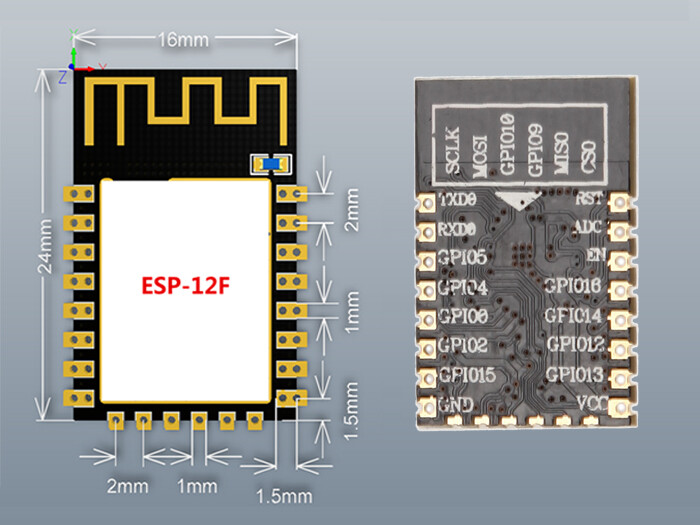
ESP8266-12F
and my board is a DIY.

Hey! I tested your code (just changing the delay for a 1 second delay instead of a 100 ms), and still didn't work, this is the printing:

21:34:42.660 -> Epoch Time: 1640208992
21:34:42.660 -> Formatted Time: 21:36:32
21:34:42.660 -> Hour: 21
21:34:42.660 -> Minutes: 36
21:34:42.660 -> Seconds: 32
21:34:42.660 -> Week Day: Wednesday
21:34:42.660 -> Month day: 11
21:34:42.660 -> Month: 10
21:34:42.697 -> Month name: October
21:34:42.697 -> Year: 1340177
21:34:42.697 -> Current date: 1340177-10-11

Which version of the Arduino ESP8266 core software are you using?

It looks like this type casting could be giving unexpected results:

Where epochTime is unsigned long and time_t could be 64bit.

This:
BREAKING: Upgrade to upstream newlib 4.0.0 release (64 bits time_t) (#7708)
From: Release Release 3.0.2 · esp8266/Arduino · GitHub
Could be a clue.

edit
I did this simple test based (version 2.7.4) on the failing part of your code (but without the NTP library which seams anyway to have returned a valid epoch time) and it worked for me:

#include <ESP8266WiFi.h>
// #include <NTPClient.h>
#include <WiFiUdp.h>

//Week Days
String weekDays[7] = {"Sunday", "Monday", "Tuesday", "Wednesday", "Thursday", "Friday", "Saturday"};

//Month names
String months[12] = {"January", "February", "March", "April", "May", "June", "July", "August", "September", "October", "November", "December"};


void setup() {
  Serial.begin(115200);
  Serial.println() ;
  Serial.println() ;
  Serial.println() ;

  char buf[ 80 ] ;

  sprintf( buf, "sizeof( unsigned long ): %d \n", sizeof( unsigned long ) ) ;
  Serial.print(buf) ;
  sprintf( buf, "sizeof( time_t ): %d \n", sizeof( time_t ) ) ;
  Serial.print(buf) ;

  unsigned long epochTime = 1640153824UL  ;  // your epoch date

  //Get a time structure
  struct tm *ptm = gmtime ((time_t *)&epochTime);

  int monthDay = ptm->tm_mday;
  Serial.print("Month day: ");
  Serial.println(monthDay);

  int currentMonth = ptm->tm_mon + 1;
  Serial.print("Month: ");
  Serial.println(currentMonth);

  String currentMonthName = months[currentMonth - 1];
  Serial.print("Month name: ");
  Serial.println(currentMonthName);

  int currentYear = ptm->tm_year + 1900;
  Serial.print("Year: ");
  Serial.println(currentYear);

  //Print complete date:
  String currentDate = (String) currentYear + "-" + (String) currentMonth + "-" + (String) monthDay;
  Serial.print("Current date: ");
  Serial.println(currentDate);
  Serial.println();

}

void loop() { }

Results:


sizeof( unsigned long ): 4 
sizeof( time_t ): 4 
Month day: 22
Month: 12
Month name: December
Year: 2021
Current date: 2021-12-22