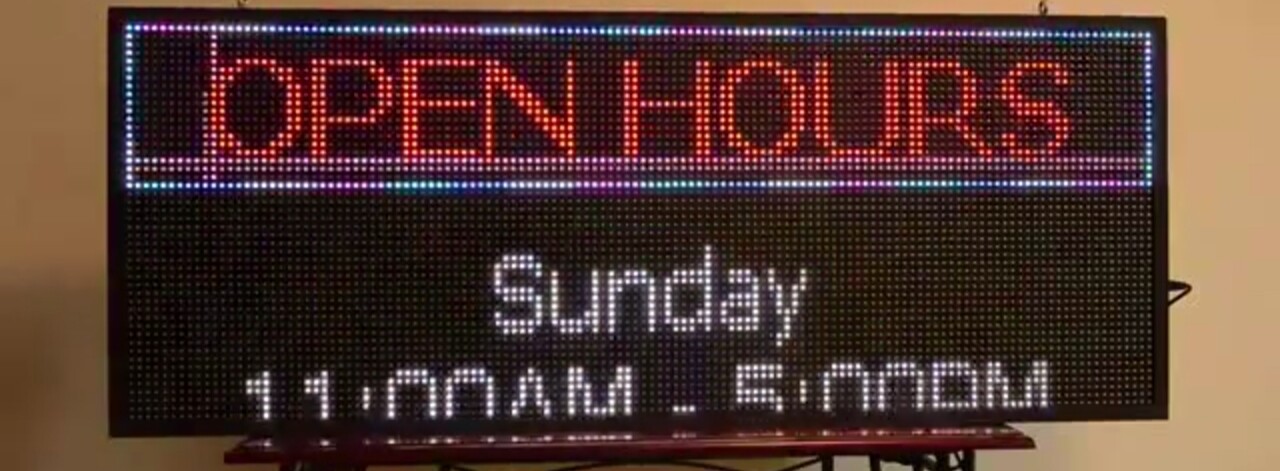
I want void temp to not follow void running, what should I add, break or delay?
#include <OneWire.h>
#include <DallasTemperature.h>

OneWire pin_DS18B20(5);
DallasTemperature DS18B20(&pin_DS18B20);

#include <SPI.h>
#include <DMD.h>
#include <TimerOne.h>
#include "SystemFont5x7.h"
#include "Arial_black_16.h"
#include "Arial14.h"
#define DISPLAYS_ACROSS 1
#define DISPLAYS_DOWN 1
String str;
char b[8];
DMD dmd(DISPLAYS_ACROSS, DISPLAYS_DOWN);

unsigned long previousMillis1 = 0;
const long interval1 = 1000;

void ScanDMD(){
  dmd.scanDisplayBySPI();
}

void setup() {
  Serial.begin(9600);
  Timer1.initialize(5000);
  Timer1.attachInterrupt(ScanDMD);
  dmd.clearScreen(true);

  DS18B20.begin();
}

void loop() {
  running();
  temp();
}

void running() {
  int slen=0;
  dmd.selectFont(SystemFont5x7);
  str = "TEMP";
  slen = str.length()+1;
  str.toCharArray(b, slen );
  dmd.drawMarquee( b, slen, (32*DISPLAYS_ACROSS)-1 ,1); //32 is the board size
  unsigned long timing  = millis();
  boolean flag = false;
  while (!flag) {
    if ((timing + 70) < millis()) {
      flag = dmd.stepMarquee(-1, 0);
      timing = millis();
    }
  }
}

void temp() {
DS18B20.requestTemperatures();

  if(millis() - previousMillis1 >= interval1) {
    previousMillis1 = millis();
      dmd.clearScreen( true );

      dmd.selectFont(SystemFont5x7);
      str=DS18B20.getTempCByIndex(0);
      slen= str.length()+1;
      str.toCharArray(b,slen);
      dmd.drawString(1,8,b,slen,GRAPHICS_NORMAL);
  }
}
Then don't call it after calling the running() function
void loop()
{
  running();
//  temp();
}
When do you want to call the temp() function, if ever ?
I want to make the first 2 text views and the second text then between the 2 texts I want one of them to be animated with running text
b707
January 29, 2023, 12:57pm
4
You start request of temperature on each call of the loop(). It hasn't time to measure.
bimosora:
void temp() {
// DS18B20.requestTemperatures();  // you don;t need this line in this place, move it inside if condition

  if(millis() - previousMillis1 >= interval1) {
    previousMillis1 = millis();
      dmd.clearScreen( true );

      dmd.selectFont(SystemFont5x7);
      str=DS18B20.getTempCByIndex(0);
      slen= str.length()+1;
      str.toCharArray(b,slen);
      dmd.drawString(1,8,b,slen,GRAPHICS_NORMAL);
     DS18B20.requestTemperatures();     // << move request there
  }
}
Pay attention to the picture, void temp also goes to the left even though there is no marquee code in void temp
b707
January 29, 2023, 1:13pm
6
What is you mean as "void temp" ? Are you understand what is "void" in C language?
b707
January 29, 2023, 1:15pm
7
indeed!
With that library I want to move the text "hello" from right to left, how do I do that?
b707
January 29, 2023, 1:29pm
9
Do not use marquee function. Move the text manually.
I don't know how the code does that
b707
January 29, 2023, 2:18pm
11
I don't know another way to do what you want, sorry.
Try other libraries... in another thread you already asked about this
This is what I want, the top one is stationary and the bottom one is moving
b707
January 29, 2023, 2:42pm
13
It possible, but you have to program it yourself.
See this as example ( the library is not suited for you, but the code almost the same)
opened 11:30AM - 29 Nov 22 UTC
closed 08:59PM - 26 Jan 23 UTC
I TRY YOUR CODE TOP-LINE SCROLLING AND BOTTOM-LINE STRING MESSAGE
HOW TO REMOVE… BACKGROUND COLOUR AND FLICKERING?
PLEASE SUGGEST A CODE HERE.
void loop(void)
{
// create foreground colors
uint16_t col[] = {
dmd.Color888(255,0, 0), // red
dmd.Color888(0, 255, 0), // green
dmd.Color888(0, 0, 255) // blue
};
uint16_t bg = 0; // background - black
int col_cnt = 3; // color count
// text
char s[] = " MURUGAN CHENNAI";
// transcode message to UTF for use with GFX fonts
char k[30];
utf8_rus(k, (const unsigned char*)s);
char* m = s;
// select standard font
dmd.selectFont(&UkrRusArial_F);
// set text foreground and background colors
dmd.setTextColor(col[0], bg);
// shift steps in pixels for running text (positive - shift right, negative - left)
// running text shift interval
uint16_t interval = 25;
long prev_step = millis();
dmd.setBrightness(200);
// Cycle for tests:
// -- running texts moving at x and y axis with single and double speed
// -- vertical scrolling message
while (1) {
if ((millis() - prev_step) > interval)
{
dmd.drawString(8,16,"12:34:56",8,col[1]); //- fixed messAGE USED FOR CLOCK OR DATE USING DS3231
if (dmd.stepMarquee(-1, 0) & 1) { // if text is reached screen bounds
dmd.clearScreen(true);
dmd.setTextColor(col[0], bg);
dmd.drawMarqueeX(m, 0,0);
}
// output mem buffer to matrix
dmd.swapBuffers(true);
prev_step = millis();
}
}
}
Also the library is not support the marquee on the part of screen as DMD.h you used, but see on the last video of thread - lower text moving independently to upper
Don't support the DMD32 and DMD2 libraries as I provided in the image above?
b707
January 29, 2023, 3:08pm
15
???
Is it true that DMD32 and DMD2 also can't make the writes go the way I want them to?
b707
January 29, 2023, 3:30pm
17
About DMD2.h I don't know exactly, but suggest so.
What is the library DMD32? Are you mean DMD_STM32 ? - yes, it doesn't support what you want.
So all the libraries don't support what I'm saying?
I saw from YouTube that something could be in the library and he wrote it like this
  int slen = 0;
  str = "TEMP";
  str.toCharArray(b,8);
  j=strlen(b)+(strlen(b)*5);
  //=====================================================

  i--;
  dmd.drawString(i, 9, b, strlen(b), GRAPHICS_NORMAL);
  if (i<=~j) {
    i=32;
    sr++;
    if (sr>2) sr=1;
  }
Here's a video I found Led scrolling display board | led display board | P10 module | led clock | Arduino uno | Rtc module
b707
January 29, 2023, 10:00pm
20
bimosora:
he wrote it like this
As can I see in your code snippet, the man do it the same as I advised you in post above - he move the string by drawing it with drawString() time by time:
bimosora:
dmd.drawString(i, 9, b, strlen(b), GRAPHICS_NORMAL);
It is exactly what I meant....