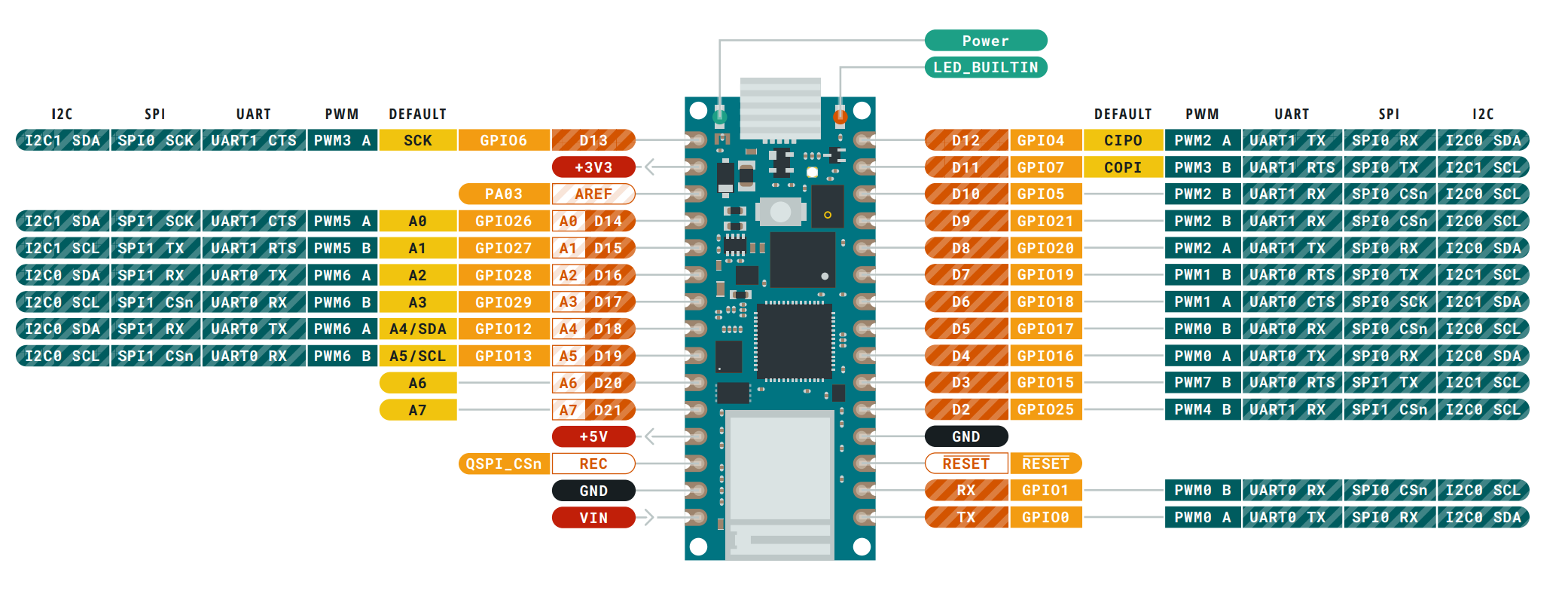
Hello,
I have an arduino nano RP2040 connect and i need to connect an openlog datalogger just like the sparkfun datalogger. i need only for the datalogger to receive data and data to be written on. It uses standart UART. However, i am already using the D0 and D1 pins on the Arduino which are the starnarde Rx and Tx pins. I am using them for an oxygen sensor which needs the UART.
Question 1: Can I connect the Rx pin of the data logger to the D8 pin on the arduino so that it can act as a Tx and it is in the UART1 not UART0. I dont know if that is relevant though? Please do let me know. And do I need any code to set that up
Question 2: Can I still transmit the data to the datalogger just with that one conection plus VCC and GND
// Note   (also  on RPi Pico W)
// Serial is the USB serial for program loading and serial mointor
// there are two hardware serial ports UART0 and UART1
//  Serial1 is mapped to UART0 on Rx pin GP1 Tx pin GP0
//  Serial2 is mapped to UART1 on Rx pin GP5 Tx pin GP4
program testing Serial2
// Raspberry Pi Pico RP2040 (and W)  Serial2 test - for loopback test connect pins Tx GP4 and Rx GP5
#include <Arduino.h>

// Note   (also  on RPi Pico W)
// Serial is the USB serial for program loading and serial mointor
// there are two hardware serial ports UART0 and UART1
//  Serial1 is mapped to UART0 on Rx pin GP1 Tx pin GP0
//  Serial2 is mapped to UART1 on Rx pin GP5 Tx pin GP4

#define TX2 4
#define RX2 5

void setup() {
  // initialize both serial ports:
  Serial.begin(115200);
  delay(2000);
  Serial.println("\n\nRaspberry Pi Pico RP2040 serial2  test Rx pin GP5 Tx pin GP4 ");
  Serial.write("   for loopback test connect pin GP4 to pin GP5\n");
  Serial2.setTX(TX2);
  Serial2.setRX(RX2);
  Serial2.begin(115200);
 Serial.print("  Serial2 RX2 is on pin GP " + String(RX2));
  Serial.println(" TX2 pin: " + String(TX2));
}

void loop() {
  // read from port 1, send to port 0:
  if (Serial2.available()) {
    int inByte = Serial2.read();
    Serial.write('>');
    Serial.write(inByte);
  }

  // read from port 0, send to port 1:
  if (Serial.available()) {
    int inByte = Serial.read();
    //Serial.write(inByte);
    Serial2.write(inByte);
  }
}