Please help me, I have got trouble with my code of arduino

Dear all,

I am newcomer in arduino programmer, i have got little trouble with my code here

I have code arduino leonardo and soil moisture, i want to arduino take data from sensor soil with values 0 - 950.
values of sensor soil I set as setPoint1 = 300 and setPoint2 =800.

I want to when the arduino read values of sensor 300 increase until 800, arduino will send to coordinator the data like "324 On" will show on coordinator.

when the arduino read value sensor > 800, arduino will send to coordinator the data like "850 Off"

when the arduino read value sensor and get decrease from 850 until > setPoint1(300) the arduin will send data like "302 Off"
an the when the arduino read values sensor <= setPoint1 (300) the arduino will send data like "299 On"

simple like this

when arduino read sensor from setPoint1 until setPoint2, coordinator will receive "301 On, 323 On, 430 On, 750 On etc until 799 On"

when the arduino read values sensor from value sensor >setPoint2 got decrease until setPoint1, the coordinator will receive data "830 Off, 810 Off, 750 Off, 530 Off, and so on until 301 Off" when valuen sensor <300, coordinator will receive "299 On, 280 On and so on

after this looping from above

thanks for your pay attention
rozikien@gmail.com

my code like this

const int analogPin = A0; // pin that the sensor is attached to
int setPoint1=300;
int SetPoint2=800;

void setup() {
// initialize serial communications:
Serial.begin(115200);
Serial1.begin(115200);
}

void loop() {

int analogValue = analogRead(analogPin);
// if the analog value is high enough, turn on the LED:

if (analogValue < setPoint1){
Serial1.print(' ');
Serial1.print(analogValue);
Serial1.print(' ');
Serial1.print("On");
delay(1000);
}
if ((analogValue > setPoint1) && (analogValue <= setPoint2)) {
//Serial1.print('A');
Serial1.print(' ');
Serial1.print(analogValue);
Serial1.print(' ');
Serial1.print("On");
delay (1000);
}

else if (analogValue>setPoint1){
Serial1.print(' ');
Serial1.print(analogValue);
Serial1.print(' ');
Serial1.print("Off");
delay(1000);
}
}
}
I'm not sure that I understand it.
There are two things, the value of the sensor and the On/Off.
You combine those into one, but I think they can be considered as two seperate things.

The On/Off is a value with hysteresis, that is all that it is doing, right ?
Above 800, set it 'Off'.
Below 300, set if 'On'.

Let's call the On/Off : boolean flagActive;

Let's make a function to print the value:

void ToCoordinator (int val, boolean active) {
   Serial1.print(' ');
   Serial1.print(val);
   Serial1.print(' ');
   if (active)
     Serial1.print("On");
  else
     Serial1.print("Off");
}

Now to distinguish the three sections:

  if (analogValue < setPoint1){
    // analog value is lower than setPoint1
  }
  else if (analogValue < setPoint2){
    // analog value is between setPoint1 and setPoint2
  }
  else {
    // analog value is higher or equal than setPoint2
  }

Add changing the Activate variable:

  if (analogValue < setPoint1){
    // analog value is lower than setPoint1
    if (!flagActive)
      flagActive = true;
  }
  else if (analogValue < setPoint2){
    // analog value is between setPoint1 and setPoint2
  }
  else {
    // analog value is higher or equal than setPoint2
    if (flagActive)
      flagActive = false;
  }

Can you make a new sketch with this and show it to us ?

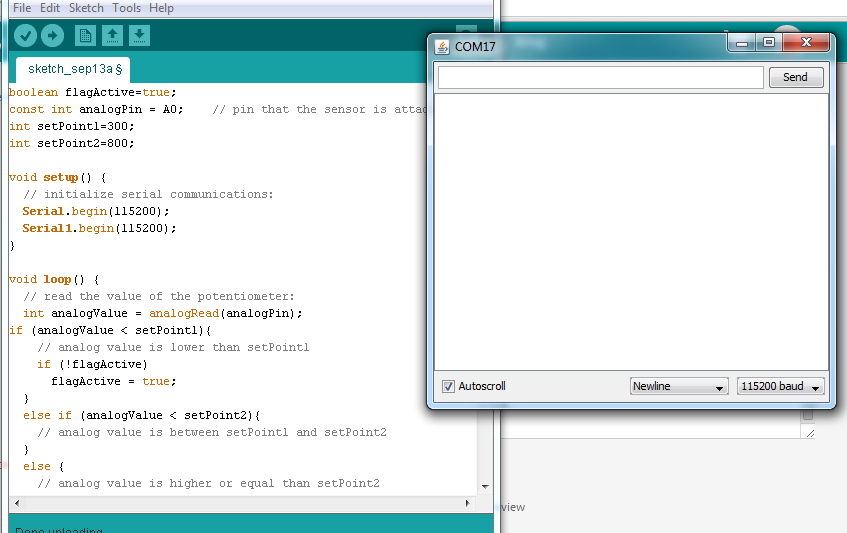
i have try your code like below, but don't show anything in my serial monitor coordinator see attachment

boolean flagActive=true;
const int analogPin = A0;    // pin that the sensor is attached to
int setPoint1=300; 
int setPoint2=800;

void setup() {
  // initialize serial communications:
  Serial.begin(115200);
  Serial1.begin(115200);
}

void loop() {
  // read the value of the potentiometer:
  int analogValue = analogRead(analogPin);
if (analogValue < setPoint1){
    // analog value is lower than setPoint1
    if (!flagActive)
      flagActive = true;
  }
  else if (analogValue < setPoint2){
    // analog value is between setPoint1 and setPoint2
  }
  else {
    // analog value is higher or equal than setPoint2
    if (flagActive)
      flagActive = false;
  }
}
void ToCoordinator (int val, boolean active) {
   Serial1.print(' ');
   Serial1.print(val);
   Serial1.print(' ');
   if (active)
     Serial1.print("On");
  else
     Serial1.print("Off");
}

actually I want looping boolean On/Off like the pictrure on attachment
coordinator will receive sensor value from arduino router and coordinator show value sensor and boolean on/off with logic on the picture looping sensor

If you want things to happen at different values of a variable use a series of IF/ESLSE statements starting with the highest value. It makes the IF statements much simpler and the logic clearer

if (analogValue > highValue) {
  // do the high stuff
}
else if (analogValue > middleValue) {
  // do the middle stuff
}
else {
   // do the low stuff
}

...R

The On/Off is with hysteresis. That is what that is called (sometimes).

I did not write the whole sketch, because you have to make it your own.
When you don't understand your own sketch, you won't be able to change it.

The function ToCoordinator() should be called to send a message. Use that function where you want to send something. Have you used functions before ?
You can also add the delay of "delay(1000);" at the end of the "loop()" function.

Robin2:
If you want things to happen at different values of a variable use a series of IF/ESLSE statements starting with the highest value. It makes the IF statements much simpler and the logic clearer

if (analogValue > highValue) {

// do the high stuff
}
else if (analogValue > middleValue) {
  // do the middle stuff
}
else {
   // do the low stuff
}


...R

can you complete your code above with logic looping like picture on attachment.

i have two arduino leonardo and two xbee and one sensor soil

one arduino leonardo for coordinator (arduino + xbee s2 + computer)
one arduino leonardo for router (arduino + sensor soil + xbee)

router will send data value sensor soil to coodinator and then coordintor receive data value sensor soil with off/on
I'm still confuse because i'm newcomer in arduino program.

thakns

z1k13n:
can you complete your code above with logic looping like picture on attachment.

If you want someone to write code for you, you should post your request in the Gigs and Collaborations section.

I am not interested in doing that - but I am prepared to help you do it yourself - which is why I made my earlier suggestion.

...R