Plot in arduino

Hello friends
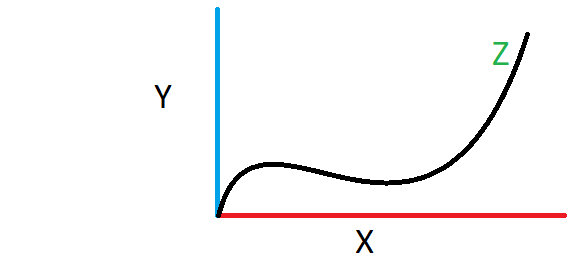
I have two variables in my project, I want the sum of these two variables to be displayed in a plot.Is it possible to do this in the Arduino program?

Untitled

For example, in the figure above, give the value of X and Y to Arduino with a potentiometer and let it draw the z vector. Is this possible in Arduino? If it is not possible in the Arduino compiler, I would be grateful if you could introduce another application.

I also saw examples where one axis was the desired variable vector and the other axis was according to the received data. I want to introduce both vector axes myself.

thank you

displayed where? do you have a screen connected to your Arduino?

1 Like

If you find the serial plotter too fast to observe, you could use the Arduino Support Package from MATLAB. It lets you specify the time period for simulation and perform mathematical operations on the measured signals.

However, just in case you do not have a free license of MATLAB, you can download PC Scope from PC based Oscilloscope using Arduino | Full Electronics Project.

1 Like

Depends on where you wish to display it?

If displaying on a PC then there is the Serial Plotter.
On IDE 1.8.x you will find it here:

On IDE2.0 it's an icon in the top right corner next to the Serial Monitor
Plotter

1 Like

The Serial plotter does not know how to draw Z = F(x,y) where x and y are coordinates along the horizontal and vertical axis.

The serial plotter only display an Y based on when you print something out which moves one dot along the x axis

3 Likes

I want it to be in the Windows environment, for example, in serial plotter, Arduino compiler, MATLAB, or any other program

My arduino board is an old nano version model and unfortunately it is not supported in "Arduino Support from MATLAB".

I will test this

What exactly do you mean by this ?
Exactly which version of the Nano have you got ?

Thank you, dear friend, but here only one variable based on time is shown, I am looking for something else

I use Arduino Nano with AT Mega 328P microcontroller (old bootloader).

"Arduino Support from MATLAB" supports Nano boards below
[Arduino Nano 3.1]
[Arduino Nano 33 IoT]
[Arduino Nano 33 BLE]
[Arduino Nano 33 BLE Sense]

Does Matlab support the Uno ?

I ask because it is possible to put the Uno bootloader on a Nano

I can connect to MATLAB through the serial port and view the information there and display only one of the variables in real time in the graph.
But I don't know how to get two separated variables in MATLAB. See this video (https://www.youtube.com/watch?v=0F-VjddQG8o)

Yes, it supports. I will test now to see if it connects

I am confused as to your problem

You say

So the connection is working. It sounds like you have a software problem at one or both ends. All versions of the classic Nano will provide the same functionality so the bootloader type has no effect apart from the newer one leaving more memory free for the sketch
1 Like

This topic was automatically closed 180 days after the last reply. New replies are no longer allowed.