Hi @airbla,
you are missing the "DATA" statement as first information within the string you send from Arduino to PLX DAQ. Thereby PLX DAQ does not know it should split and parse the arriving information and paste them to the Excel sheet.
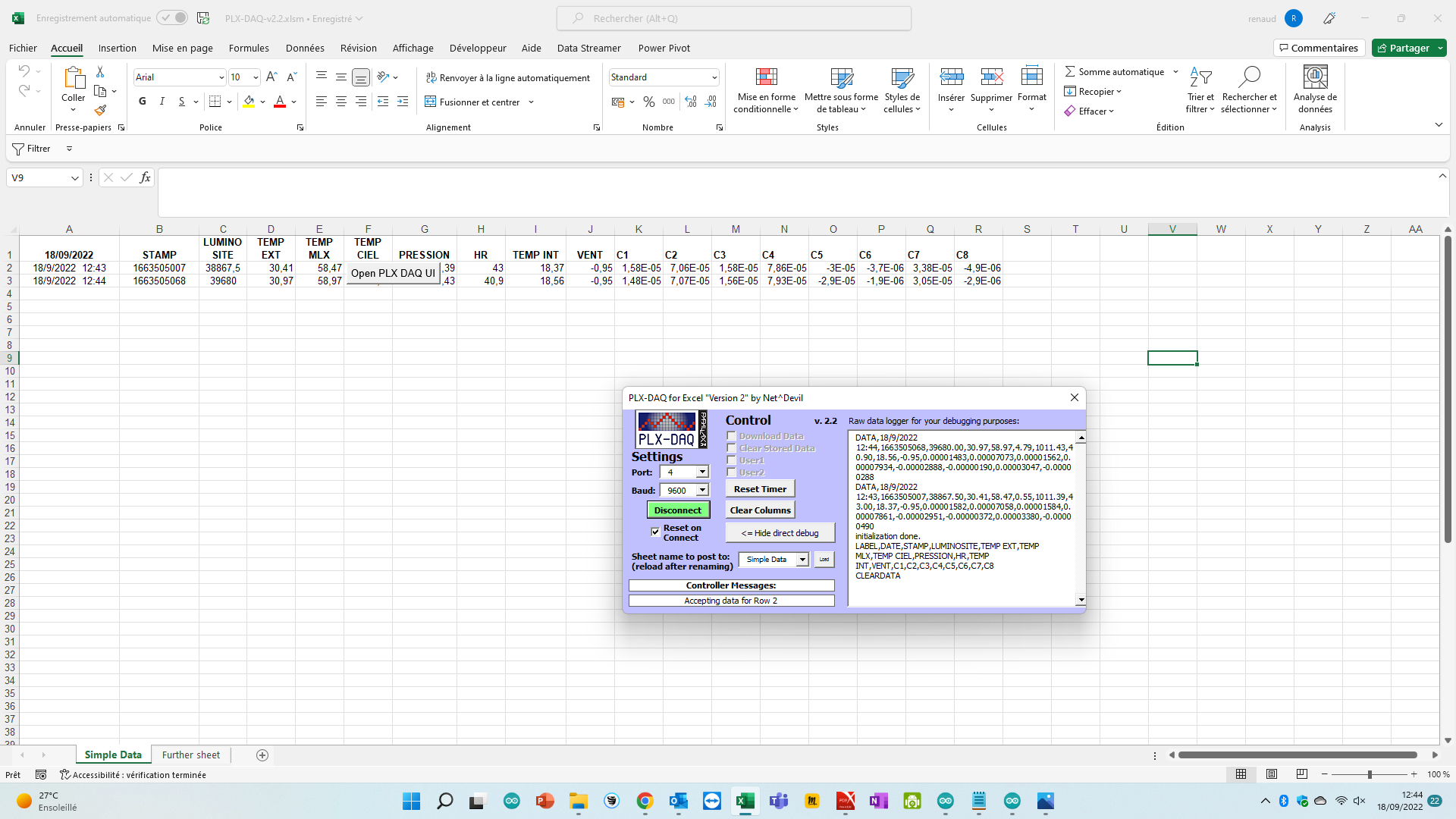
Hi NetDevil
I really appreciate your support yesterday.
Do you know how to get the PLX-DAQ always active ? By exemple, if I reduce it, no more data. If she is not as the active window, no more data….
in other words, the PC is only used for PLX-DAQ.... Do you have an idea regarding this phenomenon ? It would be so great !
With best regards
Renaud
Hi @airbla:
that is an issue I haven't heard of before, no. Actually I have no Arduino at hand to fully reproduce the issue, but I just quickly wrote a dummy function which sends test data to PLX DAQ every two seconds and it worked fine. Might be that there is a problem calling the exact Windows APIs in the background when minimized but that does also seem rather unlikely.
If you don't mind me asking, what operating system are you using (Windows 7 / 10 / Mac OS Unix) and what version of Excel (2016 / 2019 / M365)?
Hi NetDevil,
thank you for your reply. I'm using windows 11 but I can't find the version of excel (included in office365) 
I wonder if the simplest solution could not be a second small screen? I keep the main one for daily work and the small one for the excel sheet?......
Regards
Renaud
Hi @airbla,
to get your Office version please follow this guide (basically just: File => Account => About Excel): About Office: What version of Office am I using? - Microsoft Support
Using a second monitor, I thought you said that no data is coming in once Excel is no longer the active window? I guessed it would imply also just setting any other app with focus, even though Excel is still visible on the screen. If it works that way go for it - although I understand it is not a desirable solution. As long as I can't reproduce the problem I am sorry I can't give you any better advice.
Hi NetDevil,
Thank you very much for your support !.
I found on the net some vba code. The excel windows in always in the front. I reduce it in the side of my screen and I can almost work normally
Regards
Renaud

hi, my name i eduardo i have a problem with plx &arduino code i have to read 3 termocuples in excel this is my code i dont get any value please help i have 0 experience in arduino or programming,thks for any help.
#include<GyverMAX6675.h>
#include<GyverMAX6675_SPI.h>

int lectura;
//Pines del modulo temperatura 1
#define CLK_PIN   52  //SCK
#define DATA_PIN  50  //SO
#define CS_PIN    53  //CS

//Pine del modulo temperatura 2
#define CLK_PIN2   48  //SCK
#define DATA_PIN2  46  //SO
#define CS_PIN2    49  //CS

//Pines del modulo 3
#define CLK_PIN3   44  //SCK
#define DATA_PIN3  42  //SO
#define CS_PIN3    45  //CS

//antes de conectar la biblioteca, puede establecer
//el retardo de cambio de CLK en microsegundos
//para aumentar la calidad de la comunicacion a traves de los cables
//#definir MAX6675_DELAY 10

//epecifique los pines en el orden SCK SO CS
GyverMAX6675<CLK_PIN,DATA_PIN,CS_PIN>sens;
GyverMAX6675<CLK_PIN2,DATA_PIN2,CS_PIN2>sens2;
GyverMAX6675<CLK_PIN3,DATA_PIN3,CS_PIN3>sens3;


void setup() {
  Serial.begin(9600);
  Serial.println("LABEL, hora, lectura,");

}

void loop() {
  Serial.print(sens.getTemp());
  Serial.print("\t");
  Serial.print(sens2.getTemp());
  Serial.print("\t");
  Serial.print(sens3.getTemp());
  Serial.print("\t");

  delay(1000);

}
@airbla: it is always very nice to see people with problems digging into it themselves and even sharing their solutions to provide back  thanks for that. So the code snippets will just force the Excel window to always be shown "on top" even though you are working in another application? Similar to the feature the Task Manager in Windows provides (see Task Manager => Options => Always on top). I will put that on the backlog to evaluate if something like this is beneficial for all in a future release.
@lalo305: having 0 experience so far is of course a hard start, but congrats on giving it a try anyways  please check the Beginners Guide I wrote, it will address exactly the problem you have right now and will give you a good point to start understanding PLX DAQ. The Beginners Guide is included in the Zip archive you downloaded for PLX DAQ 2.11.
But nevertheless, your problem is that you forgot to include a "DATA," as your first statement in Serial.print. Also, each data which should be separated in different columns in Excel should be separated by "," in Arduino code. You also don't need the "\t", as the tabulator is just for better visualization in Serial Monitor. And your last command should be a println (to indicate you are finished with your line).
So the long code solution would be:
void loop() {
  Serial.print("DATA,");
  Serial.print(sens.getTemp());
  Serial.print(",");
  Serial.print(sens2.getTemp());
  Serial.print(",");
  Serial.println(sens3.getTemp());

  delay(1000);
}
1 Like
Hi NetDevil,
Thanks. I think this is the basis of the notion of forum. I don't know what the code, that I just copied from another forum, does. You can see that the excel window is not necessarily above but it is still active and I save the data. So I can work with PLX-DAQ active.


Hey @NetDevil ! I am currently working on an RFID attendance logger. Everytime I try to run PLX-DAQ, this error prompts.

I am currently running on Windows 11 and with Excel for Microsoft 365. I hope you can help me with this and have a great day!
Is there any way ; simultaneously read and write form 2 diffrent excel sheet using PLX-DAQ in Arduino . I want to use this in my project and make it better .
@gemsilog123 Hi and welcome to the board. Could you please share a screenshot of your UI? Most likely the port you choose is the wrong one or in the wrong format, thus Windows can't establish a connection via it
@rh_remon Welcome to you too please take a look at the Beginners Guide Word documentations I provide in the zip archive of v2.11. There should be a function called something like Cell,Get and Cell,Set which allow to include the name of the Excel sheet to read from/write to. That should help you out.
@NetDevil This macro is not working in microsoft EXCEL showing below error

Hi @jaishankarm,
well this rather seems to be an Excel issue. But just doing a quick Google search it seems you have additional security measures activated which classifies the place where the file is opened from as potentially insecure. Could you copy the Excel to your desktop and try again?
Details to be found here: Macros in embedded Excel workbook are blocked from running - Office | Microsoft Learn
Happen to need a Datalogger and before writing something came across this incredible program! Great Job!!
Thought I'd passback a sketch I wrote for Dual ADS1115 Precision ADC.
PLX-DAQv2-Dual-ADS1115.ino (4.4 KB)
Thanks and Enjoy
BTW, PLX-DAQ seems like a good candidate for github.com
1 Like
@NetDevil .... Working on a project for HID card scanning during training events and all is working as well. I would like to see about putting a button on the interface so, when the training is over, the presenter can click the button and it save the workbook. Serial.println("SAVEWORKBOOKAS,Subfolder[CurrentDateTime]\Training");
Trying to figure out how to make it create the Subfolder with the CurrentDateTime as the folder name so its easy to go back to a date and a shift the training occurred to check attendance.
Its working great and help me achieve what I am looking for, just trying to make it a bit .....extra.
Thanks
Hi @showelljr,
so yeah, that is unfortunately not possible out of the box. But there was a similar request once, which solution you might find handy.
Check here posts 519 to 521: PLX-DAQ version 2 - now with 64 bit support! (and further new features) - #519 by NetDevil
You could basically use option 1 to get the current time from PC to Arduino and make Arduino save the file with the returned time as filename; or just tell the PC to include the current date/time when saving a file by default.
In case you want to store the file in a sub folder, please create that sub folder first before saving the file. VBA will not automatically create the folder path for you but rather fail and crash....