I will be using an Arduino (either a Due or a Mega 2560) on a permanent basis (not part of a prototype). The Arduino will be connected via USB to a host computer and will be receiving and sending data between the computer and the Arduino over serial. I’d like to minimize the possibility of accidentally overwriting--or in the case of the Due erasing--the code on the Arduino.
I came across this post which recommended putting a 100nF capacitor from GND to RESET. Would this solution work with the Due and the Mega 2560?
This post mentions disabling the SPIEN fuse bit. Would this solution work with the Due and the Mega 2560?
Could I power the Arduino with external supply and then use a USB-TTL adapter, connecting only RX and TX of the adapter to pins 0 and 1? Would this effectively prevent uploading of another sketch unless I manually pressed the reset button on the board?
Are there other ways could be used to prevent unintentional overwriting?
That would be a good solution at some point in the future, but for the present, I will be doing quite a bit of programming with other Arduino boards. Also, if I end up using a Due for this setup, opening and closing either the native or programming ports at 1200bps would trigger an erase procedure. I like the idea of uninstalling the IDE, but is there a more robust approach?
Reading Your post again I get this picture:
Pc -> Arduino. How could possibly a Due make any damage? How does the Due come into the picture?
Could You post a block diagram showing the chain and the communication?
No normal data exchange protocol would cause any code erasing as I can see.
Bootload the processor with a ICSP programmer (USBasp). Do not install a bootloader. Then the only way to program the board is with an ICSP programmer. Serial programming is not possible at all.
I should have made it clearer. I'm not worried about the Arduino itself causing an erase event.
Rather, I'd like to avoid the possibility that either I or some other person using the computer would inadvertently upload another sketch to the board...
...Or that in experimenting with the serial communication on the PC that the board would be erased. The Arduino store mentions the following with regard to the Due:
Opening and closing the Native port at 1200bps triggers a 'soft erase' procedure: the flash memory is erased and the board is restarted with the bootloader.
-- quoted from the official Arduino store
@groundFungus, thanks for the recommendation; that looks like a really good option for the Mega 2560.
I just checked on the forum regarding the ICSP pins on the Arduino Due. This post from 2017 mentions that it isn't possible to program the Due using the ICSP pins... has the board since been updated to allow this functionality?
Okey. I got it.
Recently I took on a forum member and adjusted his code. Downloading and trying it I overwrote the code in an other Arduino also being connected. 2 boards connected at the same time on 2 different COM ports....
The recipe is creating back ups! Use date and time, or date and version as a part of the file name.
Accidents do happen. Having the backup restoring a crashed board is possible and easy.
No. The ICSP programming can only be done on the AVR architecture boards like the Mega. I think it's a perfect solution for the Mega though.
For the Due, you could consider connecting a USB to serial adapter module or cable to the pins on the board for one of the hardware serial ports (as listed in this table). That will allow the board to communicate with the computer via Serial, Serial1, etc., but it will be impossible to upload a sketch to the board via this connection. The USB to serial adapters are cheap and widely available. They are a useful tool to have on hand. They are often referred to as "FTDI", after the brand name of one of the most popular chips (FT232R), but there are other models available (e.g., CH340) which will work as well.
You should be careful not to expose the Due's pins to 5 V, but these modules are available with a jumper to switch between the unsafe for Due 5 V to the safe 3.3 V levels. For example:
I'm proof that it is possible. I have a Pro Micro permanently attached to my computer as a "macro keyboard" and I have accidentally uploaded sketches to it several times after selecting the wrong port from the Arduino IDE's Tools > Port menu while attempting to upload to another board.
Instructions for disabling the serial port in Windows are provided here:
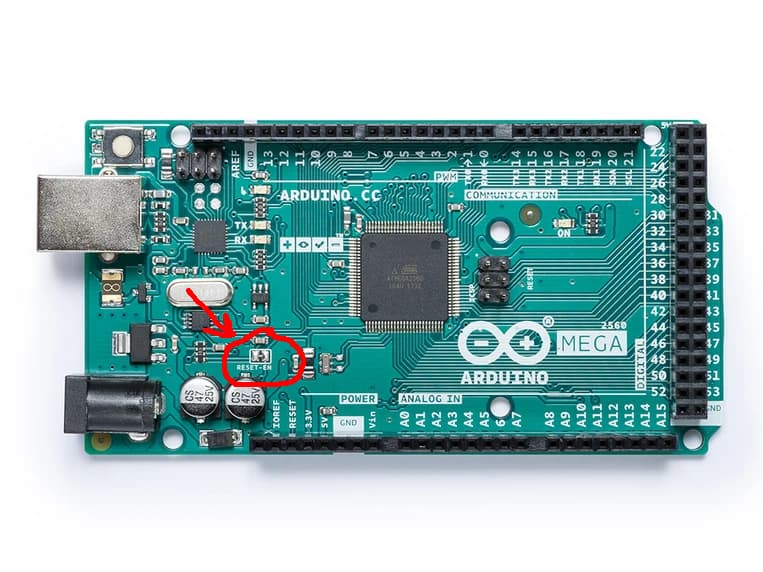
It's also possible to disable uploading on the Mega by putting a 10 uF capacitor between the GND and RESET pins, or by cutting the "RESET-EN" jumper on the board:
That's excellent. Thanks also for the confirming the use of a capacitor between GND and RESET.
It seems like many of us have accidentally uploaded sketches to the wrong Arduino
Thanks @Railroader, @groundFungus, @in0 for the suggestions. It looks as though there is a solution regardless of whether I use the Mega or Due. Thanks again for all your help!
If you are using the standard Arduino Mega board definition, the 8 kB boot section is reserved in the flash memory whether you are using a bootloader or not.
There is a nice 3rd party boards platform for the ATmega2560 which adds a Tools > Bootloader > No bootloader option to the Arduino IDE after selecting its board. This will allow you to use the full 256 kB of flash memory for your sketch without any need for making custom modifications to the board configuration files: