Problem on multiple use of serial.available() in single void loop()

Dear All,
Peace and blessing be upon you from Allah SWT. I am not an expert on Arduino. However, I am trying to code an educational robot for my lecture and I am facing problems in serial communication as follows. This is what I want to do: I want to send some serial commands for the robot to do something for one of the commands it should wait for the subsequent command and read that command and take action accordingly. To test this concept I have created the following sample code but it is not working.

int newval = 0;// initialize newval and str
String str = "";
void setup() {
  // put your setup code here, to run once:
  Serial.begin(9600);

}

void loop() { // put your main code here, to run repeatedly:
  if(Serial.available()) //check if there is any data
  {
       str = Serial.readString(); //save the incoming data in the string
       
       if (str == "Test"){ //check if
        Serial.println("This is the first response");
      }
      if (str == "Test2")// check if Test2
      {
        Serial.println("Input some number.");
        
          if (Serial.available())/// should look for the second incoming data and print accordingly, however it does not go thru the code. 
          {
            //newval = 4;
             newval = Serial.read(); 
             Serial.println(newval);
          }
        }
  }
      
 }

I will highly appreciate if someone can help me with this problem.

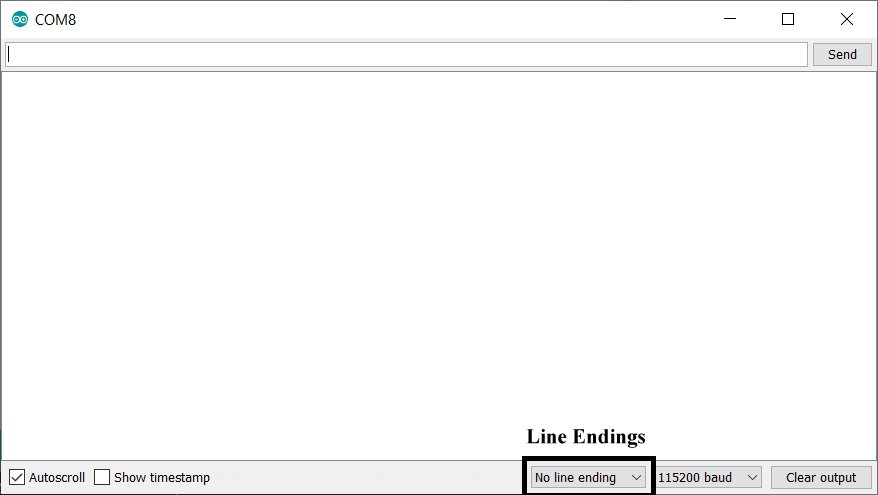
First you will need to make sure that the serial monitor line endings are set to None.


Or add a trim function to trim the invisible carriage return and/or line feed from the serial input.

str = Serial.readString(); //save the incoming data in the string
str.trim(); // trim invisible white space characters

If there is nothing available in the second

 if (Serial.available())

"Test" would have to be entered again to get to that part of the program.

You could use while(Serial.available() == 0); to wait for serial input. Not the best way to do it though.

The code looks like this:

int newval = 0;// initialize newval and str
String str = "";
void setup()
{
   // put your setup code here, to run once:
   Serial.begin(9600);

}

void loop()   // put your main code here, to run repeatedly:
{
   if (Serial.available()) //check if there is any data
   {
      str = Serial.readString(); //save the incoming data in the string
      str.trim(); // trim off invisible characters

      if (str == "Test")  //check if
      {
         Serial.println("This is the first response");
      }
      if (str == "Test2")// check if Test2
      {
         Serial.println("Input some number.");

         while (Serial.available()== 0); // wait for the second incoming data and print accordingly, however it does not go thru the code.
         {
            //newval = 4;
            newval = Serial.read();
            Serial.println(char(newval));  // char converts ASCII code to character
         }
      }
   }
}

That is not the best way to wait for serial input. If you do a search for "arduino wait for user serial input", you should get some better ways.

You should try to stay away from using the String class. The, easily misused, String class can cause memory problems. See the evils of Strings page.
Robin2's serial input basics tutorial shows robust ways to read serial data into strings (null terminated character arrays).

so the key issue here is the following line of the code

while (Serial.available()==0);

where I used
if (Serial.available())

Thanks a ton brother. It really helped. Thanks for all the suggestions.

if you're sending commands to a robot that may or may not need values, one approach is to precede the cmd with the numeric value.

Serial.read() returns a single ASCII char, not a value of four when a '4' char is received. it can be simply translated

   char c = Serial.read ();
   int val = c - '0';

additional processing is needed or multi-digit input

consider

// pcRead - debugging using serial monitor

const char version [] = "PcRead 201114a";

int debug = 0;

// ---------------------------------------------------------
// toggle output bit
int
readString (
    char *s,
    int   maxChar )
{
    int  n = 0;

    Serial.print ("> ");
    do {
        if (Serial.available()) {
            int c    = Serial.read ();

            if ('\n' == c)
                break;

            s [n++] = c;
            if (maxChar == n)
                break;
        }
    } while (true);

    return n;
}

// -----------------------------------------------------------------------------
// process single character commands from the PC
#define MAX_CHAR  10
char s [MAX_CHAR] = {};

int  analogPin = 0;

void
pcRead (void)
{

    static int  val = 0;

    if (Serial.available()) {
        int c = Serial.read ();

        switch (c)  {
        case '0':
        case '1':
        case '2':
        case '3':
        case '4':
        case '5':
        case '6':
        case '7':
        case '8':
        case '9':
            val = c - '0' + (10 * val);
            break;

        case 'A':
            analogPin = val;
            Serial.print   ("analogPin = ");
            Serial.println (val);
            val = 0;
            break;

        case 'D':
            debug ^= 1;
            break;

        case 'I':
            pinMode (val, INPUT);
            Serial.print   ("pinMode ");
            Serial.print   (val);
            Serial.println (" INPUT");
            val = 0;
            break;

        case 'O':
            pinMode (val, OUTPUT);
            Serial.print   ("pinMode ");
            Serial.print   (val);
            Serial.println (" OUTPUT");
            val = 0;
            break;

        case 'P':
            pinMode (val, INPUT_PULLUP);
            Serial.print   ("pinMode ");
            Serial.print   (val);
            Serial.println (" INPUT_PULLUP");
            val = 0;
            break;


        case 'a':
            Serial.print   ("analogRead: ");
            Serial.println (analogRead (val));
            val = 0;
            break;

        case 'c':
            digitalWrite (val, LOW);
            Serial.print   ("digitalWrite: LOW  ");
            Serial.println (val);
            val = 0;
            break;

        case 'p':
#if !defined(ARDUINO_ARCH_ESP32)
            analogWrite (analogPin, val);
            Serial.print   ("analogWrite: pin ");
            Serial.print   (analogPin);
            Serial.print   (", ");
            Serial.println (val);
            val = 0;
#endif
            break;

        case 'r':
            Serial.print   ("digitalRead: pin ");
            Serial.print   (val);
            Serial.print   (", ");
            Serial.println (digitalRead (val));
            val = 0;
            break;

        case 's':
            digitalWrite (val, HIGH);
            Serial.print   ("digitalWrite: HIGH ");
            Serial.println (val);
            val = 0;
            break;

        case 't':
            Serial.print   ("pinToggle ");
            Serial.println (val);
            digitalWrite (val, ! digitalRead (val));
            val = 0;
            break;

        case 'v':
            Serial.print ("\nversion: ");
            Serial.println (version);
            break;

        case '\n':          // ignore
            break;

        case '"':
            while ('\n' != Serial.read ())     // discard linefeed
                ;

            readString (s, MAX_CHAR-1);
            Serial.println (s);
            break;

        case '?':
            Serial.println ("\npcRead:\n");
            Serial.println ("    [0-9] append to #");
            Serial.println ("    A # - set analog pin #");
            Serial.println ("    D # - set debug to #");
            Serial.println ("    I # - set pin # to INPUT");
            Serial.println ("    O # - set pin # to OUTPUT");
            Serial.println ("    P # - set pin # to INPUT_PULLUP");
            Serial.println ("    a # - analogRead (pin #)");
            Serial.println ("    c # - digitalWrite (pin #, LOW)");
            Serial.println ("    p # -- analogWrite (analogPin, #)");
            Serial.println ("    r # - digitalRead (pin #)");
            Serial.println ("    s   - digitalWrite (pin #, HIGH)");
            Serial.println ("    t   -- toggle pin # output");
            Serial.println ("    v   - print version");
            Serial.println ("    \"   - read string");
            Serial.println ("    ?   - list of commands");
            break;

        default:
            Serial.print ("unknown char ");
            Serial.println (c,HEX);
            break;
        }
    }
}

// -----------------------------------------------------------------------------
void
loop (void)
{
    pcRead ();
}

// -----------------------------------------------------------------------------
void
setup (void)
{
    Serial.begin(115200);

    Serial.println (version);
#if defined(ARDUINO_ARCH_ESP32)
    Serial.println ("esp32");
#endif
}

This topic was automatically closed 180 days after the last reply. New replies are no longer allowed.