I am having a problem with flashing my code on a nodemcu esp8266. I have tried to flassh it with the nodemcu firmware programmer but it doesn't work. I have tried manually reseting it too by holding the flash then clicking and leaving the reset button but it does not seem to work. I am quite new to this but not sure how to make it work. I have checked on reddit and gihub but cannot find something that solves it. Can someone help?
I assume you wrote a sketch on your PC, and you now want to upload it to the 8266, correct? When you see 'connecting', press and hold the BOOT button.
ESP8266 is less than ideal for noobs.
Getting Started with ESP8266 NodeMCU Development Board| Random Nerd Tutorials
. Variables and constants in RAM (global, static), used 28656 / 80192 bytes (35%)
║ SEGMENT BYTES DESCRIPTION
╠══ DATA 1528 initialized variables
╠══ RODATA 1216 constants
╚══ BSS 25912 zeroed variables
. Instruction RAM (IRAM_ATTR, ICACHE_RAM_ATTR), used 60331 / 65536 bytes (92%)
║ SEGMENT BYTES DESCRIPTION
╠══ ICACHE 32768 reserved space for flash instruction cache
╚══ IRAM 27563 code in IRAM
. Code in flash (default, ICACHE_FLASH_ATTR), used 249924 / 1048576 bytes (23%)
║ SEGMENT BYTES DESCRIPTION
╚══ IROM 249924 code in flash
esptool.py v3.0
Serial port COM6
Connecting.................._____...
A fatal esptool.py error occurred: Invalid head of packet (0x21)
Chip is ESP8266EX
This is the error it gives and I held the boot button
I have checked your link but doesn't help me as I have tried all this stuff and have not done any errors, I have also tried pulling the D3 pin low to flash and click the flash button but no light appears and it doesn't work
I have gotten this board quite new, last month itself and have only been able to manually flash it once, and when I tried to do it online it worked only 5-7 times. I feel it is a hardware problem. This is the link I bought it from: https://shorturl.at/ggOaQ
Hi @timothym2011. This error might be caused by the communication lines between the computer and the microcontroller on the board not being able to support the rather high default upload speed. If so, the problem should be fixed by reducing the upload speed, which is configurable via a convenient menu.
Select Tools > Upload Speed > 57600 from the Arduino IDE menus and then try uploading the sketch again, just as you did before. Hopefully this time the upload will be successful. If not, add a reply here on the forum thread to let us know and we'll investigate further.
#include <ESP8266WiFi.h>
#include <PubSubClient.h>

// WiFi credentials
const char* ssid = "phebem_Extender_2.4GHz";
const char* password = "0503139787";

// MQTT credentials
const char* mqttServer = "io.adafruit.com";
const int mqttPort = 1883;
const char* mqttUser = "TimothyM2011";
const char* mqttPassword = "aio_tJKi07t0XAxzRnje5zvCCGbMTNfI";

// Pin configuration
#define MOISTURE_SENSOR_PIN A0
#define WATER_LEVEL_SENSOR_PIN D1
#define RELAY_PIN D2

WiFiClient espClient;
PubSubClient client(espClient);

// MQTT topics
const char* moistureTopic = "TimothyM2011/feeds/moisture";
const char* waterLevelTopic = "TimothyM2011/feeds/water-level";
const char* relayTopic = "TimothyM2011/feeds/relay";  // Topic for motor control

void setup() {
  Serial.begin(9600);

  // Initialize pins
  pinMode(MOISTURE_SENSOR_PIN, INPUT);
  pinMode(WATER_LEVEL_SENSOR_PIN, INPUT);
  pinMode(RELAY_PIN, OUTPUT);
  digitalWrite(RELAY_PIN, HIGH); // Turn off relay initially

  // Connect to WiFi
  WiFi.begin(ssid, password);
  while (WiFi.status() != WL_CONNECTED) {
    delay(500);
    Serial.print(".");
  }
  Serial.println("WiFi connected");

  // Connect to MQTT server
  client.setServer(mqttServer, mqttPort);
  client.setCallback(callback);

  reconnect();
}

void loop() {
  if (!client.connected()) {
    reconnect();
  }
  client.loop();

  // Read sensors
  int moistureValue = analogRead(MOISTURE_SENSOR_PIN);
  int waterLevelValue = analogRead(WATER_LEVEL_SENSOR_PIN);

  // Publish sensor values
  client.publish(moistureTopic, String(moistureValue).c_str());
  client.publish(waterLevelTopic, String(waterLevelValue).c_str());

  delay(2000); // Adjust the delay as needed
}

void callback(char* topic, byte* payload, unsigned int length) {
  String message;
  for (int i = 0; i < length; i++) {
    message += (char)payload[i];
  }

  // Control the relay based on message received
  if (String(topic) == relayTopic) {
    if (message == "ON") {
      digitalWrite(RELAY_PIN, HIGH); // Turn on the relay (motor)
      Serial.println("Motor ON");
    } else if (message == "OFF") {
      digitalWrite(RELAY_PIN, LOW); // Turn off the relay (motor)
      Serial.println("Motor OFF");
    }
  }
}

void reconnect() {
  while (!client.connected()) {
    Serial.print("Attempting MQTT connection...");
    if (client.connect("ESP8266Client", mqttUser, mqttPassword)) {
      Serial.println("connected");
      client.subscribe(relayTopic);  // Subscribe to the relay control topic
    } else {
      Serial.print("failed, rc=");
      Serial.print(client.state());
      Serial.println(" try again in 5 seconds");
      delay(5000);
    }
  }
}
This is my code
Still doesn't work. Here is error:
. Variables and constants in RAM (global, static), used 28656 / 80192 bytes (35%)
║ SEGMENT BYTES DESCRIPTION
╠══ DATA 1528 initialized variables
╠══ RODATA 1216 constants
╚══ BSS 25912 zeroed variables
. Instruction RAM (IRAM_ATTR, ICACHE_RAM_ATTR), used 60331 / 65536 bytes (92%)
║ SEGMENT BYTES DESCRIPTION
╠══ ICACHE 32768 reserved space for flash instruction cache
╚══ IRAM 27563 code in IRAM
. Code in flash (default, ICACHE_FLASH_ATTR), used 249924 / 1048576 bytes (23%)
║ SEGMENT BYTES DESCRIPTION
╚══ IROM 249924 code in flash
esptool.py v3.0
Serial port COM6
Connecting........____
Chip is ESP8266EX
A fatal esptool.py error occurred: Invalid head of packet (0x0A)
It is possible for a short or external circuitry connected to the Arduino board to interfere with the upload process, causing this type of upload error.
Make sure the board is not sitting on anything conductive that could short the contacts on the bottom of the board. Make sure there isn't any conductive debris (e.g., strands of wire or component leads) on the board or on the surface the board is sitting on.
If you have a shield or any external circuitry or components connected to your Arduino board, try this experiment:
- Disconnect the USB cable of the Arduino board from your computer.
- Disconnect any shields, modules, external circuitry, etc. from your board.
- Connect the Arduino board to your computer with a USB cable.
Now try uploading a sketch to the board again. Does the upload succeed?
This experiment will determine whether the upload error was caused by interference from your external circuitry. If so, you can then focus your attention on identifying the specific problem with the circuit and resolving it.
The esp kind of hangs in the air cause of the number of wires and I am using nodemcu so I am connecting directly from the nodemcu not the arduino
Disconnect all wires except for the USB cable from the NodeMcu board.
When I wrote "Arduino board", I was referring to the NodeMcu board. Although it would probably be most correct to only use this term when referring to boards manufactured by the Arduino company, it is common to use it to refer to any microcontroller board that is being programmed using the Arduino framework.
It still doesn't work
Take a screen shot of the tools menu.
Seems most likely then.
1 Like
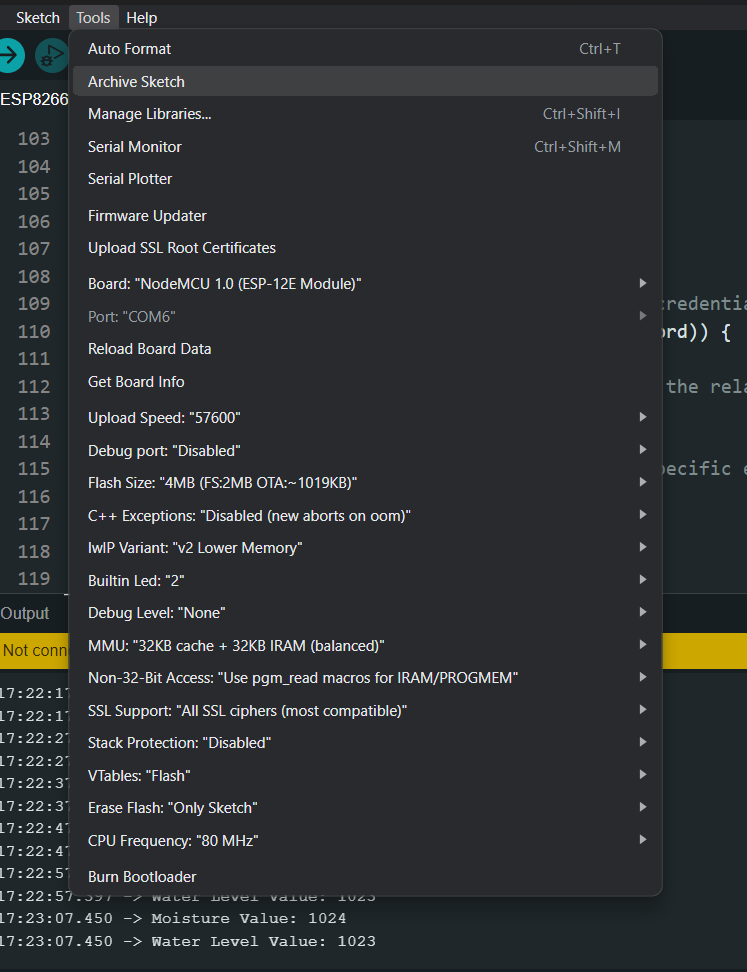
Notice the Com port is greyed out. I am on a Mac so can't advise further but you need to fix that.
I showed it without connecting the board that is why, if I connect it it will show
Can you upload to any other board?
Yes I can