I'm, no expert but do have a problem with the Serial.read() and the the Serial.available(). I have use the example sketch from this website to counter verify my own sketch.
char receivedChar;
boolean newData = false;

void setup() {
    Serial.begin(9600);
    Serial.println("<Arduino is ready>");
}

void loop() {
    recvOneChar();
    showNewData();
}

void recvOneChar() {
    if (Serial.available() > 0) {
        receivedChar = Serial.read();
        newData = true;
    }
}

void showNewData() {
    if (newData == true) {
        Serial.print("This just in ... ");
        Serial.println(receivedChar);
        newData = false;
    }
}
For some reason, there always 2 characters returned to the monitor text. My character like [A] and the [carriage return] ASCII codes. How can I strictly get the character that I'm interested? The above code only prints the characters that where send through the terminal.
Whether I use the SEND button or press the Return key, the last character is always the [carriage return] that is stored in the variable receivedChar!
The final objective is to use the + and - signs ASCII codes to increase or decrease a PWM duty cycle. See the output of the terminal.
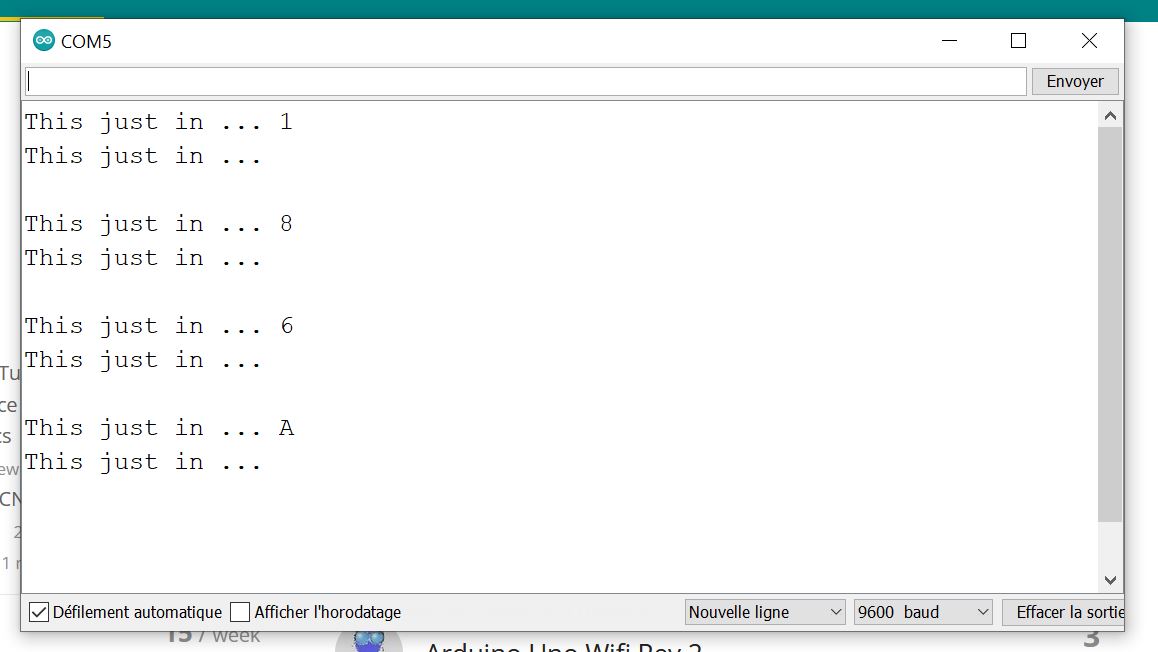
Note that this code was compiled with on linux and Windows 10 machines with 2 different Arduino MEGA boards.
Thanks for your help and Happy New Year
