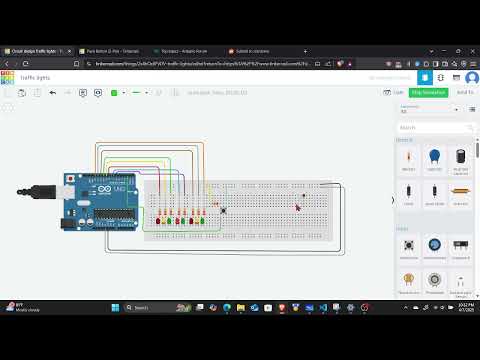
For our university project we have to build a traffic light system consisting of a major road, pedestrian crossing and minor road.
The lights are supposed to cycle from each color example:
if Main road is Red, Pedestrian Green, Minor Green
Main road is Yellow, Pedestrian Red, Minor Yellow
Main road is Green, Pedestrian Red, Minor Red
We also have to incorporate a push button in which it is pressed the major road lights becomes red and pedestrian becomes green long with the Minor lights.
In my code the rotation of the lights from each color works fine but when i click on the pedestrian button it does not turn my Major road light red, Pedestrian Green and Minor road green.
I've tried multiple times from changing the orientation of button on how it is connected, is there any way to fix this?
Maybe, just maybe, your problem lies in the sketch that is top secret.
In the Arduino IDE, use CtrlT or CMDT to format your code then copy the complete sketch. Use the < CODE / > icon from the ‘posting menu’ to attach the copied sketch.
Your schematic does not match your breadboard diagram. The breadboard diagram shows a resistor connected to the button, but this resistor does not appear on the schematic.
With these 4-pin buttons, make connections only to one diagonal pair of pins and leave the other pins unconnected. Connect one pin to the Arduino pin and the other to ground. No resistor needed. Use pinMode(pin, INPUT_PULLUP). The Arduino pin will read LOW when the button is pressed.
These are the three light-states, and a light-cycle is probably 1, 2, 3, 2, repeat.
When the button has been pressed, the light-state cancels and changes to light-state 2 (yel/red/yel), not state 1 (red/grn/grn) as you have written. Explain to your teacher the importance of NOT changing traffic lights from red to green without a caution (yellow) phase.
Now that you are in light-state 2, after the undefined timeout occurs, return to the light-cycle with light-state 1, 2, 3, 2, repeat.