Hey everyone,
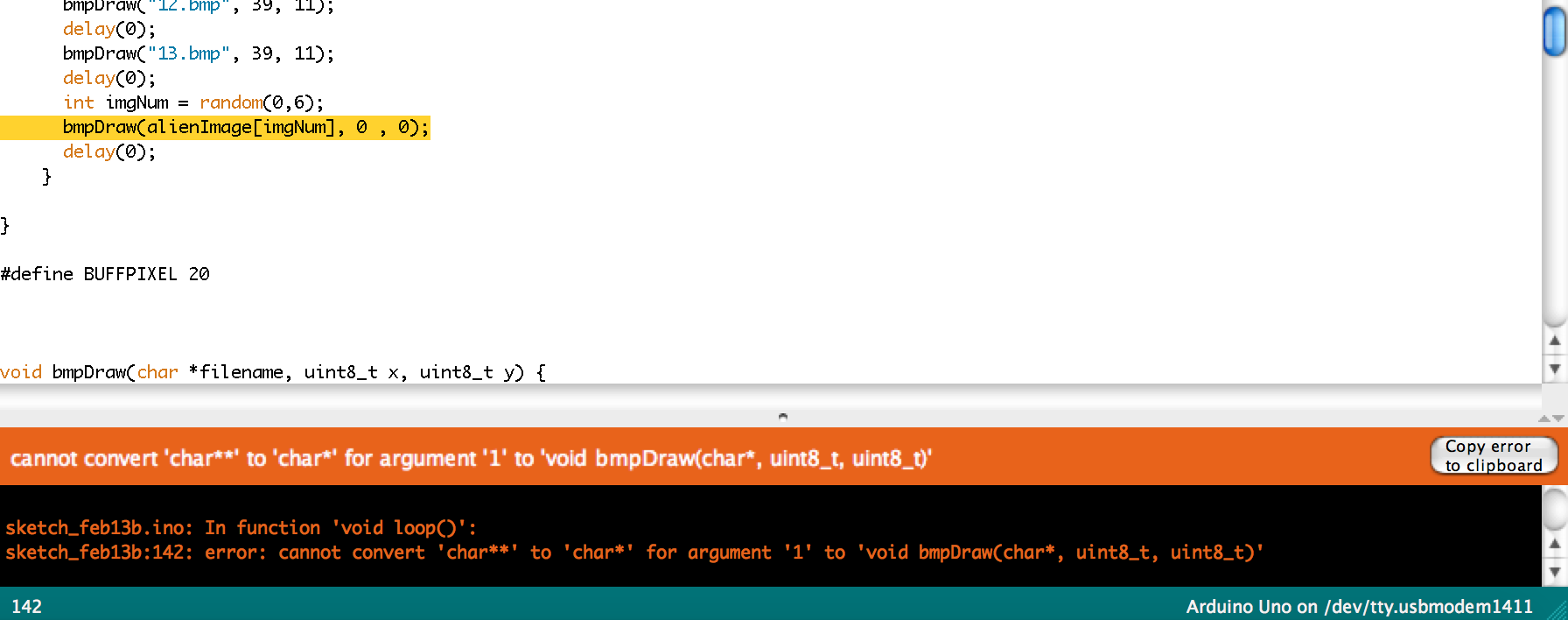
I have a number of bitmap sequences I'd like to display using an OLED color display (adafruit SSD1351) that I'm reading off of an SD card. Because the card doesn't read directories, I've had to use the char function to define these sequences. There will be an opening sequence, and a play button to randomize an outcome sequence. I'm fairly new to arduino, and I've been google to help me out with most of the code. But I'm getting an error stating 'cannot convert 'char**' to 'char*' for argument '1' to 'void bmpDraw(char*, uint8_t, uint8_t)'
Appologies if this is a complete noob post! Thanks for your help.
#include <Adafruit_GFX.h>
#include <Adafruit_SSD1351.h>
#include <SD.h>
#include <SPI.h>

#define sclk 13
#define mosi 11
#define cs   10
#define rst  9
#define dc   8
#define SD_CS 4

#define	BLACK           0x0000
#define	BLUE            0x001F
#define	RED             0xF800
#define	GREEN           0x07E0
#define CYAN            0x07FF
#define MAGENTA         0xF81F
#define YELLOW          0xFFE0
#define WHITE           0xFFFF

Adafruit_SSD1351 tft = Adafruit_SSD1351(cs, dc, rst);

File bmpFile;

const int buttonPin = 2;

int bmpWidth, bmpHeight;
uint8_t bmpDepth, bmpImageoffset;

int buttonState = 0;


char* alien01Image [] = {
  "05.bmp", "12.bmp"
};

char* alien02Image [] = {
  "06.bmp", "13.bmp"
};

char* alien03Image [] = {
  "07.bmp", "14.bmp"
};

char* alien04Image [] = {
  "08.bmp", "15.bmp"
};

char* alien05Image [] = {
  "09.bmp", "16.bmp"
};

char* alien06Image [] = {
  "10.bmp", "17.bmp"
};

char* alien07Image [] = {
  "11.bmp", "18.bmp"
};

char** alienImage [] = {
  alien01Image, alien02Image, alien03Image, alien04Image, alien05Image, alien06Image, alien07Image
};


void setup(void) {
  Serial.begin(9600);

  pinMode(cs, OUTPUT);
  digitalWrite(cs, HIGH);

  pinMode(buttonPin, INPUT);


  // initialize the OLED
  tft.begin();

  Serial.println("init");

  tft.fillScreen(BLUE);

  delay(500);
  Serial.print("Initializing SD card...");

  if (!SD.begin(SD_CS)) {
    Serial.println("failed!");
    return;
  }
  Serial.println("SD OK!");

}


void loop() {

// This function opens a Windows Bitmap (BMP) file and
// displays it at the given coordinates.  It's sped up
// by reading many pixels worth of data at a time
// (rather than pixel by pixel).  Increasing the buffer
// size takes more of the Arduino's precious RAM but
// makes loading a little faster.  20 pixels seems a
// good balance.

// read the pushbutton input pin:
  buttonState = digitalRead(buttonPin);

  bmpDraw("00.bmp", 16, 0);
  delay(0);
  bmpDraw("01.bmp", 16, 0);
  delay(0);

  if (buttonState ==HIGH) {
      bmpDraw("02.bmp", 30, 37);
      delay(0);
      bmpDraw("03.bmp", 16, 0);
      delay(0);
      bmpDraw("04.bmp", 16, 0);
      delay(0);
      bmpDraw("05.bmp", 39, 11);
      delay(0);
      bmpDraw("06.bmp", 39, 11);
      delay(0);
      bmpDraw("07.bmp", 39, 11);
      delay(0);
      bmpDraw("08.bmp", 39, 11);
      delay(0);
      bmpDraw("09.bmp", 39, 11);
      delay(0);
      bmpDraw("10.bmp", 39, 11);
      delay(0);
      bmpDraw("11.bmp", 39, 11);
      delay(0);
      bmpDraw("12.bmp", 39, 11);
      delay(0);
      bmpDraw("13.bmp", 39, 11);
      delay(0);
      int imgNum = random(0,6);
      bmpDraw(alienImage[imgNum], 0 , 0);
      delay(0)
    }

}

#define BUFFPIXEL 20


void bmpDraw(char *filename, uint8_t x, uint8_t y) {

  File     bmpFile;
  int      bmpWidth, bmpHeight;   // W+H in pixels
  uint8_t  bmpDepth;              // Bit depth (currently must be 24)
  uint32_t bmpImageoffset;        // Start of image data in file
  uint32_t rowSize;               // Not always = bmpWidth; may have padding
  uint8_t  sdbuffer[3*BUFFPIXEL]; // pixel buffer (R+G+B per pixel)
  uint8_t  buffidx = sizeof(sdbuffer); // Current position in sdbuffer
  boolean  goodBmp = false;       // Set to true on valid header parse
  boolean  flip    = true;        // BMP is stored bottom-to-top
  int      w, h, row, col;
  uint8_t  r, g, b;
  uint32_t pos = 0, startTime = millis();

  if((x >= tft.width()) || (y >= tft.height())) return;

  Serial.println();
  Serial.print("Loading image '");
  Serial.print(filename);
  Serial.println('\'');

  // Open requested file on SD card
  if ((bmpFile = SD.open(filename)) == NULL) {
    Serial.print("File not found");
    return;
  }

  // Parse BMP header
  if(read16(bmpFile) == 0x4D42) { // BMP signature
    Serial.print("File size: "); Serial.println(read32(bmpFile));
    (void)read32(bmpFile); // Read & ignore creator bytes
    bmpImageoffset = read32(bmpFile); // Start of image data
    Serial.print("Image Offset: "); Serial.println(bmpImageoffset, DEC);
    // Read DIB header
    Serial.print("Header size: "); Serial.println(read32(bmpFile));
    bmpWidth  = read32(bmpFile);
    bmpHeight = read32(bmpFile);
    if(read16(bmpFile) == 1) { // # planes -- must be '1'
      bmpDepth = read16(bmpFile); // bits per pixel
      Serial.print("Bit Depth: "); Serial.println(bmpDepth);
      if((bmpDepth == 24) && (read32(bmpFile) == 0)) { // 0 = uncompressed

        goodBmp = true; // Supported BMP format -- proceed!
        Serial.print("Image size: ");
        Serial.print(bmpWidth);
        Serial.print('x');
        Serial.println(bmpHeight);

        // BMP rows are padded (if needed) to 4-byte boundary
        rowSize = (bmpWidth * 3 + 3) & ~3;


        // Crop area to be loaded
        w = bmpWidth;
        h = bmpHeight;
        if((x+w-1) >= tft.width())  w = tft.width()  - x;
        if((y+h-1) >= tft.height()) h = tft.height() - y;

        for (row=0; row<h; row++) { // For each scanline...
          tft.goTo(x, y+row);

          // Seek to start of scan line.  It might seem labor-
          // intensive to be doing this on every line, but this
          // method covers a lot of gritty details like cropping
          // and scanline padding.  Also, the seek only takes
          // place if the file position actually needs to change
          // (avoids a lot of cluster math in SD library).
          if(flip) // Bitmap is stored bottom-to-top order (normal BMP)
            pos = bmpImageoffset + (bmpHeight - 1 - row) * rowSize;
          else     // Bitmap is stored top-to-bottom
            pos = bmpImageoffset + row * rowSize;
          if(bmpFile.position() != pos) { // Need seek?
            bmpFile.seek(pos);
            buffidx = sizeof(sdbuffer); // Force buffer reload
          }

          // optimize by setting pins now
          for (col=0; col<w; col++) { // For each pixel...
            // Time to read more pixel data?
            if (buffidx >= sizeof(sdbuffer)) { // Indeed
              bmpFile.read(sdbuffer, sizeof(sdbuffer));
              buffidx = 0; // Set index to beginning
            }

            // Convert pixel from BMP to TFT format, push to display
            b = sdbuffer[buffidx++];
            g = sdbuffer[buffidx++];
            r = sdbuffer[buffidx++];

            tft.drawPixel(x+col, y+row, tft.Color565(r,g,b));
            // optimized!
            //tft.pushColor(tft.Color565(r,g,b));
          } // end pixel
        } // end scanline
        Serial.print("Loaded in ");
        Serial.print(millis() - startTime);
        Serial.println(" ms");
      } // end goodBmp
    }
  }

  bmpFile.close();
  if(!goodBmp) Serial.println("BMP format not recognized.");
}

// These read 16- and 32-bit types from the SD card file.
// BMP data is stored little-endian, Arduino is little-endian too.
// May need to reverse subscript order if porting elsewhere.

uint16_t read16(File f) {
  uint16_t result;
  ((uint8_t *)&result)[0] = f.read(); // LSB
  ((uint8_t *)&result)[1] = f.read(); // MSB
  return result;
}

uint32_t read32(File f) {
  uint32_t result;
  ((uint8_t *)&result)[0] = f.read(); // LSB
  ((uint8_t *)&result)[1] = f.read();
  ((uint8_t *)&result)[2] = f.read();
  ((uint8_t *)&result)[3] = f.read(); // MSB
  return result;
}