I have an I2C keyboard (CardKB) connected to the I2C pins on my Arduino, I have tried this using a UNO and a Nano 33 BLE. I can receive indivdual characters using:
#define CARDKB_ADDR 0x5F  //Define the I2C address of CardKB.
#include <Wire.h>

void setup() {
  Wire.begin();
  Serial.begin(9600);
}
void loop()
{
  Wire.requestFrom(CARDKB_ADDR, 1); //Request 1 byte from the slave device.
  while (Wire.available()) {
    char c = Wire.read();
    if (c != 0)
    {
      Serial.print(c);
    }
  }
}
But no matter how I try I cannot read a string from the keyboard. I have tried so many ways to define and push characters into a string that it would be impracticable to list them all here. I am missing something very basic, but how should I define and add to a string of say 5 characters using the I2C Wire library to input the characters?
I have tried and failed with so many different approaches that showing just one of them would be pointless. There must be a correct way of forming a string from inputted characters, and that is what I would like to learn, rather than adapting my own bad ideas.
isn't the CardKB a 3.3V device ? when you connected it to your UNO, did you adjust the voltage down for the data lines?
may be try
#include <Wire.h>
const size_t maxSize = 20;
char s[maxSize + 1]; // +1 to have space for the trailing null char
size_t currentSize = 0;

void dump(const char* data) {

  Serial.print(F("new key : "));
  Serial.println(data);// if we got ASCII codes, that would print the cString

  // if not that would dump the also the binary data
  while (*data) {
    Serial.print(F("0x"));
    if (*data < 0x10) Serial.write('0');
    Serial.print(*data, HEX);
    Serial.write(' ');
    data++;
  }
  Serial.println();

}

void setup() {
  Serial.begin(115200); Serial.println();
}

void loop() {
  Wire.requestFrom(0x5F, 1);
  while (Wire.available()) {
    char c = Wire.read();
    if (c != 0x00) {
      if (currentSize < maxSize) {
        s[currentSize++] = c;
        s[currentSize] = '\0'; // terminate the cString (if we get ASCII codes)
        dump(s);
      } else {
        Serial.print(F("got 0x")); Serial.print(c, HEX);
        Serial.println(F(" but did not have enough space to add it into the string"));
      }
    }
  }
}
@GolamMostafa Thanks , I tried your suggestion but the serial monitor just runs to fast to read. So I added delay(5000) at the end of the loop(). Now the monitor shows first character pressed plus <0xff><0xff><0xff>.
What does that 0xff mean? If your enter abcd from your Keypad/Keyboard what you see on the Serial Monitor. Can you post your sketch and a view of the Serial Monitor?
There's an example program I found on github here that is:
/*
*******************************************************************************
* Copyright (c) 2022 by M5Stack
*                  Equipped with M5Core sample source code
*                          配套  M5Core 示例源代码
* Visit for more information: https://docs.m5stack.com/en/core/gray
* 获取更多资料请访问: https://docs.m5stack.com/zh_CN/core/gray
*
* Describe: CardKB.  键盘
* Date: 2021/8/11
*******************************************************************************
  Please connect to Port A(22、21),Read the characters entered by CardKB Unit
and display them on the screen. 请连接端口A(22、21),读取CardKB
Unit输入的字符并显示在屏幕上。
*/

#include <M5Stack.h>
#define CARDKB_ADDR \
    0x5F  // Define the I2C address of CardKB.  定义CardKB的I2C地址

void setup() {
    M5.begin();             // Init M5Stack.  初始化M5Stack
    M5.Power.begin();       // Init power  初始化电源模块
    M5.lcd.setTextSize(2);  // Set the text size to 2.  设置文字大小为2
    M5.Lcd.printf("CardKB Test\n");
    M5.Lcd.printf(">>");
}
void loop() {
    Wire.requestFrom(
        CARDKB_ADDR,
        1);  // Request 1 byte from the slave device.  向从设备请求1字节
    while (
        Wire.available())  // If received data is detected.  如果检测到收到数据
    {
        char c = Wire.read();  // Store the received data.  将接收到的数据存储
        if (c != 0) {
            M5.Lcd.printf("%c", c);
            Serial.println(c, HEX);
        }
    }
}
The code looks like it always asks for 1 byte from the keyboard. The implication seems to be that if a key has been pressed, then a byte will have been received. Presumably if no key is pressed, the I2C bus simply times out with no response.
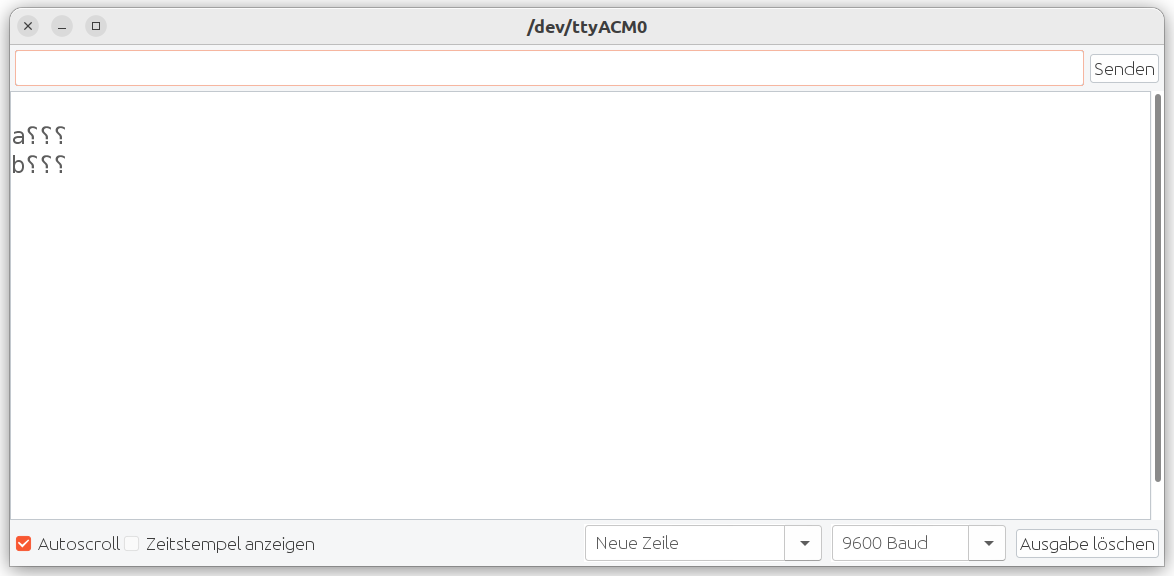
If I type abcd on the CardKB the serial monitor in the Arduino IDE gives "a???" with the question marks reversed (mirror image) of I use CuteCom as a serial monitor I get "a<0xff><0xff><0xff>".
Here is my sketch:
#define CARDKB_ADDR 0x5F  //Define the I2C address of CardKB.
#include <Wire.h>
char myData[5] = {0};

void setup()
{
  Wire.begin();
  Serial.begin(9600);
}

void loop()
{
  byte m = Wire.requestFrom(CARDKB_ADDR, 4); //Request 4 byte from the slave device.
  for (int i = 0; i < m; i++){
    myData[i] = Wire.read();
  }
  myData[m] = '\0';  //insert null-byte
  Serial.println(myData);
  delay(5000);
}
The requestFrom(slaveAddress, 4) method always reads number of bytes (4) requested at default 100 kbit/sec. Entry from the Keyboard is not that much fast; so the Serial Monitor will show validFirstCharater and FFs or anyValue for the last three characters.
The code in post #6 requests 4 bytes, rather than 1 byte, which in this case is returning 1 valid key press and 3x 0xFF. @steveinaustria would need to put together a simple test script that queried the keyboard, say every 10 seconds, giving enough time for more than 1 key to be pressed, to see if the keyboard would return more than 1 keypress in an I2C message, or if the embedded code only reports 1 keypress at a time.
EDIT: A quick look at what I think is the source code for the keyboard, suggests that it only holds 1 keypress and won't detect another keypress until the first has been read via I2C. That would suggest that the I2C request should be for a single byte. The code also seems to indicate that if no key has been pressed, then no data is sent.
we can request byte by byte and store it in the string. As the string is exceeded 4 bytes - just print it.
#include <M5Stack.h>
#define CARDKB_ADDR \
    0x5F  // Define the I2C address of CardKB.
char myData[5] = {0};
int i = 0;
void setup() {
    M5.begin();             // Init M5Stack.  初始化M5Stack
    M5.Power.begin();       // Init power  初始化电源模块
    M5.lcd.setTextSize(2);  // Set the text size to 2.  设置文字大小为2
    M5.Lcd.printf("CardKB Test\n");
    M5.Lcd.printf(">>");
}
void loop() {
    Wire.requestFrom(
        CARDKB_ADDR,
        1);  // Request 1 byte from the slave device.  向从设备请求1字节
    while (
        Wire.available())  // If received data is detected.  如果检测到收到数据
    {
        char c = Wire.read();  // Store the received data.  将接收到的数据存储
        if (c != 0) {
            myData[i] = с;
            i++;
        }
        if (i == 4)
         {
         myData[i] = '\0';
         i = 0;
         Serial.println(myData);
  }
    }
}
Yes exactly what you should expect. 0xff is what you get when you request something from a buffer but the buffer is empty. Just suppress printing them.
@J-M-L After loading the code in post 5 the Arduino Nano takes over USB port and has to be reset to and another sketch uploaded to free up the port for the monitor.
By the way, I didn't mean I had connected a Nano to a Uno, I meant I had tested the sketch on a Nano and on a Uno, separately.