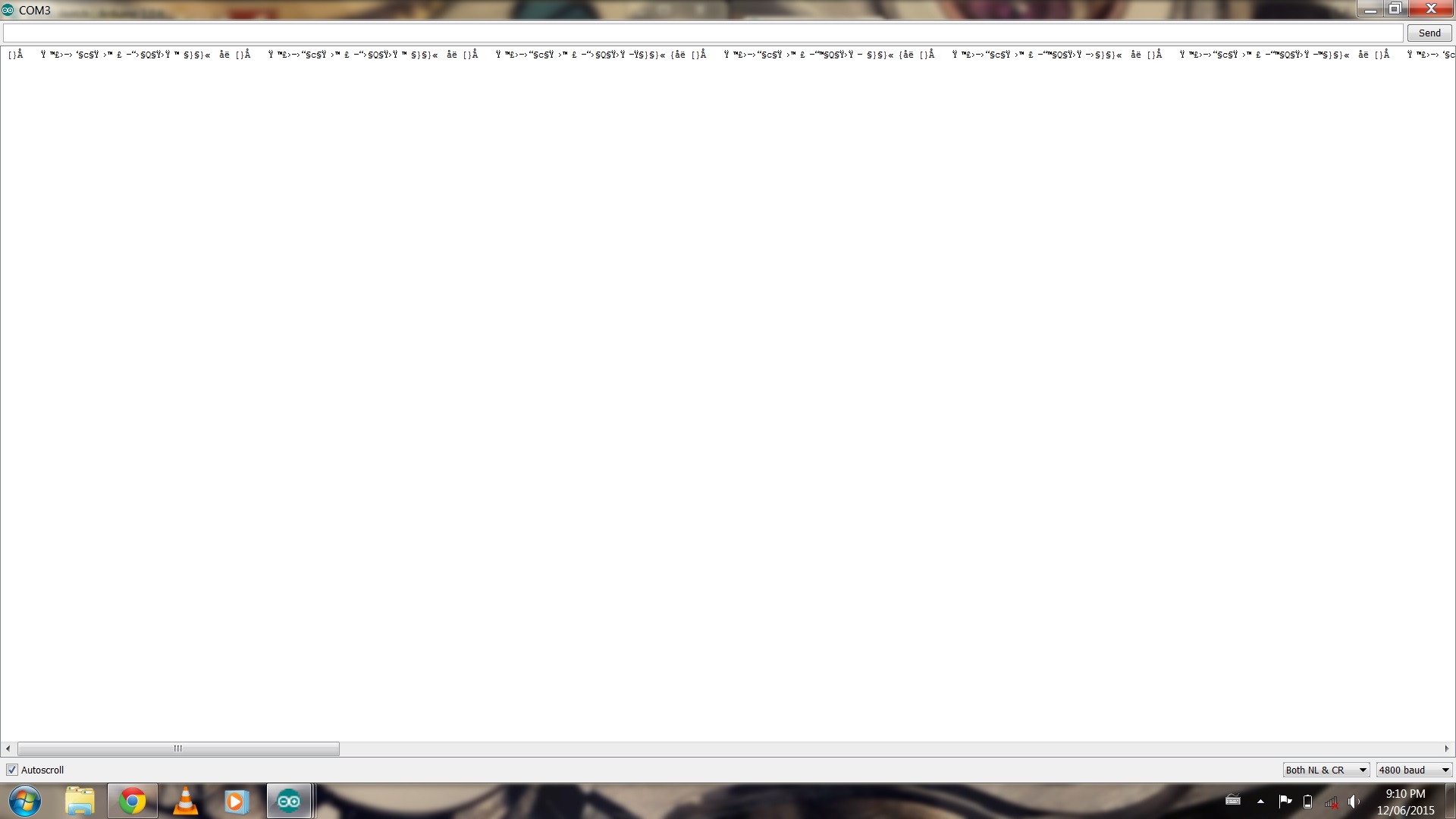
When I hook it all up, I'm using the GPS logger tutorial code from adafruit (https://learn.adafruit.com/adafruit-ult ... d/overview) but all I receive is gibberish in all baud rates. How do I go about fixing this?
Are you certain that the 422-TTL converter is essential? That is - is the data from the fishfinder really "422" (a differential signal)?
How much experience have you in setting up stuff like this?
NMEA is always 4800, 8N1. GPS loggers may entail the GPS sentence headers which, presumably, your fishfinder won't be knocking out (unless it has a GPS in it, too), but they may be integral to the adafruit tutorial you cited (however incompletely.) Try a simple serial input to serial monitor sketch, regurgitating what comes in back onto serial monitor. Or dump it into a terminal application on your computer.
I'm trying to eventually map the bottom of my lake by outputting the GPS and depth. My problen is I am recieveing the data but it is all gibberish, and it is not a baud mismatch. Any help would be great!
I see there is a NMEA 0138 HS, it's 38400.
The adafruit link is a stinker. I'm not one for libraries. Does that use "software serial" (instead of the hardware UART, pin 0 and 1)?
I would take the serial in (via pin 0) and knock it out on serial monitor - to find out what's what. You don't need a library for that. If you establish sound data transfer on that basis then you can explore other options.
[IOW, I don't have a Arduino-to-fishfinder "fix-ya".]
Ok, so how do I simply just get it to bounce straight to the serial monitor? Also the fishfinder is not NMEA HS, it does have have an adjustable baud though, I just have it set for 4800 now.
In his "Echo, Echo" example he has Serial.begin(9600);
You should change that to the baud you're using.
The serial output of your device should go to pin 0 (disconnect that when you upload to the Arduino/IOboard).
OK, so I hooked up the serial output to pin 0, changed it so the baud rates match, and changed the settings on the fishfinder so it only outputs the RMB and RMC (recommended navigation data for gps and recommended minimum data for gps) NMEA 0183 sentences, and uploaded the Simple Serial code, yet I am still receiving gibberish in all baud rates. It seems to be in sentence form-ish, do you know how I could troubleshoot this?
That's the wrong pin. You need to connect the serial output from the device to pin 1 on your Arduino. Also, before you hook anything up you should first load a "blank" sketch that has no Serial.begin() in it so that the Uno's processor isn't trying to use the same line.
[quote author=Runaway Pancake link=msg=2271183 date=1433964678]
0 is marked "RX", that's not the input?[/quote]
Yes, it's the input to the Arduino.
But for checking to see if the device output is good the easiest thing is to look at it on the serial monitor on the computer at the other end of the USB cable. In that case you want the input to the computer, not the Arduino. That's the pin marked "TX" on the Arduino.
OK, thanks jboyton. So I have to wait until my boat comes back tonight to try this but let me just make sure I got this right.
Connect the serial output from my data converter to pin 1.
Upload blank sketch
Upload simple echo script
/* Simple Serial ECHO script : Written by ScottC 03/07/2012 */

/* Use a variable called byteRead to temporarily store
   the data coming from the computer */
byte byteRead;

void setup() {
// Turn the Serial Protocol ON
  Serial.begin(4800);
}

void loop() {
   /*  check if data has been sent from the computer: */
  if (Serial.available()) {
    /* read the most recent byte */
    byteRead = Serial.read();
    /*ECHO the value that was read, back to the serial port. */
    Serial.write(byteRead);
  }
}
Make sure baud rates all match up, view in serial monitor.
I'll give it a try and let you guys know how it goes, thanks!
Not quite. The idea is to see that the output of your convertor is what you expect. So we skip the Arduino and go straight to your computer. However, the Arduino is still handy because it converts the signal to USB for you. So the signal will go from the device through the USB chip on the Arduino to the serial monitor on your computer.
Do this:
Before connecting anything, upload a blank sketch to your Arduino;
Then connect the serial output from device to pin 1 ("TX") of Arduino;
Open the serial monitor and adjust the baud rate.
If the device is outputting NMEA and you have the matching baud rate in the serial monitor you should see the strings appear on your screen.
The Lowrance unit has an adjustable baud rate, and I set it to 4800. Yes, I tried all the baud rates, the 4800 seemed to be the best one, all the others were even moreso jibberish. I also tried setting the fishfinder to higher baud rates. Ive messed around with the baud rates a lot and I really don't think that's the problem.
slr_555:
The Lowrance unit has an adjustable baud rate, and I set it to 4800. Yes, I tried all the baud rates, the 4800 seemed to be the best one, all the others were even moreso jibberish. I also tried setting the fishfinder to higher baud rates. Ive messed around with the baud rates a lot and I really don't think that's the problem.
Does this mean the data converter is the problem?
One more thing, is the data Inverted, or have you connected rx+ to tx-?
slr_555:
The Lowrance unit has an adjustable baud rate, and I set it to 4800. Yes, I tried all the baud rates, the 4800 seemed to be the best one, all the others were even moreso jibberish. I also tried setting the fishfinder to higher baud rates. Ive messed around with the baud rates a lot and I really don't think that's the problem.
Does this mean the data converter is the problem?
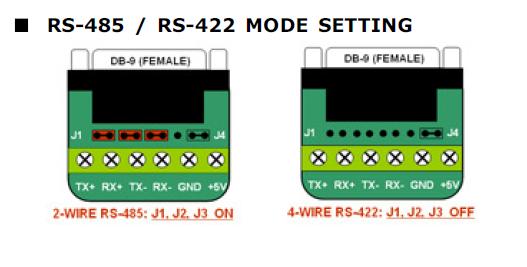
I think I found your Error. In then Convert Manual Page 3, Have you configured your converter for RS422 or are all the jumper configured for RS485? Attached is a screen grab of the manual image.
Make sure the jumpers are correct.
Remove all of the jumpers except the J4 jumper. I think your pictures show the jumpers still in place.
Chuck.
Check out my Kickstarter Project Memory Panes an expansion RAM Shield for Mega2560's. It adds 1MB of RAM for those projects where 8KB is not enough.
slr_555:
Does this mean the data converter is the problem?
It could be. Or maybe it's a wiring error. It's easy to get confused about the directions of the different TX and RX pins. Or maybe it's a jumper problem as Chuck is suggesting.
If you think the converter could be bad it's possible to test it without the fish finder by wiring it for a "loopback" test. The idea there is to short TX+ to RX+ and TX- to RX-, provide 5V and GND for power, and then wire the TTL TX to the Arduino TX and the TTL RX to Arduino RX. Then open the serial monitor and anything you type should be echoed back to you. There's plenty of opportunity to wire something wrong just for this test so it's worth double checking the wiring and jumpers first.
Thanks for all your help guys. I'm actually currently working as a fishing guide up at a lodge in northern Ontario. We've had bad weather recently and so the internet has been spotty. I will try your suggestions tonight.
chucktodd:
I think I found your Error. In then Convert Manual Page 3, Have you configured your converter for RS422 or are all the jumper configured for RS485? Attached is a screen grab of the manual image.
Make sure the jumpers are correct.
Remove all of the jumpers except the J4 jumper. I think your pictures show the jumpers still in place.
Chuck.
Check out my Kickstarter Project Memory Panes an expansion RAM Shield for Mega2560's. It adds 1MB of RAM for those projects where 8KB is not enough.
Where are the jumpers located on the converter here?